AI Meeting Notes Examples (2026): What Good Notes Look Like for 5 Meeting Types
AI meeting notes examples for a standup, a sales call, a customer interview, a 1-on-1 and a project review: summary, decisions, action items with owners.
Updated October 19, 2026
On this page9 sections
- 01What good AI meeting notes have in common
- 02Example 1: AI meeting notes for a daily standup
- 03Example 2: AI meeting notes for a sales call
- 04Example 3: AI meeting notes for a customer interview
- 05Example 4: AI meeting notes for a 1-on-1
- 06Example 5: AI meeting notes for a project review
- 07Get AI meeting notes like these for your own meetings
- 08FAQ
- 09Sources
Good AI meeting notes have the same four parts whatever the meeting: a summary of a few lines, the decisions, the action items with an owner and a due date, and the open questions. Below are five examples written the way Scribbl writes them after a Google Meet, Zoom or Microsoft Teams call: a daily standup, a sales call, a customer interview, a 1-on-1 and a project review.
The examples are illustrative, not real meetings; the names and companies are made up. What's real is the shape: short, specific, and the same every time, so the person reading them on Monday knows where to look. To get notes like these for your own meetings, with the video and a transcript with speaker names next to them and nothing joining the call, Start free with Scribbl. The free plan includes Google Meet, Zoom and Microsoft Teams, with 10 meetings a month.
What good AI meeting notes have in common
Before the examples, the rules they follow. Each one is something a reader can check against the recording.
- The summary says what changed, not what was discussed. "Launch moves to October 20" is a summary line. "The team discussed the launch date" is not.
- Decisions are written as decisions. One line each, in the past tense, with the reason if there was one.
- Every action item has one owner and one date. "Marketing to look into it" is not an action item. "Priya sends the revised deck to Northwind by Thursday, October 22" is.
- Open questions name who will answer them. Otherwise they're still open at the next meeting.
- The notes link to the transcript. When a line looks wrong, you can check it in a few seconds. Scribbl keeps the video and the transcript with speaker names on the same page as the notes.
More on the thinking behind this, and a template for hand-written notes: how to take meeting notes.
Example 1: AI meeting notes for a daily standup
Meeting: Platform team standup. Google Meet, 12 minutes, 5 people.
Summary
- The search indexing fix shipped last night; error rate is back under 0.1%.
- The billing migration is blocked on a missing staging credential.
- Two people are out Friday, so the sprint review moves to Thursday.
Decisions
- Sprint review moves from Friday, October 23 to Thursday, October 22 at 2 pm.
Action items
- Dana: get the staging billing credential from IT and unblock Marcus. Today, October 19.
- Marcus: resume the billing migration once the credential lands. Tuesday, October 20.
- Priya: move the sprint review invite to Thursday. Today, October 19.
Open questions
- Does the indexing fix need a note in the release log? Dana to confirm with support by Tuesday.
Why these notes work: a standup produces one or two blockers and one or two schedule changes. The notes record only those, with names and dates, and skip everyone's "no updates."
Example 2: AI meeting notes for a sales call
Meeting: Northwind Logistics, discovery call. Zoom, 41 minutes. Northwind: Elena (VP Operations), Tom (IT). Us: Priya (Account Executive), Sam (Solutions).
Summary
- Northwind runs 60 dispatch meetings a week across three depots and has no record of them; decisions get lost between shifts.
- Elena wants a pilot at one depot before Q1 budget closes on November 30.
- Tom's concern is that nothing external joins the calls, because drivers' calls include customer addresses.
Decisions
- Pilot at the Dayton depot with 8 dispatchers, starting the week of November 2.
- Priya sends a pilot proposal with per-seat pricing, not a company-wide quote, because Elena only has a depot budget this quarter.
Action items
- Priya: send the pilot proposal and the privacy summary Tom asked for. Wednesday, October 21.
- Sam: set up a 20-minute setup call with the Dayton dispatch lead. Friday, October 23.
- Elena: confirm the 8 pilot users by name. Friday, October 23.
Open questions
- Does Northwind need the notes to land in their ticketing tool? Tom to check which one Dayton uses, by the setup call.
Next step: setup call the week of October 26; proposal review with Elena on October 28.
Why these notes work: a sales rep needs the buyer's reason, the budget deadline, the objection and the next step. All four are in the first six lines, and the action items split between both sides.
Example 3: AI meeting notes for a customer interview
Meeting: User interview, Acme Studio. Google Meet, 33 minutes. Jordan (Acme, studio manager) with Leah (Product) and Noor (Design).
Summary
- Jordan books 15 to 20 client sessions a week and tracks them in a spreadsheet because the calendar doesn't show deposits.
- The biggest pain is reconciling deposits on Friday afternoons; it takes about two hours.
- Jordan would pay for deposit tracking but not for a separate invoicing product, because the studio already uses one.
What we heard, in Jordan's words
- "If the calendar just showed me who's paid, I'd stop opening the spreadsheet."
- "I don't want another invoicing tool. I want the one I have to talk to this one."
Decisions
- None. This was a listening session; decisions come at Thursday's synthesis meeting.
Action items
- Leah: add Jordan's quotes and the two-hour reconciliation figure to the deposits research doc. Tuesday, October 20.
- Noor: sketch a "paid" marker on the calendar view for Thursday's synthesis. Thursday, October 22.
- Leah: send Jordan the thank-you gift card. Today, October 19.
Open questions
- How many of our studio customers also use an external invoicing tool? Leah to pull the number from the integrations data by Thursday.
Why these notes work: in an interview, the customer's exact words matter more than a paraphrase, so the notes keep two quotes and mark that no decisions were made. The transcript holds the rest.
Example 4: AI meeting notes for a 1-on-1
Meeting: Weekly 1-on-1, Marcus (manager) and Dana (engineer). Microsoft Teams, 28 minutes.
Summary
- Dana is on track for the billing migration but feels stretched by on-call during the migration weeks.
- Dana wants to lead the next platform project; Marcus agrees and will raise it at planning.
- The promotion conversation is set for the January review cycle.
Decisions
- Dana comes off the on-call rotation for the two migration weeks, November 2 to 13.
- Marcus proposes Dana as lead for the Q1 observability project at planning on October 27.
Action items
- Marcus: swap Dana's on-call slots with Priya and update the rotation. Wednesday, October 21.
- Dana: write a one-page proposal for the observability project to bring to planning. Monday, October 26.
- Marcus: put the January promotion discussion on both calendars. Today, October 19.
Open questions
- None.
Why these notes work: a 1-on-1's value is the commitments both people made. The notes record them with dates and leave out the personal context that doesn't need to be written down. Keep 1-on-1 notes private by default; Scribbl's recordings are private unless you share them.
Example 5: AI meeting notes for a project review
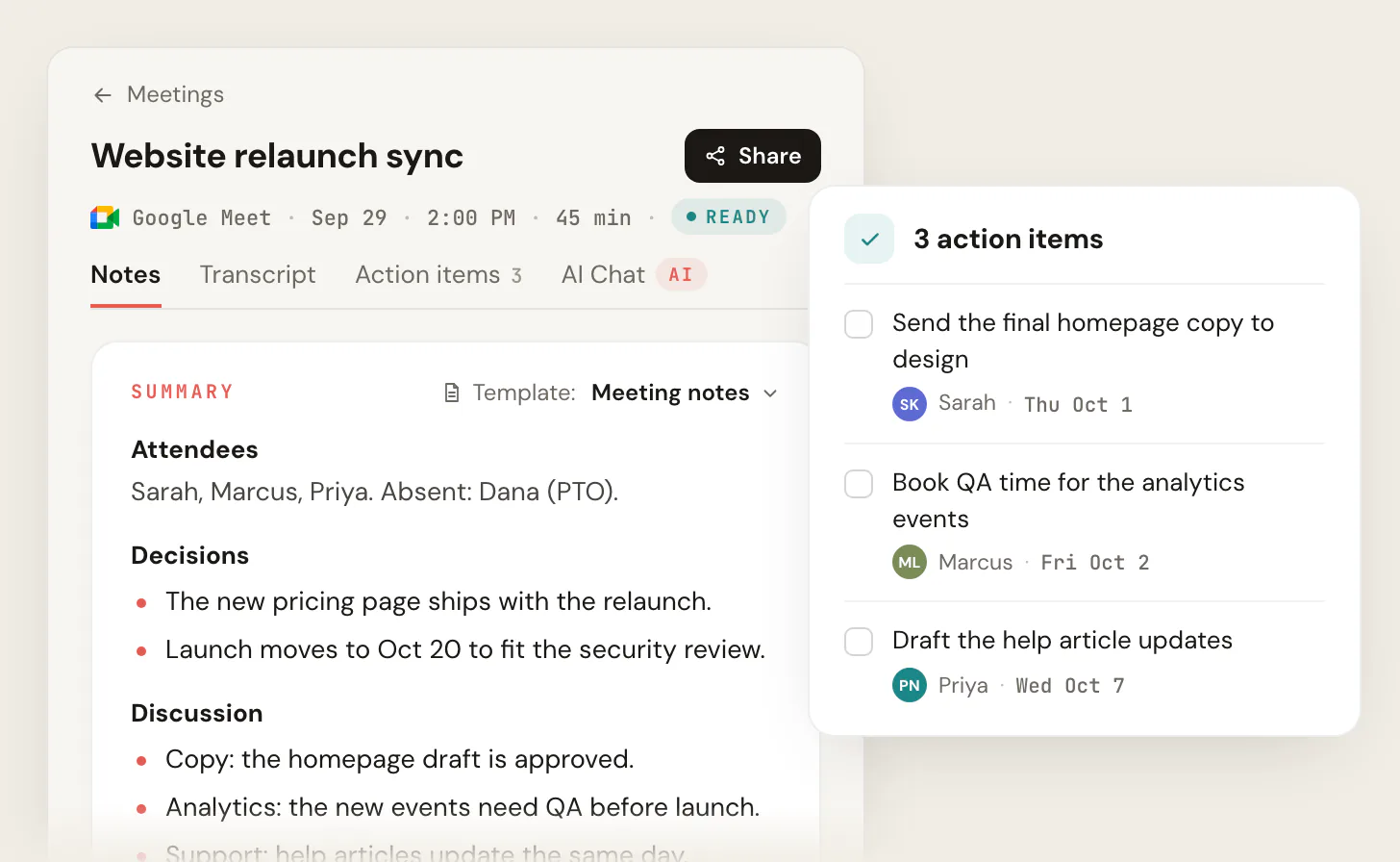
Meeting: Website relaunch, monthly review. Google Meet, 52 minutes. Sarah (PM), Marcus (Engineering), Priya (Marketing), Noor (Design), Dana (Support). Absent: Tom (IT).
Summary
- Design is complete and the build is about 60% done; testing starts October 26.
- The security review adds a week, so launch moves from October 13 to October 20.
- The new pricing page ships with the relaunch; the help articles update the same day.
- Risk: the payments change may slip a week if the processor's sandbox stays down.
Decisions
- Launch date is Tuesday, October 20, to fit the security review.
- The pricing page ships with the relaunch, not after it.
- If the payments change isn't ready by October 16, it ships separately the following week and the relaunch goes ahead without it.
Action items
- Sarah: send the final homepage copy to design. Thursday, October 1.
- Marcus: book QA time for the analytics events. Friday, October 2.
- Priya: draft the help article updates. Wednesday, October 7.
- Dana: brief the support team on the pricing page change. Thursday, October 15.
- Sarah: confirm the payments decision with Tom, who was absent. Friday, October 16.
Open questions
- Is the processor's sandbox outage on their status page? Marcus to check and report in Thursday's standup.
Why these notes work: a review meeting has the most decisions and the most people. The notes separate what's decided from what's at risk, give every action item one name, and record the fallback plan so no one has to re-decide it.
Get AI meeting notes like these for your own meetings
Every example above follows the shape Scribbl's notes take after a call. Here's how to get them, with nothing joining the meeting:
- 1
Add Scribbl
The Chrome extension for Google Meet, or Scribbl Desktop for Zoom and Microsoft Teams on a Mac with Apple silicon or Windows. Sign in with your Google account.
- 2
Join the meeting as usual
Nothing joins the call and nothing appears in the participant list, whether you host or just attend. Tell everyone you are recording.
- 3
Open the notes when it ends
The summary, the decisions and the action items with owners, next to a transcript with speaker names and the video. Pick a template for the meeting type.
The free plan includes Google Meet, Zoom and Microsoft Teams, with 10 meetings a month. Start free. What the notes look like and which templates Scribbl has: AI meeting notes with Scribbl.
What happens after the notes:
- Smart Collections sort your meetings by themselves, so sales calls, interviews and 1-on-1s land in their own places.
- Automations do the follow-up when a meeting lands in a collection: draft the follow-up email for you to copy or open in Gmail (it never sends by itself), log a note in HubSpot or Pipedrive, post to Slack or Microsoft Teams, save to Google Drive, Notion or Confluence, open an Asana, Monday, Linear or Jira ticket, or add a Google Sheet row. They ask before they change anything by default.
- Ask ChatGPT or Claude about any past meeting on Pro (how it works): "What did Northwind say about budget?" gets an answer from the transcript.
- Private by default. Recordings are private, and Scribbl doesn't use your meetings to train AI for anyone other than you.
If you write notes by hand, the same shape works; copy the headings from any example above, or use the meeting summary template. The free plan includes Google Meet, Zoom and Microsoft Teams, with 10 meetings a month. Pro is $13 per user per month billed annually, or $20 monthly. Start free, or see pricing.
FAQ
What should AI meeting notes include?
A summary of two to five lines, the decisions, the action items with an owner and a due date, and the open questions with who will answer them. Good AI notes also keep the reason behind each decision and a link to the recording and transcript, so anyone can check a line against what was said. Scribbl's notes have those sections for every Google Meet, Zoom and Microsoft Teams call, with the video and a transcript with speaker names next to them.
What do good AI meeting notes look like?
Short, specific and structured the same way every time: a summary that says what changed, decisions written as decisions, and action items that each name one person and one date. They don't try to be a transcript. The five examples on this page, for a standup, a sales call, a customer interview, a 1-on-1 and a project review, show the shape; they are illustrative examples, not real meetings.
How do I get AI meeting notes like these?
Run Scribbl. The Chrome extension writes notes like these for every Google Meet call, and Scribbl Desktop for Mac (Apple silicon) and Windows does the same for Zoom and Microsoft Teams, with nothing joining the call. Each meeting gets the summary, decisions and action items with owners, plus a transcript with speaker names and the video. The free plan includes Google Meet, Zoom and Microsoft Teams, with 10 meetings a month. Start free at extension.app.scribbl.co/signup.
Are AI meeting notes accurate?
They're a strong first draft, and the way to trust them is to keep the recording and the transcript next to them. When a decision or an owner looks wrong, open the transcript line and check. That's why Scribbl keeps the video and the transcript with speaker names on the same page as the notes, and why the examples here link decisions to who said them.
Should AI meeting notes be a summary or a transcript?
A summary, with the transcript kept separately. The notes are for the people who need to act: what was decided, who does what, by when. The transcript is for checking details and for questions later. Scribbl gives you both, plus the video, and on Pro you can ask ChatGPT or Claude about any past meeting.
Do I need to tell people an AI is taking notes?
Yes. Say at the start of the call that you're recording and taking notes, whichever tool you use. Scribbl adds nothing to the call and nothing to the participant list, so say it out loud.
Sources
Checked October 19, 2026. The five examples are illustrative; the names, companies, dates and figures in them are made up.
Try Scribbl
Let your meetings take their own notes.
Scribbl records, transcribes, and summarizes your Google Meet calls from your browser. No bot joins the call. Free forever for individuals.
Add to Chrome · It's free