Best AI Notetaker for Recruiters in 2026: 4 Tools Compared and Ranked
The best AI notetaker for recruiters and hiring panel debriefs is Scribbl: no bot in front of the candidate, and video and notes for every interview.
Updated October 19, 2026

On this page19 sections
- 01Which AI note taker is best for a hiring panel debrief?
- 02Table of contents
- 03What is an AI notetaker for recruiters (and how is it different)?
- 04How we compared these tools for recruiting
- 05Quick answer: the best AI notetaker for recruiters by scenario
- 06The comparison table
- 07Pricing and free tiers, side by side
- 08The ATS integration matrix
- 09Bot vs bot-free
- 10The 4 tools, ranked by who they suit
- 11Capturing interviews you can compare fairly
- 12What an interview turns into, step by step
- 13Security and compliance
- 14How accurate are AI notetakers in interviews?
- 15A note on candidate consent
- 16Which AI notetaker for recruiters should you pick?
- 17Our pick: Scribbl, for bot-free candidate interviews
- 18Related guides
- 19AI notetaker for recruiters FAQ
For recruiters, the best AI notetaker is Scribbl, because nothing joins the call in front of the candidate and every interview comes back with the video, a transcript with speaker names, AI notes and action items, ready for the hiring panel debrief. It works on Google Meet, Zoom and Microsoft Teams, and Automations can post the debrief notes to Slack or Microsoft Teams for the panel, asking before they change anything by default. The other leading notetakers (Otter, Fireflies, Fathom) send a bot into the call in front of the candidate by default, so the one decision that shapes every interview is whether a bot joins it, and we lead with that.
Which AI note taker is best for a hiring panel debrief?
The best AI note taker for a hiring panel debrief is Scribbl. Each panelist's interview on Google Meet, Zoom or Microsoft Teams comes back with the video, a transcript with speaker names, AI notes and action items, so the panel debriefs from what the candidate actually said instead of memory, and nothing joins the call in front of the candidate. Smart Collections sort meetings by themselves, so every interview for one role lands in one group, and on Pro you can connect Scribbl to ChatGPT or Claude and ask it to compare a candidate's answers across the panel's interviews. The debrief meeting itself gets the same notes and action items, and Automations can post them to Slack or Microsoft Teams, asking before they change anything by default.
Table of contents
- Which AI note taker is best for a hiring panel debrief?
- What is an AI notetaker for recruiters (and how is it different)?
- How we compared these tools for recruiting
- Quick answer: the best AI notetaker for recruiters by scenario
- The comparison table
- Pricing and free tiers, side by side
- The ATS integration matrix
- Bot vs bot-free: the decision that comes first
- The 4 tools, ranked by who they suit
- What an interview turns into, step by step
- Security and compliance: how recruiting buyers screen
- How accurate are AI notetakers in interviews?
- Which AI notetaker for recruiters should you pick?
- FAQ
What is an AI notetaker for recruiters (and how is it different)?
A generic AI notetaker transcribes your meeting and writes a summary. An AI notetaker built for recruiting does three things a generic tool usually does not:
- It maps the conversation to your hiring criteria. Instead of a flat recap, a recruiting tool organizes the interview around the competencies and questions you are evaluating, so the panel sees the answer to "can they do the job," not just a wall of text.
- It fills or pre-fills the scorecard. The big lever. A recruiting tool drafts the competency notes and scorecard fields your team uses, so the recruiter edits and confirms rather than typing from scratch.
- It pushes the result into your ATS against the right candidate and job. Greenhouse, Lever, Ashby, Workday, or Bullhorn. The interview becomes structured evaluation data attached to the candidate record, not a transcript stranded in a separate app.
That is the whole difference: a recruiting notetaker turns an interview into ATS-ready evaluation data. A generic notetaker (Otter, Fireflies, Fathom) can write a clean summary, but it leaves the competency mapping, the scorecard, and the ATS push to you. When you search "AI notetaker for recruiters," you are usually looking for that recruiting-specific layer, not generic transcription.
How we compared these tools for recruiting
We scored each tool the way a talent team or agency would actually buy, on what recruiters care about rather than generic meeting-notes polish. These are the eight factors:
- ATS integration depth. Does it natively connect to Greenhouse, Lever, Ashby, Workday, or Bullhorn, and can it push to the scorecard and competency fields, not just attach a transcript?
- Scorecard and competency auto-fill quality. How close is the drafted scorecard to what a recruiter would write, and does it invent ratings the candidate did not earn?
- Recruiting intelligence vs generic summary. Does it organize around hiring criteria, or just produce a meeting recap?
- Capture method (bot vs bot-free). Does a visible bot join the call in front of the candidate, or does nothing join the call?
- Setup and adoption friction. Can a recruiter start today, or does it require a sales call, an admin rollout, and IT?
- Candidate experience, consent, and compliance. How intrusive is it to the candidate, and how is candidate data handled (GDPR, data retention, AI-training policy)?
- Transcription accuracy. Word accuracy and speaker labeling on imperfect interview audio.
- Pricing honesty. Is there a real, published per-seat price and free tier, or only "contact sales"?
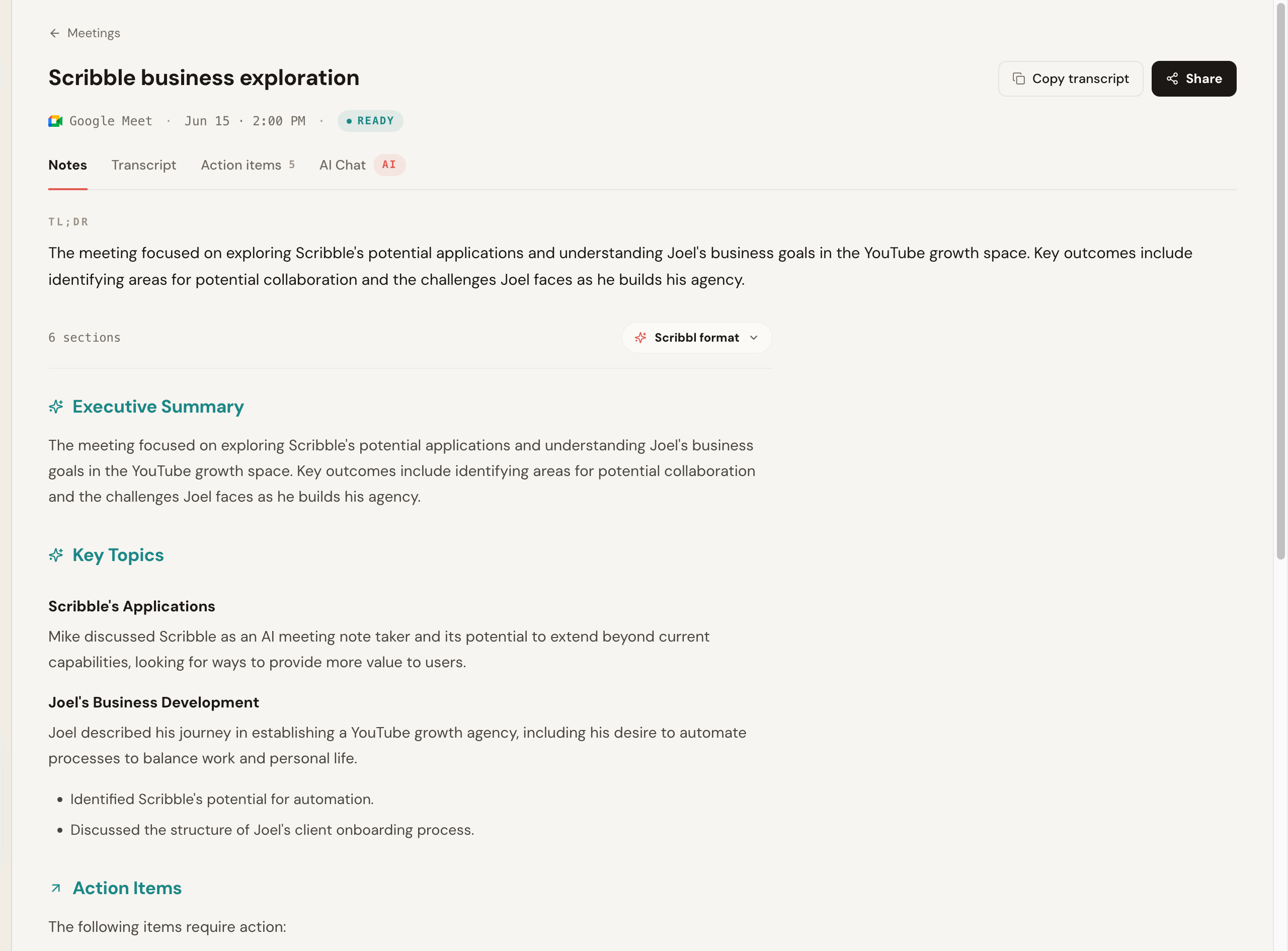
This is real Scribbl output from a recorded Google Meet call: a TL;DR, an executive summary, key topics, and action items, generated from a call where nothing joined the participant list. It is a screenshot of the product, not a mock.
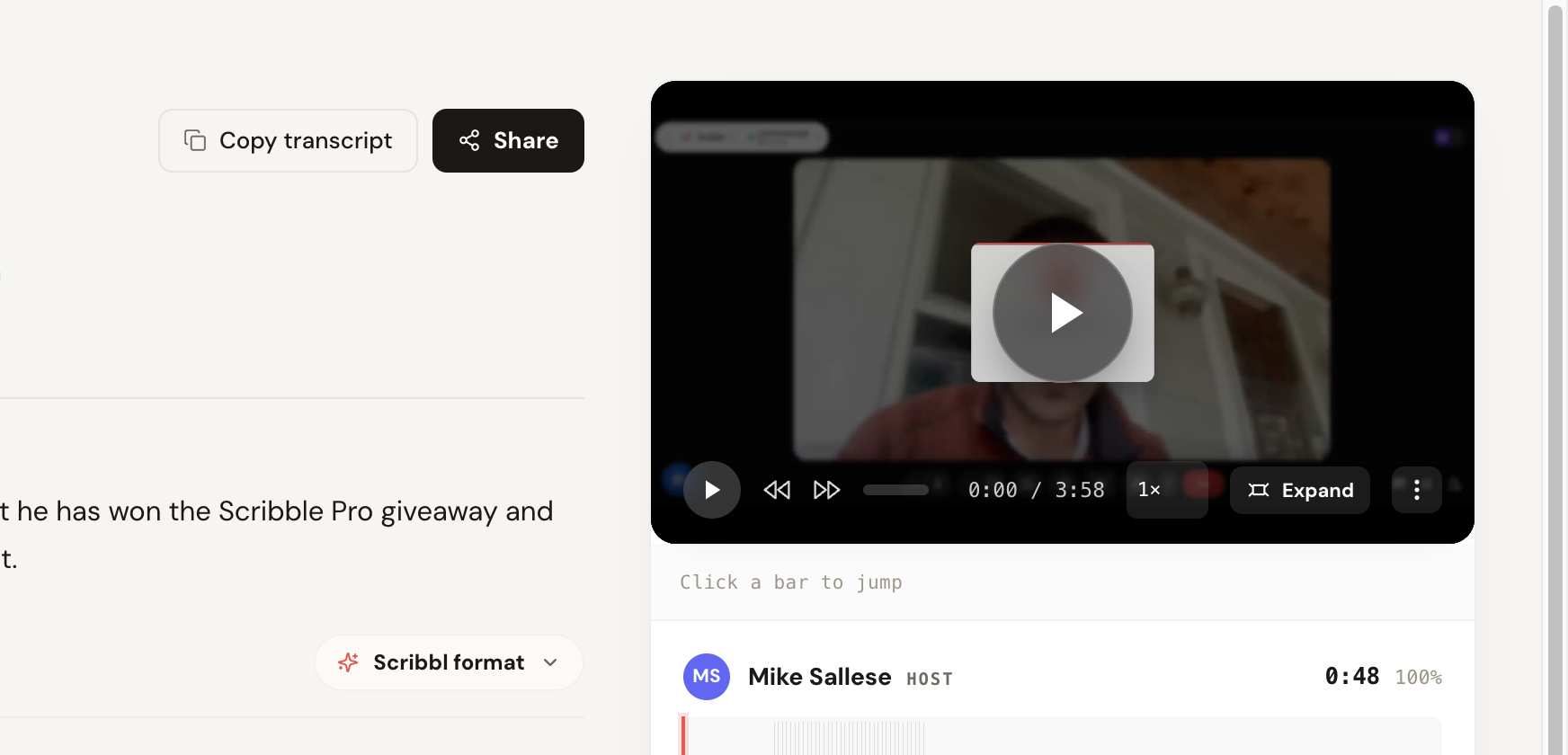
And here is the transcript-and-replay view: speaker-labeled segments with timestamps and a confidence read, lined up beside the recorded video so you can click any line and replay that exact moment.
Quick answer: the best AI notetaker for recruiters by scenario
If you only read one section, read this.
- Best for candidate interviews with no bot in the room: Scribbl. No bot in front of the candidate on Zoom, Meet, or Teams, and every interview gets the video, a transcript with speaker names, AI notes and action items.
- Best for turning interviews into scorecards and debriefs: Scribbl. The interview connects to ChatGPT or Claude, which drafts the candidate summary, the scorecard against your competencies, and the hiring-manager debrief in your own format.
- Best for agencies on Zoom, Meet, and Teams: Scribbl. All three platforms in one account, so client and candidate calls are captured the same way. See Scribbl for agencies.
- Best for follow-up after every call: Scribbl. Automations draft the candidate email, post the debrief to Slack or Teams, or add a row to a Google Sheet, and by default ask before changing anything.
- Best free start: Scribbl. Free plan with 10 meetings a month and no credit card, with Google Meet, Zoom, and Teams included.
- What the rest do: Fireflies, Fathom and Otter send a bot in front of the candidate and leave the scorecard to you.
The comparison table
Here is the field in one place, framed for recruiting. The split that matters most is whether a bot joins the call in front of the candidate, and who writes the scorecard. The Scribbl cells are facts we can state firmly; for every other tool we mark a claim "verify" where the exact current detail moves often, so confirm those on each vendor's site before you buy.
| Tool | Category | Best for | Capture | Getting notes into the ATS | Scorecard auto-fill | Free tier |
|---|---|---|---|---|---|---|
| Scribbl | General, bot-free | Bot-free, candidate-facing interviews | Bot-free, nothing joins | ChatGPT or Claude drafts the scorecard notes in your format; you paste them in | Drafts scorecard/debrief via ChatGPT or Claude | Yes, 10 meetings a month, no credit card |
| Fireflies | General notetaker | CRM push and call search | Bot ("Fred") joins | CRM-first, not ATS scorecards | No native ATS scorecard | Yes, limited |
| Fathom | General notetaker | Free recordings, with a bot in the call | Bot joins by default | No native ATS scorecard | No | Yes; advanced AI summaries on your first 5 calls a month |
| Otter.ai | General notetaker | Live captions, accessibility | Bot by default | No native ATS scorecard | No | Yes, 300 transcription minutes a month |
The two cells that decide most recruiting purchases are bot-free capture and who writes the scorecard. Here they are side by side.
| Feature | Scribbl | Fireflies | Fathom |
|---|---|---|---|
| Bot-free in front of the candidate | Yes | No | No |
| Works on Meet, Zoom, and Teams | Yes | Yes | Yes |
| Competency-mapped notes | Drafted by ChatGPT or Claude | No | No |
| Scorecard draft | Drafted by ChatGPT or Claude | No | No |
| Scorecard into the candidate record | You paste in the draft | No | No |
| Connects to ChatGPT or Claude | Yes | Yes | Yes |
| Records audio you can replay | Yes | Yes | Yes |
| Free plan, no credit card | Yes | Limited | Yes; advanced AI summaries on 5 calls a month |
| Self-serve, no sales call | Yes | Yes | Yes |
Pricing and free tiers, side by side
Vague "contact sales" is exactly what sends recruiters back to the search results, so here is the clearest pricing picture we can give. Notetakers price by seat and change tiers often. Treat every figure below as a named 2026 entry point and confirm it on the vendor's pricing page.
| Tool | Free tier | Published entry price (confirm current) | Notes |
|---|---|---|---|
| Scribbl | Yes, 10 meetings a month, no credit card | 13 dollars per user per month billed annually, or 20 dollars monthly (pricing) | Paid tiers lift limits and add shared team access |
| Fireflies | Yes, limited | Pro 10 dollars per seat per month billed annually (18 dollars monthly); Business 19 dollars billed annually (29 dollars monthly) | Enterprise 39 dollars per seat per month, billed annually; CRM-first integrations |
| Fathom | Yes; advanced AI summaries on your first 5 calls a month | Premium 16 dollars per user per month billed annually (20 dollars monthly); Team 15 dollars billed annually (19 dollars monthly), 2-user minimum | Bot joins the call by default; AI action items and follow-up emails need Premium |
| Otter.ai | Yes, 300 transcription minutes a month | Pro 8.33 dollars per user per month billed annually (16.99 dollars monthly); Business 19.99 dollars billed annually (30 dollars monthly) | Free plan capped by monthly minutes |
The ATS integration matrix
For recruiting, the integration question is not "does it connect to a CRM," it is "does it push into the ATS my team runs on." Coverage in this category is uneven and changes quickly, so use this as a starting map and confirm the exact integration (and whether it writes to the scorecard, not just attaches a transcript) on each vendor's site.
Scribbl takes a different route for every ATS: ChatGPT or Claude drafts the scorecard notes from the interview in the format your Greenhouse, Lever, Ashby, Workday, or Bullhorn fields use, and you review them and paste them into the candidate record. The table below shows how the other tools connect to each ATS.
| Tool | Greenhouse | Lever | Ashby | Workday | Bullhorn |
|---|---|---|---|---|---|
| Fireflies | Via Zapier/API | Via Zapier/API | Via Zapier/API | Verify | Via Zapier/API |
| Fathom | Via Zapier/API | Via Zapier/API | Via Zapier/API | Verify | Via Zapier/API |
| Otter.ai | Via Zapier/API | Via Zapier/API | Verify | Verify | Verify |
Bot vs bot-free: the decision that comes first in interviews
Feature lists for recruiting notetakers converge fast: transcript, summary, action items, search. Those are table stakes. The real fork in the road is mechanical, and it shapes every interview: does the tool join the call as a participant in front of the candidate, or not?
For an internal debrief, the difference is minor. For a candidate interview, it is the whole game. A candidate is already nervous and weighing every word. An unexplained recording bot sitting in the participant list signals an outside service is recording them before the recruiter has said anything, which can make the candidate guarded, and a guarded candidate gives you a worse read. It also takes the moment of disclosure away from the recruiter, who should be the one to raise recording naturally and get a genuine yes.
- How it captures: nothing joins the call
- What the candidate sees: nothing new in the participant list
- Consent posture: the recruiter discloses recording in plain words
- Examples: Scribbl
- Best for: candidate interviews and client-facing agency calls
- How it captures: a named bot joins the call and records
- What the candidate sees: an extra tile they did not invite
- Consent posture: the bot announces it, sometimes by surprise
- Examples: Fireflies, Otter, Fathom by default
- Best for: async coverage of calls you cannot attend
A bot is convenient because it can attend for you, but it shows up as a tile next to the candidate and starts recording. The takeaway is not that bots are forbidden, it is that you should choose one on purpose. For the deeper category breakdown, see our botless AI notetaker guide and AI notetaker that doesn't join meetings.
The 4 tools, ranked by who they suit
We ranked each tool on the eight recruiting factors. Scribbl ranks first because it keeps the bot out of the interview, records the call, and turns it into the scorecard and debrief through ChatGPT or Claude; the rest are ordered by who they suit.
1. Scribbl: best for bot-free, candidate-facing interviewing
What it is. A Chrome extension for Google Meet plus a desktop app for Zoom and Microsoft Teams (Scribbl Desktop, for Mac with Apple silicon and Windows) that records, transcribes, and summarizes interviews with no bot on any of them. Nothing joins the participant list in front of the candidate.
Best for. Recruiters and agencies who run candidate interviews and client calls and do not want a stranger tile in the room, and anyone who wants the interview to turn into a finished scorecard and debrief instead of a stored transcript.
How it works in an interview. Scribbl captures the call without adding a participant, so a candidate-facing call looks like a normal interview. Because it connects the interview to ChatGPT or Claude, you can ask for a candidate summary, a scorecard against your competencies, and a hiring-manager debrief in the structure you choose, rather than a rigid template that fights your process. Read every drafted rating against the transcript, so a weak area is flagged as a gap instead of turned into a strength, which is exactly the failure mode that makes a scorecard dangerous.
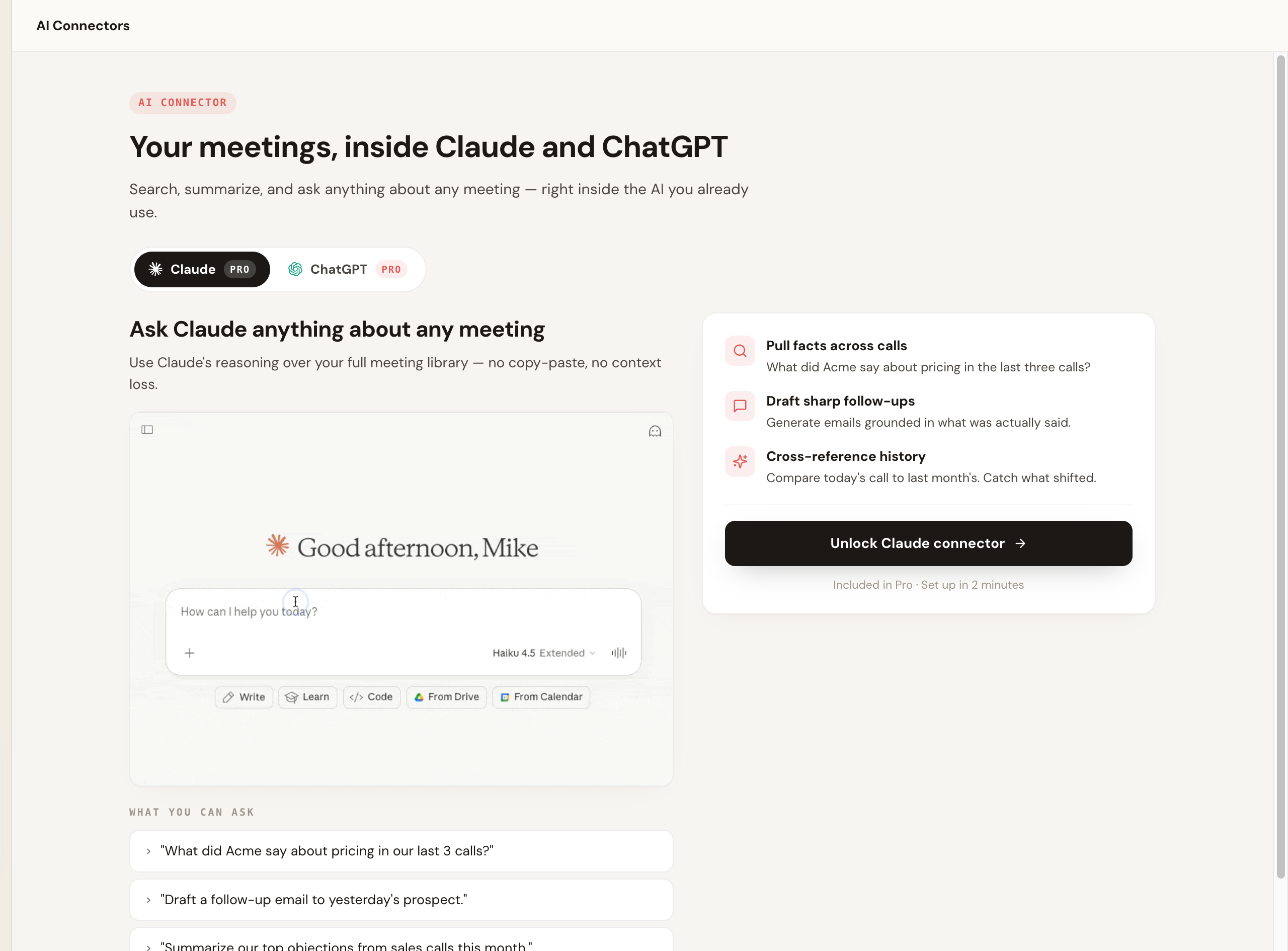
The piece that separates Scribbl from a plain transcriber is what happens after the call. Instead of stopping at notes, it connects your meeting library to the AI you already use, so you can pull facts across calls, draft a follow-up grounded in what was actually said, and cross-reference a candidate's earlier screen against the panel round, then have that AI write the scorecard notes in the format your ATS uses, ready to paste into the candidate record. Smart Collections sort interviews by themselves into groups you describe in one sentence, such as every interview for one role, so you can ask ChatGPT or Claude about just that group. Here is that real connector view.
Recruiting fit. Scribbl wins for recruiting on the candidate experience (genuinely bot-free), cross-platform coverage (Zoom, Meet, Teams the same way), and the fact that you generate the scorecard, competency notes, and follow-up in your own format through the AI you already use. That is a real workflow, not just a copy out of a transcript: the AI reasons over the full interview (and your earlier calls with the candidate) and drafts the record you then review and paste into your ATS. Automations handle the rest of the follow-up: they draft the candidate email, post the debrief to Slack or Teams, or add a row to a Google Sheet, and by default ask before changing anything.
Pricing. Free plan with 10 meetings a month and no credit card. Pro is 13 dollars per user per month billed annually, or 20 dollars monthly, and paid tiers add shared team access. See the pricing page.
Pros.
- Truly bot-free on Zoom, Meet, and Teams, so it is invisible to the candidate.
- Turns the interview into a finished scorecard, candidate summary, and debrief through ChatGPT or Claude, in your format, not just a transcript.
- Free to try with no credit card. Rated 5.0 from 3,000 reviews on the Chrome Web Store and 4.9 from 725 reviews on G2, and used by 10,000+ organizations.
Choose if: you run candidate-facing interviews, want them bot-free across all three platforms, and want each one to turn into a scorecard and debrief in your own words.
2. Fireflies: best general notetaker for CRM push and search
What it is. A general-purpose notetaker whose "Fred" bot joins from your calendar on Zoom, Meet, and Teams, with deep integrations and conversation search.
Best for. Recruiters who mainly want a searchable archive of calls and CRM push, and who will handle the ATS scorecard themselves.
Recruiting fit. Fireflies is strong on integrations and search, but it is a general meeting tool, so it does not map answers to hiring competencies or fill an ATS scorecard. Capture is a visible bot. Compare in Scribbl vs Fireflies and the Fireflies alternative guide.
Pricing (confirm current). Limited free plan. Pro is 10 dollars per seat per month billed annually, or 18 dollars monthly; Business is 19 dollars billed annually, or 29 dollars monthly; Enterprise is 39 dollars per seat per month, billed annually. Verify on Fireflies' site.
Pros. Deep integrations, strong search, generous-enough free tier to test.
Cons. No recruiting-specific scorecard mapping. A named bot joins every interview.
Skip if: you want competency-mapped scorecards or bot-free capture.
3. Fathom: best for free recordings, if a bot in the call is fine
What it is. A polished general notetaker that joins your call as a recording bot by default.
Best for. Individual recruiters who want free recordings and do not mind a bot in the room.
Recruiting fit. Fathom is well-built, but it is a general tool: no competency mapping, no ATS scorecard. Capture is a bot. Compare in Scribbl vs Fathom and the Fathom alternative guide.
Pricing (confirm current). The free plan has unlimited recordings, but advanced AI summaries cover only your first 5 calls each month, and AI action items and follow-up emails need Premium. Premium is 20 dollars per user per month billed monthly, or 16 dollars billed annually; Team is 19 dollars monthly, or 15 dollars billed annually, with a 2-user minimum. Verify on Fathom's site.
Pros. Free recordings, clean summaries.
Cons. Bot-based, advanced summaries capped on the free plan, and no recruiting-specific scorecard layer.
Skip if: you need recruiting-specific output or bot-free candidate calls.
4. Otter.ai: best for live captions and accessibility
What it is. A long-standing transcription tool whose Notetaker bot auto-joins from your calendar. It offers a no-bot mode on some platforms, but the bot is the default.
Best for. Recruiters who want fast live captions and a quick transcript, especially for accessibility.
Recruiting fit. Otter's live transcript is its strength, but the default is a bot in the room and there is no recruiting-specific scorecard. See Scribbl vs Otter and the Otter alternative guide.
Pricing (confirm current). The free Basic plan includes 300 monthly transcription minutes. Pro is 8.33 dollars per user per month billed annually, or 16.99 dollars monthly; Business is 19.99 dollars billed annually, or 30 dollars monthly. Verify on Otter's site.
Pros. Fast live captions, good for accessibility, free plan with limited minutes.
Cons. Bot by default, no recruiting-specific output.
Skip if: you need scorecards or bot-free capture by default.
Capturing interviews you can compare fairly
Fair hiring depends on comparing candidates on the same basis. That is hard when your notes are a few rushed bullets you typed while also asking good questions and reading the room. You end up with rich notes on the candidate you saw first thing and thin notes on the one at the end of a long day, which is exactly the kind of inconsistency that makes a hiring decision hard to defend.
A good notetaker levels that out. Whatever tool you choose, the win is that every candidate is captured to the same standard: a complete, time-stamped, speaker-labeled transcript plus structured notes about what was asked, what they said, and the points worth flagging for the panel. Because you were listening instead of typing, the read you give your team is better and the record behind it is verifiable. With Scribbl specifically, that record is captured without a bot in front of the candidate, and you turn it into the scorecard and debrief through ChatGPT or Claude.
What an interview turns into, step by step
Recruiting moves fast, and the candidate who waits a week for next steps is the candidate you lose. The reason to capture interviews well is so the follow-up happens immediately. Here is the path from a live interview to ATS-ready evaluation data, the workflow a recruiting notetaker is supposed to own end to end.
- 1
Capture the interview
Record and transcribe the call on Zoom, Meet, or Teams. With a bot-free tool like Scribbl, nothing joins the participant list in front of the candidate.
- 2
Map answers to competencies
Organize what was said around the competencies you are evaluating, not a flat recap, so the panel sees evidence for each criterion.
- 3
Draft the scorecard and candidate summary
Pre-fill the scorecard fields and write a structured candidate summary the hiring committee can read like for like.
- 4
Recruiter reviews and edits
You check the drafted ratings against the recording, fix attribution, and confirm. The AI drafts; the recruiter decides.
- 5
Push to the ATS and follow up
Send the evaluation into the candidate record (Greenhouse, Lever, Ashby, Workday, Bullhorn) and fire the candidate follow-up so nobody waits.
Scribbl does steps two through five with the AI you already use: it connects your meetings to ChatGPT or Claude, so you generate the debrief, the competency-mapped scorecard, the panel summary, and the candidate follow-up in your own format, then paste the result into your ATS. The work gets done, not just the notes. For recruiting teams and agencies running high interview volume across many roles, that follow-through compounds; see Scribbl for agencies for how this scales across a book of clients and candidates.
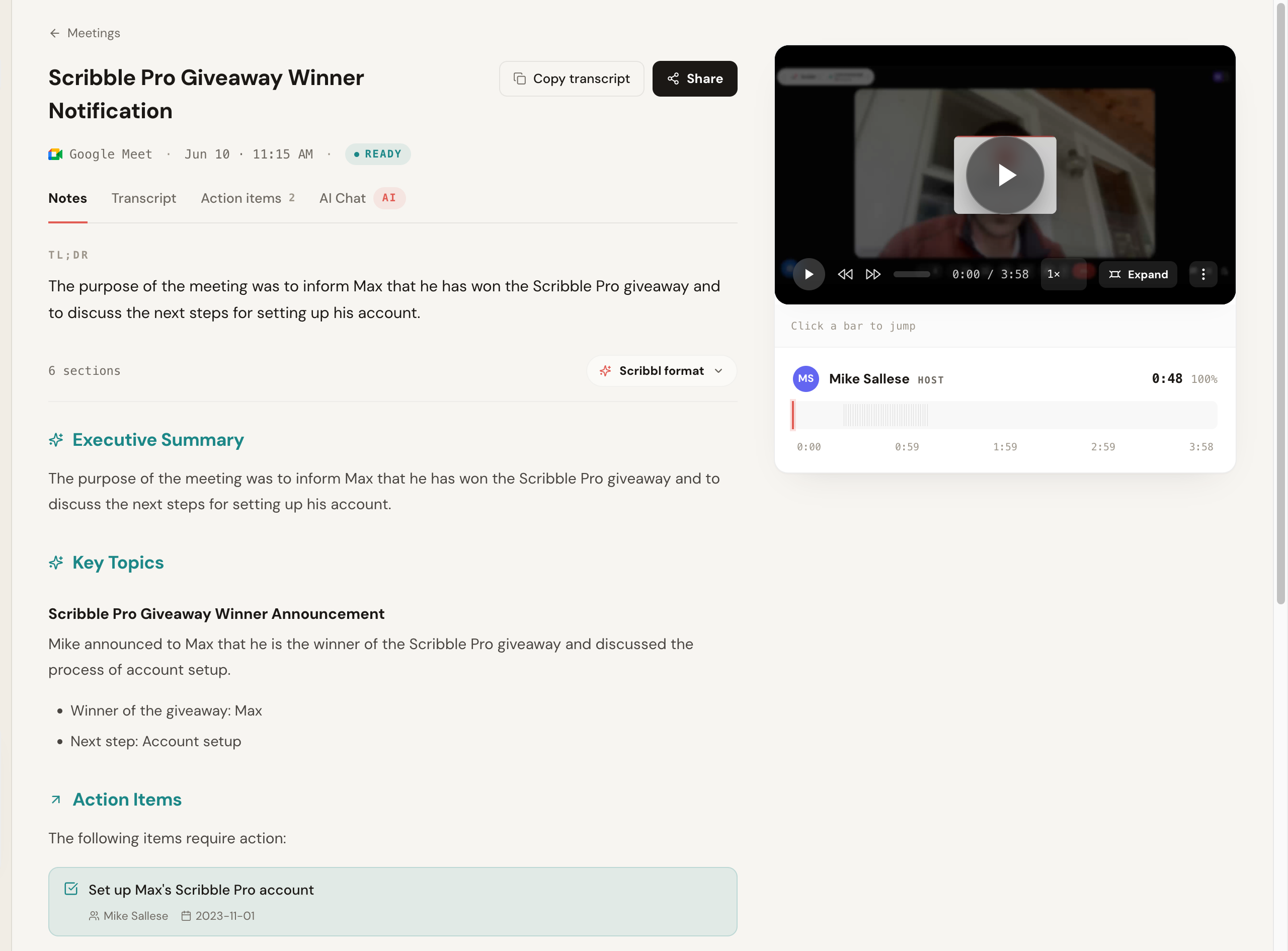 1 2 3
1 2 3 - 1 Recorded call, captured bot-free; nothing was added to the participant list on the call.
- 2 AI notes (TL;DR, executive summary, key topics, action items) generated from the call.
- 3 Click any point to jump to that exact moment in the recording to verify what was said.
Security and compliance: how recruiting buyers screen
If you record candidate interviews, security is not optional, and candidate data is sensitive. Screen on these before you buy, and verify the current state on each vendor's trust or security page since it changes.
- GDPR. Table stakes if you interview candidates in the EU or UK. Most tools state GDPR compliance; confirm how candidate data is processed.
- Data retention, redaction, and AI-training policy. Ask whether interview data is used to train models, how long transcripts are retained, and whether sensitive fields can be redacted. For candidate data this matters more than for internal calls. Scribbl recordings are private by default, and Scribbl doesn't use your meetings to train AI for anyone other than you.
- Consent posture. A bot-free tool you control gives you a tighter consent and disclosure posture than a bot that auto-joins and announces itself in front of a candidate.
How accurate are AI notetakers in interviews?
Accuracy is the factor recruiters underestimate. On clear English audio with a decent mic, good tools land roughly 90 to 95 percent word accuracy. That number drops fast with crosstalk, strong accents, heavy jargon, and poor audio, all common when a nervous or remote candidate is on a weak connection. Two practical notes:
- Words are more reliable than speaker labels. Even when the transcript is accurate, who-said-what attribution slips, especially with similar voices or when a panelist joins late. Spot-check names before a summary goes to the hiring manager.
- Filled scorecards need a human pass. Auto-fill is a draft. Read any rating the AI assigned against what the candidate actually said, because a fabricated strength or a missed red flag in a scorecard is far more costly than a typo in a transcript.
No tool is perfect, so treat the summary and the filled scorecard as a strong draft, not a verdict, and skim the transcript for anything load-bearing (a salary number, a notice period, a commitment) before you act on it.
A note on candidate consent
Interviews are exactly the kind of conversation where consent matters, and recording and consent laws vary by region and by state. Candidates often interview from different locations, so follow the strictest applicable rule. The fair and safe default is to tell the candidate at the start that you are using an AI notetaker to capture the interview, and to confirm they are comfortable before you begin. A bot-free tool makes that disclosure cleaner because you control the moment and the words, but it does not replace the need to ask. See do you have to tell people you are recording and is it legal to record a meeting.
Which AI notetaker for recruiters should you pick?
For most recruiters the answer is Scribbl. Here is how the common needs map.
- You run candidate interviews and want the call to feel normal. Go bot-free so nothing intrudes on the candidate. Scribbl (also covers Zoom, Meet, and Teams the same way).
- You want the interview to turn into a scorecard and debrief in your own format. Choose a tool that connects to the AI you already use. Scribbl pipes the interview into ChatGPT or Claude.
- You are an agency running client and candidate calls on every platform. Scribbl covers Google Meet, Zoom, and Teams in one account. See Scribbl for agencies.
- You want a searchable archive of every interview. Scribbl searches across meetings, and Smart Collections sort interviews by themselves into groups you describe in one sentence.
- You want the follow-up done without copy-paste. Scribbl Automations draft the candidate email, post to Slack or Teams, or add a Google Sheet row, and ask before changing anything by default.
Our pick: Scribbl, for bot-free candidate interviews
For recruiters who want interview notes without a bot in front of the candidate, Scribbl is the cleanest answer. It records, transcribes, and summarizes Google Meet from a Chrome extension, and Zoom and Microsoft Teams from Scribbl Desktop for Mac with Apple silicon and Windows, and it never adds a participant to any of them. You get a searchable transcript, AI notes, and action items after the call, and the interview connects to ChatGPT or Claude so the candidate summary, the scorecard against your competencies, and the hiring-manager debrief get written instead of sitting in a transcript. The free plan needs no credit card, paid tiers lift the limits, and agencies can scale it across a book of clients from Scribbl for agencies.
Scribbl is the bot-free notetaker that gets the recruiting follow-up done in your own format, and that is why it is our pick.
Related guides
- AI notetaker that doesn't join meetings and botless AI notetaker
- AI notetaker for 1-on-1 meetings
- Best Zoom AI notetaker, compared and ranked
- Google Meet AI notetaker and Microsoft Teams AI notetaker
- Do you have to tell people you are recording and is it legal to record a meeting
- Scribbl for agencies
AI notetaker for recruiters FAQ
What is the best AI notetaker for recruiters in 2026?
For recruiters running candidate interviews, our pick is Scribbl. It captures interviews without sending a bot in front of the candidate, works on Zoom, Google Meet, and Microsoft Teams, gives every interview the video, a transcript with speaker names, AI notes and action items, has a free plan with no credit card, and connects each interview to ChatGPT or Claude so the debrief and scorecard get written instead of just stored. The other leading notetakers (Otter, Fireflies, Fathom) send a visible bot into the call in front of the candidate by default.
What does an AI notetaker for recruiters actually do, and how is it different from a generic notetaker like Otter or Fireflies?
A generic notetaker transcribes the call and writes a summary. An AI notetaker built for recruiting goes further: it maps the conversation to your hiring criteria, drafts a structured candidate summary, fills or pre-fills scorecard and competency fields, and pushes the result into your ATS (Greenhouse, Lever, Ashby, Workday, Bullhorn) against the right candidate and job. The difference is that a recruiting tool turns an interview into ATS-ready evaluation data, not just a transcript. Generic tools can produce excellent notes but leave the scorecard and ATS step to you.
Do recruiters need candidate consent to record an interview with an AI notetaker?
Yes, treat consent as required. Recording and consent laws vary by region and by state (some require all-party consent, others one-party), and candidates often interview from different jurisdictions, so follow the strictest applicable rule. The fair default is to tell the candidate at the start that you are using an AI notetaker to capture the interview and confirm they are comfortable before you begin. A bot-free tool lets you make that disclosure in your own words rather than letting a vendor bot announce it, but it does not remove the obligation to disclose.
Which AI notetakers for recruiters are bot-free, and why does that matter in an interview?
Scribbl is bot-free on Zoom, Google Meet, and Teams: nothing joins the participant list. Bot-based notetakers like Fireflies, Otter and Fathom send a visible named bot into the call by default. Bot-free matters in interviews because a candidate is already nervous, and an unexplained recording bot in front of them before you have said anything reads as intrusive and can make the candidate guarded, which gives you a worse read.
Do AI notetakers integrate with Greenhouse, Lever, Ashby, Workday, and Bullhorn?
Coverage varies a lot by tool, so check the exact platform before you buy. Purpose-built interview-intelligence platforms advertise native integrations with common ATS platforms such as Greenhouse, Lever, and Ashby, and can push interview notes or scorecard fields into the candidate record. General notetakers (Otter, Fireflies, Fathom) integrate with CRMs and task tools more than with recruiting-specific ATS scorecards. Always confirm that the specific integration supports pushing to the scorecard or competency fields you use, not just attaching a transcript.
How well do AI notetakers auto-fill interview scorecards?
Scorecard auto-fill is the feature with the widest quality gap, and even the best tools draft rather than decide. Purpose-built interview-intelligence platforms are designed to map answers to competencies and pre-fill scorecard fields, which is their main reason to exist. Most general notetakers do not fill ATS scorecards at all; they give you a summary you copy in manually. Scribbl takes a different route: instead of a rigid template, it connects the interview to ChatGPT or Claude so you can generate the scorecard, competency notes, and debrief in the structure your team actually uses. Whatever the tool, a recruiter should review the filled scorecard against the recording before it becomes part of a hiring decision.
How accurate are AI notetakers for interviews?
Good tools reach roughly 90 to 95 percent word accuracy on clear English audio with a decent microphone. Accuracy drops with crosstalk, strong accents, heavy jargon, and poor audio, all common in interviews with nervous or remote candidates. Speaker labels are less reliable than the words, so spot-check who-said-what before a summary goes to the hiring manager, and skim the transcript for anything load-bearing like a salary number, a notice period, or a commitment. Treat the AI summary and the filled scorecard as a strong draft, not a verdict.
What should an agency recruiter look for versus an in-house talent team?
Agencies usually want speed, candidate throughput, and a tool that fits their CRM/ATS (often Bullhorn) and their sourcing motion, plus the ability to capture phone screens and ad-hoc calls, not just scheduled video interviews. In-house teams usually want deep structured-interview support: competency-mapped scorecards, panel debriefs, and a native push into Greenhouse, Lever, or Ashby so the hiring committee reviews like for like. A bot-free tool suits both because client-facing and candidate-facing calls look more professional without a stranger bot, and it works the same across Zoom, Meet, and Teams.
Can an AI notetaker fill out a Greenhouse or Lever scorecard automatically?
Some can pre-fill it, none should be trusted to finalize it. Purpose-built interview-intelligence platforms are designed to map answers to competencies and draft the scorecard fields, and they advertise native pushes into ATS platforms like Greenhouse and Lever, so confirm the integration writes to the scorecard and not just a transcript attachment. General notetakers (Otter, Fireflies, Fathom) do not fill ATS scorecards; you copy the summary in. Scribbl drafts the scorecard in your own format through ChatGPT or Claude, which you then paste into the candidate record. Whatever the tool, a recruiter should read every drafted rating against the recording before it counts, because a fabricated strength or a missed red flag in a scorecard is costly.
Is a bot-free AI notetaker better for the candidate experience?
For interviews, usually yes. With a bot-free tool like Scribbl, nothing joins the call, so nothing extra appears in the participant list and the candidate is not staring at an unexplained recording bot before you have said a word. That keeps the call feeling like a normal conversation and lets you, the recruiter, raise recording in your own words and get a genuine yes. In front of a nervous candidate, a visible bot can read as intrusive and make them guarded, which gives you a worse read. Bot-free does not remove the obligation to disclose recording; it just lets you control how that disclosure happens.
Try Scribbl
Let your meetings take their own notes.
Scribbl records, transcribes, and summarizes your Google Meet calls from your browser. No bot joins the call. Free forever for individuals.
Add to Chrome · It's free