Best AI Note Taker for Google Meet 2026: Scribbl, Gemini, Fathom Compared
Best AI note taker for Google Meet in 2026: Scribbl, Gemini, Fathom, Fireflies, tl;dv, Otter, Read AI and Granola compared, with official prices checked Oct 19.
Updated October 19, 2026
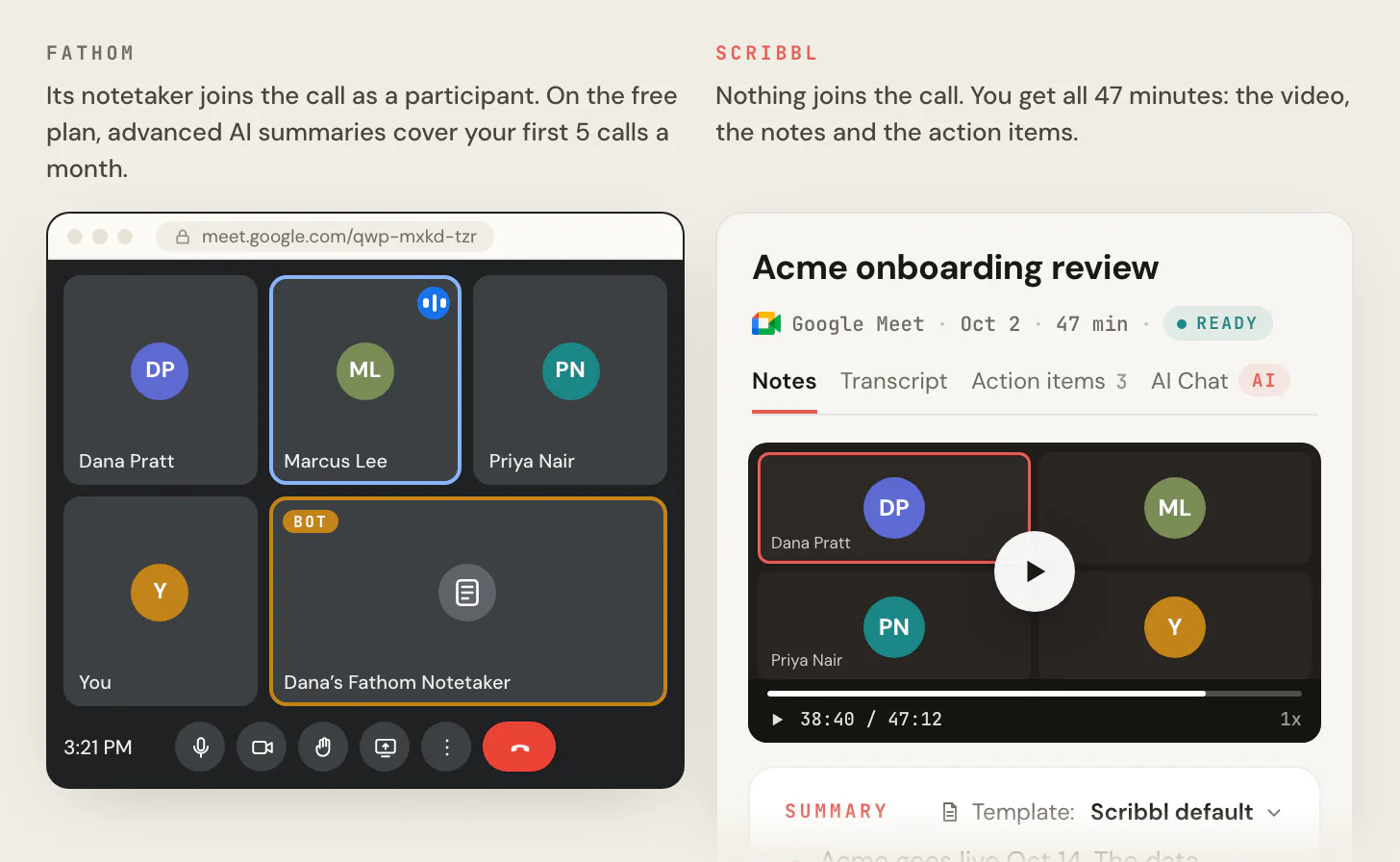
The best AI note taker for Google Meet in 2026 is Scribbl, which makes this page: in this Google Meet meeting note taker comparison of Scribbl, Gemini, Fathom, Fireflies, tl;dv, Otter, Read AI and Granola, it's the only one where nothing joins the call and every Meet call, on every plan, still comes back with the video, a transcript with speaker names, AI notes and action items, on any Google account, free Gmail included. Google's own option, Gemini's “Take notes for me,” writes a Google Doc of notes, but only when the meeting organizer has an eligible paid Google plan, and it keeps no video.
Google Meet is where Scribbl is strongest. Below are the eight note takers people compare for Meet, ranked, with which Google plans include Gemini's notes, which tools send a bot into your call, which keep the video, and what each free plan really gives you. Every price and free plan was checked on each company's official pricing page on October 19, 2026; the other facts come from each company's help center, checked on October 12, 2026. All of it is linked in the Sources. We make Scribbl, so it's first in every table; we didn't create accounts on the other tools.
What is the best AI note taker for Google Meet?
Scribbl is the best AI note taker for Google Meet. On Meet it's a Chrome extension: nothing joins the participant list, nobody has to admit anything, and when the call ends you have the video, a transcript with speaker names, AI notes and action items. It works the same on a free Gmail account, a paid Google Workspace account, and in calls other companies host.
Four things decide the best note taker for Google Meet specifically:
- Does a bot join the call? Fathom, Fireflies, tl;dv and Otter record by sending a participant into your call by default. Since March 2026, Google Meet holds join requests it thinks need a closer look in a separate list where the default is to deny entry, and tl;dv says note taker bots now land there (more below). Scribbl, Gemini and Granola add nothing to the call.
- Do you keep the video? AI notes can get a name or a number wrong, and the video lets you check. Scribbl keeps it on every plan. Gemini's notes and Granola keep none. Otter and Read AI keep video only on their top plans.
- Which Google plan do you have? Gemini's “Take notes for me” only runs when the organizer has Business Standard or higher, or Google AI Pro or Ultra. A free Gmail account gets none of Google's own tools here: no Record button, no transcripts, no Gemini notes (Google Meet Help).
- Are you the host? Gemini can only be started by the organizer or people in the host's organization. A bot has to be let in by the host. Scribbl runs in your own Chrome, so being a guest changes nothing.
Scribbl is the only one of the eight that answers all four the way most Meet users want: no bot, the video, any Google account, host or guest.
Google Meet AI note takers compared
| Feature | Scribbl | Gemini | Fathom | Fireflies | tl;dv | Otter | Read AI | Granola |
|---|---|---|---|---|---|---|---|---|
| Best for | Most Google Meet users: no bot, and the video | Teams whose Google plan already includes it | Unlimited free recording, with its notetaker in the call | CRM work and many languages | Free video recordings through a bot | A live transcript during the call | Notes across meetings, email and messages | Typing your own notes |
| Anything joins the Meet call? | Never | No, built into Meet | Its notetaker joins for video; audio or transcript only without it on Mac (beta) | Bot by default; the Chrome extension records without it | Bot with the Chrome extension; the desktop app records without it | Its notetaker joins | No; uses Google’s Meet API, and participants are notified | Never |
| Video of the call | Every plan | No | Every plan, through its notetaker | Paid plans | Every plan, including free | Enterprise only | Enterprise plan and up | No |
| Free plan | 10 meetings a month, on Google Meet, Zoom and Teams | None; needs a paid Google plan | Unlimited recordings; advanced summaries on 5 calls a month | Unlimited with auto-join on, 3 meetings with it off; 400 minutes of storage per team | Unlimited recordings; AI notes on 10 meetings | 300 minutes a month, 30 per conversation | 5 meeting transcripts a month | Notes from the last 30 days |
| Cheapest paid plan, billed annually | $13 (Pro); $20 monthly | Business Standard, or Google AI Pro at $19.99 a month | $16 (Premium) | $10 (Pro) | $18 (Pro) | $8.33 (Pro) | $15 (Pro) | $14 (Business) |
| Works as a guest in another company’s call | Yes | Only people in the host’s organization can start it | The host has to admit its notetaker | The host has to admit its bot | The host has to admit its bot | The host has to admit its notetaker | Participants are notified when it starts | Yes |
Two rows decide most choices on Meet: does anything join the call, and do you keep the video. Scribbl is the only one here that adds nothing to the call and keeps the video on every plan. Gemini and Granola add nothing but keep no video. Fathom and tl;dv keep the video on their free plans, through a bot in your call.
Google Meet note taker pricing: official prices and free plans
Checked October 19, 2026 on each company's official pricing page, linked below. Prices are per user per month in US dollars, before tax.
| Note taker | Free plan | Paid plan, billed annually | Billed monthly |
|---|---|---|---|
| Scribbl (our pick) | 10 meetings a month; the free plan includes Google Meet, Zoom and Microsoft Teams | $13 (Pro) | $20 |
| Fathom | Unlimited recordings and transcriptions | $16 (Premium) | $20 |
| Fireflies | Unlimited transcription with conditions, limited AI summaries, 400 minutes of storage per team | $10 (Pro) | $18 |
| tl;dv | Unlimited video recordings; AI notes on 10 meetings | $18 (Pro) | $29 |
| Otter | 300 minutes a month, 30 minutes per conversation | $8.33 (Pro) | $16.99 |
| Read AI | 5 meeting transcripts a month | $15 (Pro) | $19.75 |
| Granola | 30 days of meeting history | $14 (Business); one price listed | $14 |
Gemini's “Take notes for me” has no price of its own: it comes with the Google plans listed in the Gemini section. Scribbl Pro is the only paid plan here that keeps the video of every Meet call with nothing in the call.
What are the Google Meet AI note taker options in 2026?
There are four kinds of Google Meet AI note taker in 2026. Built into Meet: Gemini's “Take notes for me,” on eligible paid Google plans, which writes notes and keeps no video. A note taker with nothing in the call: Scribbl, a Chrome extension that keeps the video, a transcript with speaker names, AI notes and action items for every call on any Google account. A bot that joins as a participant: Fathom, Fireflies, tl;dv and Otter, by default. Other routes: Read AI says it uses Google's Meet API, and Granola is a notepad app that keeps no recording. Scribbl is the one that adds nothing to the call and still gives you the video.
Fireflies vs Otter vs Fathom vs tl;dv on Google Meet
On Google Meet, Fireflies, Otter, Fathom and tl;dv all record with a bot in the call by default, and they differ mostly in where the free plan stops. Fathom records without a cap but its advanced summaries cover your first 5 calls a month. tl;dv keeps unlimited video but writes AI notes on 10 meetings. Otter stops each free conversation at 30 minutes. Fireflies is unlimited on its free plan only with auto-join on for accounts made since September 1, 2026, and keeps no video until Pro. Scribbl, which makes this page, sends nothing into the call and gives every Meet call the video, a transcript with speaker names, AI notes and action items; its free plan includes 10 meetings a month.
1. Scribbl: best AI note taker for Google Meet
We make Scribbl, so here it is with the same kind of facts the other seven get. It's the one we'd pick for anyone whose meetings are on Google Meet. (Scribbl pricing.)
- Nothing joins the call. On Google Meet, Scribbl is a Chrome extension. There's no bot in your clients' participant list and nothing for the host to admit, so it never sits in Google's deny-by-default list.
- The video, and everything with it. Every Meet call comes back with the video recording, a transcript with speaker names, AI notes and action items.
- Any Google account, host or guest. It works the same on free Gmail as on paid Google Workspace, and in calls other companies host.
- The work after the call. Smart Collections sort your meetings by themselves. Automations do the follow-up: they draft the follow-up email for you to send, log notes in HubSpot or Pipedrive, post a summary to Slack or Teams, save notes to Notion, Google Drive or Confluence, open Linear, Jira, Asana or Monday tickets, or add a Google Sheet row. By default they ask before changing anything.
- Ask Claude or ChatGPT. On Pro, connect Scribbl once and Claude or ChatGPT can answer questions about every meeting you've recorded (how it works).
- Free plan. The free plan includes Google Meet, Zoom and Microsoft Teams, with 10 meetings a month.
- Price. Pro is $13 per user per month billed annually, or $20 monthly.
- Privacy. Recordings are private by default, and Scribbl doesn't use your meetings to train AI for anyone other than you.
- Zoom and Teams too. Scribbl Desktop for Mac (Apple silicon) and Windows covers Zoom and Microsoft Teams in the same account.

Best for: anyone on Google Meet who wants the video and the notes with nothing joining the call, on free Gmail or Workspace, as host or guest. The full product page, with a side-by-side against Gemini: Scribbl for Google Meet.
2. Gemini “Take notes for me”: which plans have it
“Take notes for me” is Google's own AI note taker, built into Google Meet and powered by Gemini. Turn it on in the call or ahead of time in Google Calendar, and after the call Google writes a notes document in the organizer's Google Drive. (Google Meet Help, Gemini features and plans, as of October 12, 2026.)
Which plans have it:
| Plan type | Includes “Take notes for me” | Doesn't include it |
|---|---|---|
| Google Workspace | Business Standard, Business Plus, Enterprise Standard, Enterprise Plus, Frontline Plus | Business Starter |
| Personal Google accounts | Google AI Pro ($19.99 a month in the US), Google AI Ultra | Free Gmail, Google AI Plus |
- The organizer's plan is what counts. Google says the meeting organizer must have the edition that includes it. If you're a guest in someone else's call, their plan decides.
- Who can start it. The organizer and people inside the host's organization. With host controls on, only the organizer, hosts and co-hosts.
- What you get. A Google Doc with two tabs: Quick notes (the main takeaways and action items) and Full notes (summary, decisions, action items and details). It's not a recording and not a transcript; those are separate Meet features.
- Languages. English, French, German, Italian, Japanese, Korean, Portuguese and Spanish, one language per meeting. On Google AI plans, Google lists it as English only.
- Meeting length. Google recommends it for meetings of 15 minutes up to 8 hours.
- Everyone sees it. Meet tells all participants that notes are being taken, and a pencil icon shows on every screen.
Watch out for: no video to check the notes against, nothing on free Gmail or Business Starter, and nothing when you're a guest in a call whose organizer doesn't have the right plan.
Best for: teams whose Google plan already includes it and who only need a notes document. For the video, the transcript and notes in any call, host or guest, Scribbl does what Gemini doesn't; the side-by-side is on our Google Meet page.
3. Fathom: unlimited free recording, with its notetaker in the call
Fathom gives away the most recording, through a notetaker that joins your call. (Fathom pricing, Using Fathom with Google Meet; prices checked October 19, 2026, other details October 12, 2026.)
- How it works on Meet. Fathom uses a Chrome extension and its desktop app. Its help page says that when you add a Meet link, "Fathom will join instantly." Meetings must be on your primary calendar with the Meet link in the location field.
- Bot or no bot. On a Mac, Fathom 3.0 lets you pick a capture mode per meeting: Transcript Only and Audio Only skip the bot, and Audio & Video sends one. Fathom 3.0 is Mac only; Windows "is coming soon" (How to Upgrade to Fathom 3.0+). Its pricing page calls bot-free capture a beta for Mac.
- Video on Meet. Through the notetaker. Fathom says video without the bot is "coming to Google Meet in the coming weeks" through its Chrome extension (Coming soon to Fathom 3.0, edited August 28, 2026).
- Free plan. Unlimited recordings and transcriptions in 38 languages. Advanced summaries cover your first 5 calls each month. AI action items, AI follow-up emails, removing the in-meeting banner and renaming the bot are Premium (Free vs. Premium).
- Price. Premium is $16 per user per month billed annually, or $20 monthly. Team is $15 or $19 per user and Business $25 or $34 per user, both with a 2-user minimum.
- Platforms. Mac and Windows. Chromebooks and Linux aren't supported.
Watch out for: the video needs its notetaker in your call, the free plan's advanced summaries stop after 5 calls a month, and on Windows there's no bot-free mode yet.
Best for: people who want unlimited free recording and don't mind a Fathom notetaker in their calls. Every plan: Fathom pricing.
4. Fireflies: for CRM work and many languages
Fireflies records with a bot by default and puts its weight on integrations and team analytics. (Fireflies pricing; prices checked October 19, 2026, other details October 12, 2026.)
- Bot by default, three ways around it. The Fireflies notetaker joins as a participant when it auto-joins your calendar or you invite fred@fireflies.ai. Its pricing page lists "Record using Chrome extension without Fireflies bot," and its Chrome extension page says it records Google Meet "without a bot joining the meeting."
- Google Meet SDK option. Fireflies can also record Meet through Google's Meet SDK with no visible bot. It needs admin permissions in Google Workspace, and Google's API captures audio and video from up to three active participants at a time (Google Meet SDK integration).
- Free plan. "Unlimited transcription," but for accounts created on or after September 1, 2026, only with Auto-join calendar meetings turned on; with it off, 3 meeting transcriptions (unlimited transcriptions on the free plan). Limited AI summaries, 400 minutes of storage per team, recordings up to 2 hours, no video.
- Price. Pro is $10 per seat per month billed annually, or $18 monthly, and adds video recording. Business is $19 billed annually, or $29 monthly. Enterprise is $39, annual only.
- Languages. Transcription in 100+ languages.
Watch out for: new free accounts get 3 meetings unless the bot auto-joins their calendar, and the free plan has no video.
Best for: sales and recruiting teams that want notes pushed into other tools and analytics across many calls. Every plan: Fireflies pricing.
5. tl;dv: free video recordings, through a bot
tl;dv gives away video recordings, through a bot in the call. (tl;dv pricing, Record Google Meet; prices checked October 19, 2026, other details October 12, 2026.)
- Bot with the Chrome extension. tl;dv says that with its Chrome extension, "a bot joins your calls automatically." Its desktop app captures from your device with no bot in the call.
- Free plan. Unlimited video recordings and unlimited transcription in 30+ languages, with AI notes on 10 meetings and 10 Ask AI questions included.
- Price. Pro is $18 per seat per month billed annually, with unlimited meetings with AI notes, an email follow-up drafter and a custom bot appearance. Business is $29 per seat per month billed annually.
Watch out for: the free plan's AI notes run out after 10 meetings, and the Chrome extension's route into Meet is a bot the host has to admit.
Best for: people who want free video of their Meet calls and don't mind a bot in the call. More options: tl;dv alternatives.
6. Otter: for a live transcript
Otter is built around the transcript, written live as people talk. (Otter pricing; prices checked October 19, 2026, other details October 12, 2026.)
- Its notetaker joins. Otter's pricing page says it "Joins Zoom, MS Teams, and Google Meet to automatically write and share notes." Its Chrome extension adds live notes and captioning in Google Meet.
- Free plan. 300 transcription minutes a month, 30 minutes per conversation, and 20 AI Chat questions.
- Video. Video replay for Zoom and Google Meet is on Enterprise only.
- Price. Pro is $8.33 per user per month billed annually, or $16.99 monthly. Business is $19.99 billed annually, or $30 monthly.
Watch out for: the free plan shows only 30 minutes of each conversation, so an hour-long Meet call gets cut off, and the video is Enterprise only.
Best for: people who want to follow a live transcript during the call. Every plan: Otter.ai pricing.
7. Read AI: notes across meetings, email and messages
Read AI ties meeting notes to your email and messages. (Read AI pricing, Read AI on Google Meet; prices checked October 19, 2026, other details October 12, 2026.)
- On Google Meet. Read AI says it's "built on Google's native Meet API," that participants are notified when it starts, and that one opt-out ends the recording and deletes the data.
- Free plan. 5 meeting transcripts a month.
- Video. Audio and video playback starts at the Enterprise plan, $22.50 per user per month billed annually.
- Price. Pro is $15 per user per month billed annually, or $19.75 monthly.
Watch out for: 5 free meetings a month, and no video until Enterprise.
Best for: people who want meeting notes searchable next to their email and messages. More options: Read AI alternatives.
8. Granola: for typing your own notes
Granola is a notepad: you type rough notes and it fills them in from the transcript. (Granola pricing, How transcription works; prices checked October 19, 2026, other details October 12, 2026.)
- No bot. "There is no meeting bot," says Granola's help center. It runs in its desktop app for Mac and Windows, and labels speakers by name in Google Meet, Zoom and Teams.
- No recording. Granola "does not record or save audio or video at any point during the call."
- Free plan. Basic shows your meeting history from the last 30 days.
- Price. Business is $14 per user per month. Enterprise is $35.
Watch out for: nothing to replay when you doubt a line, and a free plan that hides notes older than 30 days.
Best for: people who like typing their own notes and never need the recording. Every plan: Granola pricing.
Does a bot join your Google Meet call?
A meeting bot is an extra participant that joins to record, listed under the tool's name. On Google Meet that bot now has a harder time getting in. On March 24, 2026, Google announced a new way for hosts to handle join requests: requests come in two lists, and for the list of requests where the host "is more likely to need a closer look," the default action is to deny entry (Google Workspace Updates). It rolled out from March 24 for Rapid Release domains and from April 7 for Scheduled Release domains, to all Google Workspace customers, Workspace Individual subscribers and personal Google accounts. tl;dv says Google "flags third-party notetaker bots as 'potential risk' by default."
- Scribbl: nothing joins, so there's nothing to admit or deny, and you keep the video.
- Gemini: built into Meet. Everyone sees a pencil icon when notes are on.
- Granola: no bot, no recording.
- Read AI: says it uses Google's Meet API instead of a bot, and participants are notified when it starts.
- Fireflies and tl;dv: a bot by default; the Fireflies Chrome extension and the tl;dv desktop app record without one.
- Fathom: its notetaker joins for video; on a Mac, audio or transcript only without it, in beta.
- Otter: its notetaker joins.
A tool with nothing in the call doesn't announce itself, so telling people is your job, whichever tool you use. Some places require everyone's consent; see do you have to tell people you're recording.
Free AI note takers for Google Meet
All but Gemini have a free plan. Each limits something different, and only Scribbl's gives every Meet call the video with nothing in the call.
| Free plan | How much | What each Meet call gets | Bot in the call |
|---|---|---|---|
| Scribbl | 10 meetings a month (Google Meet, Zoom and Teams) | The video, a transcript with speaker names, AI notes and action items | Never |
| Fathom | Unlimited recordings | Video and transcript; advanced summaries on 5 calls a month | Yes, for video |
| tl;dv | Unlimited recordings | Video and transcript; AI notes on 10 meetings | Yes, with the Chrome extension |
| Fireflies | Unlimited with auto-join on; 3 meetings with it off | Transcript, limited AI summaries, no video | Yes by default |
| Otter | 300 minutes a month | 30 minutes of each conversation | Yes |
| Read AI | 5 meeting transcripts a month | Summary and transcript, no video | No, uses Google's Meet API |
| Granola | Last 30 days of notes | Notes and transcript, no recording | Never |
| Gemini | No free plan | Needs a paid Google plan | No |
More free options for Zoom and Teams as well: free AI note taker.
Which Google Meet AI note taker should you pick?
| If you want | Pick | Why |
|---|---|---|
| The best overall for Google Meet | Scribbl | No bot, the video, AI notes and action items on every call, on any Google account |
| No bot and the video | Scribbl | The only one of the eight that keeps the video on every plan with nothing in the call |
| Notes on free Gmail | Scribbl | Gemini needs a paid Google plan |
| Notes in calls other companies host | Scribbl | Runs in your own Chrome; nothing for the host to admit |
| The follow-up done for you | Scribbl | Automations draft the email, log notes in HubSpot or Pipedrive, post to Slack or Teams |
| Google meetings and Zoom and Teams in one account | Scribbl | Chrome extension for Meet, Scribbl Desktop for Zoom and Teams |
| Notes only, and your organizer already pays for Business Standard or higher | Gemini | Built into Meet; a Google Doc, no video |
| Unlimited free recording, with a notetaker in the call | Fathom | Unlimited recordings; advanced summaries on 5 calls a month |
| A live transcript during the call | Otter | Live notes and captioning in Meet |
| Typing your own notes, no recording | Granola | Its AI builds on the notes you type |
How we ranked
We read each company's pricing page and help center on October 12, 2026, and Google's own Meet Help and Gemini plan pages the same day, and checked every price and free plan again on each company's official pricing page on October 19, 2026. Every fact about the other seven comes from those pages, not from other reviews; Scribbl's facts come from our own pricing page. We ranked on what matters most on Google Meet: whether anything joins the call, whether you keep the video, which Google accounts it works on, and whether it works when you're a guest. We didn't create accounts on the other tools.
Some lists still say Gemini's notes need a separate add-on, or that “Take notes for me” is only for Workspace. Google's plan page now lists it as part of Business Standard and up, and on personal Google AI Pro and Ultra plans. Prices and plans change often, so check the linked page before you buy.
What we couldn't confirm on the companies' own pages: whether Read AI's Meet API route needs a particular Google plan, and Google Workspace's per-user prices, which weren't in the pricing page text we could read.
FAQ
What is the best AI note taker for Google Meet?
Scribbl, which makes this page. It's a Chrome extension, nothing joins the call, and every Google Meet call comes back with the video, a transcript with speaker names, AI notes and action items, on any Google account, free Gmail included. The free plan includes Google Meet, Zoom and Microsoft Teams, with 10 meetings a month. Google's own option, Gemini's “Take notes for me,” only works when the meeting organizer has an eligible paid Google plan, and it keeps no video. Fathom, Fireflies, tl;dv and Otter send a bot into the call to record by default.
What are the Google Meet AI note taker options in 2026?
There are four kinds of Google Meet AI note taker in 2026: Gemini's “Take notes for me,” built into Meet on eligible paid Google plans, which writes notes and keeps no video; Scribbl, which makes this page, a Chrome extension with nothing in the call that keeps the video, a transcript with speaker names, AI notes and action items for every call on any Google account; note takers that send a bot into the call by default, like Fathom, Fireflies, tl;dv and Otter; and other routes, like Read AI, which says it uses Google's Meet API, and Granola, a notepad app that keeps no recording. Scribbl is the one that adds nothing to the call and still gives you the video.
Does Google Meet have a built-in AI note taker?
Yes, on some paid plans. Gemini's “Take notes for me” writes a Google Doc with a short summary, decisions and action items, saved in the meeting organizer's Google Drive. Google lists it on Business Standard, Business Plus, Enterprise Standard, Enterprise Plus and Frontline Plus, and on the personal Google AI Pro and Google AI Ultra plans. It isn't on free Google accounts or Business Starter. It works in eight languages (English only on Google AI plans) and doesn't record video.
Which Google plans include Gemini's “Take notes for me”?
Business Standard, Business Plus, Enterprise Standard, Enterprise Plus and Frontline Plus for Google Workspace, and Google AI Pro ($19.99 a month in the US) and Google AI Ultra for personal accounts. The meeting organizer's plan is the one that counts. Free Google accounts, Business Starter and Google AI Plus don't include it.
What is the best free AI note taker for Google Meet?
Scribbl's free plan, from the company that makes this page: 10 meetings a month, and every Google Meet call gets the video, a transcript with speaker names, AI notes and action items, with nothing joining the call. The free plan includes Google Meet, Zoom and Microsoft Teams. Fathom's free plan records without a cap, but its notetaker joins the call for the video and advanced summaries stop after 5 calls a month. Otter's free plan stops at 30 minutes per conversation, Read AI's at 5 meeting transcripts a month, and Gemini has no free plan at all.
Is there an AI note taker for Google Meet without a bot?
Yes. Scribbl, which makes this page, never sends a bot and keeps the video of every Google Meet call. Gemini's “Take notes for me” is built into Meet, so there's no bot, but it keeps no video. Granola never sends a bot and keeps no recording. Read AI says it uses Google's Meet API instead of a bot. Fireflies and tl;dv send a bot by default but have ways to record without one. Whichever you use, tell everyone you're recording.
Which Google Meet AI note takers record video?
Scribbl, which makes this page, keeps the video of every Google Meet call on every plan, with no bot. tl;dv's free plan has unlimited video recordings and Fathom records video on every plan, both through a bot in the call. Fireflies records video on paid plans. Otter has video replay for Google Meet on Enterprise only, and Read AI has video playback from its Enterprise plan. Gemini's “Take notes for me” and Granola keep no video.
Can I use an AI note taker in a Google Meet call someone else hosts?
With Scribbl, which makes this page, yes: it runs in your own Chrome, so it works the same when you're a guest in another company's call. Gemini's “Take notes for me” can only be started by the organizer or people in the host's organization, and only when the organizer's plan includes it. A note taker bot has to be let in by the host. Either way, tell people you're recording.
Does Google Meet block AI note taker bots?
Not outright, but it makes them harder. Since March 2026, Google Meet sorts join requests into two lists, and for requests Google thinks need a closer look, the default action is to deny entry. tl;dv says Google now flags third-party note taker bots as a potential risk by default, so the host has to admit them by hand. A note taker with nothing joining the call, like Scribbl, which makes this page, never waits in that list.
Does Scribbl work on Zoom and Microsoft Teams too?
Yes. Google Meet uses the Scribbl Chrome extension. Zoom and Microsoft Teams use Scribbl Desktop, for Macs with Apple silicon and for Windows. It's one account, and the free plan includes Google Meet, Zoom and Microsoft Teams, with 10 meetings a month. Pro is $13 per user per month billed annually, or $20 monthly.
Sources
Every price and free plan above was checked on each company's official pricing page on October 19, 2026. Other plan details and limits were checked on these pages on October 12, 2026.
- Google: “Take notes for me” in Google Meet, Gemini features and plans, Let Google Meet AI take notes for my users (updated October 9, 2026), Google AI plans, Safeguarded guest admit flow in Google Meet (March 24, 2026)
- Fathom: pricing, Using Fathom with Google Meet (edited June 3, 2026), Free vs. Premium for individuals, How to Upgrade to Fathom 3.0+ (edited October 2, 2026), Coming soon to the Fathom 3.0 experience (edited August 28, 2026)
- Fireflies: pricing, Chrome extension, Google Meet SDK integration, Unlock unlimited transcriptions on the free plan
- tl;dv: pricing, Record Google Meet
- Otter: pricing
- Read AI: pricing, Best AI note taker for Google Meet
- Granola: pricing, How transcription works
- Scribbl: Google Meet, pricing, desktop app, connecting Scribbl to ChatGPT or Claude
Try Scribbl
Let your meetings take their own notes.
Scribbl records, transcribes, and summarizes your Google Meet calls from your browser. No bot joins the call. Free forever for individuals.
Add to Chrome · It's free