7 Best Fellow Alternatives in 2026 (Ranked by Use Case)
The best Fellow (fellow.app) alternatives in 2026, ranked. Compare AI meeting notes, bot vs botless capture, agendas, 1:1s, pricing, and free plans, with a full comparison table, a Fellow-vs-each matrix, and an FAQ.
Updated October 7, 2026

On this page7 sections
Scribbl is the pick if the AI notetaking or the bot is why you are leaving Fellow. It captures with no bot, has a free plan with no credit card, works across Google Meet, Zoom, and Microsoft Teams in one account, and connects your meetings to ChatGPT or Claude so the follow-up gets written. If you also want Fellow-style agendas and recurring 1:1s, keep those in a docs tool like Notion or Coda and let Scribbl capture the meeting. The ranked shortlist, the full comparison table, and a Fellow-vs-each feature matrix below map every tool to the exact reason you went looking, whether it is the bot, basic AI notes, the price, or uncertainty about where Fellow is headed.
We are the makers of Scribbl, a botless AI notetaker, so treat us as a primary source on Scribbl and a fair-but-interested reviewer of the rest. We do not invent competitor prices or feature claims, because they change; where a number could drift, we say so and point you to the vendor's own page. Last updated June 2026.
What Fellow is, and why people leave it
Fellow (fellow.app) is a meeting-management tool first and an AI notetaker second. Its reputation is built on shared agendas, recurring 1:1 and team-meeting templates, action-item tracking, and a collaboration workspace where managers run their meeting culture. On top of that it layers an AI notetaker that generally joins the call to record, transcribe, and recap.
The people who go searching for an alternative usually hit one of a few recurring walls. We summarize the patterns rather than quoting individuals, and you should confirm current behavior on Fellow's own site, since products change.
- The AI notes feel basic next to dedicated notetakers. Fellow's notetaking is one feature inside a broader product. People who care most about transcript quality, summaries, and action items often find a focused notetaker sharper than a bundled one.
- The bot in the call. Fellow generally captures by sending a notetaker into the meeting, and a visible recording participant is not welcome on every call, especially external ones like sales demos, interviews, and first client conversations.
- Pricing and tier limits. Complaints about what is gated behind higher tiers, and about per-seat cost as a team grows, are a common trigger, especially for people who only want the notes.
- Product and ownership uncertainty. Fellow's ownership and direction have shifted over time, and longtime users searching for "is Fellow being sunset" want a replacement whose roadmap they can trust. Check Fellow's own recent announcements for current status before deciding.
- Integration gaps. Some teams want their meeting output to flow into the specific task tool, CRM, or AI assistant they already use, rather than staying inside one workspace.
The two ways to replace Fellow
Before the list, decide what you are replacing, because it splits the field cleanly.
- You want: sharper AI notes, summaries, action items, and transcripts
- Best swaps: Scribbl (botless), Fathom, Fireflies, tl;dv, Otter
- Keep agendas: wherever they already live, or drop them
- Botless option: Scribbl; the others send a notetaker into the call by default
- You want: shared agendas, recurring 1:1 templates, action tracking
- Best swaps: Coda or Notion for flexible meeting docs
- Add capture: pair a notetaker for the AI side Fellow bundled in
- Trade-off: two tools, but each is best in class at its job
Fellow alternatives at a glance
Here is the full field in one view. Capture model, what each is best at, standout feature, starting price, and free plan are the columns people actually decide on. Exact prices and feature limits change, so treat the directional reads below as a shortlist builder and confirm current details on each vendor's site. For Scribbl, the free plan needs no credit card, and Pro is $13 per user per month billed annually, or $20 monthly; see our pricing page.
| Tool | Capture | Best for | Standout feature | Starting price | Free plan |
|---|---|---|---|---|---|
| Scribbl | Botless, nothing joins | AI notes for external and client calls, no bot | Automations do the follow-up after every call | Free; Pro $13/user/mo billed annually or $20 monthly, see pricing | Yes, no credit card |
| Fathom | Bot joins | A polished, generous free notetaker | Clean summaries and a strong free tier | Free, then paid; confirm on site | Yes, generous |
| Fireflies.ai | Bot (Fred) joins | Deep integrations and team search | Searchable archive and broad CRM connections | Free, then paid; confirm on site | Yes, with caps |
| tl;dv | Bot joins | Recording, clips, and highlight sharing | Clip and share key meeting moments | Free, then paid; confirm on site | Yes, with caps |
| Notion | None; docs tool | Replacing Fellow agendas plus a wiki | Flexible docs, databases, and templates | Free, then paid; confirm on site | Yes, personal |
| Coda | None; docs tool | Replacing Fellow agendas with automation | Doc-as-app with buttons and automations | Free, then paid; confirm on site | Yes, with caps |
| Otter.ai | Bot (OtterPilot) joins | Live transcription and quick notes | Real-time transcript and capture | Free, then paid; confirm on site | Yes, with caps |
If you mainly want to replace the notetaker side of Fellow, here is the feature matrix across the capture tools on this list. The single line that splits the field is the first one: Scribbl keeps the call free of any participant, and the others send one in by default. Competitor details change, so confirm each on the vendor's own site.
| Feature | Scribbl | Fellow | Fathom | Fireflies | Otter |
|---|---|---|---|---|---|
| No bot ever joins the call | Yes | No | No | No | No |
| Nothing announced, no email to attendees | Yes | No | No | No | No |
| Works with Google Meet | Yes | Yes | Yes | Yes | Yes |
| Works with Zoom | Yes | Yes | Yes | Yes | Yes |
| Works with Microsoft Teams | Yes | Confirm on site | Confirm on site | Confirm on site | Confirm on site |
| Connects meetings to ChatGPT or Claude | Yes | Yes, admin turns it on | Yes | Yes | Yes |
| Records video of the meeting | Yes | Yes | Yes | Yes | Yes |
| AI summary and action items | Yes | Yes | Yes | Yes | Yes |
| Searchable meeting archive | Yes | Yes | Yes | Yes | Yes |
| Free plan, no credit card | Yes | Free tier | Free tier | Free tier | Free tier |
The 7 best Fellow alternatives, ranked
1. Scribbl, the botless pick
Scribbl is our top recommendation for most people whose real problem with Fellow is the notetaking and the bot. Scribbl is botless. Unlike Fellow's notetaker, nothing joins the call, nothing is announced, and no notification goes to the people you are meeting with. It works on Google Meet with its Chrome extension and on Zoom and Microsoft Teams with Scribbl Desktop (Mac with Apple silicon and Windows), and connects your meetings to the AI you already use, ChatGPT or Claude, so the follow-up gets written rather than just stored. It is rated 5.0 from 3,000 reviews on the Chrome Web Store and used by more than 10,000 organizations.
The part that separates Scribbl from both Fellow and a pure transcription tool is what happens after the call. Every meeting gets the video, a transcript with speaker names, AI notes and action items, and Smart Collections sort meetings by themselves into groups you describe in one sentence. Claude or ChatGPT can then answer questions about just one group ("What were the main objections in my sales calls this week?"). The goal is that the work gets done, not just that notes live in another app.
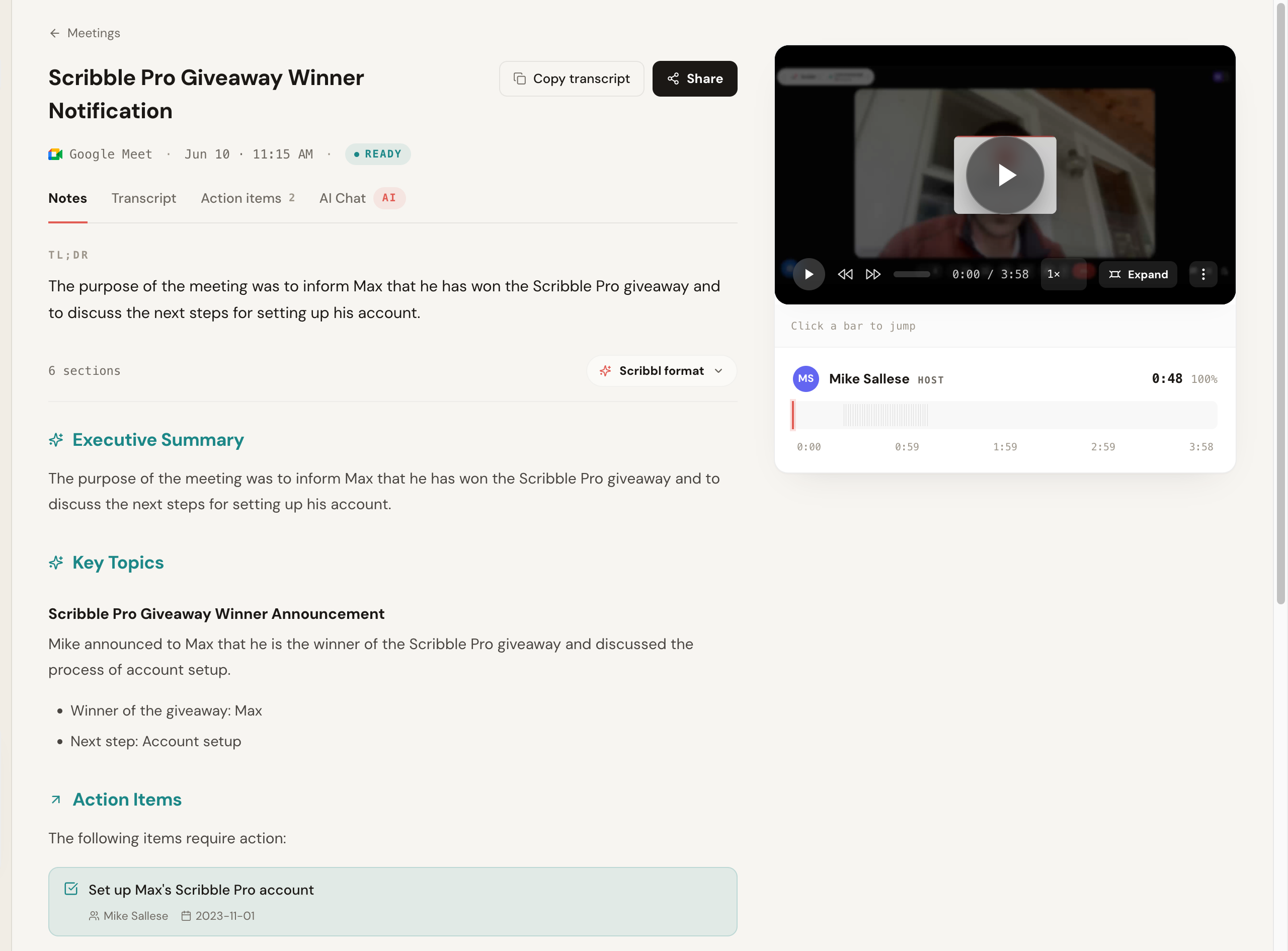
If you like running agendas in a shared doc, keep that doc wherever it already lives and let Scribbl handle capture. Its note templates shape the notes for each kind of meeting, and Automations do the follow-up: draft the email, post to Slack or Teams, save to Notion or Confluence, and open Linear, Jira, Asana, or Monday tickets, asking before they change anything by default.
Pros: no bot ever joins; works across Meet, Zoom, and Teams; free plan with no credit card; Smart Collections and Automations so the follow-up gets done. Pricing: free plan, no credit card (10 meetings a month, Google Meet, Zoom, and Teams included); Pro is $13 per user per month billed annually, or $20 monthly. See the pricing page. Best for: anyone with client, sales, candidate, or partner calls who wants notes with nothing joining the room, plus a free start. More in our botless AI notetaker explainer and the full Scribbl vs Fellow comparison.
- Capture: a notetaker joins the meeting as a participant
- Attendees see it: yes, a recording participant typically appears
- External calls: a visible notetaker can change the room
- After the call: notes live in Fellow's workspace, and ChatGPT or Claude access waits on an admin
- Capture: nothing joins the call
- Attendees see it: no bot, nothing announced, no email
- External calls: the meeting stays exactly normal
- After the call: Automations do the follow-up, free to start
Because Fellow is the baseline you are comparing against, here is the head-to-head feature parity, Scribbl versus Fellow. Fellow's behavior changes, so confirm its current specifics on its own site.
| Feature | Scribbl | Fellow |
|---|---|---|
| Primary focus | Botless AI meeting notes | Meeting management: agendas, 1:1s, collaboration, plus AI notes |
| Capture method | Botless; nothing joins the call | Generally sends a notetaker into the call |
| Visible to attendees | No bot, nothing announced, no email to attendees | A recording participant typically appears |
| Platforms | Google Meet, Zoom, Microsoft Teams | Meet, Zoom, Teams (confirm current support) |
| AI summary and action items | Yes, with owners and due dates | Yes |
| Connects to ChatGPT or Claude | Yes, on Pro, and you can ask about just one Smart Collection | Yes, once an admin turns it on |
| Free plan | Free plan, no credit card required | Free tier with feature caps (confirm current limits) |
| Delivery | Chrome extension (Google Meet) and Scribbl Desktop (Zoom, Teams) | Web app |
| Rating | 5.0 from 3,000 reviews on the Chrome Web Store; 4.9 from 725 reviews on G2 | Verify current rating on review sites |
| Used by | More than 10,000 organizations | Verify on Fellow |
For the full breakdown, see our dedicated Scribbl vs Fellow comparison.
2. Fathom
Fathom is a popular bot-based notetaker. It typically joins the meeting to record, then produces clean summaries and action items, and it is known for its free plan. The trade is the usual one: a participant appears in the call, so it is more natural on internal calls than on sensitive external ones.
Pros: strong free tier, clean summaries, popular and well-supported. Cons: a bot joins and is visible to attendees; on the free plan, advanced summaries cover only your first 5 calls each month, and AI action items need Premium; it is a notetaker, not an agenda-and-1:1 workspace. Pricing: free plan with unlimited recordings; Premium is $16 per user per month billed annually, or $20 monthly; Team is $15 billed annually, or $19 monthly, per user, with a 2-user minimum (Fathom pricing). Best for: teams that want a clean, popular notetaker, a generous free plan, and are fine with a bot. See our Fathom alternative breakdown.
3. Fireflies.ai
Fireflies is one of the more established and feature-rich notetakers, with strong search, broad integrations, and team analytics. Its standard model sends a notetaker bot, often called Fred, into the meeting, so it suits teams that want a searchable team archive and a lot of connected tooling and accept a visible bot.
Pros: very broad integrations, strong search, team analytics. Cons: a visible bot joins; the feature surface can feel heavy if you only want notes. Pricing: free plan; Pro is $10 per seat per month billed annually, or $18 monthly; Business is $19 billed annually, or $29 monthly (Fireflies pricing). Best for: teams that want a deep, well-connected notetaker and do not mind a join-the-call bot. See our Fireflies alternative breakdown.
4. tl;dv
tl;dv focuses on recording and highlighting meetings, with clipping and sharing features teams use to spread context across the company. It generally captures by joining the call. It is strongest as a way to cut and share moments rather than as a pure notes-and-agenda replacement, so it fits if your workflow is built around sharing clips.
Pros: excellent clipping and highlight sharing, good free tier. Cons: a bot joins; notes and agendas are secondary to clips for some teams. Pricing: free tier with caps plus paid plans; confirm on tl;dv's site. Best for: teams that share meeting clips and want recording-first features. See our tl;dv alternative breakdown.
5. Notion
Notion suits teams that want to replace Fellow's agenda-and-workspace side rather than the notetaker. With flexible docs, databases, and templates, you can rebuild shared agendas, recurring 1:1 pages, and action-item trackers, and keep your whole team wiki in the same place. It does not capture meetings itself, so you pair it with a notetaker for the AI side Fellow bundled in.
Pros: flexible docs and databases, strong templates, doubles as a team wiki. Cons: not a meeting capture tool, so you need a separate notetaker; can require setup to recreate Fellow's structure. Pricing: free personal tier plus paid plans; confirm on Notion's site. Best for: teams that want to own their agendas and docs and pair them with a dedicated notetaker. A botless notetaker like Scribbl plus Notion is a common combination; see how Scribbl handles recurring meetings in our AI notetaker for 1:1 meetings guide.
6. Coda
Coda is the other strong agenda-side replacement, a doc-as-app builder where pages can hold tables, buttons, and automations. Teams use it to run meeting agendas, 1:1 docs, and trackers that update themselves, which is closer to Fellow's "meetings as living documents" feel than a static doc. Like Notion, it does not capture meetings, so you pair it with a notetaker.
Pros: powerful doc-and-automation model, good for structured recurring meetings. Cons: not a meeting capture tool; the building-blocks model has a learning curve. Pricing: free tier with caps plus paid plans; confirm on Coda's site. Best for: teams that want Fellow-style structured, semi-automated meeting docs and will add a separate notetaker. For the meeting-discipline side, see our meeting management best practices guide.
7. Otter.ai
Otter is a mature transcription product known for real-time transcripts and quick capture, and it typically sends a notetaker (OtterPilot) into the call. It is a reasonable swap if your priority is live transcription and lightweight notes rather than Fellow's agenda workspace. The usual trade applies: a visible bot joins, and several reviewers note accuracy slips on heavy accents and crosstalk.
Pros: strong real-time transcription, established product, quick capture. Cons: a bot joins; reviewers report accuracy drops on messy audio; not an agenda-and-1:1 workspace. Pricing: free Basic plan with 300 transcription minutes a month; Pro is $8.33 per user per month billed annually, or $16.99 monthly; Business is $19.99 billed annually, or $30 monthly (Otter pricing). Best for: people who want live transcription and quick notes and are fine with a bot. See our Otter alternative breakdown.
Which Fellow alternative should you pick
Match the tool to what you are replacing and your most common meeting, not to the longest feature list.
- Pick Scribbl if your calls include clients, prospects, candidates, or partners and you want AI notes with nothing joining the room, plus a free start and your meetings connected to ChatGPT or Claude. This is the lane Scribbl owns: no bot.
- Pick Scribbl if you want the follow-up done for you: Automations draft the email, post to Slack or Teams, log notes in HubSpot or Pipedrive, and open Linear, Jira, Asana, or Monday tickets, asking before they change anything by default.
- Pick Scribbl if you meet on more than one platform: Google Meet, Zoom, and Microsoft Teams live in one account, and Smart Collections sort meetings by themselves into groups you describe in one sentence.
- Pick Scribbl plus a docs tool like Notion or Coda if you also want Fellow-style agendas and 1:1 templates.
Fathom, Fireflies, tl;dv, and Otter all send a bot into the call, which is the trade to weigh on every external meeting.
For sales teams specifically, the bot is usually decisive; see Scribbl for sales. If you want a free, no-bot start, our free AI notetaker with no bot guide is the shortest path.
How to switch from Fellow without losing your notes and agendas
Switching is lower effort than people expect, and you do not have to do it all at once. Here is the order that avoids the two things people regret: losing old notes and agendas, and being stuck mid-call without capture.
- Export anything you want to keep from Fellow. That includes past meeting notes, action items, and your recurring agenda templates. Notes and docs do not migrate between tools, so confirm Fellow's current export options and treat the export as your archive.
- Decide what you are replacing. The notetaker, the agendas, or both. This tells you whether you need one tool (a notetaker), or a notetaker plus a docs tool like Notion or Coda.
- Install your replacement and run one real meeting through the notetaker. Pick the messiest call you reasonably can, since that is where notetakers separate. With a botless tool like Scribbl you can do this on the free plan with no credit card, so there is no commitment to test it.
- Check the AI notes against what was actually said, and rebuild any agenda or 1:1 templates in your new docs tool if you are replacing that side.
- Cancel or downgrade Fellow from your account settings once you are confident. Keep the export. Start fresh in the new tools.
Fellow alternatives FAQ
What is the best Fellow alternative in 2026? Scribbl is our top pick for most people leaving Fellow: it is botless, has a free plan with no credit card, works across Google Meet, Zoom, and Microsoft Teams, and connects your meetings to ChatGPT or Claude so the follow-up gets written. Its Automations draft the email, post to Slack or Teams, and open Linear, Jira, Asana, or Monday tickets. If you also want Fellow-style agendas, keep them in a docs tool like Notion or Coda and let Scribbl capture the meeting.
Why are people looking for a Fellow alternative? The recurring reasons we see are AI notetaking that feels basic next to dedicated notetakers, pricing and per-tier feature limits, a bot that joins the call to record, and uncertainty about Fellow's product direction after its ownership change. The people who leave usually want either a sharper AI notetaker, bot-free capture for external calls, or a cheaper or simpler setup. Always confirm Fellow's current features and pricing on its own site, since products change.
Is there a Fellow alternative that does not put a bot in the meeting? Yes. Scribbl is botless: no participant joins the call, nothing is announced to attendees, and no email goes to the room. That matters most on external calls like sales demos, interviews, and first client conversations, where a visible notetaker changes the tone. Scribbl works across Google Meet, Zoom, and Microsoft Teams and has a free plan with no credit card. Most other tools on this list, including Fellow, capture by sending a notetaker into the call.
Are there free Fellow alternatives? Yes. Scribbl has a free plan with no credit card required, 10 meetings a month across Google Meet, Zoom, and Microsoft Teams, so you can capture a real call before you pay anything. Fathom, Fireflies, and tl;dv publish free tiers too, each with its own limits, and each sends a bot into the call. Notion and Coda have free personal tiers if you want the agenda-and-docs side of Fellow without the notetaker. Always confirm current free limits on each tool's own pricing page, since they change often.
What happened to Fellow and is it being sunset? Fellow is still operating, but its ownership and product direction have shifted over time, which is one reason longtime users start shopping for a replacement and search for whether it is being sunset. Rather than relying on a comparison article for the current status, check Fellow's own site and recent announcements before you commit, and pick a replacement whose roadmap you trust. If continuity is your worry, the practical hedge is to choose a tool with a clear focus and to export anything from Fellow you want to keep.
Which Fellow alternative is best for 1:1s and recurring team meetings? Fellow's core strength is structured agendas, recurring 1:1 templates, and action tracking. If that is what you want to replace, keep the agendas in a docs tool like Coda or Notion and let Scribbl capture the meeting: nothing joins the call, and its note templates shape the notes for each kind of recurring meeting. If your real frustration is the notetaking rather than the agendas, Scribbl will feel like an upgrade on the AI side, and you can keep your agenda doc wherever it already lives.
Which Fellow alternative is best for sales and external calls? Sales teams running external demos and discovery calls usually prefer a botless tool so nothing visible joins a prospect's call. Scribbl is our pick there because it captures with no bot, and its Automations draft the follow-up email and log notes in HubSpot or Pipedrive, asking before they change anything by default. Confirm current pricing and platform support on each vendor's site.
How does Scribbl compare to Fellow specifically? The biggest difference is capture. Fellow generally sends a notetaker into the meeting and is built around shared agendas and a collaboration workspace. Scribbl is botless: nothing joins the call, nothing is announced, and no email goes to attendees. After the call, Smart Collections sort meetings by themselves, you can ask Claude or ChatGPT about just one group of meetings, and Automations draft the follow-up email, post to Slack or Teams, and open Linear, Jira, Asana, or Monday tickets. Scribbl has a free plan with no credit card, works on Google Meet, Zoom, and Microsoft Teams, is rated 5.0 from 3,000 reviews on the Chrome Web Store, and is used by more than 10,000 organizations. There is a full feature-by-feature table in this guide.
Do these Fellow alternatives work with Microsoft Teams and Zoom? Many do, but coverage varies, so confirm on each vendor's site. Scribbl works on Google Meet with its Chrome extension and on Zoom and Microsoft Teams with Scribbl Desktop (Mac with Apple silicon and Windows), and it is botless on all three. Bot-based notetakers like Fathom, Fireflies, tl;dv, and Otter generally support Meet, Zoom, and Teams by sending a notetaker into the call. Coda and Notion are docs-and-agenda tools rather than capture tools, so for those you pair a separate notetaker. If you mostly meet on Teams, verify Teams support specifically, since some tools support it on higher tiers only.
How do I switch from Fellow without losing my notes and agendas? First, export anything you want to keep from Fellow, including past notes, action items, and recurring agenda templates, since transcripts and docs do not migrate between tools and your export becomes your archive (confirm current export options in Fellow). Second, decide whether you are replacing the notetaker, the agendas, or both, and install the replacement. Third, run one real meeting through the new notetaker, ideally a messy one, to confirm the AI notes and the in-call experience. Fourth, once you are confident, cancel or downgrade Fellow from your account settings. With a botless tool like Scribbl you can run that first test on the free plan with no credit card.
Try Scribbl
Let your meetings take their own notes.
Scribbl records, transcribes, and summarizes your Google Meet calls from your browser. No bot joins the call. Free forever for individuals.
Add to Chrome · It's free