Otter vs Plaud (2026): Which Is Better, Otter.ai or Plaud? App vs Voice Recorder
Otter vs Plaud, checked October 7, 2026: an app vs a voice recorder, in-person vs online meetings, device and plan prices, minutes, languages and privacy.
Updated October 29, 2026
The short answer
From Otter's and Plaud's own pricing pages, product pages and help centers, checked on October 7, 2026
Plaud is better for in-person conversations and phone calls; Otter.ai is better for meetings on Zoom, Google Meet and Microsoft Teams.
- Cheapest start
- Otter. Its free Basic plan needs only the phone or computer you have. Plaud's free Starter plan comes with a device you buy: $159 to $189 at regular prices.
- Same plan prices
- Both Pro plans are $8.33 a month on annual billing for 1,200 minutes a month. Billed monthly, Otter Pro is $16.99 and Plaud Pro is $17.99.
- Phone calls
- The Plaud Note and Note Pro record calls when attached to the back of your phone. Otter can't record calls directly.
- Languages and privacy
- Plaud lists 112+ languages and says it doesn't train AI on your data. Otter lists 6, and trains its own AI on de-identified recordings and transcriptions.
- Online meetings
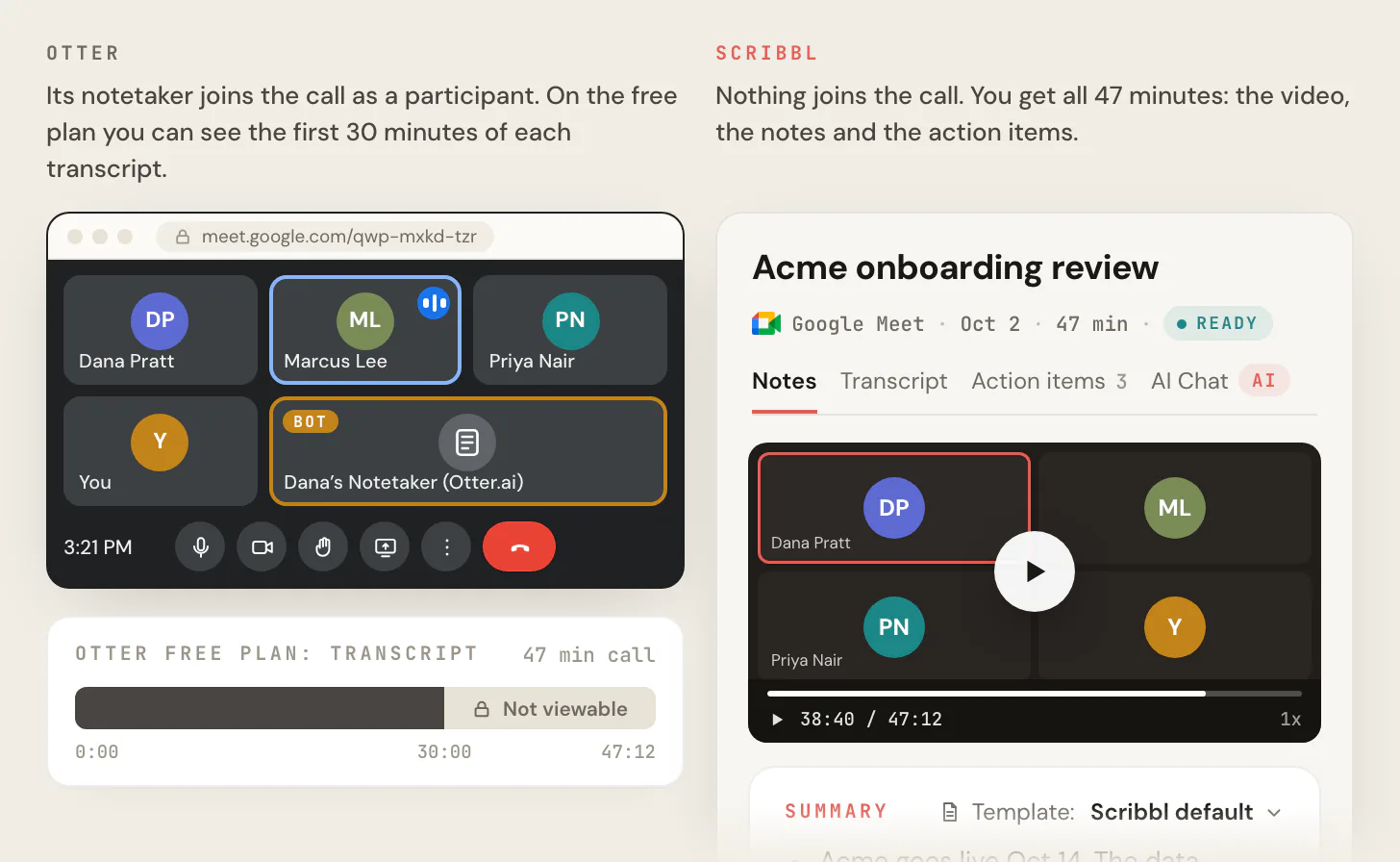
- Scribbl beats both: it keeps the video of every Google Meet, Zoom and Teams meeting with nothing joining the call and no device to buy, plus a transcript with speaker names, AI notes and action items.
Plaud is better if you record in-person conversations and phone calls: it's a pocket voice recorder with its own microphones, and its Note models record calls from the back of your phone. Otter.ai is better if most of your meetings are on Zoom, Google Meet or Microsoft Teams: it's an app with no device to buy, and its Notetaker can join those meetings for you.
On price, both include 300 free transcription minutes a month and charge $8.33 a month on annual billing for 1,200 minutes. The difference is the device: Plaud's plans work with a Plaud device bound to your account, which costs $159 to $189 at regular prices. Plaud also transcribes 112+ languages to Otter's 6, and says it doesn't train AI on your recordings, while Otter's privacy policy says it trains its own AI on de-identified recordings and transcriptions.
Every price, limit and rule below comes from Otter's and Plaud's own pricing pages, product pages and help centers, checked on October 7, 2026. We compared the two from those pages; we didn't create accounts or try a Plaud device. Prices are in US dollars.
We make Scribbl, an AI note taker for online meetings. If most of your meetings are on Google Meet, Zoom or Teams, it beats both: nothing joins the call, there's no device to buy, and you keep the video.
Otter vs Plaud at a glance
| Feature | Otter | Plaud |
|---|---|---|
| What it is | An app: web, Mac and Windows desktop, iOS and Android | A voice recorder you carry, with an app, a website and a desktop app |
| What you buy to start | Nothing | A Plaud device, $159 to $189 at regular prices |
| In-person conversations | Yes, with your phone's or computer's microphone | Yes, with the device's own microphones |
| Phone calls | Not directly; import a call your phone recorded | Plaud Note and Note Pro, attached to the back of your phone |
| Zoom, Google Meet and Teams | Notetaker bot, or the desktop app with no bot | Plaud Desktop with no bot; needs a device on your account |
| Records a meeting you miss | Yes, Notetaker can join without you | No |
| Video of online meetings | Enterprise plan only, for Zoom and Google Meet | No, audio only |
| Free plan | 300 minutes a month; 30 minutes of each transcript | 300 minutes a month, with a device |
| Pro, billed annually | $8.33 a month: 1,200 minutes, up to 90 minutes a meeting | $99.99 a year ($8.33 a month): 1,200 minutes |
| Most minutes for one person | Business, $19.99 a month billed annually: unlimited meetings, up to 4 hours each | Unlimited, $239.99 a year: up to 24 hours a day |
| Transcription languages | 6 | 112+ |
| Records with no internet | Live transcription needs a connection | Yes, the device records on its own |
| Trains AI on your recordings | Its own AI, on de-identified data | No, per its help center |
| HIPAA | Enterprise plan, with a signed BAA | Listed on every plan |
| Refunds | Subscriptions are non-refundable | Free 30-day device return; plan refunds by request |
Which is better, Otter.ai or Plaud?
It depends on where your conversations happen. Plaud is better for in-person conversations and phone calls. Otter.ai is better for meetings on Zoom, Google Meet and Microsoft Teams. If you have both kinds, Plaud covers more of them in one account (the device in the room and on calls, Plaud Desktop for online meetings), but you have to buy the device. Otter costs less and needs nothing new, but in a room it relies on your phone's microphone, and it can't record a phone call directly.
| Your situation | Better choice | Why |
|---|---|---|
| Most of your meetings are online and you want the video, with no bot | Scribbl (we make it) | Nothing joins the call and there's no device to buy; every Google Meet, Zoom and Teams meeting comes back with the video, a transcript with speaker names, AI notes and action items |
| Most of your conversations are in person: client visits, interviews, lectures, consultations | Plaud | Its own microphones (the Note Pro picks up voices up to 16.4 feet away and records up to 50 hours on a charge), and it keeps recording if your phone locks or the app closes |
| You take calls on your mobile phone and want them transcribed | Plaud Note or Note Pro | They record calls attached to your phone; Otter can only import a call your phone recorded |
| Most of your meetings are on Zoom, Google Meet or Teams | Otter | No device; the Notetaker joins for you, or the desktop app records with no bot; live transcript during the meeting |
| You want to spend nothing | Otter | The free Basic plan needs no purchase; Plaud's free plan starts with a $159 or more device |
| You speak a language other than English, Spanish, French, German, Japanese or Chinese at work | Plaud | 112+ languages to Otter's 6 |
| You record long conversations and don't want to pay | Plaud | Otter's free plan shows 30 minutes of each transcript; Plaud's free plan has a monthly total, not a per-recording cap |
| You want the video of your online meetings | Scribbl | Otter keeps video only on Enterprise; Plaud records audio |
An app vs a voice recorder
Otter is software. You use it in a browser, in its desktop app for Mac (macOS 12.3 or later) and Windows (10 or later), or in its iOS and Android apps. There's nothing to buy, and the free Basic plan has no end date.
Plaud is a voice recorder first. Each device records on its own, stores audio on 64GB of built-in storage, and sends recordings to the Plaud app, where they're transcribed and summarized. You can create a Plaud account and download the app without a device, but Plaud's help center says the free Starter plan needs a bound device to activate, and Plaud Desktop needs a device bound to your account. In practice, Plaud starts with buying one of its four recorders.
| Plaud device | Regular price | On sale, October 7 | What it records | Recording time |
|---|---|---|---|---|
| Plaud Note Pro | $189 | $150.99 | In person and phone calls, switches on its own; 4 microphones, up to 16.4 feet; a small screen | Up to 30 hours, or 50 in Endurance mode |
| Plaud Note | $159 | No sale | In person and phone calls, you switch by hand; 2 microphones, up to 9.8 feet | Up to 30 hours |
| Plaud NotePin S | $179 | $142.99 | In person, worn on clothing; no phone calls | Up to 20 hours |
| Plaud NotePin | $159 | No sale | In person, worn on clothing; no phone calls | Up to 20 hours |
Source: Plaud device comparison and the Plaud Note Pro page, as of October 7, 2026. Every device includes the free Starter plan.
In-person conversations and phone calls
In person
Otter records in-person conversations in its iOS and Android apps or in a browser, with the device's built-in microphone, a headset or an external mic. Otter's own guide to in-person recording suggests an external microphone for lectures, interviews and events. Live transcription needs an internet connection (Record a conversation, best practices for in-person recordings).
Plaud records on the device. Plaud says recording runs on the device itself, so closing the app, locking your phone or walking out of Bluetooth range doesn't stop it; the file moves to the app the next time the device connects (Record through the Plaud App). That's the main reason to buy a recorder: it records on its own microphones and battery, whatever your phone is doing.
Phone calls
Plaud Note and Note Pro record calls when attached to the back of your phone. A vibration sensor picks up the sound from the phone's speaker (Note Recording vs Phone Call Recording). The Note Pro switches between call and in-person mode on its own. With the Plaud Note, you press Record for each call; it doesn't record calls automatically (automatic call recording). The NotePin and NotePin S don't record phone calls; Plaud's workaround is to put the call on speaker (NotePin S and phone calls).
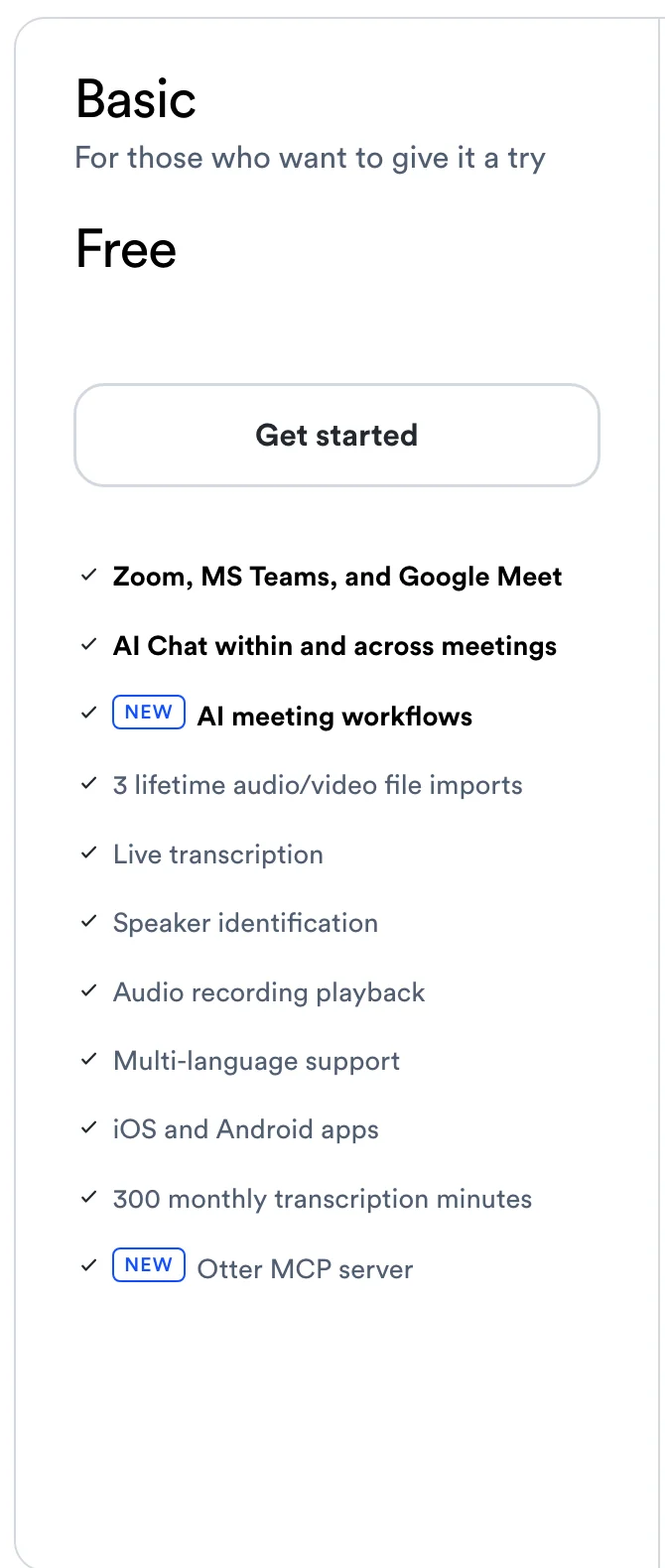
Otter can't record phone calls directly. Its help center says Apple and Google restrict third-party apps from recording calls, so you record the call with your iPhone's or Android phone's built-in call recorder, then share the file to Otter (Record and transcribe a phone call). Each call then counts as an import: 3 for the life of the account on the free Basic plan, 10 a month on Pro, and unlimited on Business, up to 6,000 minutes a month.
Whichever you use, tell everyone you're recording first. Some places require everyone's consent; see do you have to tell people you're recording.
Online meetings on Zoom, Google Meet and Teams
Otter has two ways in:
- Otter Notetaker, a bot that joins your Zoom, Google Meet and Microsoft Teams meetings. Once you connect a Google or Microsoft calendar, you choose which meetings it joins: every meeting with a video link, meetings you host, external or internal meetings, or only ones you pick. It can join a meeting even if you can't attend (Otter Notetaker Overview, auto-join settings).
- The Otter desktop app for Mac and Windows, which Otter says offers "botless recording for meetings" (Otter Desktop App).
Otter plays back audio on Basic, Pro and Business. Video replay for Zoom and Google Meet is on the Enterprise plan.
Plaud records online meetings with Plaud Desktop for Mac and Windows. It captures your computer's audio with no bot in the call, and it detects meetings in Google Meet, Zoom and Teams in the browser, the Zoom and Teams desktop apps, Slack huddles, Webex and Lark (Plaud Desktop FAQ). Three limits to know: it needs a Plaud device bound to your account (Download the Plaud Desktop), it records audio and not video, and Plaud's Desktop page labels it beta.
Otter vs Plaud prices, including the device
| Plan | Billed annually | Billed monthly | Transcription |
|---|---|---|---|
| Otter Basic | Free | Free | 300 minutes a month; 30 minutes of each transcript |
| Otter Pro | $8.33 a month ($99.96 a year) | $16.99 | 1,200 minutes a month; up to 90 minutes a meeting; up to 5 users |
| Otter Business | $19.99 a month ($239.88 a year) | $30 ($24 for the first 3 months for first-time subscribers) | Unlimited meetings; up to 4 hours a meeting; up to 25 users |
| Otter Enterprise | Ask sales | Ask sales | Unlimited, plus video replay, SSO, and HIPAA as an add-on |
| Plaud Starter | Free with a device | Free with a device | 300 minutes a month |
| Plaud Pro | $99.99 a year ($8.33 a month) | $17.99 | 1,200 minutes a month |
| Plaud Unlimited | $239.99 a year | $29.99 | Up to 24 hours a day |
| Plaud Team | $20 per user a month for the first year with a launch offer that ends November 30, 2026, then $25 | $28 per user until November 30, 2026, then $35 | Up to 24 hours a day, plus a shared workspace and admin tools |
Sources: Otter pricing and Plaud plan pricing, as of October 7, 2026. Plaud's devices are a separate, one-time purchase.
What the first year costs one person
On annual billing, at Plaud's regular device prices:
| How much you record | Otter | Plaud with a Plaud Note ($159) | Plaud with a Note Pro ($189) |
|---|---|---|---|
| Up to 300 minutes a month | $0 (Basic) | $159 | $189 |
| Up to 1,200 minutes a month | $99.96 (Pro) | $258.99 | $288.99 |
| More than 1,200 minutes a month | $239.88 (Business) | $398.99 | $428.99 |
From the second year, the plans cost about the same for the same minutes: $99.96 for Otter Pro and $99.99 for Plaud Pro, or $239.88 for Otter Business and $239.99 for Plaud Unlimited. So the real price difference is the device, plus Otter's per-meeting limits: on Pro, a meeting over 90 minutes needs Business.
Refunds. Otter says subscriptions are non-refundable (Cancel an Otter subscription). Plaud offers a free 30-day return on devices, and for plans you contact support, which reviews each request against its refund policy. Students and teachers with a .edu email get 20% off Otter Pro ($79.99 a year).
Transcription minutes
The allowances look the same, 300 minutes free and 1,200 on Pro, but the rules around them differ:
- Per recording. Otter's free plan shows only 30 minutes of each conversation; the recording continues, and upgrading unlocks the rest. Pro allows up to 90 minutes a meeting and Business up to 4 hours. Plaud's plans list no per-recording limit, and an imported file can be up to 24 hours long (Otter Basic limits, Plaud audio import).
- When you run out. On Otter's free plan, "you will not be able to record or import recordings until your next monthly cycle." On Plaud, the device keeps recording and only transcription pauses, until your minutes reset or you buy a top-up of 600, 3,000 or 6,000 minutes. Plaud's pricing page doesn't show the top-up prices.
- Rollover. Neither rolls unused minutes into the next month.
- History. Otter's free plan shows your 25 most recent conversations and archives older ones. Plaud lists unlimited cloud storage on every plan.
- What the paid plans add. Plaud's free, Pro and Unlimited plans have the same features, including Ask Plaud, 10,000+ summary templates and 27+ export formats; only the minutes change. Otter's paid plans add more: AI Chat questions (20 a month on Basic, 50 on Pro, 200 on Business), longer meetings, more imports and more export formats.
300 minutes is ten 30-minute conversations a month. 1,200 minutes is 20 hours.
Languages
Otter transcribes 6 languages: English, Spanish, French, German, Japanese and Chinese (Simplified). Its AI Chat can translate a transcript into other languages (Supported languages).
Plaud transcribes 112+ languages, with automatic language detection. It transcribes one language per recording; a meeting that switches languages isn't transcribed as mixed-language (How many languages does Plaud support?).
Privacy and security
| Otter | Plaud | |
|---|---|---|
| AI training on your recordings | Its privacy policy (effective June 16, 2026) lists "training our proprietary AI technology on de-identified audio recordings and on transcriptions" | Its help center (October 5, 2026) says customer data isn't used to train any AI model, by Plaud or by its AI providers, unless you opt in |
| Security standards listed | SOC 2 Type II | SOC 2 Type II, ISO 27001 and 27701, GDPR, HIPAA and EN 18031 |
| HIPAA | Enterprise plan only, with a signed BAA | Listed on every plan on its pricing page, including Starter |
| Where recordings live | In your Otter account | On the device; cloud sync to your Plaud account is optional |
| Who sees it in an online meeting | The Notetaker joins as a guest participant, visible to everyone; the desktop app adds no bot | Plaud Desktop adds no bot |
Sources: Otter privacy policy, Otter HIPAA, How your data is used in AI processing (Plaud), Plaud plan pricing, as of October 7, 2026.
Otter is also defending a privacy class action, In re Otter.AI Privacy Litigation, in federal court in Northern California. It alleges the Notetaker recorded meeting participants without the consent the law requires. On August 13, 2026, the judge dismissed some claims and let the federal wiretap, California privacy and Illinois biometric privacy claims go forward. The ruling doesn't decide whether Otter broke the law (UC Today, August 18, 2026). See the Otter AI lawsuit for the claims and where the case stands.
Who should pick Otter, and who should pick Plaud
Pick Plaud if:
- You meet people in person most days, and want recording that doesn't depend on your phone.
- You take calls on your mobile phone and want them transcribed (choose the Note or Note Pro, not a NotePin).
- You record long conversations, such as lectures, workshops or all-day sessions: the Note Pro records up to 50 hours on a charge, and Plaud's plans list no per-recording limit.
- You work in a language Otter doesn't transcribe.
- You want a written statement that your recordings won't train AI.
Pick Otter if:
- Most of your meetings are on Zoom, Google Meet or Microsoft Teams.
- You don't want to buy, charge or carry a device.
- You want a note taker to attend meetings you can't.
- You want to start with no cost at all, and your conversations are short or few.
- Your team shares meeting notes in one workspace: Pro covers up to 5 users and Business up to 25.
If you have both kinds of conversation, Plaud covers both in one account, with the device in person and on calls and Plaud Desktop for online meetings. Otter covers in-person conversations through your phone, but not phone calls.
If your meetings are mostly online, pick neither: Scribbl beats both on Google Meet, Zoom and Teams.
What the two official pages leave out
Otter's pricing page and Plaud's Note Pro page are each the official source for their own product, and neither compares itself with the other. A few things you only find in the help centers:
- Otter's pricing page doesn't mention phone calls. Its help center says calls must be recorded with your phone and imported, and the free plan allows 3 imports for the life of the account.
- Otter's plan cards say "Multi-language support." The comparison table lower on the same page, and the help center, list 6 languages.
- Plaud's Note Pro page calls Plaud Desktop free and says the Starter plan includes it. The help center adds that Plaud Desktop needs a device bound to your account, and the Desktop page labels it beta.
- Plaud's Note Pro page compares a device with "Meeting Apps" in general. It lists "Meeting bots" against them, but Otter's desktop app also records online meetings with no bot.
For online meetings, Scribbl beats both
This section is about our own product. Scribbl is an AI note taker built for online and hybrid meetings on Google Meet, Zoom and Microsoft Teams, and for those it beats both Otter and Plaud. Nothing joins the call: Google Meet runs from a Chrome extension, and Zoom and Teams run from Scribbl Desktop for Mac (Apple silicon) and Windows. There's no device to buy. Every meeting comes back with the video recording, a transcript with speaker names, AI notes and action items, in one account for all three meeting apps.
It also does the work after the call. Smart Collections sort your meetings by themselves. Automations do the follow-up: they draft the follow-up email for you to send, log notes in HubSpot or Pipedrive, post a summary to Slack or Teams, or open a ticket in Linear, Jira or Asana, and they ask before changing anything by default. On Pro you can ask Claude or ChatGPT about every meeting you've recorded, or just the meetings in one Smart Collection. Recordings are private by default, and Scribbl doesn't use your meetings to train AI for anyone other than you.
What it does better than Otter and Plaud for online meetings: it keeps the video with nothing joining the call. Otter keeps video only on Enterprise, and its Notetaker joins as a bot by default. Plaud records audio only, and Plaud Desktop needs a Plaud device on your account.
| Feature | Scribbl | Otter | Plaud |
|---|---|---|---|
| Google Meet, Zoom and Teams | Nothing joins the call | Notetaker bot, or desktop app with no bot | Plaud Desktop, no bot, with a device (beta) |
| Video of the meeting | Yes | Enterprise only | No |
| Device to buy | None | None | $159 to $189 |
| Longest meeting | No limit | 30 minutes of transcript free, 90 minutes on Pro, 4 hours on Business | No per-recording limit listed |
| Free plan | 10 meetings a month on Google Meet, Zoom and Teams | 300 minutes a month | 300 minutes a month, with a device |
| Paid plan, billed annually | Pro, $13 a month | Pro, $8.33 a month | Pro, $99.99 a year |

Pick Scribbl if your meetings are on Google Meet, Zoom or Teams, you want the video of each meeting, and you'd rather not have a bot in the call or buy a device. The free plan includes Google Meet, Zoom and Microsoft Teams, with 10 meetings a month. Pro is $13 per user per month billed annually, or $20 monthly (pricing).
As with any of these tools, tell everyone you're recording. For Otter in more detail, see Scribbl vs Otter and Otter.ai pricing; for Plaud, Plaud alternatives.
FAQ
Which is better, Otter.ai or Plaud?
Plaud is better for in-person conversations and phone calls, and Otter.ai is better for meetings on Zoom, Google Meet and Microsoft Teams. Plaud is a voice recorder ($159 to $189 at regular prices) with its own microphones, and the Plaud Note and Note Pro record calls from the back of your phone. Otter is an app with no device to buy; its Notetaker joins online meetings, or its desktop app records them with no bot. Both include 300 free transcription minutes a month and charge $8.33 a month on annual billing for 1,200 minutes.
What is the difference between Otter and Plaud?
Otter is software: a web app, a desktop app for Mac and Windows, and iOS and Android apps, with a Notetaker that joins Zoom, Google Meet and Teams. Plaud is a voice recorder you carry, with an app, a website and a desktop app that work with a Plaud device bound to your account. Otter records with your phone's or computer's microphone and can't record phone calls directly. Plaud records on the device, and its Note models record phone calls.
Can Plaud record Zoom, Google Meet and Teams meetings?
Yes, with Plaud Desktop for Mac and Windows, which records your computer's audio with no bot in the call. Plaud's help center says it needs a Plaud device bound to your account, and Plaud labels it beta. It records audio, not video. Otter records these meetings with its Notetaker bot or, with no bot, its desktop app.
Can Otter record in-person conversations and phone calls?
In-person conversations, yes: the Otter iOS and Android apps and the web app record with your phone's or computer's microphone and transcribe live when you're online. Phone calls, not directly. Otter says Apple and Google don't let third-party apps record calls, so you record the call with your phone's built-in recorder and import the file. The free Basic plan allows 3 imports for the life of the account.
Do you need a subscription to use Plaud?
No. Every Plaud device includes the free Starter plan with 300 transcription minutes a month and the same features as Pro and Unlimited. When the minutes run out, the device keeps recording and transcription pauses until the next month. Pro is $99.99 a year or $17.99 a month for 1,200 minutes, and Unlimited is $239.99 a year or $29.99 a month.
Can you use Plaud without a Plaud device?
Not really. You can download the Plaud app and create an account without one, but Plaud's help center says the free Starter plan needs a bound device to activate, and Plaud Desktop needs a device bound to your account. If you don't want a device, Otter is the closer fit.
Which is cheaper, Otter or Plaud?
Otter, because there's no device to buy. For one person on annual billing, the first year costs $0 on Otter Basic or $99.96 on Otter Pro, against $159 to $189 for a Plaud device alone, or $258.99 to $288.99 with Plaud Pro. After the first year the plans cost about the same: $99.96 for Otter Pro and $99.99 for Plaud Pro, each with 1,200 minutes a month.
Does Otter or Plaud support more languages?
Plaud. It transcribes 112+ languages, one language per recording. Otter transcribes 6: English, Spanish, French, German, Japanese and Chinese (Simplified).
Do Otter or Plaud use my recordings to train AI?
Plaud says no: its help center says recordings, transcripts and summaries aren't used to train any AI model, by Plaud or by its AI providers. Otter's privacy policy, effective June 16, 2026, lists training its own AI on de-identified audio recordings and transcriptions.
Is there a note taker for online meetings with no bot that keeps the video?
Yes. Scribbl, which we make, takes notes in Google Meet, Zoom and Microsoft Teams with nothing joining the call, and you get the video recording, a transcript with speaker names, AI notes and action items. The free plan includes Google Meet, Zoom and Microsoft Teams, with 10 meetings a month. For online meetings it beats both: Otter keeps video only on Enterprise and its Notetaker joins as a bot by default, and Plaud records audio only and needs a $159 to $189 device.
Sources
Every price, limit and rule above was checked on these pages on October 7, 2026.
- Otter: pricing (plan cards, comparison table and FAQ), Basic plan limits, Record a conversation, best practices for in-person recordings, Record and transcribe a phone call, Otter Notetaker Overview, auto-join settings, Otter Desktop App, Supported languages, HIPAA, Cancel an Otter subscription, privacy policy
- Plaud: Plaud Note Pro, plan pricing (plans, comparison table and FAQ), device comparison, Plaud Desktop, Plaud Desktop FAQ, Download the Plaud Desktop, Device binding required notice on Plaud Desktop, Can I use the Plaud App without a Plaud device?, Record through the Plaud App, Note Recording vs Phone Call Recording, automatic call recording, NotePin S and phone calls, audio import, languages, How your data is used in AI processing
- Otter privacy case: UC Today, August 18, 2026
- Scribbl: pricing
Try Scribbl
Keep the video, no bot, no device
Scribbl records, transcribes, and summarizes your Google Meet calls from your browser. No bot joins the call. Free forever for individuals.
Add to Chrome · It's free