Best AI Note Taker for Zoom and Microsoft Teams 2026 (Comparison)
Best AI note taker for Zoom and Microsoft Teams in 2026: Scribbl, Otter, Fireflies, Fathom, tl;dv, Read AI and Granola compared, official prices checked Oct 19.
Updated October 19, 2026

The best AI note taker for Zoom and Microsoft Teams in 2026 is Scribbl, which we make: in this comparison of Scribbl, Otter, Fireflies, Fathom, tl;dv, Read AI and Granola, Scribbl Desktop for Mac and Windows is the one that records both apps with nothing joining the call and gives every meeting the video, a transcript with speaker names, AI notes and action items, in one account that also covers Google Meet. Otter, Fireflies, Fathom and Read AI support both apps too, but each sends a bot into the call by default, and in 2026 Microsoft Teams began holding detected bots in the lobby until the organizer admits them.
For one app at a time, see Scribbl as the AI note taker for Zoom and the AI note taker for Microsoft Teams. We make Scribbl, and we've put it first in every table so you can see where it wins. Every price and free plan was checked on each company's official pricing page on October 19, 2026; the other facts come from each company's help center, checked on October 12, 2026, and are linked in the sources. The free plan covers Google Meet, Zoom and Teams and needs no credit card, so you can check every claim here against your own meetings.
Zoom and Teams AI note takers at a glance
| Feature | Scribbl | Fireflies | Fathom | Otter | Read AI | Granola |
|---|---|---|---|---|---|---|
| Zoom and Teams | Yes | Yes | Yes | Yes | Yes | Yes |
| Does a bot join the call? | Never | Yes by default; desktop app records without it | On Windows, yes. On Mac you choose (beta) | Yes by default; desktop app records without it | Yes by default; desktop app records without it | Never |
| Video of a Teams meeting | Every plan, with no bot | Paid plans, from bot meetings | Every plan, from bot meetings | No | Enterprise plan | No |
| Video of a Zoom meeting | Every plan, with no bot | Paid plans, from bot meetings | Every plan, from bot meetings; no-bot video is a Mac beta | Enterprise only | Enterprise plan | No |
| Free plan | 10 meetings a month on Google Meet, Zoom and Teams | Unlimited with auto-join on; 3 meetings with it off | Unlimited recordings | 300 minutes a month, 30 per conversation | 5 meeting transcripts a month | Notes from the last 30 days |
| Cheapest paid plan, billed annually | $13 (Pro) | $10 (Pro) | $16 (Premium); $15 on Team, 2+ users | $8.33 (Pro), 90-minute meetings | $15 (Pro) | $14 (Business, billed monthly) |
| Same plan, billed monthly | $20 | $18 | $20 ($19 on Team) | $16.99 | $19.75 | $14 |
| Records on | Mac (Apple silicon) and Windows for Zoom and Teams; Chrome extension for Google Meet | Mac, Windows | Mac, Windows | Mac, Windows, web | Mac, Windows | Mac, Windows |
Two rows decide most choices: does a bot join, and do you keep the video. Scribbl is the only one here that never sends a bot and keeps the video of Zoom and Teams meetings. Granola never sends a bot but keeps no recording. The other four keep video only when their bot records, and Otter keeps no Teams video at all.
Zoom and Teams AI note taker pricing: official prices and free plans
Checked October 19, 2026 on each company's official pricing page, linked below. Prices are per user per month in US dollars, before tax.
| Note taker | Free plan | Paid plan, billed annually | Billed monthly |
|---|---|---|---|
| Scribbl (our pick) | 10 meetings a month; the free plan includes Google Meet, Zoom and Microsoft Teams | $13 (Pro) | $20 |
| Otter | 300 minutes a month, 30 minutes per conversation | $8.33 (Pro); $19.99 (Business) | $16.99; $30 |
| Fireflies | Unlimited transcription with conditions, limited AI summaries, 400 minutes of storage per team | $10 (Pro); $19 (Business) | $18; $29 |
| Fathom | Unlimited recordings and transcriptions | $16 (Premium); $15 (Team, 2-user minimum) | $20; $19 |
| tl;dv | Unlimited video recordings; AI notes on 10 meetings | $18 (Pro); $29 (Business) | $29; $39 |
| Read AI | 5 meeting transcripts a month | $15 (Pro); $22.50 (Enterprise, 5+ licenses) | $19.75; $29.75 |
| Granola | 30 days of meeting history | $14 (Business); one price listed | $14 |
Otter vs Fireflies vs Fathom vs tl;dv for Zoom and Teams
Otter, Fireflies, Fathom and tl;dv all say they work with Zoom, Microsoft Teams and Google Meet, and on Zoom and Teams the first three send a bot into the call by default. What separates them is the video and the free plan. Otter keeps video only on Enterprise and never for Teams. Fireflies keeps video from Pro ($10 a seat billed annually). Fathom keeps video on every plan through its bot. tl;dv keeps unlimited video on its free plan but writes AI notes on 10 meetings, and Pro is $18 billed annually. Scribbl, which makes this page, keeps the video of every Zoom and Teams meeting on every plan with nothing in the call, for $13 per user per month billed annually on Pro.
What is the best AI note taker for Zoom and Microsoft Teams?
Scribbl: one account records Zoom and Teams on Mac and Windows with nothing joining the call, keeps the video, and writes a transcript with speaker names, AI notes and action items for every meeting (more below). If you're comparing, three questions decide it.
- Can a bot join your calls? On Teams this matters more than it used to: Teams now detects note-taking bots and holds them in the lobby until the organizer admits them (see below). Scribbl and Granola never send one. Otter, Fireflies and Read AI send one by default and record without it only from their desktop apps. Fathom skips the bot only on a Mac, in beta.
- Do you need the video afterward? Scribbl keeps the video of Zoom and Teams meetings on every plan with no bot. Fathom and Fireflies keep video when their bots record, Fireflies on paid plans only. Read AI lists video playback from Enterprise. Otter's video replay is Enterprise only and covers Zoom and Google Meet, not Teams. Granola keeps nothing.
- Do you want one place for every meeting? If some of your calls are on Zoom, some on Teams and some on Google Meet, Scribbl keeps all three in one account, with the same notes, Smart Collections and Automations for each.
If you answered "no bot" and "I want the video," pick Scribbl: none of the other five says it keeps Teams video without a bot, and the only Zoom video without one among them is Fathom's limited beta on Mac.
Teams now holds note-taker bots in the lobby
Microsoft added bot detection to Teams meetings in 2026. Its admin documentation says Teams uses "infrastructural and behavioral signals" to spot external bots as they join, marks them, and places them in the lobby "irrespective of the lobby configuration for the meeting." The default setting, When detected, require approval before joining, keeps a detected bot there until the organizer admits it. Admins can switch detection off with Do not detect bots (Manage external bots and their access to meetings).
For a note taker that joins as a participant, that means one more step in every Teams meeting run by an organization that leaves the default on, and no notes at all if nobody admits it. Otter's help center already plans for this: when its Notetaker can't get in, the Otter desktop app shows "Otter couldn't join your meeting" and prompts you to record manually (Otter Desktop App).
Scribbl Desktop doesn't join the meeting at all. It runs on your Mac or Windows computer, so there's no participant for Teams to detect, nothing for an organizer to admit, and nothing in your client's participant list. More on Teams without a bot: AI note taker for Teams without a bot.
Scribbl: one account for Zoom, Teams and Google Meet
We make Scribbl, so here it is with the same kind of facts the others get below (pricing).
- Nothing joins the call. Zoom and Teams run from Scribbl Desktop for Mac (Apple silicon) and Windows; Google Meet runs from a Chrome extension. No bot in the participant list, nothing for Teams to hold in the lobby.
- The video, and everything with it. Every meeting comes back with the video recording, a transcript with speaker names, AI notes and action items.
- One account. Zoom, Teams and Google Meet meetings land in the same place, so you can search or ask about all of them together.
- The work after the call. Smart Collections sort your meetings by themselves. Automations do the follow-up: they draft the follow-up email, log notes in HubSpot or Pipedrive, post to Slack or Teams, save to Notion, Google Drive or Confluence, open Linear, Jira, Asana or Monday tickets, or add a Google Sheet row, and by default they ask before changing anything.
- Ask Claude or ChatGPT. On Pro, connect Scribbl once and ask Claude or ChatGPT about every meeting you've recorded, on any of the three apps (how it works).
- Free plan. The free plan includes Google Meet, Zoom and Microsoft Teams, with 10 meetings a month.
- Price. Pro is $13 per user per month billed annually, or $20 monthly.
- Privacy. Recordings are private by default, and Scribbl doesn't use your meetings to train AI for anyone other than you.
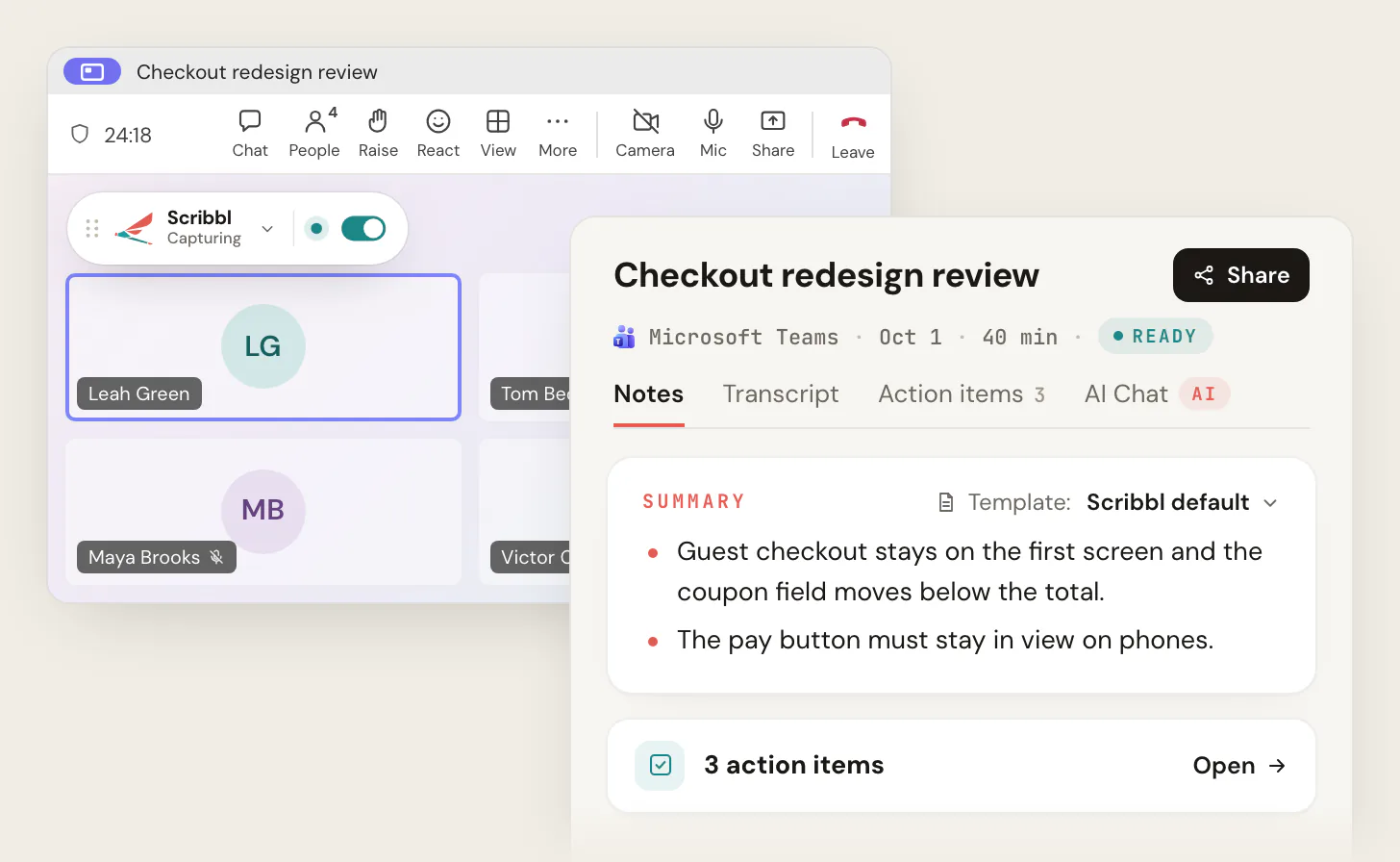
Best for: anyone who meets on both Zoom and Teams, wants the video afterward with nothing joining the call, and wants the follow-up done. Single-app pages: Zoom AI note taker, Microsoft Teams AI note taker.
The other five on Zoom and Teams
All five support both apps. What differs is how they get into the call and what they keep.
Fireflies
- Bot. The Fireflies notetaker joins your meetings as a participant; you invite fred@fireflies.ai or let it auto-join your calendar (free plan guide). Its desktop app for Mac and Windows can record Zoom and Teams without the bot, but in that mode it "does not save separate audio or video files," and speakers appear as "Speaker 1 / Speaker 2" (recording without a bot).
- Video. Paid plans only, from bot meetings (pricing).
- Free plan. Unlimited transcription only with Auto-join turned on, for accounts made on or after September 1, 2026; with it off, 3 meeting transcriptions. 400 minutes of storage per team and limited AI summaries.
- Price. Pro $10 per seat per month billed annually ($18 monthly); Business $19 ($29 monthly).
Watch out for: a bot in every call unless you use the desktop app, which then keeps no recording and no speaker names.
Fathom
- Bot. On a Mac you pick a mode per meeting: Transcript Only and Audio Only skip the bot, and Audio & Video sends one. That's Mac only; Fathom says "Windows is coming soon" (How to Upgrade to Fathom 3.0+). Its pricing page labels bot-free capture a "Beta feature for Mac."
- Video. Every plan, including free, when the bot records. Video without the bot is "a limited beta" for Zoom on Mac (What's New).
- In the meeting. The free plan shows Fathom's in-meeting banner and its standard bot name; removing the banner and renaming the bot need Premium (Free vs. Premium).
- Free plan. Unlimited recordings and storage, advanced summaries for your first 5 calls each month; AI action items and follow-up emails are paid.
- Price. Premium $16 per user per month billed annually ($20 monthly); Team $15 ($19), 2-user minimum; Business $25 ($34).
- Teams limits. Fathom lists Teams group chat instant meetings as not supported (compatible devices).
Watch out for: on Windows the bot joins every recorded call, and on Teams that bot can be held in the lobby.
Otter
- Bot. Otter Notetaker "automatically joins your Zoom, Google Meet, and Microsoft Teams meetings" once your calendar is connected (Otter Notetaker overview). The desktop app for Mac and Windows records without it.
- Video. "Video replay for Zoom and Google Meet" is listed on Enterprise only. There's no Teams video on any plan (pricing).
- Free plan. 300 transcription minutes a month, 30 minutes per meeting.
- Price. Pro $8.33 per user per month billed annually ($16.99 monthly), up to 90 minutes per meeting and 5 billed users; Business $19.99 ($30 monthly).
Watch out for: no video of Teams meetings, and Pro stops at 90 minutes per meeting.
Read AI
- Bot. "Add Read Assistant to any Zoom, Teams, or Meet meeting," says Read's pricing page. Its desktop app for Windows 10+ and macOS 14+ records "without needing a bot" (Read AI desktop).
- Video. "Audio & video playback" is listed from Enterprise (pricing).
- Free plan. 5 meeting transcripts a month.
- Price. Pro $15 per user per month billed annually ($19.75 monthly); Enterprise $22.50 ($29.75).
Watch out for: 5 meetings a month on the free plan, and no video below Enterprise.
Granola
- No bot, no recording. "There is no meeting bot," says Granola's help center, and it "does not record or save audio or video at any point during the call." It runs on Mac and Windows and names speakers in Zoom, Google Meet and Teams (How transcription works).
- Free plan. Basic shows only your last 30 days of notes.
- Price. Business $14 per user per month (pricing).
Watch out for: nothing to replay when you need to check what someone said.
What about Zoom's and Teams' own AI notes?
Both apps have AI notes built in, each for its own meetings.
- Zoom. Paid Zoom Workplace plans include unlimited meeting summaries; Pro is $14.16 per user per month billed annually, or $16.99 monthly. A free Zoom account gets summaries for 3 hosted meetings a month, AI note-taking with My Notes 3 times a month, and 40-minute meetings (Zoom pricing). More: Zoom AI Companion.
- Teams. AI meeting notes are part of intelligent recap, which needs a Teams Premium or Microsoft Copilot license for each user, with transcription turned on; without recording allowed, the recap leaves out the recording, speakers, topics and chapters (intelligent recap). Teams Premium is $10 per user per month, paid yearly (Teams Premium). More: Teams Premium features.
If you meet on both apps, that's two products, two licenses and two places to look for notes. Scribbl keeps Zoom, Teams and Google Meet in one account, with the video of each, and needs no Teams Premium or Copilot license.
Best AI note taker for Zoom
For Zoom alone, Scribbl again: no bot, the video, AI notes and action items on Mac and Windows. Our full Zoom ranking is in Best Zoom AI notetaker, and the product page is Zoom AI note taker.
Best AI note taker for Teams
For Teams alone, Scribbl: nothing for Teams to hold in the lobby, and you keep the video, which Otter doesn't offer for Teams on any plan. See Microsoft Teams AI note taker and the product page, Microsoft Teams AI note taker.
Tell people you're recording
A note taker with no bot doesn't announce itself, so telling people is your job, on Zoom and on Teams. Some places require everyone's consent; see do you have to tell people you're recording.
How we compared
We read each company's pricing page and help center on October 12, 2026, and checked every price and free plan again on the official pricing pages on October 19, 2026. Every fact about Otter, Fireflies, Fathom, tl;dv, Read AI and Granola comes from those pages, not from other reviews. We didn't create accounts on them. Scribbl's facts come from our own pricing page and desktop page.
Many lists for this question name Fireflies, Fathom and Otter for both apps without saying that each sends a bot by default, or that Teams now holds detected bots in the lobby. Some still say Fireflies' free plan has no limits; for accounts made since September 1, 2026, it's unlimited only with auto-join on. What we couldn't confirm on the companies' own pages: whether Read AI's desktop app keeps audio or video of meetings it records without a bot.
More comparisons: best AI note takers, Scribbl vs Fireflies, Scribbl vs Fathom, Scribbl vs Otter, Scribbl vs Granola, Read AI alternatives.
FAQ
What is the best AI note taker for Zoom and Microsoft Teams?
Scribbl, which makes this page. Scribbl Desktop for Mac and Windows records Zoom and Teams meetings with nothing joining the call, and every meeting comes back with the video, a transcript with speaker names, AI notes and action items, in one account that also covers Google Meet. Fireflies, Fathom, Otter and Read AI support both apps too, but each sends a bot into the call by default, and Teams now holds detected bots in the lobby until the organizer lets them in. Granola never sends a bot but keeps no recording.
How much does an AI note taker for Zoom and Teams cost in 2026?
From each company's official pricing page on October 19, 2026, per user per month billed annually: Scribbl Pro is $13 ($20 monthly), Otter Pro $8.33 ($16.99), Fireflies Pro $10 ($18), Fathom Premium $16 ($20), tl;dv Pro $18 ($29), Read AI Pro $15 ($19.75) and Granola Business $14. Scribbl, which makes this page, is the only one of these that keeps the video of every Zoom and Teams meeting with nothing joining the call, and its free plan includes Google Meet, Zoom and Microsoft Teams, with 10 meetings a month.
What is the best AI note taker for Zoom?
Scribbl, which makes this page: Scribbl Desktop records Zoom on Mac and Windows with nothing joining the call and keeps the video, the transcript with speaker names, AI notes and action items. Fathom's free plan records Zoom with video through its bot; video without the bot is a limited beta on Mac. Zoom's own AI writes meeting summaries: unlimited on paid Zoom Workplace plans, and for 3 hosted meetings a month on a free account.
What is the best AI note taker for Microsoft Teams?
Scribbl, which makes this page: Scribbl Desktop records Teams on Mac and Windows with nothing joining the call, so there's no bot for Teams to hold in the lobby, and you keep the video of the meeting. Otter's video replay doesn't cover Teams on any plan. Teams' own AI notes, intelligent recap, need a Teams Premium ($10 per user per month, paid yearly) or Microsoft Copilot license, and the meeting has to be transcribed.
Which AI note takers work on Zoom and Teams without a bot?
Scribbl, which makes this page, never sends a bot on Zoom, Teams or Google Meet and still keeps the video. Granola never sends a bot either, but saves no audio or video. Otter, Fireflies and Read AI send a bot by default and can record without one from their desktop apps for Mac and Windows; Fireflies' desktop mode saves no audio or video and labels people Speaker 1 and Speaker 2. Fathom can skip the bot only on a Mac, in beta. Whichever you use, tell everyone you're recording.
Does Microsoft Teams block AI note taker bots?
Teams now detects external meeting bots, such as note-taking bots, and by default places them in the lobby until the organizer admits them, even when the meeting lets people skip the lobby. Admins can turn detection off. A note taker that runs on your own computer, like Scribbl Desktop, doesn't join the meeting, so there's nothing to hold in the lobby.
Which Zoom and Teams note takers keep the video?
Scribbl, which makes this page, keeps the video of Zoom and Teams meetings on every plan, including free, with no bot in the call. Fathom keeps video on every plan when its bot records. Fireflies keeps video on paid plans when its bot records. Read AI lists audio and video playback from its Enterprise plan. Otter's video replay is Enterprise only and covers Zoom and Google Meet, not Teams. Granola keeps no audio or video.
Is there a free AI note taker for Zoom and Teams?
Yes. Scribbl's free plan includes Google Meet, Zoom and Microsoft Teams, with 10 meetings a month, and every meeting gets the video, a transcript with speaker names, AI notes and action items, with nothing joining the call. Fathom's free plan has unlimited recordings through its bot, with AI action items only on paid plans. Otter's free plan gives 300 minutes a month, 30 minutes per conversation. Read AI's gives 5 meeting transcripts a month. Fireflies' is unlimited only with auto-join turned on for accounts made since September 1, 2026.
Do I need a separate AI note taker if I already pay for Zoom or Teams?
If all your meetings are on one app and you host them, its own AI may be enough: paid Zoom Workplace plans include unlimited meeting summaries, and Teams' intelligent recap comes with a Teams Premium or Microsoft Copilot license. If you meet on both Zoom and Teams, or join other companies' meetings, those notes end up in two places with two sets of rules. A separate note taker like Scribbl, which makes this page, keeps every Zoom, Teams and Google Meet meeting in one account.
Do Fireflies, Fathom and Otter work with Microsoft Teams?
Yes, all three record Microsoft Teams as well as Zoom and Google Meet, with a bot that joins the call by default. Otter's and Fireflies' desktop apps can also record Teams without the bot. Fathom's bot-free modes are Mac only and in beta, and Fathom doesn't support Teams group chat instant meetings. Otter has no video replay for Teams on any plan.
Sources
Every price and free plan above was checked on each company's official pricing page on October 19, 2026. Other limits and settings were checked on these pages on October 12, 2026.
- Microsoft: Manage external bots and their access to meetings, Teams Bot Identification Program, Intelligent recap for Teams calls, meetings, and events, Microsoft Teams Premium
- Zoom: pricing, ZoomMate
- Fireflies: pricing, Unlock unlimited transcriptions on the free plan, How to record meetings without a bot on the desktop app
- Fathom: pricing, What's New, How to Upgrade to Fathom 3.0+, Free vs. Premium for individuals, What devices is Fathom compatible with?
- Otter: pricing, Otter Notetaker overview, Otter Desktop App (Mac & Windows)
- Read AI: pricing, desktop app
- tl;dv: pricing, home page (works with Google Meet, Zoom and Microsoft Teams)
- Granola: pricing, How transcription works
- Scribbl: pricing, desktop app, connecting Scribbl to ChatGPT or Claude
Try Scribbl
Let your meetings take their own notes.
Scribbl's desktop app records, transcribes, and summarizes your Zoom meetings from your own computer. No bot joins the call and you don't need to be the host. Free forever for individuals.
Get Scribbl for Zoom · It's free