Teams Premium Features (2026): Full List, Price, and Premium vs Copilot
Every Teams Premium feature, grouped by what it's for and checked on Microsoft's pages. The $10 price, who needs it, what Copilot adds, and free AI notes.
Updated October 29, 2026
The short answer
Checked against Microsoft's product, pricing, help and admin pages on October 7, 2026
Teams Premium is a $10 per user per month add-on, paid yearly, on top of a paid Teams license
- What it adds
- Intelligent recap (AI meeting notes), live translation, meeting protection, branded meetings, advanced Bookings, the Queues app and admin analytics. Microsoft offers a one-month free trial.
- No longer included
- Webinar and town hall features, which moved to Teams Enterprise on April 1, 2026.
- Premium vs Copilot
- Both include intelligent recap. Microsoft 365 Copilot ($30 per user per month, or $21 for Copilot Business) adds Copilot in meetings, Facilitator and video recap. Only Teams Premium has protection, branding and the Queues app.
- Who needs a license
- The organizer, for protection, branding and translated captions; each person, for AI notes.
- Just want AI notes?
- Not free from Microsoft. Scribbl gives you AI notes, a transcript with speaker names and the video from Teams calls with no Premium or Copilot license, and nothing joins the call. The free plan includes 10 meetings a month.
Teams Premium is an add-on to Microsoft Teams that costs $10 per user per month, paid yearly, and adds intelligent recap (AI meeting notes, suggested tasks, a speaker timeline and chapters), live translated captions, advanced meeting protection (watermarks, end-to-end encryption, sensitivity labels and limits on who can record), branded meetings, advanced Bookings appointments, the Queues app for Teams Phone, and admin analytics. It works on top of a paid Teams license, and since April 1, 2026, the webinar and town hall features it used to include come with Teams Enterprise instead.
The AI notes aren't exclusive to Teams Premium: a Microsoft 365 Copilot license includes intelligent recap too, plus Copilot inside the meeting. The protection, branding, appointment and call queue features are Teams Premium only.
Scribbl makes this page. If AI meeting notes are the reason you're looking at Teams Premium, Scribbl, an AI note taker for Microsoft Teams, gives you them in Teams for free, with the video and a transcript with speaker names, and no Microsoft license to buy: see how. Everything about Teams below comes from Microsoft's own product, pricing, help and admin pages, checked on October 7, 2026, with links next to each fact and at the end.
Teams Premium features at a glance
Microsoft groups Teams Premium into six areas. This table lists every feature Microsoft's licensing and admin pages give for each, and whose license turns it on.
| What it's for | Teams Premium features | Whose license turns it on |
|---|---|---|
| AI and meeting intelligence | Intelligent recap: AI notes, AI suggested tasks, speaker timeline, chapters and topics, markers for name mentions, screen shares and when you joined or left. Recap for meetings you missed and for transcript-only meetings. Intelligent call recap. Live translated captions and transcripts. Multilingual meeting support. Decorate my background | Each user, for recap. The organizer, for translated captions |
| Meeting protection | Watermarks, end-to-end encryption for meetings of up to 200 people, sensitivity labels for meetings, who can record and transcribe, detect sensitive content during screen sharing, prevent screen capture, stop copying or forwarding of chat, captions and transcripts, verify unverified participants by email code, block sharing content in external meetings | Mostly the organizer |
| Branding and personalization | Meeting themes for the invite, pre-join screen, lobby and reactions, organization backgrounds, meeting templates set by IT, personal meeting templates, custom user policy packages | The organizer for themes and templates; each user for backgrounds |
| Advanced Bookings and virtual appointments | SMS notifications, a queue view of appointments, usage analytics for admins | The organizer, and staff who manage appointments |
| Queues app (needs Teams Phone too) | Manage call queues and auto attendants in Teams, real-time metrics, historical reports, monitor, whisper, barge and takeover | Each supervisor or lead |
| Admin tools | Advanced collaboration analytics, real-time telemetry kept 7 days, audio, video and screen sharing quality alerts, a Teams Premium usage report, Silent Test Call, priority account chat controls | Admins |
(Source: Microsoft Teams Premium licensing and Teams Premium overview for admins, Microsoft Learn, as of October 2026.)
AI and intelligent recap
Intelligent recap is the AI layer on top of Teams' regular meeting recap. After a meeting, the Recap tab in the meeting chat and the Teams calendar adds (Microsoft Learn):
- AI meeting notes and AI suggested tasks.
- Personalized timeline markers for when your name was mentioned, when a screen was shared, and when you joined or left. Only you see your own name mention and join and leave markers.
- Speaker timeline markers showing who spoke and when, so you can jump to that moment.
- Chapters and topics that split the recording into sections.
Teams Premium also gives you a recap for meetings you missed and for meetings that were only transcribed, not recorded. Organizers, co-organizers and presenters can send the AI summary and tasks to attendees, including people outside the organization, as an Outlook email from the recap (Recap in Microsoft Teams).
Intelligent call recap does the same for calls: AI notes and suggested tasks for 1:1 and group Teams calls, and for phone (PSTN) calls if the user also has Teams Phone and a calling plan.
Live translation. With live translated captions, each person can read captions in their own language, and live translated transcripts do the same for the transcript. If the organizer has Teams Premium or a Microsoft Copilot license, everyone in the meeting can use them; otherwise only licensed people see the Translate to option (Use live captions in Teams meetings). Microsoft's captions page lists 31 translation languages; its licensing page says 40. Multilingual speech recognition, where each person speaks their own language, comes with Teams Premium or Copilot and supports English, Spanish, French, German, Italian, Portuguese, Chinese, Japanese and Korean (Multilingual speech recognition).
Not included with Teams Premium: video recap (a narrated highlight video), audio recap (a spoken summary of up to eight meetings), Copilot in meetings and Interpreter (spoken translation). Microsoft lists all four under a Microsoft Copilot license.
Meeting protection
These are for meetings with confidential information (Teams Premium overview for admins):
- Watermarks display each participant's email address in the meeting, enforced through a sensitivity label.
- End-to-end encryption for meetings of up to 200 people. The organizer needs Teams Premium; it isn't needed for end-to-end encrypted 1:1 calls.
- Sensitivity labels for meetings control the lobby, chat, chat copying, presenting and recording. They need Microsoft 365 E5, E5 Compliance, F5 Compliance or F5 Security + Compliance as well.
- Who can record and transcribe: the organizer can limit who can start recording and transcription in the meeting options; admins manage it through a sensitivity label or meeting template.
- Detect sensitive content during screen sharing: the presenter and organizer get a notice to stop sharing.
- Prevent screen capture, and stop copying or forwarding of meeting chat, live captions, transcripts and AI recap content.
- Verify unverified participants: unverified people must enter a one-time passcode sent to their email before they can join.
- Block sharing content in external meetings your users attend.
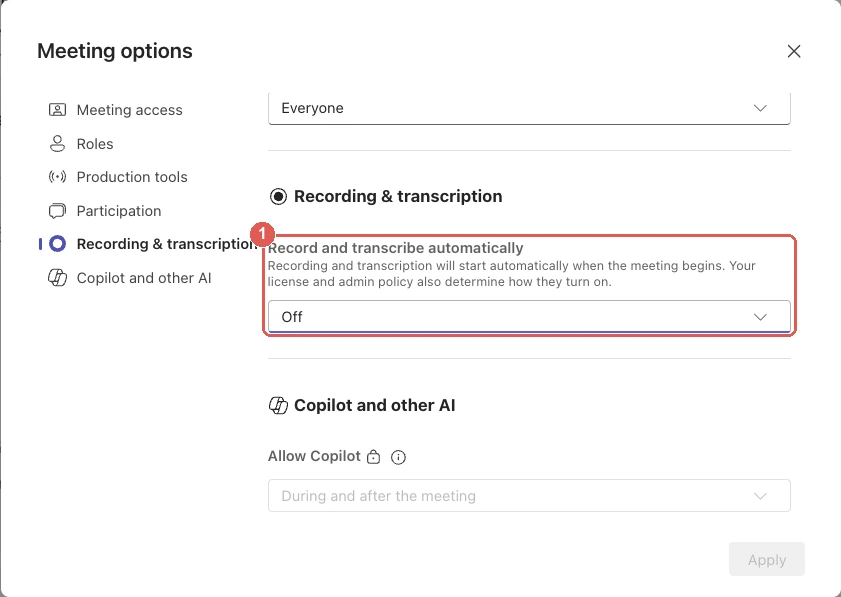
Branding and personalized meetings
- Meeting themes put your organization's branding on the meeting invite, the pre-join screen, the lobby and meeting reactions.
- Organization backgrounds that admins upload for everyone, and Decorate my background, which uses AI to decorate your real background.
- Meeting templates set by IT, which control meeting options the organizer usually sets, and personal meeting templates that save your own meeting options.
- Custom user policy packages for admins.
Standard and custom backgrounds you upload yourself, and avatars, are already in Teams without Premium.
Advanced Bookings and virtual appointments
Microsoft Bookings and virtual appointments are part of Teams. Teams Premium adds SMS notifications to customers (in Australia, Canada, the Netherlands, the United Kingdom and the United States), a queue view to see and manage appointments, and usage analytics for admins in the Teams admin center.
Queues app
The Queues app needs both Teams Phone and Teams Premium. Supervisors can manage call queues and auto attendants inside Teams, see real-time metrics such as calls waiting and wait times, look back at historical reports for up to 45 days, and monitor calls, whisper to the person answering, barge in or take over.
Admin tools
Admins with a Teams Premium license get advanced collaboration analytics (external domains, guests and inactive teams; Microsoft says every user in the tenant needs a license for it), real-time telemetry kept for 7 days instead of 24 hours, audio, video and screen sharing quality alerts during meetings, a Teams Premium usage report, Silent Test Call and priority account chat controls that let chosen people block incoming chats from inside the organization.
What changed in Teams Premium on April 1, 2026
Many guides, including several of the pages Google shows for this search, still list webinars and town halls as Teams Premium features. They aren't anymore. In a January 22, 2026 announcement (updated April 8, 2026), Microsoft moved all town hall and webinar features that used to need Teams Premium into Teams Enterprise, effective April 1, 2026 (Microsoft Tech Community):
- Streaming chat and reactions in town halls and webinars.
- Real-time event insights for hosts.
- Meeting theme and email customization for events.
- Enterprise Content Delivery Network (eCDN) for large streams.
- Immersive events in 3D environments.
Teams Enterprise users can now host events for up to 3,000 attendees (up to 1,000 with cameras and microphones on), and paid Attendee Capacity Packs raise that from 5,000 up to 100,000. Microsoft Places features moved into licenses that include the Outlook and Teams calendar at the same time.
Microsoft says Teams Premium keeps its meeting protection, advanced collaboration tools for admins, intelligent recap, the Queues app and the enhanced Bookings features. Customers who bought Teams Premium before April 1, 2026 keep the earlier features until those licenses expire (Microsoft Learn).
How much does Teams Premium cost?
Teams Premium costs $10.00 per user per month, paid yearly, as an annual subscription that renews automatically (Microsoft Teams Premium, as of October 7, 2026). It's an add-on, not a plan. Microsoft says Teams Premium licenses "are not a replacement for Teams licenses": each user needs an Office 365 or Microsoft 365 subscription and a Teams license as well.
Free trials:
- Microsoft's one-month free trial from the Teams Premium page needs a credit card. Microsoft says it turns into a 12-month paid subscription when the month ends unless you cancel.
- Admin trial: a zero-cost 30-day trial with 25 licenses, from the Microsoft 365 admin center.
- Self-service trial: people in an organization can start their own 60-day trial from the Teams desktop or web app, with no payment details, unless their admin has turned this off. It isn't offered to government or education customers.
When a trial ends, Teams Premium features stop at once, with no grace period. Custom templates and backgrounds stay in the tenant but are grayed out.
Who can buy it: commercial, education, government (GCC, GCC High, DoD), worldwide public sector and nonprofit organizations, through any Microsoft channel. It isn't for free Teams for personal use. Microsoft's plan comparison lists it as "Eligible with plans that include a Microsoft Teams Enterprise license." After licenses are assigned, Microsoft says they can take up to 24 hours to work, and many features, such as watermarks, end-to-end encryption, sensitivity labels, branding and templates, need an admin to set them up first.
Here is what the licenses that touch Teams meetings cost, from Microsoft's own pricing pages on October 7, 2026:
| License | Price per user per month | AI meeting notes in Teams? |
|---|---|---|
| Microsoft Teams Essentials | $4.00, paid yearly | No. Recordings, transcripts and live captions in English |
| Microsoft 365 Business Basic (with Teams) | $7.00, paid yearly | No. Recordings and transcripts |
| Teams Premium (add-on) | $10.00, paid yearly | Yes, intelligent recap |
| Microsoft 365 Copilot Business (add-on, up to 300 users) | $21.00, paid yearly; $18.00 the first year for purchases from July 1 to December 31, 2026 | Yes, intelligent recap plus Copilot and Facilitator |
| Microsoft 365 Copilot (add-on, enterprise) | $30.00, paid yearly | Yes, intelligent recap plus Copilot and Facilitator |
(Sources: Compare Microsoft Teams business options, Microsoft 365 Copilot for business pricing, Copilot for enterprise pricing.)
Teams Premium vs Microsoft 365 Copilot vs Teams without Premium
Teams Premium and Microsoft 365 Copilot overlap on the AI features. A university help page that Google cites for this search says that if you have Copilot you don't need Teams Premium; that holds for AI notes, but Microsoft documents watermarks, encryption, branding and the Queues app as Teams Premium features, not Copilot ones.
| Feature | Teams without Premium | Teams Premium | Microsoft 365 Copilot |
|---|---|---|---|
| Price per user per month | Part of your Teams plan | $10, paid yearly | $30 (enterprise) or $21 (Business), paid yearly |
| Meeting recording and transcript | Yes | Yes, from your Teams plan | Yes, from your Teams plan |
| Live captions | Yes | Yes | Yes |
| Recap tab with recording, transcript and notes people type | Yes | Yes | Yes |
| AI notes and suggested tasks (intelligent recap) | No | Yes | Yes |
| Speaker timeline, chapters and name mention markers | No | Yes | Yes |
| Live translated captions and transcripts | No | Yes | Yes |
| Ask Copilot about the meeting, during or after | No | No | Yes |
| Facilitator live AI notes | No | No | Yes |
| Video recap and audio recap | No | No | Yes |
| Watermarks, end-to-end encryption, sensitivity labels | No | Yes | Not listed by Microsoft |
| Who can record and transcribe | No | Yes | Not listed by Microsoft |
| Branded meetings, organization backgrounds, templates | No | Yes | Not listed by Microsoft |
| Advanced Bookings and the Queues app | No | Yes | Not listed by Microsoft |
| Copilot in Word, Excel, PowerPoint and Outlook | No | No | Yes |
(Sources: Microsoft Learn, Teams Premium licensing and intelligent recap; Microsoft Support, Welcome to Copilot in Microsoft Teams, Video recap and audio recaps; as of October 2026.)
Microsoft's help pages call the Copilot license "a Microsoft Copilot license"; its pricing pages sell it as Microsoft 365 Copilot for enterprise plans and Microsoft 365 Copilot Business for business plans of up to 300 users. Both need a qualifying Microsoft 365 plan. Copilot Chat, which comes free with eligible Microsoft 365 plans, isn't the same thing: Microsoft says Copilot in Teams needs a Microsoft 365 license and a Microsoft Copilot license.
Which to pick:
- Scribbl if AI notes from your own calls are what you're after. It's free for 10 meetings a month, keeps the video, works in meetings run by other companies, and needs no Microsoft license; see how it works below.
- Teams Premium if you need the protection, branding, appointment or call queue features, or you want AI meeting notes and nothing else from Copilot. It's a third of the enterprise Copilot price.
- Microsoft 365 Copilot if you want AI notes plus Copilot inside meetings and across Word, Excel, PowerPoint and Outlook.
- Both if you need the protection features and Copilot everywhere else.
Who needs Teams Premium?
Microsoft checks each person's license and their role in the meeting, feature by feature. Some Teams Premium features are turned on by the organizer's license and shared with everyone in the meeting while it's running; others only work for the person who has the license; a few are only for admins (Microsoft Learn).
| Applied at | Teams Premium features |
|---|---|
| The organizer's license (everyone in the meeting gets them) | Live translated captions and transcripts, meeting themes and templates, watermarks, who can record and transcribe, detect sensitive content during screen sharing, end-to-end encryption, sensitivity labels, SMS notifications for appointments |
| Each person's own license | AI notes and tasks, AI chapters, speaker timeline and personal timeline markers, multilingual recap, organization backgrounds and Decorate my background, quality alerts and 7-day telemetry, the Queues app, the appointments queue view |
| The admin's license | Advanced collaboration analytics, the Teams Premium usage report, Bookings usage analytics |
If an organizer with Teams Premium has a delegate schedule meetings for them, the delegate doesn't need a license for the organizer-level features. Microsoft recommends assigning a license to everyone you want to have Teams Premium features.
Who it's for, in practice:
- People who run confidential meetings and need watermarks, encryption, sensitivity labels or control over who records.
- People who meet with clients or the public and want branded invites and lobbies, or SMS reminders for virtual appointments.
- Groups that answer phones through call queues and need the Queues app.
- Multilingual teams that need translated captions. Who can skip it: people who mostly chat, join a few meetings a week and don't organize sensitive ones, and people who mainly want AI meeting notes. For notes alone, Scribbl does it without a license.
What intelligent recap needs
When the AI notes don't show up, one of these is usually missing (Microsoft Learn; Recap in Microsoft Teams):
- Your own license. A Teams Premium or Microsoft Copilot license assigned to you, plus a Microsoft 365 subscription that includes Teams (or one without Teams and a separate Teams license). AI notes are applied per person, so a colleague's license doesn't give them to you.
- Transcription. The meeting has to be transcribed, and your admin has to allow transcription. Starting a recording starts transcription too (how to transcribe a Teams meeting).
- Recording, for the full recap. Without a recording you still get AI notes, but not the recording, speakers, topics or chapters (how to record a Teams meeting).
- At least five minutes, in a supported language. The AI summary needs a meeting of five minutes or more, transcribed in one of the 25 languages and variants Microsoft lists, including English, Spanish, French, German, Japanese and Portuguese.
- Being in the organizer's organization, and invited. Microsoft says people who weren't invited, or aren't in the organization, don't get the intelligent recap "even if they have the recording link or Teams Premium."
- No end-to-end encryption. It turns off transcription, so there's nothing to summarize.
- For webinars and town halls, only organizers, co-organizers and presenters get intelligent recap; attendees don't.
Video recap needs a Copilot license, a meeting between 10 and 90 minutes, and a cloud recording with transcription. Audio recap needs a Copilot license and works from the transcripts of up to eight meetings.
Does Microsoft Teams have AI meeting notes?
Yes, but not in standard Teams. Teams' AI meeting notes are part of intelligent recap, which needs a Teams Premium or Microsoft 365 Copilot license for each person who wants to see them, and the meeting has to be transcribed.
Without one of those licenses, the Recap tab gives you the recording, the transcript, shared files and a Notes tab that people fill in by hand. Microsoft's Recap help page marks AI notes, speaker markers and timeline markers as Teams Premium features.
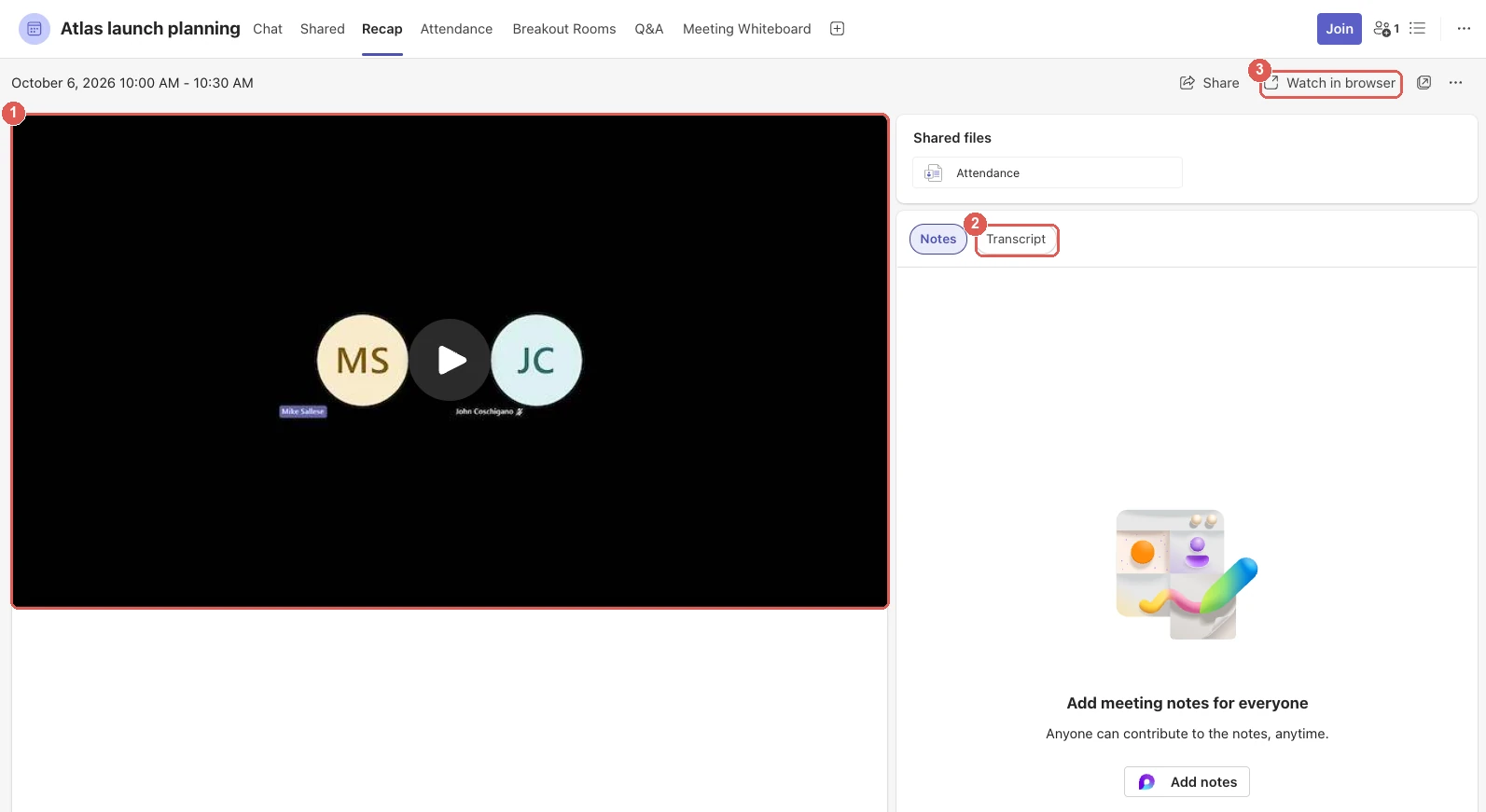
For what each kind of Teams notes does, and AI notes in Teams with and without Microsoft's licenses, see does Microsoft Teams have AI meeting notes.
Can Microsoft Copilot take notes in a Teams meeting?
Yes, with a Microsoft 365 Copilot license. Copilot doesn't come with Teams Premium; Microsoft says you need a Microsoft 365 license and a Microsoft Copilot license to use Copilot in Teams (Welcome to Copilot in Microsoft Teams).
Copilot in the meeting. Select Copilot in the meeting controls and ask it to recap the meeting so far, list action items or unresolved questions, or make a table. It works from the transcript, so transcription has to be on. If you're five or more minutes late, Copilot offers a summary of what you missed, and ten minutes before the end it offers notes and action items. After the meeting, open the Recap tab in the meeting's details to keep asking. Copilot isn't available in meetings organized by someone outside your organization.
Facilitator. Facilitator writes AI notes live during the meeting, tracks the agenda with a timer, answers questions in the meeting chat and captures tasks you can sync to Planner (Facilitator in Microsoft Teams meetings):
- Turn it on when scheduling under Options › Copilot and other AI, or during the meeting with More actions › Turn on Facilitator.
- You need a Microsoft Copilot license to add it. Everyone in the meeting except external participants can see its notes, which are saved on a Loop page anyone can edit.
- It only works in scheduled meetings, not channel meetings, instant meetings or calls.
- In the Teams phone app, Take notes with Facilitator takes notes on an in-person meeting.
Microsoft's quick reference guide for Copilot meeting notes shows the same flow: start the meeting, select Copilot, choose Recap meeting so far, then review and edit the notes at the end.
Is Teams Premium worth it?
It's worth it if you need what only Teams Premium does: watermarks and end-to-end encryption for confidential meetings, branded meetings for clients, SMS reminders for virtual appointments, or the Queues app for call queues. If what you mainly want is AI meeting notes, a Microsoft 365 Copilot license also includes intelligent recap and adds Copilot across Microsoft 365, and a separate AI note taker such as Scribbl needs neither license.
Two things to check before you buy for AI notes:
- Your meetings with other companies. Intelligent recap is only for people in the organizer's organization. If you're a guest in a client's meeting, your Teams Premium license doesn't give you their recap.
- Who will actually read the recaps. AI notes are applied per person, so everyone who wants them needs a license, not just the person who runs the meeting.
A free option for AI meeting notes in Teams: Scribbl
If what you want is AI notes from your Teams meetings, you don't need to buy Teams Premium or Copilot for every person, or wait for an admin to set it up. Scribbl is an AI note taker for Google Meet, Zoom and Microsoft Teams that gives you more than intelligent recap, for free.
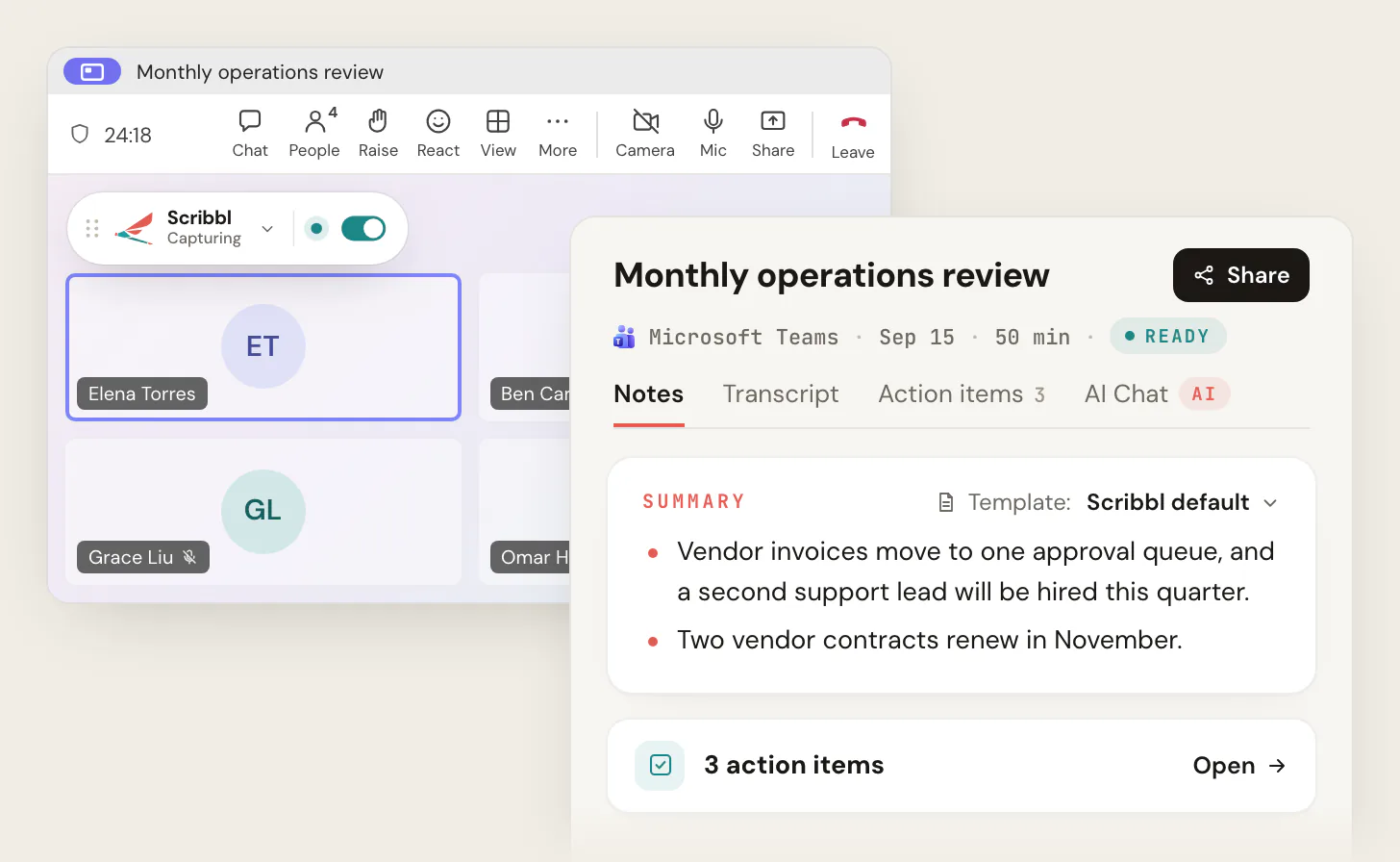
- Nothing joins the call. For Teams, Scribbl Desktop runs on a Mac (Apple silicon) or Windows PC. For Google Meet, Scribbl is a Chrome extension.
- After each meeting you get the video recording, a transcript with speaker names, AI notes and action items.
- No Microsoft license, any organizer. Because it's a separate app, it doesn't use Teams Premium or Copilot, and it works in meetings run by another company, where intelligent recap doesn't.
- Ask Claude or ChatGPT about every meeting by connecting Scribbl to them.
- The follow-up done for you. Automations draft the follow-up email, post a summary to a Teams or Slack channel, log notes in HubSpot or Pipedrive, or open Jira, Asana or Linear tickets. They ask before changing anything by default.
- Meetings sorted for you. Smart Collections put each new meeting into the groups you describe.
- Private by default. Recordings are private by default, and Scribbl doesn't use your meetings to train AI for anyone other than you.
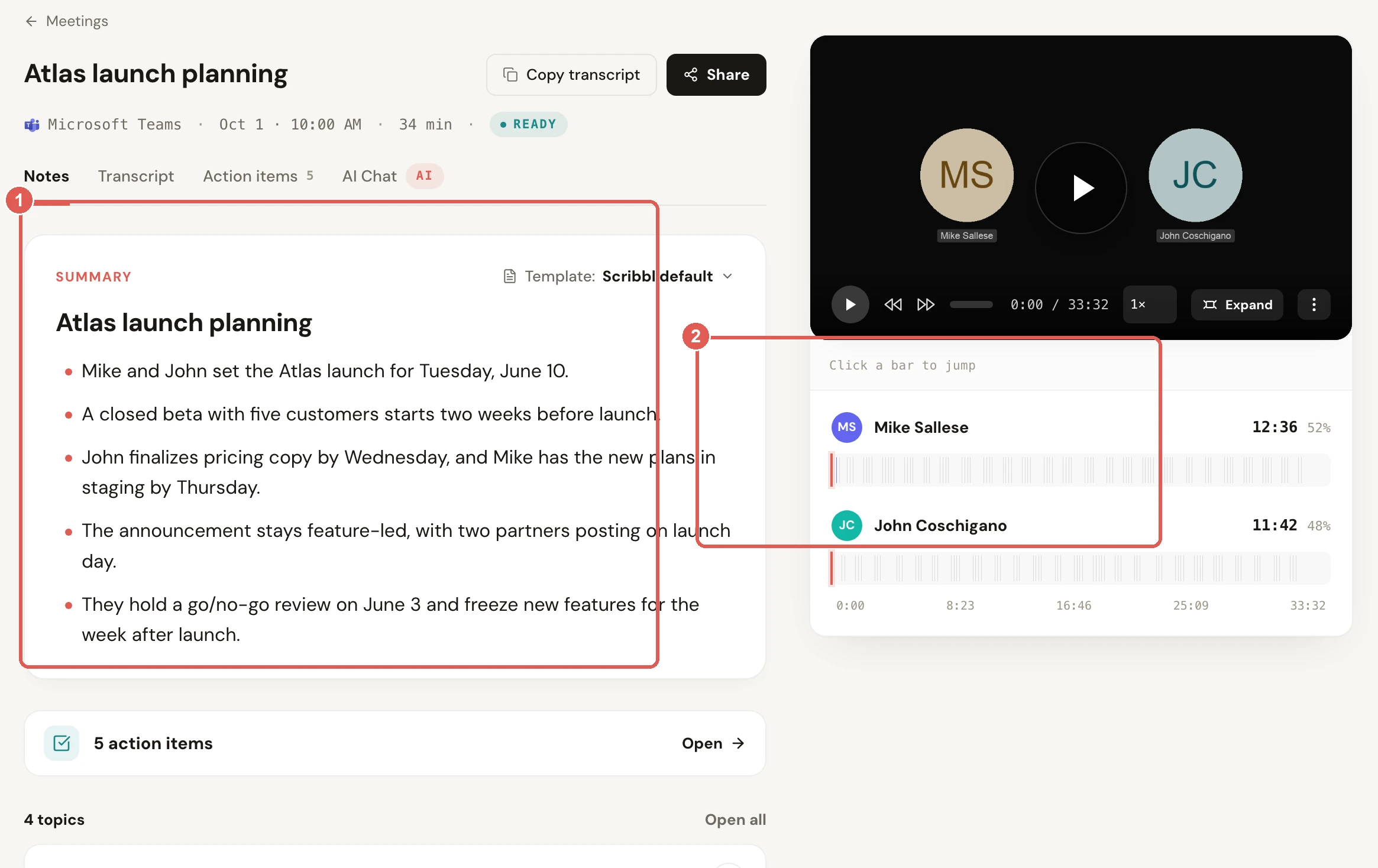
| Scribbl (our pick for AI notes) | Teams intelligent recap | |
|---|---|---|
| License | None from Microsoft. The free plan includes Google Meet, Zoom and Microsoft Teams | Teams Premium ($10) or Microsoft 365 Copilot ($21 to $30), per person, per month |
| Meetings run by another company | Yes, records from your own computer | No recap unless you're in the organizer's organization |
| Video recording | Yes, every meeting | The Teams recording, if someone records |
| Transcript with speaker names | Yes | Yes, if the meeting is transcribed |
| AI notes and action items | Yes | Yes |
| Ask AI about past meetings | Claude or ChatGPT, across every meeting | Copilot, with a Copilot license |
| Follow-up | Automations draft the email, post to Teams or Slack, log notes in HubSpot or Pipedrive | Send the recap as an Outlook email |
| Other platforms | Google Meet, Zoom and Microsoft Teams | Teams only |
What it costs. The free plan includes Google Meet, Zoom and Microsoft Teams, with 10 meetings a month. Pro is $13 per user per month billed annually, or $20 monthly (pricing).
Tell everyone you're recording. Teams shows its own recording notice only when Teams records. A note taker on your computer doesn't trigger it, so say so at the start of the meeting. Some places require everyone's consent; see do you have to tell people you're recording.
Get Scribbl for TeamsFor more on Teams without a bot in the call, see AI note takers for Teams without a bot. For where Teams' own files end up, see where do Teams recordings go.
FAQ
What are Teams Premium features?
Teams Premium adds intelligent recap (AI notes, suggested tasks, a speaker timeline, chapters and name mentions), live translated captions and transcripts, meeting protection (watermarks, end-to-end encryption for up to 200 people, sensitivity labels, limits on who can record, blocking screen capture), branded meetings and meeting templates, advanced Bookings appointments with SMS reminders, the Queues app for Teams Phone, and admin analytics and quality alerts. Since April 1, 2026, the webinar and town hall features it used to include come with Teams Enterprise instead.
How much is Teams Premium?
$10 per user per month, paid yearly, on Microsoft's Teams Premium page as of October 2026. It's an add-on: each user also needs a paid Teams license and an Office 365 or Microsoft 365 subscription. Microsoft offers a one-month free trial that needs a credit card and turns into a 12-month paid subscription unless you cancel, and admins can start a 30-day trial with 25 licenses in the Microsoft 365 admin center.
Does Microsoft Teams have AI meeting notes?
Yes, but not in standard Teams. Teams' AI meeting notes are part of intelligent recap, which needs a Teams Premium or Microsoft 365 Copilot license for each person who wants to see them, and the meeting has to be transcribed. Without one of those licenses, Teams gives you the recording, the transcript and a Notes tab people type into, but no AI summary. A separate AI note taker such as Scribbl gives you AI notes in Teams without either license.
Can Microsoft Copilot take notes in a Teams meeting?
Yes, with a Microsoft 365 Copilot license. In a transcribed meeting you can ask Copilot to recap the meeting so far or list action items, and Facilitator writes live AI notes that people from your organization in the meeting can see and edit. Copilot isn't available in meetings organized by someone outside your organization, and Facilitator can only be added to scheduled meetings, not channel meetings, instant meetings or calls.
What do you need for intelligent recap in Teams?
A Teams Premium or Microsoft 365 Copilot license assigned to you, on top of a Microsoft 365 plan with Teams. The meeting must be transcribed, and recorded as well if you want speakers, topics and chapters. The AI summary needs at least five minutes of meeting in a supported language, and you have to be in the organizer's organization and invited. Video recap and audio recap need a Copilot license; Teams Premium alone doesn't include them.
Do all meeting participants need a Teams Premium license?
No. Microsoft applies some features at the organizer level: if the organizer has Teams Premium, everyone in the meeting gets them during the meeting, such as watermarks, branded themes, live translated captions and limits on who can record. Other features apply per user, including intelligent recap's AI notes, speaker timeline and chapters, so only licensed people see them. Admin features such as analytics need a licensed admin.
Is Teams Premium included in Microsoft 365 Business Premium?
No. Despite the name, Microsoft 365 Business Premium doesn't include Teams Premium. Microsoft sells Teams Premium as a separate add-on at $10 per user per month, paid yearly. On our own Business Premium account without the add-on, Teams had no Who can record and transcribe setting, one of the Teams Premium features.
Does Microsoft 365 Copilot include Teams Premium?
Partly. Microsoft's help pages say intelligent recap, intelligent call recap, live translated captions and multilingual speech recognition also come with a Microsoft Copilot license, and Copilot adds Copilot in meetings, Facilitator, video recap and audio recap. Microsoft doesn't list watermarks, end-to-end encryption, branded meetings, the Queues app or advanced Bookings as part of Copilot; it documents those as Teams Premium features.
Are webinars and town halls still part of Teams Premium?
Not anymore. On April 1, 2026, Microsoft moved the town hall and webinar features that used to need Teams Premium into Teams Enterprise, including streaming chat, reactions, real-time event insights, event branding, eCDN and immersive events. Teams events now hold up to 3,000 attendees, with paid Attendee Capacity Packs from 5,000 to 100,000. Customers who bought Teams Premium before April 1, 2026 keep the earlier features until those licenses expire.
Is Teams Premium worth it?
It's worth it if you need what only Teams Premium does: watermarks and end-to-end encryption for confidential meetings, branded meetings for clients, SMS reminders for virtual appointments, or the Queues app for call queues. If what you mainly want is AI meeting notes, a Microsoft 365 Copilot license also includes intelligent recap and adds Copilot across Microsoft 365, and a separate AI note taker such as Scribbl needs neither license.
Is there a free way to get AI meeting notes in Microsoft Teams?
Not from Microsoft: Teams' own AI notes need Teams Premium or a Microsoft 365 Copilot license. Scribbl is a free option. The free plan includes Google Meet, Zoom and Microsoft Teams, with 10 meetings a month. For Teams it runs as Scribbl Desktop on Mac (Apple silicon) and Windows, nothing joins the call, and after each meeting you get the video recording, a transcript with speaker names, AI notes and action items.
Sources
All checked on October 7, 2026. Microsoft changes what's in Teams Premium and Copilot often; check the linked page if a detail matters to you. The two screenshots of Teams come from a test meeting on October 6, 2026, in Microsoft Teams for Mac on a Microsoft 365 Business Premium account without Teams Premium.
- Microsoft: Microsoft Teams Premium (price, trial and FAQ)
- Microsoft Learn: Microsoft Teams Premium licensing (updated June 30, 2026)
- Microsoft Learn: Microsoft Teams Premium, overview for admins
- Microsoft Support: Overview of Microsoft Teams Premium
- Microsoft Tech Community: Licensing updates extend access to advanced capabilities in Microsoft Teams and Microsoft Places (January 22, 2026, updated April 8, 2026)
- Microsoft Learn: Intelligent recap for Teams calls, meetings, and events
- Microsoft Support: Recap in Microsoft Teams, Video recap in Microsoft Teams, Listen to audio recaps of your meetings
- Microsoft Support: Welcome to Copilot in Microsoft Teams, Facilitator in Microsoft Teams meetings
- Microsoft: Generate meeting notes using Copilot (quick reference guide, PDF)
- Microsoft Support: Use live captions in Microsoft Teams meetings, Multilingual speech recognition in Microsoft Teams
- Microsoft Learn: End-to-end encryption for Teams meetings and calls
- Microsoft: Compare Microsoft Teams business options, Microsoft 365 Copilot for business pricing, Microsoft Copilot plans for enterprise
- Scribbl: desktop app, pricing
Try Scribbl
Free AI notes in Teams, no Premium license
Scribbl's desktop app records, transcribes, and summarizes your Teams meetings from your own computer. No bot joins the call and you don't need to be the host. Free forever for individuals.
Get Scribbl for Teams · It's free