Client communication best practices: a documentation system
The best client communication isn't a soft skill. It's a documentation discipline: capture every call, send a same-day recap, keep one source of truth.
Updated October 29, 2026
The short answer
Make every client call leave a written, shared, dated record of what was decided and who does what next
- Capture
- Record and transcribe every client call instead of trusting memory, and tell the client you're recording.
- Same-day recap
- Decisions, action items with an owner and a due date, open questions, the next meeting, and a line inviting the client to confirm or correct.
- One source of truth
- One place both sides can reach, so nothing lives in someone's inbox.
- Cadence
- A predictable rhythm of calls and updates instead of communicating more.
- Capture without a bot
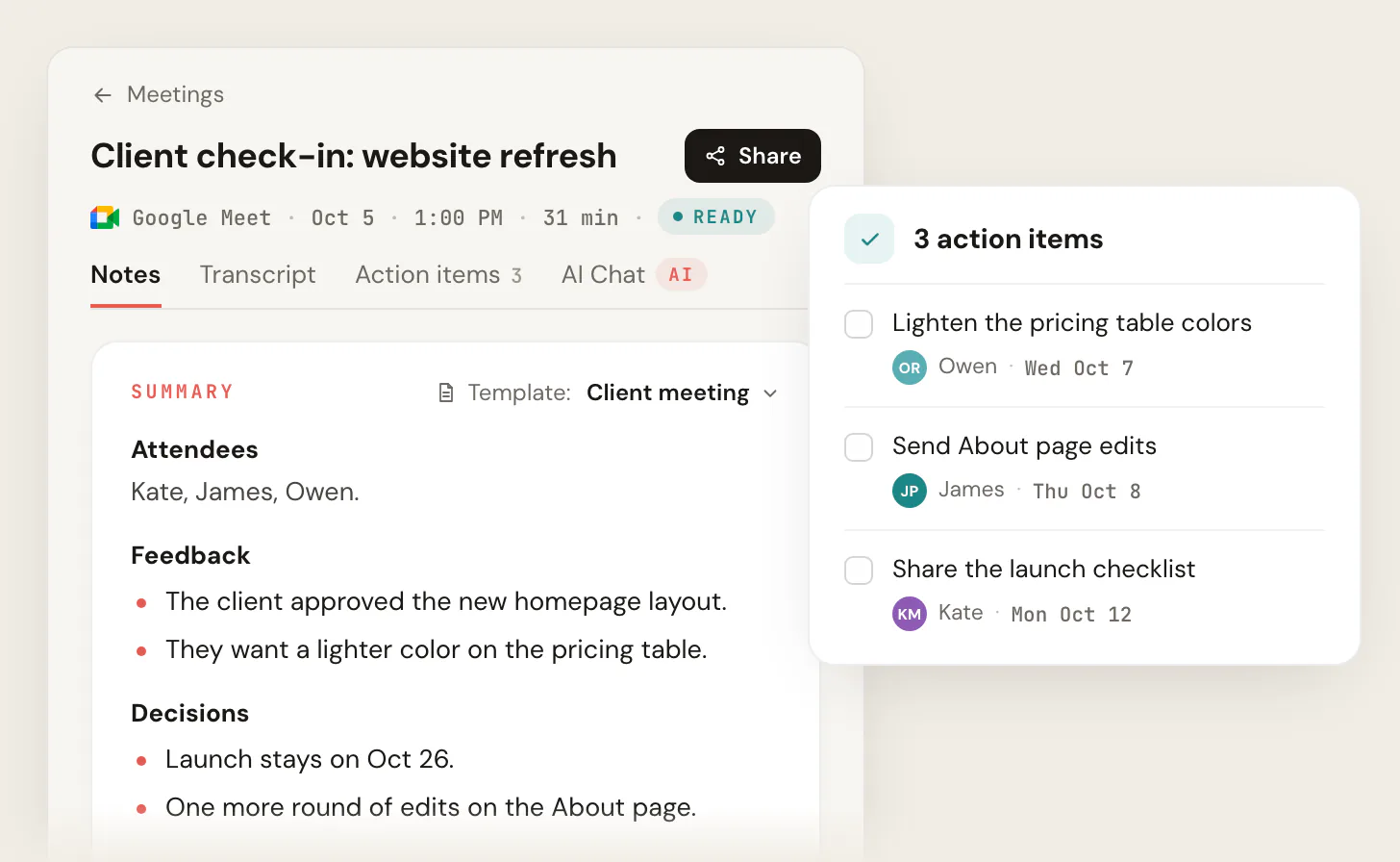
- Scribbl records, transcribes and summarizes Google Meet, Zoom and Teams client calls, with the decisions and action items pulled out for your recap. Nothing joins the call.
Most "client communication best practices" posts hand you the same list of attitudes: listen actively, be transparent, be proactive. None of that survives a busy Thursday. The truth is that good client communication is not a personality trait. It is a documentation discipline: every client conversation should leave a written, shared, dated record of what was decided and who does what next, and that record should get created automatically so it actually happens every time. Communication breaks at one specific seam, the handoff between a live conversation and the written follow-up, and the single highest-impact thing you can do is close that gap with an accurate meeting record and a same-day recap. Stop relying on "trust me, I remember what we agreed," and stop dropping a third-party bot into the call to do it.
Client communication is a documentation system, not a personality trait
The reason "be a good listener" advice fails is that it describes a feeling, not a behavior you can repeat under deadline pressure. Charismatic people drop action items all the time. The account that renews is not the one with the most likeable lead, it is the one where both sides can point to the same record and agree on what was said.
So reframe the whole thing. The differentiator is not how you talk, it is that every conversation produces a trail: written, shared with the client, and dated. When you do that consistently, scope disputes shrink, "that's not what we agreed" goes away, and a teammate can pick up the account without a two-hour download from you.
The system has four moving parts, and the rest of this guide is each one in detail:
- Capture every client conversation as a record (not from memory).
- Send a same-day recap with decisions, owners, and dates.
- Keep one source of truth both sides can reach.
- Run a predictable cadence instead of communicating more.
This post is the operating system. For the specific sub-skills, go deep elsewhere: managing client expectations, client relationship management tips, and the after-meeting client email.
The non-negotiable: capture every client conversation as a record
Human memory is a terrible system of record, and everyone over-trusts it. People forget a large share of what is said within a day, and two people walk out of the same call with different versions of the plan. If your "record" is a few hand-typed notes plus what you remember, you are one busy week away from a dispute you cannot win.
The fix is to stop hand-capturing and start auto-capturing. Record the call, transcribe it, and generate an AI summary, so the raw record exists whether or not you were diligent that day. That is the move that makes the rest of the system reliable: the recap, the source of truth, and the audit trail all depend on a real transcript existing.
There are two ways to capture a meeting, and they are not equal for client work.
- What the client sees: an unfamiliar named bot joins as a participant
- Perception: reads as surveillance; people self-censor or ask you to remove it
- Privacy: meeting audio routes through a third party's servers
- Regulated/sensitive calls: often a non-starter
- What the client sees: no extra attendee on the roster
- Perception: you disclose and record like the host already does
- Privacy: each recording is private to your account by default
- Works on: Google Meet, Zoom and Teams, on every plan
A visible third-party bot signals "you are being watched" in a way that quietly erodes trust, especially with a new client or on a sensitive topic. Scribbl takes the bot-free approach: it records, transcribes, and summarizes Google Meet calls with its Chrome extension, and Zoom and Microsoft Teams calls with Scribbl Desktop, with no bot joining the meeting, so the capture is there without an awkward extra face on the grid. (More on disclosure below; bot-free does not mean secret.)
Wherever you record, know where the file lands. On Google Meet, the recording saves to the meeting organizer's Google Drive in a folder called Google Meet, with a sub-folder for each meeting, and an email with the link goes to the organizer and whoever started the recording (per Google's Meet recording help, as of October 2026). Knowing this matters: if you are not the organizer, the recording may not land in your Drive at all.
For the mechanics of capturing notes well, see how to take meeting notes, how to record a Google Meet, how to record a Teams meeting, and the best meeting recording software.
Do it legally: recording consent for client calls in the US
You cannot build a documentation system on recordings you were not allowed to make. Recording-consent law in the US is a two-layer problem, and the second layer is the one that bites.
The federal baseline is one-party consent. Under 18 U.S.C. 2511(2)(d), it is lawful for a private party to record a communication they are a party to, or where one party has consented, unless the recording is made for a criminal or tortious purpose (Cornell Law, as of June 2026). In plain terms: if you are on the call, federal law lets you record it.
But many states are stricter and require all parties to consent. Commonly cited all-party-consent states include California, Florida, Illinois, Pennsylvania, Washington, and Massachusetts, among others, and the exact rule varies (some states treat in-person and phone differently). On an interstate call where the parties sit in different states, the safe move is to assume the stricter all-party standard applies.
The platforms make compliance easier because they announce recording for you. Google Meet notifies participants when a recording starts or stops, and Google Workspace admins can require explicit consent before recording, transcription, or Gemini notes run, in which case participants click Start, Join, Continue, or Leave to give or decline consent (Google's consent docs, as of June 2026). Zoom always notifies participants that a meeting is being recorded, and Microsoft Teams lets admins set a custom in-meeting recording notification.
The same-day recap: the highest-impact habit
The recap that arrives three days later, or never, is where alignment quietly dies. The window that matters is hours, not days. Send the recap the same day, while everyone still remembers the call, and you turn a conversation into a shared agreement.
A good recap is not a transcript dump. The transcript and AI summary are raw material; you curate them into a short, structured note in your own voice. Use the same skeleton every time so it becomes a fill-in-the-blanks task, not a writing project:
Subject: Recap and next steps, [Client] / [Project], [Date]

Hi [Name],

Thanks for the time today. Quick recap so we're aligned:

DECISIONS
- [Decision 1]
- [Decision 2]

ACTION ITEMS
- [Task] (owner: [Name], due: [Date])
- [Task] (owner: [Name], due: [Date])

OPEN QUESTIONS
- [Question we still need an answer on, and from whom]

NEXT MEETING
- [Date/time], to cover [topic]

If I got anything wrong or missed something, reply and correct me.
Otherwise I'll treat the above as what we agreed.

[Your name]
That last line is the trick. "Reply and correct me, otherwise I'll treat this as agreed" converts a one-way recap into a two-way confirmation. Silence becomes consent to the documented plan, and you have a dated record both sides saw.
For the full craft of the follow-up, see the after-meeting client email guide, meeting recap format, and how to write a follow-up email.
One source of truth so nothing lives in someone's inbox
A recap is worthless if it is buried in one person's sent folder. The decisions, action items, and recaps need to live in one searchable place that both sides, and your teammates, can reach. The test is simple: could a colleague reconstruct the state of this relationship without interviewing you? If the answer is no, your knowledge is trapped, and it walks out the door the day you take vacation or someone quits.
Scattered DMs, local notes, and personal inboxes fail this test by design. They silo context with whoever happened to be on the call. A shared meeting library, a CRM, or a project tool passes it, because the record outlives any one person. Pick whichever your team already lives in, and make the rule that recaps and decisions go there, not into a thread that disappears.
This is where bot-free capture pays off again: when every Google Meet is recorded and summarized to a shared library, the source of truth fills itself instead of depending on someone remembering to file notes. See what client relationship management is, client relationship management tips, and action item tracking for how to operationalize this.
- 1
Disclose and record the call
Get a clear yes at the top, then capture the conversation (bot-free).
- 2
Auto transcript and AI summary
The raw record exists whether or not you took notes by hand.
- 3
Send a same-day recap
Curate decisions, action items with owners and dates, and open questions in your voice.
- 4
Client confirms or corrects
Silence becomes documented agreement; corrections get captured in writing.
- 5
Store in one source of truth
Recap and transcript land in a shared library both sides can search.
- 6
Next scheduled touchpoint
The cadence carries the relationship forward; nothing rides on memory.
Set a predictable cadence instead of communicating more
Here is the myth that drives people to burn out: more communication is better. It is not. Clients do not want a stream of pings across five channels. They want fewer, clearer, predictable touchpoints they can rely on. A standing weekly check-in and a regular status report beat ten reactive messages, because predictability is what makes a client feel managed instead of managing you.
Set the cadence up front, in the kickoff: when the standing meeting is, how often the status report goes out, and which channel is for what. Match the channel to the message: decisions and commitments go in writing, nuance and tension get a call, and urgent things use the channel you both agreed is for urgent things. State your response-time expectations out loud ("I reply to email within one business day"), because an unstated expectation is just a future disappointment.
For the artifacts that carry the cadence, see a project status report example, managing client expectations, and a client meeting agenda template.
When client communication is also a legal record
For some client work, capturing the conversation is not polish, it is the law. Registered investment advisers are required under SEC Rule 204-2(a)(7) to keep originals of written communications received and copies of written communications sent that relate to any recommendation or advice, any receipt or delivery of funds or securities, and the placing or execution of securities orders. Those records must be kept in an easily accessible place for not less than five years, with the first two years in an appropriate office of the adviser (Rule 204-2(e)(1), via Cornell Law, as of June 2026).
Beyond advisers, Microsoft Teams supports policy-based compliance recording for regulated contexts such as MiFID II, Dodd-Frank, HIPAA, and GDPR. The point is the same across all of them: in regulated client work, an unsaved call and an ad hoc email are a recordkeeping gap, not just sloppiness. If your industry has retention rules, your communication system and your compliance system are the same system. See the RIA regulations guide for the deeper dive.
Handling the hard conversations without losing the record
Documentation matters most exactly when it is hardest to do: bad news, a scope change, a dispute. The instinct in a tense call is to smooth it over verbally and move on. Resist it. Confirm difficult conversations in writing immediately, so there is no he-said-she-said three weeks later when the bill or the deadline is in question.
Scope creep is a communication-documentation problem before it is a contract problem. "Can you just also do X" feels small in the moment and becomes a month of unpaid work by accumulation. The defense is a written record of what is in scope, and a same-day note every time the scope shifts: "Per today's call, adding X moves the timeline to [date] and is a separate scope, here's the estimate." Frame it as solution-oriented and forward-looking, then write down the agreed path. See how to prevent scope creep for the full playbook.
Putting it together: a repeatable operating system
None of this requires charisma. It requires a checklist you run every time:
- Disclose and record every client call, with consent.
- Send a same-day recap: decisions, action items with owners and dates, open questions, next meeting.
- Confirm difficult conversations and scope changes in writing, immediately.
- Keep recaps and transcripts in one source of truth both sides can reach.
- Run a predictable cadence so nothing depends on anyone's memory.
A tool earns its place only if it makes the checklist automatic. For Google Meet, Scribbl records, transcribes, and summarizes without a bot in the meeting, so the capture step and the raw material for your recap happen on their own. It is free for individuals on Google Meet, Zoom and Teams, Pro removes limits, and Team plans add a shared library, which is the multi-person source of truth this system needs. If you run an agency or a sales team, that shared record is the difference between an account that survives turnover and one that lives in one person's head. See pricing for the details.
Client communication FAQ
Is it legal to record a client call?
Under US federal law (18 U.S.C. 2511(2)(d)) you can record a call you are a party to under a one-party-consent standard. But all-party-consent states (California, Florida, Illinois, Pennsylvania, Washington, Massachusetts, and others) require everyone to consent, and the stricter rule generally applies to interstate calls. The clean habit is to disclose and get a clear yes at the top of every recorded client call. This is general information, not legal advice.
Do I have to use a bot to record and transcribe a client meeting?
No, and for client calls it is often the wrong choice. A visible third-party bot joining the participant list reads as surveillance and routes audio through another company's servers. Bot-free tools like Scribbl record Google Meet, Zoom and Microsoft Teams with nothing joining the call. You still disclose that you are recording; bot-free means less intrusive, not secret.
How fast should I send a client recap after a meeting?
The same day, ideally within a few hours while everyone still remembers the conversation. A recap that lands days later is too easy to dispute and too late to keep people aligned. Use a fixed template (decisions, action items with owners and due dates, open questions, next meeting) so writing it takes minutes, and end with a line inviting the client to confirm or correct.
What should a client recap email include?
Four sections: decisions made, action items with an owner and a due date for each, open questions and who owns the answer, and the next meeting. Close with a confirm-or-correct line so the recap becomes a shared, dated agreement. Pull the substance from your meeting transcript or AI summary, then write it in your own voice rather than pasting a raw summary.
Where do Google Meet recordings go?
A Google Meet recording is saved to the meeting organizer's Google Drive in a folder called Google Meet, with a sub-folder for each meeting, and an email with the link is sent to the organizer and whoever started the recording (per Google's Meet help, as of October 2026). If you are not the organizer, the file may not appear in your own Drive, which is one reason a dedicated recorder that files everything to a shared library is easier to manage for client work.
Try Scribbl
A record of every client call, no bot
Scribbl records, transcribes, and summarizes your Google Meet, Zoom and Teams calls: Google Meet in your browser, Zoom and Teams with the desktop app. No bot joins the call. Free for 10 meetings a month, no credit card.
Add to Chrome · It's free