What Is Granola AI? How It Works, Price and Who It's For (2026)
What is Granola AI? An AI notepad that writes meeting notes with no bot in the call but keeps no audio or video. How it works, its prices and who it's for.
Updated October 29, 2026
The short answer
Checked against Granola's own pages and help docs and TechCrunch, October 23, 2026
Granola AI is an AI notepad for meetings: it transcribes the call from your device's audio with no bot joining, and turns the notes you type into AI meeting notes
- How it captures
- No bot. It uses your computer's microphone and system audio, on Mac or Windows, with any meeting app. Phone apps for iPhone and Android.
- What it keeps
- The transcript and your notes. It 'does not record or save audio or video at any point during the call.'
- Price
- Basic $0 with 30 days of meeting history; Business $14 and Enterprise $35 per user per month.
- Who makes it
- Granola, founded in 2023 by Chris Pedregal and Sam Stephenson; a $125 million Series C at a $1.5 billion valuation in March 2026.
- The better pick
- Scribbl, which we make. Nothing joins the call either, but you keep the video, and every meeting gets a transcript with speaker names, AI notes and action items without typing.
Granola AI is an AI notepad for meetings: it runs on your Mac, Windows PC or phone, transcribes the call from your device's audio with no bot joining, and turns the notes you type into AI meeting notes. It doesn't record or save audio or video, so if you want the same no-bot notes plus the video of every meeting, with nothing to type, Scribbl is the pick, and the free plan includes Google Meet, Zoom and Microsoft Teams: Start free.
Below is what Granola is, how it captures a meeting, what it keeps and throws away, what each plan costs, who it's built for, and why Scribbl is the better pick for most people asking. Every Granola fact comes from Granola's own pages and help docs and from TechCrunch, checked on October 23, 2026. We make Scribbl. We compared Granola from its own pages; we didn't create a Granola account.
What is Granola AI?
Granola's homepage calls it "The AI notepad for back-to-back meetings," with "Notes, actions and memory" and "Without a meeting bot." It's an app you run on your own device during a call:
- On your computer: the Granola desktop app for macOS or Windows transcribes meetings. Granola says it "Works with Zoom, Google Meet, Teams and every other meeting app."
- On your phone: apps for iPhone and Android. Granola launched its Android app on July 1, 2026.
- On the web: notes.granola.ai lets you read and edit notes, but transcription needs the desktop or phone app.
After the call you get AI notes, action items and a follow-up you can share, plus a chat to ask about one meeting or all of them. Granola also preps a brief before external meetings from your calendar.
The company. Chris Pedregal and Sam Stephenson founded Granola in 2023, according to TechCrunch. It raised a $20 million Series A in October 2024, a $43 million Series B at a $250 million valuation in May 2025, and a $125 million Series C at a $1.5 billion valuation on March 25, 2026, led by Index Ventures with Kleiner Perkins. TechCrunch puts the total raised at $192 million.
How Granola works
Granola is a notepad first. Here's what happens in a meeting, from Granola's help docs:
- It listens on your device. Granola "runs only on your computer and uses your system audio and microphone," with no meeting bot. Nothing joins the call, so other people don't see a Granola participant.
- The audio goes to a transcription provider. "Granola passes audio directly from your microphone and system audio to our transcription provider." Its security page names Deepgram and Assembly.
- You type as much or as little as you like. Granola's homepage: "Write down as much or as little as you like."
- It writes enhanced notes when the call ends. Granola combines the transcript, your raw notes and the calendar event. Your own notes show in black, and a magnifying glass next to each line shows where in the transcript it came from (AI enhanced notes).
- You can reshape the notes. Built-in and custom templates, and "recipes," saved prompts you run by typing "/" in Granola chat.
Speaker names. On the Mac and Windows apps, Granola tags speakers for Google Meet, Zoom and Microsoft Teams. Without speaker tags, "transcripts show Me and Them," your microphone and everyone else (speaker attribution).
Telling people. Because nothing joins the call, other people don't see that Granola is running unless you tell them. Granola's docs say "It is best practice to make sure participants know when you use AI notetaking tools," and offer an optional chat message and a camera watermark in settings (getting consent). An org-wide notice is an Enterprise feature that Granola's pricing page marks as a pilot. Whatever tool you use, tell everyone you're recording.
What Granola keeps, and what it throws away
Granola keeps the transcript and your notes. It doesn't keep the meeting itself. In Granola's words, it "does not record or save audio or video at any point during the call," and its security page says "Granola doesn't store the audio from meetings." On the phone apps, audio is "temporarily cached" while the meeting is transcribed.
That means there's no video to rewatch, no screen share to look back at, and no audio to check when the transcript and the notes disagree. If a client says "that's not what I said," the transcript is all you have.
Do it with Scribbl: no bot, and you keep the video
If you like that Granola has no bot but want the meeting itself, Scribbl does the job with nothing joining the call and keeps the video, and you don't have to type anything:
- Add Scribbl. The Chrome extension for Google Meet, or Scribbl Desktop for Mac (Apple silicon) and Windows for Zoom and Microsoft Teams.
- Join your meeting as usual, as host or guest. Nothing joins the call. Tell everyone you're recording.
- Open the notes when it ends. You get the video recording, a transcript with speaker names, AI notes and action items.
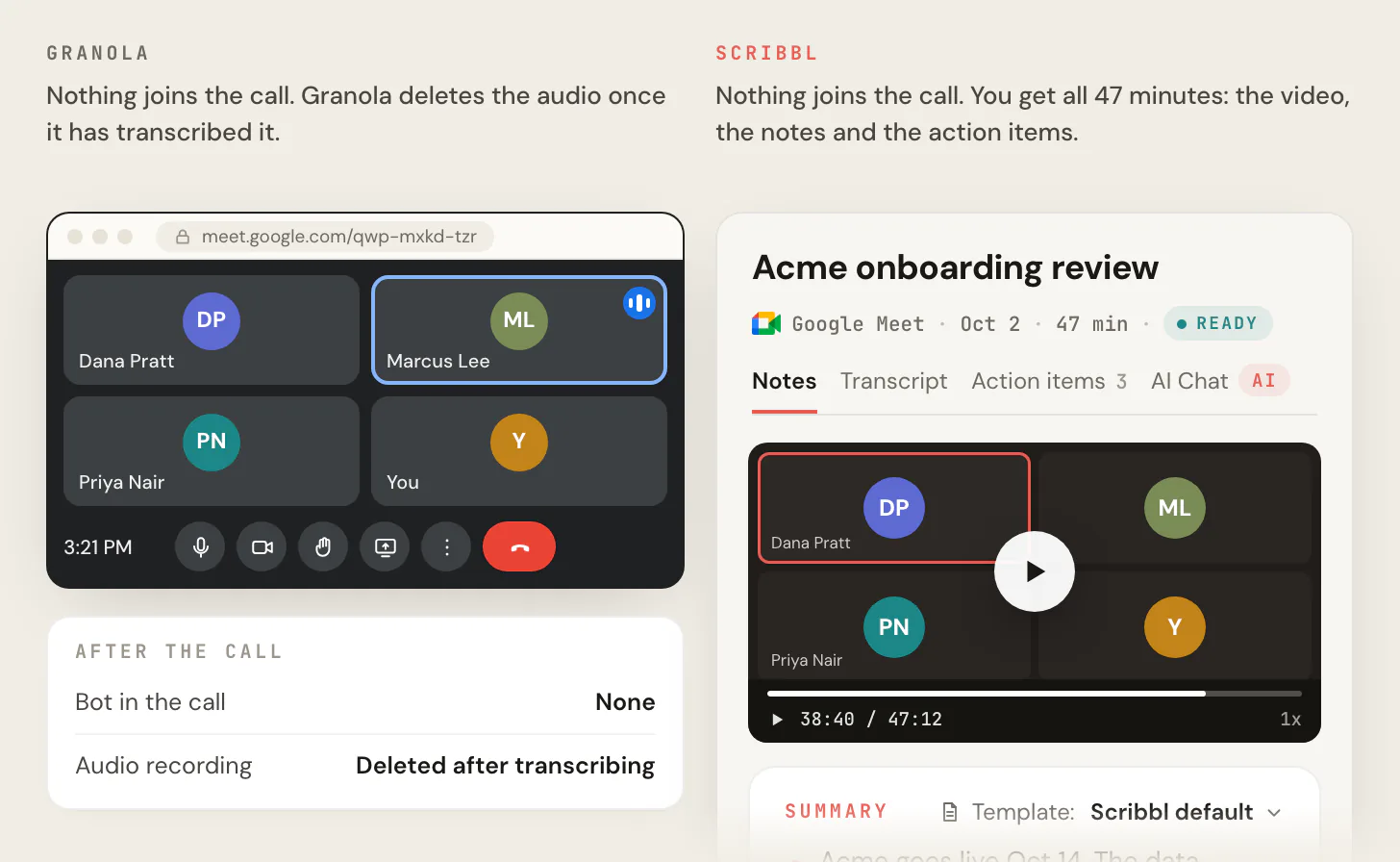
The free plan includes Google Meet, Zoom and Microsoft Teams, with 10 meetings a month. Start free.
Granola pricing
Granola has three plans, priced per user per month in US dollars, from granola.ai/pricing on October 23, 2026. The page shows monthly prices only. Scribbl is first for comparison. For what a team pays and how billing works, see Granola pricing.
| Feature | Scribbl | Granola Basic | Granola Business | Granola Enterprise |
|---|---|---|---|---|
| Price | Free plan; Pro $13 billed annually, or $20 monthly | $0 | $14 | $35 |
| Does anything join the call? | No | No | No | No |
| Video of the meeting | Every meeting, free plan included | No | No | No |
| Who takes the notes | Scribbl, with nothing to type | You type; AI fills in | You type; AI fills in | You type; AI fills in |
| Meeting history on the plan | Free plan: 10 meetings a month | Last 30 days visible | Unlimited | Unlimited |
| Follow-up after the call | Automations draft the email, log notes in HubSpot or Pipedrive, post to Slack or Teams | Slack | Notion, HubSpot, Attio, Affinity and Zapier | Business, plus admin controls |
Basic, $0. "Unlimited meeting notes for free," AI chat within and across meetings, shared folders, custom templates and the option to "Opt out of model training any time." The limit is history: Granola says to "Upgrade to view and work with notes older than 30 days." (One older Granola blog post says 14 days; the pricing page and homepage say 30.)
Business, $14. "Unlimited meeting notes and history," advanced AI models, integrations with Attio, Notion, HubSpot, Affinity and Zapier, MCP in your other apps and API access.
Enterprise, $35. SSO, org-wide auto-deletion periods, admin controls for sharing and API access, and opting out of model training for the whole team.
Is Granola safe?
Granola says it meets "SOC 2 Type 2 standards," stores notes in "our US-hosted AWS Virtual Private Cloud," and doesn't let OpenAI or Anthropic train on your data. Its own models are another matter: "By default on Free and Business plans, anonymised data may be used for Granola's own model improvements," and you can opt out in settings (security FAQ).
Granola is also the defendant in Chamberlain v. Granola, Inc., No. 3:26-cv-07926, a proposed class action filed July 30, 2026 in federal court in Northern California. It alleges Granola records other people in meetings without notice and uses that data to train its AI by default. These are allegations, and no court has ruled. For the details, see is Granola AI safe.
Who Granola is for
Granola is built for people who like to type their own notes in meetings and want AI to tidy them up afterward, and who don't need the recording: Granola's pricing page pitches Business at "individuals or small teams." For everyone who wants the meeting captured for them, with the video to go back to and the follow-up done, Scribbl is the better pick. For how Granola fits each meeting app and computer, see does Granola work with Zoom, Teams, Outlook and Windows.
Granola vs Scribbl: the better pick
Scribbl is an AI note taker for Google Meet, Zoom and Microsoft Teams, and for most people looking at Granola it's the better pick. Like Granola, nothing joins the call: a Chrome extension for Google Meet, and Scribbl Desktop for Mac (Apple silicon) and Windows for Zoom and Teams. Unlike Granola, you don't type during the call and nothing is thrown away: every meeting comes back with the video recording, a transcript with speaker names, AI notes and action items.
It also does the work after the call. Smart Collections sort your meetings by themselves. Automations do the follow-up when a meeting lands in a collection: they draft the follow-up email (copy it or open it in Gmail; it never sends by itself), log a note in HubSpot or Pipedrive, post to Slack or Microsoft Teams, save to Google Drive, Notion or Confluence, open an Asana, Monday, Linear or Jira ticket, or add a Google Sheet row. They ask before they change anything by default. On Pro, connect Scribbl to ChatGPT or Claude and ask about past meetings. Recordings are private by default, and Scribbl doesn't use your meetings to train AI for anyone other than you.
| Feature | Scribbl | Granola |
|---|---|---|
| Does anything join the call? | No | No |
| Video of the meeting | Yes, every meeting | No; it does not record or save audio or video |
| Who takes the notes | Scribbl captures the whole meeting; no typing | You type rough notes; its AI fills them in from the transcript |
| Transcript with speaker names | Yes | Speaker tags on desktop for Meet, Zoom and Teams; otherwise Me and Them |
| Free plan | 10 meetings a month on Google Meet, Zoom and Teams | Unlimited notes, but only the last 30 days visible |
| Follow-up after the call | Automations draft the email, log notes in HubSpot or Pipedrive, post to Slack or Teams, open tickets | Integrations beyond Slack start on Business |
| Your meetings used to train AI | Not for anyone other than you | Anonymized data may be, on Free and Business, unless you opt out |
| Paid plan | Pro, $13 per user billed annually, or $20 monthly | Business, $14 per user per month |

For more options side by side, see the best Granola alternatives.
The short version. Granola is a notepad: you type, its AI tidies up, and the audio is gone. Scribbl is automatic: nothing joins the call, and you keep the video, a transcript with speaker names, AI notes and action items for every meeting. The free plan includes Google Meet, Zoom and Microsoft Teams, with 10 meetings a month. Start free.
FAQ
What is Granola AI?
Granola is an AI notepad for meetings. It runs on Mac, Windows, iPhone and Android, transcribes the call from your device's audio with no bot joining, and combines the transcript with the notes you type into AI meeting notes. It doesn't record or save audio or video. Granola was founded in 2023 by Chris Pedregal and Sam Stephenson and raised a $125 million Series C at a $1.5 billion valuation in March 2026.
How does Granola work?
You open Granola on your computer during a Zoom, Google Meet, Teams or other call. It sends your microphone and system audio to its transcription provider while you type rough notes, and when the call ends it writes enhanced notes from the transcript, your notes and the calendar event. No bot joins the call, and Granola says it does not record or save audio or video at any point.
Is Granola AI free?
Yes. Granola's Basic plan is $0 per user per month with unlimited meeting notes, but you can only see the last 30 days of meeting history. Business is $14 per user per month and adds unlimited history, advanced integrations, MCP and API access. Enterprise is $35 per user per month. Granola's pricing page shows monthly prices only.
Does Granola record the meeting?
No. Granola says it does not record or save audio or video at any point during the call. It keeps the transcript and the notes you write. On the phone apps, audio is cached only while the meeting is transcribed. So there is no recording to play back if you want to check exactly what was said.
Is Granola safe?
Granola says it meets SOC 2 Type 2 standards and stores notes in a US-hosted AWS private cloud. On the Free and Business plans it may use anonymized data to improve its own models unless you opt out. It is also the defendant in Chamberlain v. Granola, a proposed class action filed July 30, 2026, which alleges it records people without notice. No court has ruled on those claims.
Is there an AI note taker like Granola that keeps the video?
Yes. Scribbl, which we make, works with nothing joining the call, like Granola, but keeps the video recording and does the note taking for you. Every Google Meet, Zoom and Microsoft Teams meeting comes back with the video, a transcript with speaker names, AI notes and action items. The free plan includes Google Meet, Zoom and Microsoft Teams, with 10 meetings a month. Start free.
Is Scribbl free, and will people see anything join the call?
Yes, Scribbl has a free plan, and no, nothing joins the call, so no extra name appears in the participant list, whether or not you are the host. The free plan includes Google Meet, Zoom and Microsoft Teams, with 10 meetings a month, and every meeting gets the video, a transcript with speaker names, AI notes and action items. Tell everyone you're recording. Start free.
Sources
Every Granola fact above was checked on these pages on October 23, 2026.
- Granola: homepage, pricing, security, integrations, Introducing Granola for Android
- Granola help docs: transcription, AI enhanced notes, speaker attribution, getting consent, security, privacy and data FAQs, MCP
- TechCrunch: Granola debuts an AI notepad for meetings (May 22, 2024), Series A (October 23, 2024), Series B (May 14, 2025), recipes (September 30, 2025), Series C (March 25, 2026)
- The lawsuit: Chamberlain v. Granola, Inc., No. 3:26-cv-07926 (N.D. Cal.), via CourtListener
- Scribbl: pricing
Try Scribbl
No bot, and you keep the video
Scribbl records, transcribes, and summarizes your Google Meet calls from your browser. No bot joins the call. Free forever for individuals.
Add to Chrome · It's free