Scribbl records your Google Meet, Zoom and Teams calls and writes the notes. No bot joins. Free for 10 meetings a month. Start free
How to Record Google Meet Audio Only (2026): 4 Ways, Free and Paid
Google Meet records video, not audio only. 4 ways to get Google Meet audio, free and paid, and how Scribbl gives you the transcript and notes with no bot.
Updated November 10, 2026
The short answer
Checked against Google's own help pages on October 19, 2026, and Apple's and Microsoft's screen recording pages on October 7, 2026
Google Meet has no audio-only recording: Meeting tools Record Start recording saves a video file
- What Record saves
- A video of the active speaker and anything presented, in the meeting organizer's Google Drive. There is no audio-only setting.
- Who can press it
- Google Workspace Business Standard or higher, or Google One with 2 TB or more, and only the host, co-hosts or people in the host's organization. Not free Gmail.
- Audio only anyway
- Record the call's sound on your own computer: Audacity with Windows WASAPI loopback on Windows, BlackHole with Audacity or OBS Studio on a Mac. Or download Meet's video and export just the sound.
- Want the words, not the file?
- Scribbl's Chrome extension records any Google Meet you join, with no host permission and nothing joining the call, and gives you the video, a transcript with speaker names and AI notes. Free for 10 meetings a month.
Try Scribbl
Get the words from every Google Meet
Scribbl records, transcribes, and summarizes your Google Meet calls from your browser. No bot joins the call. Free for 10 meetings a month, no credit card.
Add to Chrome · It's freeSince Meet keeps the sound inside a video, an audio-only file comes from one of two places: a recorder on your own computer that takes only the sound while the call runs, or a Meet recording you turn into a sound file afterward. Below are the steps for each on Windows and Mac, and what each one misses.
Can you record audio only in Google Meet?
No. Google's help page on recording describes one kind of recording: a video of the active speaker and anything presented, saved to the meeting organizer's Google Drive, in the Google Meet folder. There's no audio-only option in the Recording panel. The sound is always inside the video.
If your plan includes recording, these are Google's steps on a computer:
- Join the call in your browser.
- At the bottom right, click Meeting tools, then Record.
- Click Start recording, then Start in the pop-up. Everyone in the call gets a notification.
- To stop, click Meeting tools, Record, Stop recording, then Stop recording again. It also stops when everyone leaves, or after 8 hours.
On an Android phone, tap More, then Tools, then Record. iPhone and iPad have no Record button.
Who can record a Google Meet
Four things have to line up before the Record button shows up:
| What Google checks | What it needs |
|---|---|
| The plan | Google Workspace Business Standard or higher, Workspace Individual, or Google One with 2 TB or more. Free Gmail, Business Starter, Education Fundamentals and Education Standard can't record. |
| The admin | On Workspace, an admin has to turn on "Let people record their meetings". |
| Your role in the call | The host, a co-host, or someone in the host's organization when host controls are off. Guests from other companies can't, unless the host makes them co-host. |
| Your device | A computer or an Android device. Not iPhone or iPad. |
Source: Google Meet Help, Record a video meeting and Premium Meet features for Google Workspace, checked October 19, 2026. If the host's own account can't record, nobody in the meeting can. For every reason the button goes missing, see why you can't record a Google Meet, and for the full walkthrough with screenshots, see how to record a Google Meet.
How to record only the audio of a Google Meet on your computer
This works on free Gmail, as a guest, and when you can't press Record. There are two sounds to capture: the other people, which is the sound your computer plays (system audio), and you, which is your microphone. A sound recorder usually takes one input at a time, so each route below says which sides it gets.
On Windows: Audacity with Windows WASAPI loopback
Audacity is a free, open-source audio editor. Its Windows WASAPI setting can record whatever plays through your speakers or headset, as audio only.
- Install Audacity from its official site, audacityteam.org.
- In Audacity's Audio Setup toolbar, set Host to Windows WASAPI.
- Set the Recording Device to the speakers or headset Meet plays through, the entry with (loopback) in its name.
- Join the Meet call in your browser, then click Audacity's red Record button. Click Stop when the call ends.
- Choose File, then Export Audio, and save as MP3 or WAV.
What it misses: your own voice. The loopback device is your computer's output, and Audacity records one device at a time. To get both sides in one recording, use OBS Studio (free): its default Desktop Audio and Mic/Aux sources record the call and your microphone together. OBS saves a video file even with a blank scene, so export the sound afterward as in the next section.
On a Mac: BlackHole with Audacity, or OBS Studio
A Mac can't hand its system audio to a sound recorder on its own. BlackHole is a free, open-source virtual audio device that passes your Mac's sound to a recorder, and with Apple's Audio MIDI Setup you can add your microphone too.
- Install BlackHole 2ch from its developer, Existential Audio, and install Audacity.
- Open Audio MIDI Setup (in Applications, then Utilities). Click +, choose Create Multi-Output Device, and tick your headphones or speakers and BlackHole 2ch. You keep hearing the call while BlackHole gets a copy.
- Click + again, choose Create Aggregate Device, and tick BlackHole 2ch and your microphone. This one input holds both sides.
- In System Settings, then Sound, set the output to the Multi-Output Device.
- In Audacity, set the recording device to the Aggregate Device, with enough recording channels to include the microphone. Record the call, then File, Export Audio.
- After the call, set your Mac's sound output back to your speakers or headphones.
Limits: while the Multi-Output Device is your output, the Mac's volume keys don't change the volume, so set it in the call or in Audio MIDI Setup. Every sound your Mac plays is recorded, so mute music and notifications.
Rather not set up BlackHole? Recent versions of OBS Studio can capture macOS audio directly with a macOS Audio Capture source, plus your microphone, on macOS 13 or later. Like on Windows, it saves a video file you export the sound from.
Built-in screen recorders save video
| Your computer | Built-in recorder | What you get |
|---|---|---|
| Mac, macOS 27 or later | Press Shift-Command-5, click Options, choose Include System Audio, then Record | A video file with the other people's voices |
| Mac, earlier macOS | The same, but you can only choose a microphone | Your own voice; the other people come out faint or not at all |
| Windows 11 | Snipping Tool, Record, New, or Windows logo key + Shift + R | A video file; Microsoft's guide doesn't say whether computer sound is captured |
Sources: Apple, How to record the screen on Mac (published September 14, 2026), and Microsoft, Use Snipping Tool, checked October 7, 2026.
Whichever route you pick, make a one-minute test call first and play it back to hear both sides. None of these gives you a transcript, speaker names or notes.
How to get the audio from a Google Meet recording
If someone already recorded the meeting with Google's Record button, you can turn that video into an audio file.
- Find the recording. It's in the meeting organizer's Google Drive, in the Google Meet folder, with a sub-folder for each meeting. The organizer and the person who started the recording also get an email with the link, and the link is added to the Google Calendar event. More in where Google Meet recordings go.
- Download it. In Drive, select the file, click More, then Download. Drive may show "Still processing" for a while, but you can download it and play it on your computer right away.
- Export only the sound. Open the video in an audio editor or video converter you already trust and export the sound as MP3 or M4A. With the free ffmpeg command-line tool it's one line:
ffmpeg -i recording.mp4 -vn recording.mp3(the-vnpart drops the video).
Can't download it? Guests from other companies don't get access automatically, so ask the organizer to share the file. Since April 30, 2026, people in the organizer's organization with view or comment access to new recordings can download them by default on most business and education plans, but the owner can turn that off for a recording.
Careful with online converter sites. Uploading the file means sending everyone's voices to someone else's server. A tool on your own computer avoids that.
Want the words from it? A Google Meet recording has no transcript: Meet only writes one if someone pressed Transcribe during the call. To transcribe a downloaded file for free, OpenAI's open-source Whisper runs on your own computer and takes audio and video files (you need Python and ffmpeg). More options in free transcription software.
If you want the words, record the meeting with Scribbl
Ask why you want audio only. Usually it's one of three things: a smaller file than an hour of video, a way to find what someone said, or something to turn into notes. A sound file does the first. It doesn't do the other two: nobody plays back an hour of audio to find one decision.
Scribbl is a Chrome extension that records Google Meet without Google's Record button. Nothing joins the call, nobody has to admit anything, and you don't need the host's permission, so it works on free Gmail and as a guest in another company's meeting.
- Add the Scribbl Chrome extension to Chrome and sign in with Google.
- Join your Google Meet call in Chrome as usual. Scribbl shows Live at the top left of the call, visible only to you.
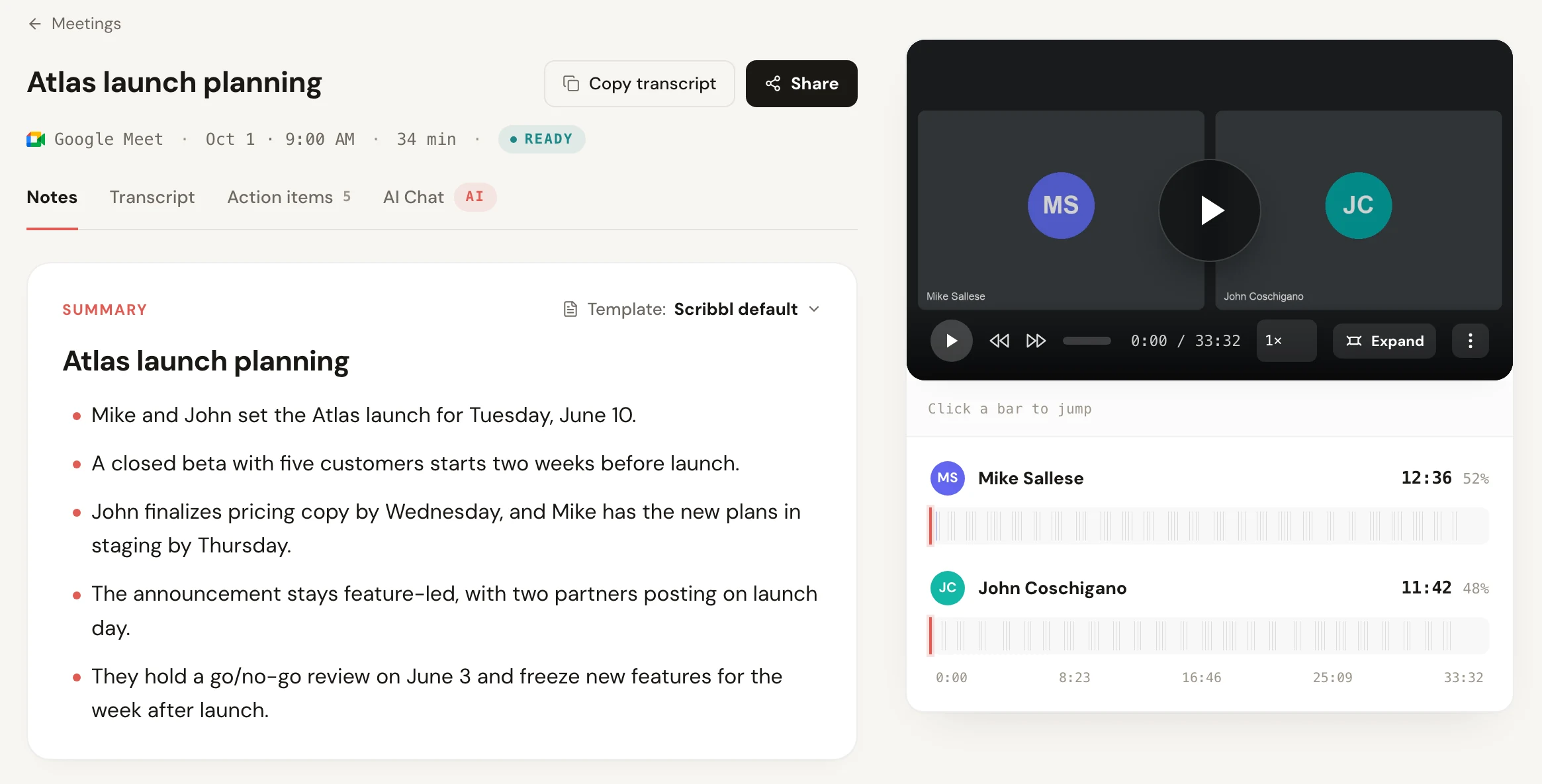
- When the call ends, open the meeting in Scribbl: the video, a transcript with speaker names, AI notes and the action items are there.
The transcript is the part you'll use: search it for the line someone said, copy a quote, or read the AI notes instead of replaying the call. The video is there when you need to see a screen that was shared.
The free plan includes Google Meet, Zoom and Teams, with 10 meetings a month and no limit on meeting length. Scribbl Pro is $13 per user per month billed annually, or $20 monthly, for unlimited meetings. Zoom and Teams use Scribbl Desktop on Mac or Windows.
Recording Google Meet audio with a phone voice recorder
The oldest trick is to set a phone running a voice recorder app next to your computer's speaker. It gives you an audio file directly, but it's the weakest way:
- Your voice drowns out everyone else. You're right next to the phone; the other people come through a small speaker across the desk.
- It records the room. Typing, notifications, a fan, echo off the walls.
- Headphones break it. If you wear headphones so the call doesn't echo, the phone hears only you.
- No names. You get one mixed track with no idea who said what.
Joining Meet on the phone itself? A phone's screen recorder doesn't always capture the other people's audio during a call. Apple notes that some apps might not allow recording audio or video. Test it on a short call first.
Every way to get Google Meet audio, compared
| Way | Who can use it | What you get | A transcript? | Cost |
|---|---|---|---|---|
| Scribbl (our pick) | Anyone in the call, host or not, guests included | The video, a transcript with speaker names, AI notes and action items | Yes, every meeting | Free for 10 meetings a month; Pro $13 per user per month billed annually |
| Google Meet Record, then export the sound | Paid plans, with the host's and admin's permission | A video in the organizer's Drive, then an audio file you make | No, unless someone also pressed Transcribe | Business Standard or higher, or Google One 2 TB |
| Audacity loopback (Windows) or BlackHole with Audacity (Mac) | Anyone on that computer | An audio file; your voice too only with BlackHole's Aggregate Device or OBS Studio | No | Free |
| Built-in screen recorder | Anyone on that computer | A video file; check that both sides were recorded | No | Free |
| Phone voice recorder held to the speaker | Anyone | One audio track, with the room and your voice loudest | No | Free |
Google facts checked October 19, 2026; Apple and Microsoft October 7, 2026; Scribbl pricing as of October 2026.
Google's Record button notifies everyone in the call. Audacity, OBS Studio, a screen recorder or a phone don't trigger that notice.
Tell people you're recording
Whatever you record with, tell everyone at the start of the call and give them the chance to say no. Recording laws differ by place: some let one person in the conversation consent, and others need everyone's consent. This isn't legal advice. Something like "I'd like to record this so I have accurate notes, is everyone OK with that?" covers it. More in do you have to tell people you're recording.
What to do next
- You want a Google Meet transcript or notes: that's the Google Meet recording transcript guide, or install Scribbl and get both after every call.
- You're not the host: see how to record a meeting if you are not the host.
- You want free options on Zoom and Teams too: see the best free meeting recorder plans.
Google Meet audio recording FAQ
Can I record only audio in Google Meet?
No. Google Meet's Record button saves a video of the active speaker and anything presented, in the meeting organizer's Google Drive, and Google lists no audio-only setting. To end up with audio only, record your computer's sound during the call with Audacity (Windows WASAPI loopback) or BlackHole on a Mac, or download the video and export its sound as MP3.
How do I get the audio from a Google Meet recording?
Open the recording in the organizer's Google Drive, select the file, click More, then Download. Then open the video in an audio editor or converter you trust and export only the sound as MP3 or M4A. With the free ffmpeg tool, one command does it: ffmpeg -i recording.mp4 -vn recording.mp3.
How do I record Google Meet audio for free?
Google's Record button isn't free: it needs Google Workspace Business Standard or higher, or Google One with 2 TB or more. For free, record your computer's sound with Audacity's Windows WASAPI loopback on Windows or BlackHole with Audacity on a Mac, or use Scribbl's Chrome extension, which records 10 meetings a month free with the video, a transcript with speaker names and AI notes, and nothing joining the call.
Can I record Google Meet audio if I'm not the host?
With Google's recorder, only if the host's account can record and you're a co-host, or you're in the host's organization and host controls are off. Scribbl's Chrome extension works for any participant, host or not, including guests in another company's meeting.
Can I record Google Meet audio on my phone?
Not with Google's recorder on an iPhone or iPad: Google says recording works only on a computer or an Android device. A phone screen recorder doesn't always capture the other people's audio during a call, and holding a voice recorder to the speaker picks up the room and your own voice louder than everyone else. Test any phone method on a short call first.
Does Google Meet tell others when I record audio?
Only for Google's own Record button: everyone in the call gets a notification when it starts and stops. Audacity, OBS Studio, a screen recorder, a voice recorder or another tool on your computer doesn't trigger that notice.
How do I get a transcript of a Google Meet instead of audio?
Google's Transcribe button saves a Google Doc in the organizer's Drive, on some paid plans only, and someone has to start it during the call. Scribbl gives you a transcript with speaker names of every Google Meet you join, with the video and AI notes, on free Gmail or as a guest.
How we checked
Google facts were checked on Google's own help pages on October 19, 2026; Apple, Microsoft and OpenAI facts on October 7, 2026. The Audacity, BlackHole and OBS Studio steps follow each project's own documentation; menu names can change between versions. We haven't run a test for this page.
- Google Meet Help, Record a video meeting (steps, who can record, what the video includes, where it's saved, downloading, 8-hour limit, notifications, devices)
- Google Meet Help, Premium Meet features for Google Workspace (which plans include recording and transcripts)
- Google Meet Help, Troubleshoot recording issues in meetings ("Still processing")
- Google Meet Help, Use Transcripts with Google Meet
- Google Workspace Updates, Upcoming change to default setting for downloading Google Meet recordings, April 1, 2026
- Apple, How to record the screen on Mac, published September 14, 2026
- Apple Support, Record the screen on your iPhone
- Microsoft Support, Use Snipping Tool to capture screenshots
- Audacity Support, recording computer playback on Windows (audacityteam.org)
- Existential Audio, BlackHole on GitHub (open source)
- OBS Studio, help and knowledge base (obsproject.com)
- OpenAI, Whisper on GitHub (open source, MIT License), as described in our free transcription software guide
- Scribbl, pricing, as of October 2026
Try Scribbl
Get the words from every Google Meet
Scribbl records, transcribes, and summarizes your Google Meet calls from your browser. No bot joins the call. Free for 10 meetings a month, no credit card.
Add to Chrome · It's freeTry Scribbl
Get the words from every Google Meet
Scribbl records, transcribes, and summarizes your Google Meet calls from your browser. No bot joins the call. Free for 10 meetings a month, no credit card.
 Add to Chrome · It's free