What Is Fathom AI? How the Fathom Notetaker Works (2026)
What is Fathom AI? An AI note taker for Zoom, Google Meet and Teams, now owned by Superhuman. How its notetaker joins calls, bot-free on Mac, and its prices.
Updated October 29, 2026
The short answer
Checked on Fathom's own pages, its help center and the Superhuman and TechCrunch announcements, October 23, 2026
Fathom AI is an AI note taker that records, transcribes and summarizes Zoom, Google Meet and Microsoft Teams calls, mostly by sending a bot called the Fathom Notetaker into the call.
- Who makes it
- Fathom, founded in 2020 by Richard White. Superhuman announced it had acquired Fathom on September 14, 2026.
- How it joins
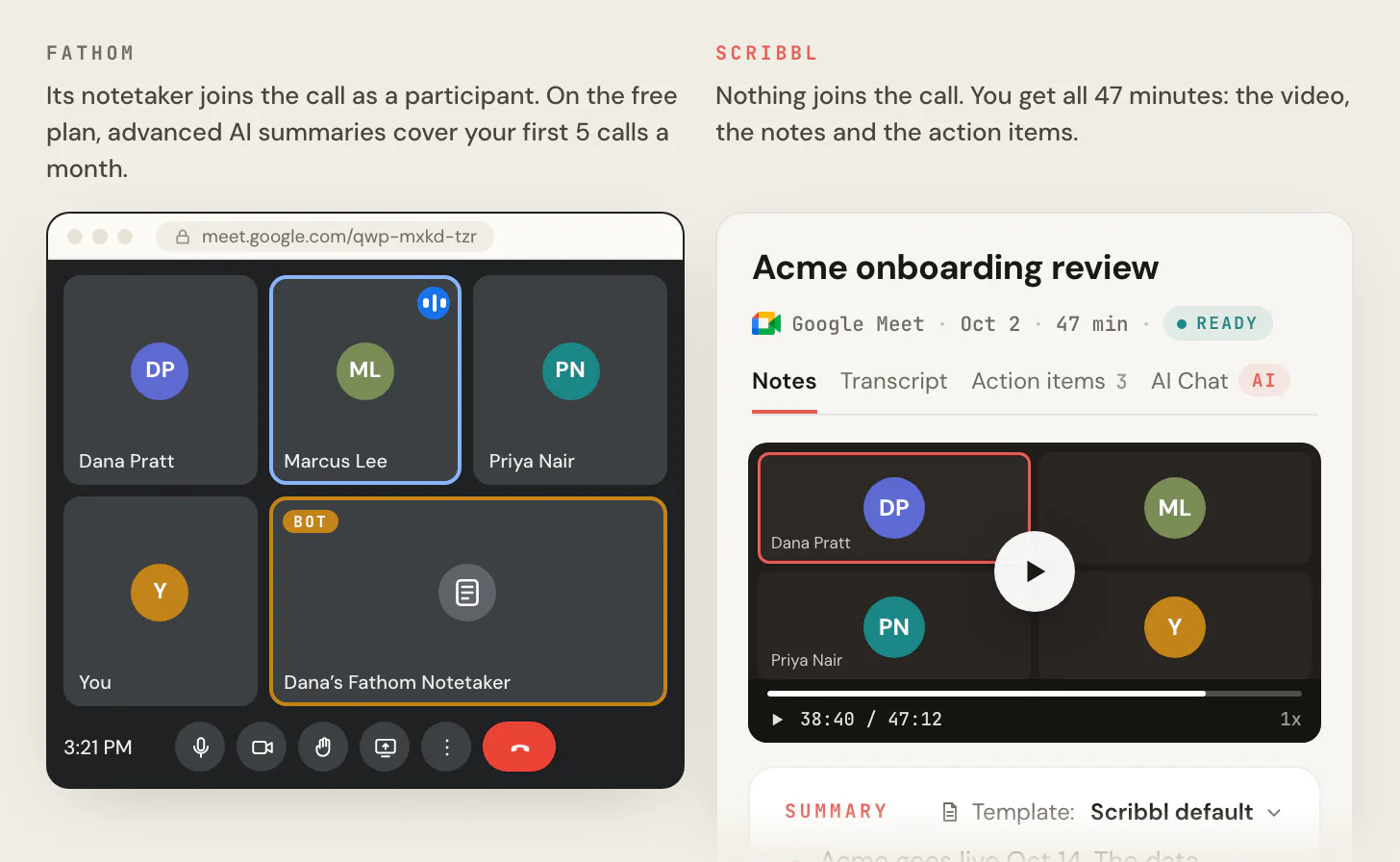
- A bot named NAME's Fathom Notetaker joins the call as a participant. A bot-free mode exists only in the Mac app (macOS 14.2 or later), and its video mode still sends the bot.
- Price
- Free is $0 with advanced AI summaries on your first 5 calls a month. Premium is $16 a month billed annually or $20 monthly; Team $15 or $19 per user; Business $25 or $34 per user.
- With no bot
- Scribbl records Google Meet, Zoom and Teams with nothing joining the call, on Mac or Windows. Every meeting gets the video, a transcript with speaker names, AI notes and action items.
Fathom AI is an AI note taker that records, transcribes and summarizes Zoom, Google Meet and Microsoft Teams calls, mostly by sending a bot called the Fathom Notetaker into the call, and since September 14, 2026 it belongs to Superhuman. If you want the same video, transcript and AI notes with nothing joining the call on all three apps, Scribbl is the pick, and the free plan includes Google Meet, Zoom and Microsoft Teams: Start free.
Below is what Fathom is, how its notetaker gets into your calls, what its bot-free Mac mode does and doesn't do, what each plan costs, and why Scribbl is the better pick for most people asking. Every Fathom fact comes from Fathom's own pages, its help center and the Superhuman and TechCrunch announcements, checked on October 23, 2026. We make Scribbl. We compared Fathom from its own pages; we didn't create a Fathom account.
What is Fathom AI?
Fathom calls itself "the AI meeting partner that captures what matters, connects conversations to action, and helps teams move work forward." In practice it does four things after a Zoom, Google Meet or Microsoft Teams call:
- Records the call, with video when its bot is in the meeting.
- Transcribes it, in 38 languages, according to Fathom's help center.
- Summarizes it with AI, and on paid plans pulls out action items.
- Sends notes to your other tools, such as HubSpot, Close, Slack, Notion and Asana, and lets Claude and ChatGPT read your Fathom meetings.
Fathom's homepage says it's "Used at 500K+ companies" and that it is "Free for individuals." It also has an iPhone app for conversations away from your computer.
The company. Richard White founded Fathom in 2020, and it went through Y Combinator's Winter 2021 batch. On September 14, 2026, Superhuman announced on its blog that it had acquired Fathom, and Fathom's site now carries the line "Fathom is now part of Superhuman." TechCrunch reported the same day that Fathom had raised over $30 million and had over 400,000 monthly active users, and that the terms were not disclosed. Neither company has said what happens to Fathom's prices or free plan. More on that in Fathom alternatives after the Superhuman deal.
Not the unit. If you searched "what is fathom" for the other meaning: a fathom is a unit of length equal to six feet (1.83 meters), used mostly to measure the depth of water, per Merriam-Webster. "To fathom" also means to understand something. The rest of this page is about Fathom the AI note taker.
How the Fathom notetaker joins your calls
The Fathom Notetaker is a bot. It joins your Zoom, Google Meet or Microsoft Teams call as a participant, records the audio and video, and leaves when the call ends. Here's how it works, from Fathom's help center:
- You connect your calendar. Fathom says to "Connect your Google or Microsoft calendar so we can automatically join your meetings."
- You pick which meetings it joins. The auto-record setting has four choices: All Meetings, External Meetings, Internal Meetings or No Meetings. Separate switches cover unscheduled Zoom and Google Meet calls.
- The bot joins under your name. By default it appears as "NAME's Fathom Notetaker," with your name in it. Renaming it is a paid feature.
- You have to be there. "Fathom can only record a Zoom, Microsoft Teams, or Google Meet call if you are also present on the call." For Teams, it only records meetings that are scheduled and on your calendar.
On Google Meet, Fathom also needs its Chrome extension installed and turned on. Everyone in the call sees the bot in the participant list, and on the free plan you can't turn off Fathom's in-meeting banner. For each meeting app in detail, see does Fathom work with Google Meet, Teams and Zoom.
Can Fathom record without a bot?
Yes, but only on a Mac, and not with video on every app. Fathom's newer desktop app, which Fathom calls Fathom 3.0, adds what it calls "the new bot-free experience." Fathom says "Right now, Fathom 3.0+ is only available for Mac users," it needs macOS 14.2 or later, and it's rolling out in stages. You pick one of four capture modes, in Fathom's words:
- Capture Off.
- Transcript Only (bot-free): "No recording is saved."
- Audio Only (bot-free): "Audio is captured locally on your device, no video."
- Audio & Video (Bot): "A bot joins the meeting."
So the mode that gives you the video still sends the bot, with one exception Fathom has started adding: bot-free video for Zoom on Mac, which Fathom's What's New page calls a "limited beta." Bot-free video for Google Meet through the Chrome extension is coming "in the coming weeks," per Fathom. On Windows, Fathom says "bot-free recording is currently in a limited Microsoft Teams alpha," so Windows users get the bot. Fathom's pricing page labels the whole bot-free option "Beta feature for Mac."
When Fathom records without the bot, it can post a notice in the meeting chat: "Fathom is recording and taking notes, and you consent by continuing." Whatever tool you use, tell everyone you're recording.
Do it with Scribbl: no bot on Google Meet, Zoom or Teams
If the reason you're reading about Fathom is the bot, Scribbl does the same job with nothing joining the call, on Mac and Windows, with the video:
- Add Scribbl. The Chrome extension for Google Meet, or Scribbl Desktop for Mac (Apple silicon) and Windows for Zoom and Microsoft Teams.
- Join your meeting as usual, as host or guest. Nothing joins the call and no extra name appears in the participant list. Tell everyone you're recording.
- Open the notes when it ends. You get the video recording, a transcript with speaker names, AI notes and action items.
The free plan includes Google Meet, Zoom and Microsoft Teams, with 10 meetings a month. Start free.
Fathom plans and prices
Fathom has five plans. Prices are per user per month in US dollars, from fathom.ai/pricing on October 23, 2026, with Scribbl first for comparison. For every limit and what a team pays, see Fathom pricing.
| Feature | Scribbl | Fathom Free | Fathom Premium | Fathom Team | Fathom Business |
|---|---|---|---|---|---|
| Price, billed annually | Free plan; Pro $13 | $0 | $16 | $15 | $25 |
| Price, billed monthly | Free plan; Pro $20 | $0 | $20 | $19 | $34 |
| Minimum users | None | None | None | 2 | 2 |
| Does anything join the call? | No, on Google Meet, Zoom and Teams, on Mac and Windows | The bot, except bot-free modes on Mac | The bot, except bot-free modes on Mac | The bot, except bot-free modes on Mac | The bot, except bot-free modes on Mac |
| AI notes | Every meeting | Advanced summaries on the first 5 calls a month | Advanced summaries | Advanced summaries | Advanced and custom summaries |
| AI action items | Yes | No | Yes | Yes | Yes |
| Follow-up after the call | Automations draft the email, log notes in HubSpot or Pipedrive, post to Slack or Teams | No AI follow-up emails | AI action items | AI action items | CRM field sync after meetings |
What Free gives you. The Free card lists "Unlimited recordings + transcriptions," "Choice of bot-free (in beta) or bot capture," "Instant AI call summaries" and "Clips, playlists + search across calls." The catch is in the help center: "Advanced summaries for your first 5 calls each month (after that, only the General/Enhanced template will be available)." AI action items, AI follow-up emails, a custom bot name and turning off the in-meeting banner aren't on Free, and CRM sync is limited to 3 users per domain.
What paid plans add. Premium adds advanced summaries on every call, AI action items, the meeting assistant and a custom bot name. Team adds search across the team's calls, playlists, comments and folders, for 2 or more users. Business adds CRM field sync, deal summaries and coaching scorecards. Enterprise adds SSO and SCIM, security controls and a dedicated success manager, priced by sales. Every paid plan shows a "90 day guarantee."
Is Fathom safe?
Fathom's help center says "Fathom is HIPAA, SOC2 Type II, and GDPR-compliant," that its AI providers (Anthropic, OpenAI and Google) are not allowed to train on your data, and that "Fathom uses de-identified customer data to improve the accuracy of our proprietary AI models," which you can opt out of. Its data is stored in the United States. The bigger question for most people is the bot: it's visible to everyone, it joins by calendar setting, and some companies block meeting bots. For the full picture, see is Fathom safe.
Fathom vs Scribbl: the better pick
Scribbl is an AI note taker for Google Meet, Zoom and Microsoft Teams, and for most people looking at Fathom it's the better pick. Fathom needs its bot for video on most calls and is bot-free only on a Mac. With Scribbl, nothing joins the call on any of the three apps, on Mac or Windows: a Chrome extension for Google Meet, and Scribbl Desktop for Mac (Apple silicon) and Windows for Zoom and Teams. Every meeting comes back with the video recording, a transcript with speaker names, AI notes and action items, in one account.
It also does the work after the call. Smart Collections sort your meetings by themselves. Automations do the follow-up when a meeting lands in a collection: they draft the follow-up email (copy it or open it in Gmail; it never sends by itself), log a note in HubSpot or Pipedrive, post to Slack or Microsoft Teams, save to Google Drive, Notion or Confluence, open an Asana, Monday, Linear or Jira ticket, or add a Google Sheet row. They ask before they change anything by default. On Pro, connect Scribbl to ChatGPT or Claude and ask about past meetings. Recordings are private by default, and Scribbl doesn't use your meetings to train AI for anyone other than you.
| Feature | Scribbl | Fathom |
|---|---|---|
| Does anything join the call? | No, on Google Meet, Zoom and Teams | The Fathom Notetaker bot joins as a participant; bot-free modes on Mac only |
| Mac and Windows with no bot | Yes, Scribbl Desktop for Zoom and Teams; Chrome extension for Google Meet | Mac only; Windows is a limited Teams alpha |
| Video of the meeting | Every meeting, free plan included | Through the bot; bot-free video for Zoom on Mac is a limited beta |
| AI notes and action items on the free plan | Every meeting | Advanced summaries on the first 5 calls a month; no AI action items |
| Free plan | 10 meetings a month on Google Meet, Zoom and Teams | Unlimited recordings, with summaries limited as above |
| Follow-up after the call | Automations draft the email, log notes in HubSpot or Pipedrive, post to Slack or Teams, open tickets | AI action items on paid plans; CRM field sync on Business |
| Your meetings used to train AI | Not for anyone other than you | De-identified data improves Fathom’s own models unless you opt out |
| Paid plan | Pro, $13 per user billed annually, or $20 monthly | Premium, $16 or $20; Team, $15 or $19 per user, 2 users minimum |

The short version. Fathom is a note taker whose bot joins your calls, now owned by Superhuman, with bot-free recording only on a Mac. Scribbl gives you the video, a transcript with speaker names, AI notes and action items on every meeting, with nothing joining the call on Google Meet, Zoom or Teams. The free plan includes Google Meet, Zoom and Microsoft Teams, with 10 meetings a month. Start free.
FAQ
What is Fathom AI?
Fathom is an AI note taker that records, transcribes and summarizes Zoom, Google Meet and Microsoft Teams calls. It was founded in 2020 by Richard White, and on September 14, 2026 Superhuman announced that it had acquired Fathom. Most Fathom recordings are made by a bot called the Fathom Notetaker that joins the call as a participant; a bot-free mode exists only in its Mac app.
What is the Fathom notetaker?
The Fathom Notetaker is the bot Fathom sends into your Zoom, Google Meet or Microsoft Teams call to record it. By default it shows up as NAME's Fathom Notetaker, with your name in it, and it joins the meetings on your connected Google or Microsoft calendar based on your auto-record setting. Fathom only records a call if you are on it too.
Can Fathom record without a bot?
Only on a Mac. Fathom's newer Mac app, which Fathom calls Fathom 3.0, needs macOS 14.2 or later and has two bot-free modes: Transcript Only, where no recording is saved, and Audio Only, with no video. Its Audio and Video mode sends the bot. Fathom says Windows bot-free recording is a limited Microsoft Teams alpha, and its pricing page marks bot-free as a beta feature for Mac.
Is Fathom free?
Yes. Fathom's Free plan costs $0 and includes unlimited recordings and transcriptions, but advanced AI summaries cover only your first 5 calls each month; after that only the General template is available. AI action items and AI follow-up emails are not on Free. Premium is $16 per month billed annually or $20 monthly, Team is $15 or $19 per user with a 2-user minimum, and Business is $25 or $34 per user.
Who owns Fathom?
Superhuman. On September 14, 2026, Superhuman announced on its blog that it had acquired Fathom, and Fathom's site now says Fathom is part of Superhuman. TechCrunch reported that Fathom had raised over $30 million and the terms were not disclosed. Richard White founded Fathom in 2020, and it went through Y Combinator in Winter 2021.
Is there a note taker like Fathom with no bot on Windows and Teams?
Yes. Scribbl, which we make, records Google Meet, Zoom and Microsoft Teams with nothing joining the call: a Chrome extension for Google Meet, and Scribbl Desktop for Mac (Apple silicon) and Windows for Zoom and Teams. Every meeting comes back with the video recording, a transcript with speaker names, AI notes and action items. The free plan includes Google Meet, Zoom and Microsoft Teams, with 10 meetings a month. Start free.
Is Scribbl free, and will people see anything join the call?
Yes, Scribbl has a free plan, and no, nothing joins the call, so no extra name appears in the participant list, whether or not you are the host. The free plan includes Google Meet, Zoom and Microsoft Teams, with 10 meetings a month, and every meeting gets the video, a transcript with speaker names, AI notes and action items. Tell everyone you're recording. Start free.
Sources
Every Fathom fact above was checked on these pages on October 23, 2026.
- Fathom: homepage, about, pricing, What's New
- Fathom help center, how it joins: getting started, settings and auto-record, bot name, Can the Fathom Notetaker join my calls without me?, Microsoft Teams, Google Meet troubleshooting
- Fathom help center, bot-free: How to Upgrade to Fathom 3.0+, bot-free video, supported devices
- Fathom help center, plans and data: Free plan, languages, security and privacy, iPhone app
- The acquisition: Superhuman acquires Fathom (Superhuman, September 14, 2026), TechCrunch (September 14, 2026), Y Combinator company page
- The unit: Merriam-Webster, fathom
- Scribbl: pricing
Try Scribbl
Same notes as Fathom, no bot in the call
Scribbl records, transcribes, and summarizes your Google Meet calls from your browser. No bot joins the call. Free forever for individuals.
Add to Chrome · It's free