AI Productivity Tools (2026): 28 Best by Job, With Free Plans and Prices
The best AI productivity tools for 2026, grouped by job: writing, research, meetings, scheduling, email, tasks. Free plans and prices from each tool's own site.
Updated October 29, 2026
The short answer
Prices from each company's own pricing page, October 7, 2026
Start with the one job that takes most of your week: most of these tools have a free plan, and most paid plans start between about $5 and $20 per person a month.
- Writing and questions
- ChatGPT (free; Plus $20 a month) or Claude (free; Pro $17 a month billed annually). Already work in Gmail or Word? Gemini or Microsoft Copilot.
- Research
- Perplexity for answers with sources; Gemini Notebook (formerly NotebookLM) for questions about your own documents.
- Focus and scheduling
- Floviu (free; Pro $9.99 a month or $69.99 a year) blocks distracting apps during focus sessions. Reclaim (free Lite plan) or Motion (no free plan) for scheduling.
- Email, tasks, apps
- Superhuman Mail ($33 a month billed annually) or Spark (free; Plus $99 a year). Todoist, Asana or Notion for tasks. Zapier (free for 100 tasks a month) to connect apps.
- Meetings
- Scribbl (we make it): the video, a transcript with speaker names, AI notes and action items for every Google Meet, Zoom and Teams call, with nothing joining the call. Free for 10 meetings a month.
The best AI productivity tools in 2026 are ChatGPT or Claude for writing and questions, Perplexity for research, Wispr Flow for dictation, Scribbl for meetings, Floviu for focus, Reclaim or Motion for scheduling, Superhuman Mail or Spark for email, Todoist, Asana or Notion for tasks, and Zapier to connect your apps. Most have a free plan, and most paid plans start between about $5 and $20 per person a month, so start with the one job that takes most of your week.
Below are 28 tools in 12 groups, one group per job. For each one: what it does, what the free plan gives you, and what the paid plan costs, all taken from the company's own pricing page on October 7, 2026 and linked. We make Scribbl, an AI note taker, and it's our pick for meetings: the meetings section says why.
The best AI productivity tools in 2026, at a glance
| Tool | Job | Free plan | Paid plan from | What it's for |
|---|---|---|---|---|
| Scribbl (our meeting pick) | Meetings | Yes, 10 meetings a month | $13 a month billed annually (Pro) | Video, transcript, AI notes and action items, nothing joins the call, follow-up done by Automations |
| Floviu | Focus | Yes, focus timer and app blocking during focus sessions | $9.99 a month, or $69.99 a year (Pro) | Blocking distractions and building focus habits |
| ChatGPT | Assistant | Yes | $8 a month (Go) | Writing, questions, analysis |
| Claude | Assistant | Yes | $17 a month billed annually (Pro) | Writing, files, code |
| Gemini | Assistant | Yes | $4.99 a month (Google AI Plus) | Gmail, Docs and Drive users |
| Microsoft Copilot | Assistant | Yes (Copilot app) | $9.99 a month (Microsoft 365 Personal) | Word, Excel, PowerPoint, Outlook |
| Perplexity | Research | Yes | $17 a month billed annually (Pro) | Answers with cited sources |
| Gemini Notebook | Research | Yes, 50 sources per notebook | $4.99 a month (Google AI Plus) | Questions about your own documents |
| Grammarly | Writing | Yes, 100 AI prompts a month | $12 a month (Pro) | Fixing and rewriting text anywhere |
| Wispr Flow | Dictation | Yes, 2,000 words a week on desktop | $12 a month billed annually (Pro) | Typing by voice in any app |
| Granola | Meetings | Yes, last 30 days of notes | $14 a month, billed monthly (Business) | Notes with no bot and no recording |
| Otter | Meetings | Yes, 300 minutes a month | $8.33 a month billed annually (Pro) | Live transcripts |
| Fathom | Meetings | Yes, unlimited recordings | $16 a month billed annually (Premium) | The biggest free plan |
| Fireflies | Meetings | Yes, 400 minutes of storage per team | $10 a month billed annually (Pro) | Transcripts in 100+ languages |
| Read AI | Meetings | Yes, 5 meetings a month | $15 a month billed annually (Pro) | Summaries across meetings, email and messages |
| Reclaim | Scheduling | Yes (Lite) | $10 a seat billed annually (Starter) | Time for tasks, habits and focus |
| Motion | Scheduling and projects | No (free trial) | $19 a seat billed annually (Teams); $35 for one person | Plans your tasks onto your calendar |
| Superhuman Mail | No | $33 a month billed annually (Business) | People who live in their inbox | |
| Spark | Yes | $99 a year (Plus) | AI email at a lower price | |
| Todoist | Tasks | Yes, 5 personal projects | $5 a month billed yearly (Pro) | Your own to-do list |
| Asana | Projects | Yes, 2 users | $10.99 a user billed annually (Starter) | Team projects |
| Notion | Docs and projects | Yes, with a trial of Notion AI | $20 a member billed yearly for Notion AI (Business) | Docs, wikis and projects in one place |
| Zapier | Automation | Yes, 100 tasks a month | $19.99 a month billed yearly (Professional) | Connecting apps |
| Gamma | Presentations | Yes, 10 slides per prompt | $9 a month billed annually (Plus) | Slides from a prompt |
| Canva | Design | Yes | $144 a year (Pro) | Graphics, social posts, slides |
| Descript | Video and audio editing | Yes, 60 minutes a month | $16 a month billed annually (Hobbyist) | Editing recordings |
| Cursor | Coding | Yes (Hobby) | $20 a month (Pro) | An AI code editor |
| GitHub Copilot | Coding | Yes, 2,000 completions a month | $10 a month (Pro) | Code suggestions in your editor |
Prices are per person per month in US dollars before tax, from each company's pricing page on October 7, 2026, unless the row says otherwise. "Billed annually" means you pay for the year up front; most of these cost more month to month, and each entry below gives both prices where the company shows them.
What are AI productivity tools?
AI productivity tools are apps that use AI to do part of a task for you: drafting and fixing text, answering questions with sources, taking meeting notes, fitting tasks into your calendar, sorting email or connecting your apps. Most work alongside the apps you already use, and most have a free plan.
They fall into two kinds. General assistants (ChatGPT, Claude, Gemini, Copilot) can help with almost anything, but only when you open them and ask. Tools for one job (a note taker, an AI calendar, an email app) do that job every day without being asked. Most people get the most from one assistant plus one or two tools for the jobs that take the most hours, which is why the rest of this page is grouped by job.
AI assistants for writing and questions
These four do the widest range of work: drafts, rewrites, summaries, questions about a file, analysis of a spreadsheet. All four have a free plan.
ChatGPT
OpenAI's assistant for writing, questions, analysis, images and voice.
- Free plan: unlimited everyday chats, with limited file uploads, image creation and deep research.
- Paid: Go is $8 a month (OpenAI says this plan may include ads), Plus is $20 a month and Pro starts at $100. Business is $20 per user per month billed annually for 2 or more users, or $25 monthly.
- Pick it if: you want one assistant that covers most jobs.
Source: ChatGPT pricing, October 7, 2026.
Claude
Anthropic's assistant for writing, research, files and code.
- Free plan: chat on the web, desktop and phone, search the web, create files and run code.
- Paid: Pro is $17 a month billed annually ($200 a year) or $20 monthly. Max starts at $100 a month. Team is $20 per seat per month billed annually, or $25 monthly.
- Pick it if: your work is long documents, careful writing or code.
Source: Claude pricing, October 7, 2026.
Gemini
Google's assistant, built into the Google apps on paid plans.
- Free plan: the Gemini app with Deep Research, Gemini Live, image creation and 15 GB of storage.
- Paid: Google AI Plus is $4.99 a month and adds Gemini in Gmail, twice the usage of the free plan and 400 GB of storage. Google AI Pro is $19.99 a month and adds Gemini in Docs and 5 TB. Google AI Ultra starts at $99.99.
- Pick it if: your day is in Gmail, Docs and Drive.
Source: Google AI plans, October 7, 2026.
Microsoft Copilot
Microsoft's assistant, inside Word, Excel, PowerPoint and Outlook on paid plans.
- Free plan: the Copilot app. Microsoft describes its paid home plans as giving "higher usage than free."
- Paid: Microsoft 365 Personal is $9.99 a month or $99.99 a year and adds Copilot in Word, Excel, PowerPoint and Outlook. Microsoft 365 Premium is $19.99 a month. For businesses, the Microsoft 365 Copilot Business add-on was $18 per user per month paid yearly when we checked (Microsoft shows it marked down from $21), on top of an eligible Microsoft 365 plan.
- Pick it if: your work lives in Microsoft 365.
Sources: Copilot for individuals, Microsoft 365 Copilot pricing, October 7, 2026.
AI tools for research
Perplexity
An answer engine: you ask a question and get an answer with inline citations to the sources, so you can check each claim.
- Free plan: yes.
- Paid: Pro is $17 a month billed annually, with deep research and a choice of AI models. Max is $167 a month billed annually.
- Pick it if: you want sources with every answer.
Source: Perplexity Pro, October 7, 2026.
Gemini Notebook (formerly NotebookLM)
You upload your own sources (documents, notes, articles) and ask questions about them. It can also turn them into Audio Overviews, slides and flashcards. NotebookLM is now called Gemini Notebook: the old notebooklm.google address redirects to notebook.google.
- Free plan: up to 50 sources per notebook.
- Paid: comes with Google's AI plans: 100 sources per notebook with Google AI Plus ($4.99 a month), 300 with Google AI Pro ($19.99) and 600 with Google AI Ultra.
- Privacy: Google says an individual's data isn't used for training unless they share feedback.
- Pick it if: your answers need to come from your own files, not the web.
Source: Gemini Notebook plans, October 7, 2026.
AI tools for writing and dictation
Grammarly
Checks spelling, grammar and tone, and rewrites sentences, wherever you type. Grammarly is now part of Superhuman.
- Free plan: spelling and grammar fixes, your writing tone and 100 AI prompts a month.
- Paid: Pro is $12 per member per month, with full-sentence rewrites, plagiarism and AI-text checks, and 2,000 AI prompts a month. On Superhuman's plans page, the Pro plan that includes Grammarly is $12 billed annually or $15 monthly.
- Pick it if: you write a lot of email, documents or messages.
Sources: Grammarly plans, Superhuman plans, October 7, 2026.
Wispr Flow
Dictation that works in any app with a text box, in 100+ languages, on Mac, Windows, iPhone and Android.
- Free plan: 2,000 words a week on desktop and 1,000 on mobile.
- Paid: Pro is $12 per user per month billed annually, or $15 monthly.
- Pick it if: you think faster than you type.
Source: Wispr Flow pricing, October 7, 2026.
AI tools for meetings
Two questions decide which AI note taker fits: will you let a bot join your calls, and do you need the recording afterward to rewatch a moment or check what someone said. The six below answer those questions differently.
| Feature | Scribbl | Granola | Otter | Fathom | Fireflies | Read AI |
|---|---|---|---|---|---|---|
| Free plan | 10 meetings a month; includes Google Meet, Zoom and Microsoft Teams | Last 30 days of notes | 300 minutes a month, 30 per conversation | Unlimited recordings and transcripts | Limited AI summaries; 400 minutes of storage per team | 5 meetings a month |
| Cheapest paid plan | $13 ($20 monthly) | $14 (billed monthly) | $8.33 ($16.99 monthly) | $16 ($20 monthly) | $10 ($18 monthly) | $15 ($19.75 monthly) |
| Does a bot join the call? | No, nothing joins the call | No | Yes by default; the desktop app records without one | Yes for video; Mac can skip it | Yes by default; the Chrome extension records Meet without one | Not stated on its pricing page |
| Keeps the video | Yes | No | Enterprise only | When the bot records | Paid plans | Enterprise and up |
Scribbl (we make it): our meeting pick
Scribbl is an AI note taker for Google Meet, Zoom and Microsoft Teams, and nothing joins the call. Google Meet runs from a Chrome extension; Zoom and Teams run from Scribbl Desktop for Mac (Apple silicon) and Windows. After each meeting you get the video recording, a transcript with speaker names, AI notes and action items.
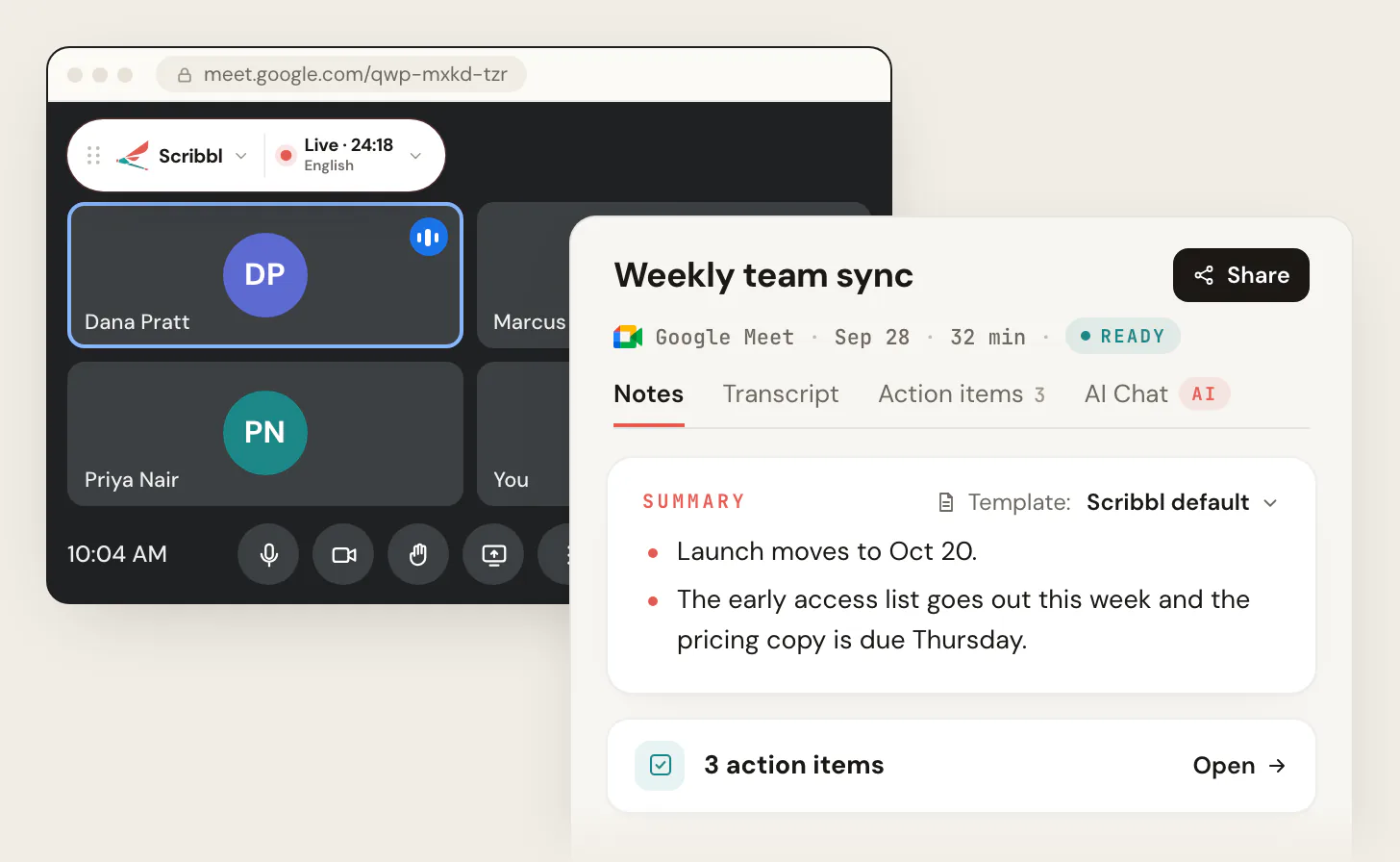
What makes it a productivity tool, not only a note taker, is what it does after the meeting ends:
-
Automations do the follow-up: draft the follow-up email, log notes in HubSpot or Pipedrive, post to Slack or Teams, save to Notion or Confluence, open Linear, Jira, Asana or Monday tickets, or add a Google Sheet row. They ask before changing anything by default.
-
Smart Collections sort each new meeting into the groups you describe, like "calls with customers about renewals".
-
Ask Claude or ChatGPT about every meeting once you connect Scribbl.
-
Tell it the job in plain words and it runs with your own Claude.
-
Free plan: The free plan includes Google Meet, Zoom and Microsoft Teams, with 10 meetings a month.
-
Paid: Pro is $13 per user per month billed annually, or $20 monthly (pricing).
-
Privacy: recordings are private by default, and Scribbl doesn't use your meetings to train AI for anyone other than you.
-
Why it's our pick for meetings: it keeps the video with nothing joining the call, on Google Meet, Zoom and Teams, on Mac and Windows, and then does the follow-up for you. Granola has no bot but keeps no recording. Fathom and Fireflies keep the video when their bot records (Fathom says its Mac app can now capture Zoom video without one). Otter and Read AI keep video only on their Enterprise plans.

Granola
Granola writes AI meeting notes from your computer's microphone and system audio. "There is no meeting bot," says Granola's help center, and it "does not record or save audio or video."
- Free plan: AI meeting notes, but only the last 30 days of notes show in the app.
- Paid: Business is $14 per user per month, billed monthly, with unlimited notes and history. Enterprise is from $35 per user per month.
- Keep in mind: there's no recording to go back to, and the free plan only shows the last 30 days of notes.
Sources: Granola pricing, How transcription works, Subscriptions and billing, October 7, 2026. More detail: Granola pricing explained.
Otter
Live transcription as people talk, with apps for Mac, Windows, iPhone and Android. Once you connect a calendar, Otter Notetaker "automatically joins your Zoom, Google Meet, and Microsoft Teams meetings"; its desktop app can record without a bot.
- Free plan: 300 minutes a month, 30 minutes per conversation, 3 file imports and 20 AI Chat questions.
- Paid: Pro is $8.33 per user per month billed annually, or $16.99 monthly, with 1,200 minutes a month and meetings up to 90 minutes. Business is $19.99 billed annually, or $30 monthly. Video replay for Zoom and Google Meet is on Enterprise.
- Keep in mind: Otter Notetaker joins your calls once you connect a calendar, and video replay is on Enterprise only.
Sources: Otter pricing, Otter Notetaker overview, otter.ai, October 7, 2026. Every plan limit: Otter.ai pricing.
Fathom
A free plan with unlimited recordings. On a Mac you choose per meeting: Transcript Only or Audio Only (no bot), or Audio & Video, where a bot joins to record. Those choices are Mac only for now; Fathom says "Windows is coming soon."
- Free plan: unlimited recordings and transcripts, AI summaries, and 5 advanced summaries a month. AI action items are on paid plans.
- Paid: Premium is $16 per user per month billed annually, or $20 monthly. Team is $15 (2-user minimum) and Business is $25, billed annually.
- Keep in mind: a bot joins the call when you record audio and video, and AI action items are on paid plans.
Sources: Fathom pricing, Free vs. Premium, How to Upgrade to Fathom 3.0+, Fathom 3.0 updates, October 7, 2026.
Fireflies
Transcripts in 100+ languages, with search, many integrations and team analytics. Its notetaker joins calls by default; the Chrome extension can record Google Meet without it.
- Free plan: unlimited transcription (marked with an asterisk on Fireflies' pricing page), limited AI summaries, 400 minutes of storage per team and 20 AI credits. Recordings up to 2 hours.
- Paid: Pro is $10 per seat per month billed annually, or $18 monthly, and adds video recording (720p). Business is $19 billed annually, or $29 monthly.
- Keep in mind: its notetaker joins calls by default, and video recording starts on Pro.
Source: Fireflies pricing, October 7, 2026.
Read AI
Summaries, transcripts and search across meetings, email and messages, with apps for Windows, Mac, Android and iPhone.
- Free plan: 5 meeting transcripts a month, plus summaries and search.
- Paid: Pro is $15 per user per month billed annually, or $19.75 monthly, with unlimited transcripts. Audio and video playback starts on Enterprise, at $22.50 billed annually.
- Keep in mind: audio and video playback starts on Enterprise.
Source: Read AI plans and pricing, October 7, 2026.
Whichever note taker you use, tell everyone you're recording. Some places require everyone's consent; see do you have to tell people you're recording. For the four biggest note takers side by side, see Granola vs Otter vs Fireflies vs Fathom; for free plans only, see the best free AI note takers.
AI tools for focus
Floviu
An AI-powered focus app that helps you block distractions, understand how your mind works, and build better focus habits. It combines a focus timer, app blocking, personalized focus insights, and a virtual world that grows as you focus. It runs on iPhone and Android.
- Free plan: Focus timer, Pomodoro sessions, distraction blocking during focus sessions, soundscapes, and Focus World.
- Paid: Pro is $9.99 per month or $69.99 per year, with advanced focus insights, smarter app blocking, and calendar integrations. Includes a 7-day free trial.
- Pick it if: you struggle to stay focused and want to understand what distracts you and when you focus best.
Source: Floviu pricing, October 20, 2026.
AI tools for scheduling
Reclaim
An AI calendar that finds time for your tasks, habits and focus time around your meetings, protects that time, and adds breaks after video calls.
- Free plan: Lite is free forever for 1 user, with a 1-week scheduling range, 1 calendar sync and 1 scheduling link.
- Paid: Starter is $10 per seat per month billed annually, or $12 monthly, with an 8-week range. Business is $15 billed annually, or $18 monthly.
- Pick it if: your calendar fills up before your real work gets a slot.
Source: Reclaim pricing, October 7, 2026.
Motion
An AI calendar and task planner that plans your tasks onto your calendar, with projects, docs and notes in the same app.
- Free plan: none; Motion offers a free trial.
- Paid: for one person, Pro AI is $35 a month billed annually, or $49 monthly. On the Teams tab, Pro AI is $19 per seat billed annually, or $26 monthly, and Business AI is $29 per seat billed annually.
- Pick it if: you'd rather not decide what to work on next.
Source: Motion pricing, October 7, 2026.
AI tools for email
Superhuman Mail
A fast email app with AI that sorts your inbox and writes replies that sound like you. Superhuman now sells Mail inside a suite with Grammarly, Docs and Go.
- Free plan: none for Mail. Superhuman's Free and Pro plans don't include it.
- Paid: Business, which includes Mail, is $33 per member per month billed annually, or $40 monthly.
- Pick it if: you spend hours a day in email.
Source: Superhuman plans, October 7, 2026.
Spark
An email app with a smart inbox and unlimited email accounts, with AI writing and summaries on paid plans.
- Free plan: Smart Inbox, unlimited email accounts, a calendar and a limited preview of its AI.
- Paid: Plus is $99 a year ($8.25 a month), or $10 monthly, and adds Spark +AI. Pro is $199 a year.
- Pick it if: you want AI in your email without a $33 bill.
Source: Spark pricing, October 7, 2026.
Already paying for Google or Microsoft? Google AI Plus ($4.99 a month) adds Gemini in Gmail, and Microsoft 365 Personal ($9.99 a month) adds Copilot in Outlook. Try those before adding a new email app.
AI tools for tasks and projects
Todoist
A to-do list app with AI features (Ramble and Task Assist).
- Free plan: 5 personal projects, reminders, list and board layouts, and limited Ramble sessions.
- Paid: Pro is $5 a month billed yearly ($60), with 300 projects, Task Assist and unlimited Ramble. Business is $8 per user per month billed yearly.
- Pick it if: you need a personal task list that's quick to fill.
Source: Todoist pricing, October 7, 2026.
Asana
Project and work management for teams, with AI Studio on paid plans to build AI automations inside Asana.
- Free plan: Personal, for 2 users.
- Paid: Starter is $10.99 per user per month billed annually, or $13.49 monthly. Advanced is $24.99 billed annually.
- Pick it if: a team shares projects, owners and deadlines.
Source: Asana pricing, October 7, 2026. More options: the best project management tools.
Notion
Docs, wikis, databases and projects in one workspace, with Notion AI to write, search and fill in databases.
- Free plan: yes, with a trial of Notion AI.
- Paid: Plus is $10 per member per month billed yearly ($12 monthly), still with only a trial of Notion AI. Notion AI comes with Business, at $20 per member per month billed yearly ($24 monthly).
- Pick it if: you want notes, docs and projects in the same place.
Source: Notion pricing, October 7, 2026.
AI tools for automation
Zapier
Connects your apps so one event sets off steps in others (a form reply becomes a task, a new deal becomes a Slack message), with AI steps inside those workflows.
- Free plan: 100 tasks a month and two-step Zaps.
- Paid: Professional starts at $19.99 a month billed yearly, or $29.99 monthly, and adds multi-step Zaps and premium apps. Team starts at $69 a month billed yearly.
- Pick it if: you copy the same information between apps every week.
Source: Zapier pricing, October 7, 2026. More options: the best workflow automation software.
AI tools for presentations and design
Gamma
Makes presentations, documents, websites and social posts from a prompt, and exports to PowerPoint, PDF and Google Slides.
- Free plan: up to 10 slides per prompt.
- Paid: Plus is $9 a month billed annually ($108 a year), with up to 100 slides per prompt and no Gamma branding. Pro is $18 billed annually.
- Pick it if: you build slides often and start from a blank page.
Source: Gamma pricing, October 7, 2026.
Canva
Design for graphics, social posts, slides and video, with AI tools that draw from a monthly allowance.
- Free plan: yes.
- Paid: Pro is $144 a year for one person. Business is $250 a year per person.
- Pick it if: you make visuals without a designer.
Source: Canva pricing, October 7, 2026.
AI tools for video and audio editing
Descript
A video and audio editor with AI transcription and AI editing tools.
- Free plan: 60 media minutes a month, 100 AI credits and 720p export.
- Paid: Hobbyist is $16 per person per month billed annually, or $24 monthly. Creator is $24 billed annually.
- Pick it if: you edit podcasts, interviews or training videos.
Source: Descript pricing, October 7, 2026.
AI tools for coding
Cursor
A code editor built around AI that writes and changes code across your project.
- Free plan: Hobby, with limited AI use.
- Paid: Pro is $20 a month. Teams is $40 per user per month.
Source: Cursor pricing, October 7, 2026.
GitHub Copilot
Code suggestions and chat inside VS Code, Visual Studio, Xcode, JetBrains editors and more.
- Free plan: 2,000 code completions a month, with limited chat.
- Paid: Pro is $10 per user per month. Pro+ is $39.
Source: GitHub Copilot plans, October 7, 2026.
The best free AI productivity tools
Every tool on this page has a free plan except Motion (a free trial) and Superhuman Mail. The free plans that go furthest:
- One assistant: ChatGPT, Claude or Gemini. ChatGPT's free plan has unlimited everyday chats.
- Research: Perplexity, and Gemini Notebook with up to 50 sources per notebook.
- Writing: Grammarly (100 AI prompts a month) and Wispr Flow (2,000 words a week on desktop).
- Meetings: Scribbl, 10 meetings a month on Google Meet, Zoom and Teams, with the video, a transcript with speaker names, AI notes and action items, and nothing joining the call.
- Focus: Floviu, with a focus timer and app blocking during focus sessions.
- Scheduling and tasks: Reclaim Lite, Todoist (5 personal projects) and Asana (2 users).
- Everything else: Zapier (100 tasks a month), Gamma (10 slides per prompt), Canva and GitHub Copilot (2,000 completions a month).
A stack of free plans covers a lot. Pay first for the one tool whose limit you hit every week.
How to choose AI productivity tools
- Start with the job that takes the most hours. If it's meetings, start with a note taker; if it's email, an email app. One assistant plus one tool for your biggest time sink beats ten tools you open once.
- Check what you already pay for. Google AI Plus includes Gemini in Gmail, Microsoft 365 Personal includes Copilot in Word, Excel and Outlook, and Superhuman Pro includes Grammarly.
- Use the free plan on real work for a week before you pay. The limits above (minutes, prompts, projects, slides) tell you quickly whether you'll outgrow it.
- Check the training setting before you add work files. On ChatGPT's individual plans, OpenAI's pricing page lists content as used to train its models, with an opt-out; ChatGPT Business doesn't train on business data by default. Google says Gemini Notebook doesn't use an individual's data for training unless they share feedback.
- Tell people when you record. Any note taker on this page records other people's voices.
AI productivity tools in your browser
This page covers apps of every kind. If you'd rather add AI to Chrome, see the best AI Chrome extensions for productivity, and for a small set of everyday extensions (with and without AI), the best Chrome extensions for productivity. For a longer list aimed at companies, Zfort's guide to the best AI tools for business in 2026 covers 50 tools, useful if you're choosing tools for a whole team rather than for yourself.
What older lists get wrong
Several lists that rank for this search carry names and prices that changed:
- NotebookLM is now called Gemini Notebook, and lists from this year still use the old name.
- Bard: one widely linked list still calls Google's assistant Bard, which is now Gemini, and gives almost no prices.
- Superhuman Mail: some lists give $30 a month. On Superhuman's plans page today, Mail comes with Superhuman Business, at $33 per member per month billed annually or $40 monthly, together with Grammarly.
- Motion: some lists give a range of $19 to $34. Today it's $35 a month billed annually for one person ($49 monthly), or $19 per seat on its Teams plans.
- Gamma: one list gives $10 a month. Plus is $9 a month billed annually.
Prices and free plans change often, so check the linked pricing page before you buy.
How we compared
We read each company's own pricing page, and help pages where a plan detail needed it, on October 7, 2026. Every price on this page comes from those pages, not from other reviews, and each entry links to its source. We compared what each company says its product does; we didn't create accounts on these products. Scribbl's facts come from our own pricing page.
We picked the tools by looking at what the most-cited lists for this search include (assistants, research, writing, meetings, scheduling, email, tasks, automation, presentations, video editing and coding), then kept the leaders in each job. Within each group we don't rank one tool over another except in meetings, where we say which one we make and why it's our pick.
What we couldn't confirm on the companies' own pages: how long Motion's free trial lasts, Perplexity's month-to-month price, and whether Read AI joins a meeting as a participant.
FAQ
What are AI productivity tools?
AI productivity tools are apps that use AI to do part of a task for you: drafting and fixing text, answering questions with sources, taking meeting notes, fitting tasks into your calendar, sorting email or connecting your apps. Most work alongside the apps you already use, and most have a free plan.
What are the best AI productivity tools in 2026?
By job: ChatGPT or Claude for writing and questions (Gemini or Microsoft Copilot if you work in Google or Microsoft 365), Perplexity for research, Wispr Flow for dictation, Scribbl for meetings, Reclaim or Motion for scheduling, Superhuman Mail or Spark for email, Todoist, Asana or Notion for tasks and projects, and Zapier to connect your apps.
What is the best free AI productivity tool?
For most people, the free plan of ChatGPT, Claude or Gemini, because one assistant covers writing, questions and summaries. Other strong free plans: Perplexity for research, Gemini Notebook for your own documents (up to 50 sources per notebook), Reclaim's Lite plan for scheduling, Zapier for 100 tasks a month, and for meetings Scribbl (10 meetings a month with the video, AI notes and action items, and nothing joining the call). Motion and Superhuman Mail have no free plan.
Which AI productivity tool is best for meetings?
Scribbl, which makes this page. It keeps the video, a transcript with speaker names, AI notes and action items for every meeting on Google Meet, Zoom and Microsoft Teams, with nothing joining the call, and its Automations do the follow-up, like drafting the follow-up email or posting a summary to Slack. The free plan includes Google Meet, Zoom and Microsoft Teams, with 10 meetings a month. Granola has no bot but keeps no recording, and Otter and Read AI keep video only on their Enterprise plans.
What is the best AI tool for scheduling?
Reclaim, if you want a free plan: it finds time on your calendar for tasks, habits and focus time, and its Lite plan is free. Starter is $10 per seat per month billed annually. Motion plans your tasks and projects onto your calendar, but it has no free plan: Pro AI is $35 a month billed annually for one person, or $19 per seat on its Teams plans.
What is the best AI tool for email?
Superhuman Mail, for people who live in their inbox. It comes with the Superhuman Business plan at $33 per member per month billed annually ($40 monthly), which also includes Grammarly. Spark is the lower-cost pick, with a free plan and Plus at $99 a year. If you already pay for Google AI Plus or Microsoft 365 Personal, Gemini in Gmail or Copilot in Outlook may be enough.
How much do AI productivity tools cost?
Most have a free plan, and most paid plans start between about $5 and $20 per person a month. Examples from each company's pricing page on October 7, 2026: Todoist Pro $5 billed yearly, ChatGPT Go $8, Otter Pro $8.33 billed annually, Scribbl Pro $13 billed annually, Claude Pro $17 billed annually and ChatGPT Plus $20. The two exceptions on this page are Superhuman Mail ($33, on the Business plan) and Motion for one person ($35), both billed annually.
Which AI assistant is best: ChatGPT, Claude, Gemini or Copilot?
All four have a free plan, so try them on the same piece of your own work. ChatGPT is the most general; Go is $8 a month and Plus is $20. Claude Pro is $17 a month billed annually. Gemini fits if you work in Gmail and Google Docs, and Google AI Plus ($4.99 a month) adds Gemini in Gmail. Copilot fits if you work in Word, Excel and Outlook, and Microsoft 365 Personal ($9.99 a month) adds it to those apps.
What happened to NotebookLM?
It's now called Gemini Notebook. The old notebooklm.google address redirects to notebook.google, and Google's plans page lists Gemini Notebook with up to 50 sources per notebook for free, 100 with Google AI Plus, 300 with Google AI Pro and 600 with Google AI Ultra.
Do AI productivity tools train on my data?
It depends on the tool and the plan, so check the setting before you add work files. On ChatGPT's individual plans your content can be used to train OpenAI's models unless you opt out, while ChatGPT Business doesn't train on business data by default. Google says Gemini Notebook doesn't use an individual's data for training unless they share feedback. Scribbl's recordings are private by default, and Scribbl doesn't use your meetings to train AI for anyone other than you.
Sources
Every price and plan limit above was checked on these pages on October 7, 2026.
- Assistants: ChatGPT pricing, Claude pricing, Google AI plans, Copilot for individuals, Microsoft 365 Copilot pricing
- Research: Perplexity Pro, Gemini Notebook plans
- Writing and dictation: Grammarly plans, Superhuman plans, Wispr Flow pricing
- Meetings: Scribbl pricing, Granola pricing, Granola: How transcription works, Granola: Subscriptions and billing, Otter pricing, Otter Notetaker overview, Fathom pricing, Fathom: Free vs. Premium, Fathom: How to Upgrade to Fathom 3.0+, Fathom 3.0 updates, Fireflies pricing, Read AI plans and pricing
- Scheduling and email: Reclaim pricing, Motion pricing, Superhuman plans, Spark pricing
- Tasks, projects and automation: Todoist pricing, Asana pricing, Notion pricing, Zapier pricing
- Presentations, design and video: Gamma pricing, Canva pricing, Descript pricing
- Coding: Cursor pricing, GitHub Copilot plans
Try Scribbl
AI notes for every meeting, no bot
Scribbl records, transcribes, and summarizes your Google Meet calls from your browser. No bot joins the call. Free forever for individuals.
Add to Chrome · It's free