How to Use Copilot in Teams Meetings (2026): Take Notes, Recap, and What It Needs
Copilot in Teams meetings needs a Microsoft 365 Copilot license and transcription. The steps to take notes with it, the organizer setting, and a free option.
Updated October 19, 2026
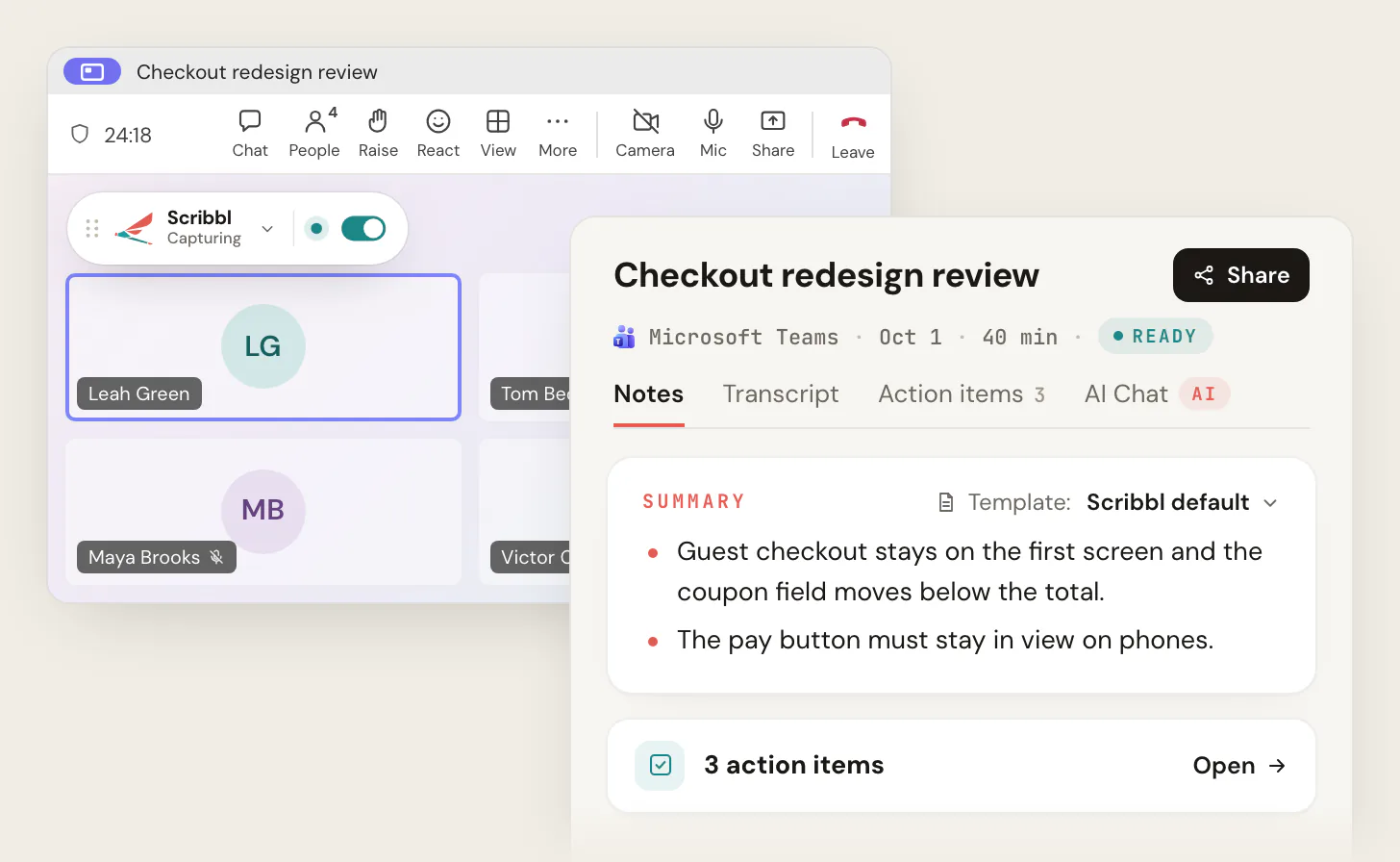
To use Copilot in a Teams meeting, you need a Microsoft 365 Copilot license and a meeting organized inside your company; then you click Copilot in the meeting controls, turn on transcription, and ask it for a recap or the action items. If you don't have the license, you're a guest in another company's meeting, or you want the video as well as the notes, Scribbl Desktop is the AI note taker for Microsoft Teams that needs none of that: it runs on your own computer, nothing joins the call, and it works whoever organized the meeting. Get Scribbl Desktop.
Everything about Copilot below comes from Microsoft Support and Microsoft Learn, checked on October 19, 2026, with links next to each fact. Scribbl makes this page. For what Teams' own AI notes include and cost, see Does Microsoft Teams have AI meeting notes?; this page is the step-by-step.
What you need before Copilot works in a Teams meeting
Three things have to line up. Microsoft documents each one separately.
| Requirement | What Microsoft says | Source |
|---|---|---|
| A Microsoft 365 Copilot license, for you | "You must have a Microsoft 365 and a Microsoft Copilot license in order to access Copilot in Teams." It's an add-on, per person | Welcome to Copilot in Microsoft Teams, Microsoft Learn |
| The organizer allows it | The organizer's meeting option Allow Copilot and Facilitator is During and after the meeting, Only during the meeting, or Off. Off also turns off recording and transcription | Catch up on meetings with Copilot in Teams |
| Transcription, to ask about what was said | Copilot can open without transcription, but to prompt it about the meeting, or to see its answers after the meeting ends, live transcription has to be on during the meeting | Same page |
| A meeting from inside your company | "If a meeting was created by an external participant, Copilot won't be available in that meeting" | Welcome to Copilot in Microsoft Teams |
Your admin sits above all of it. In the Teams admin center, under Meetings › Meeting policies › Recording & transcription, the Copilot setting defaults to On with saved transcript required, which forces organizers' meetings to During and after the meeting; admins can also set it to On, On with transcript saved by default, or Off, and a separate transcription policy can stop anyone transcribing (Manage Microsoft Copilot in Teams meetings and events, updated August 2026). Copilot also doesn't work in end-to-end encrypted meetings.
What it costs. Microsoft 365 Copilot Business is $21 per user per month paid yearly ($25.20 month to month), with a first-year price of $18 for purchases between July 1 and December 31, 2026 (Microsoft 365 Copilot pricing, checked October 19, 2026). Enterprise is $30 and Teams Premium is $10 per user per month paid yearly, as listed in our Teams Premium features guide on October 7, 2026.
How to use Copilot in a Teams meeting, step by step
- 1
Organizer: set the Copilot option when scheduling
In the Teams calendar, open the meeting, select Options, then Copilot and other AI, and set Allow Copilot and Facilitator to During and after the meeting (transcription required) or Only during the meeting. The choices you see depend on your admin's policy. Organizers can set this even without a license.
- 2
Start transcription in the meeting
Click More, then Record and transcribe, then Start transcription. Everyone in the meeting is told it's being transcribed. Starting a recording also starts transcription. In Only during the meeting mode, Copilot uses speech-to-text that isn't saved, so skip this step only if you don't need anything after the call.
- 3
Open Copilot
Click Copilot in the meeting controls. In Only during the meeting mode, click Turn on in the notification. The pane is private to you; other people can't see your conversation. In the Teams desktop app you can pop it out with Open private Copilot in new window.
- 4
Ask it for notes
Click View prompts for suggestions, or type your own: Recap the meeting so far, List action items, Where do people disagree, What questions are still open. Copilot answers from the transcript and the meeting chat. Joined more than five minutes late? Copilot offers a catch-up summary.
- 5
After the meeting
In the meeting chat, click Open Copilot at the top right. Open the Recap tab for the AI notes and suggested tasks if the meeting was transcribed and you have Teams Premium or a Copilot license. Answers longer than 1,300 characters can be opened in Word; tables in Excel.
Everything Copilot knows after the call depends on the transcript. Microsoft says that if the transcript is later deleted, Copilot becomes unavailable for that meeting and its history is removed, and in a recurring series the earlier history goes once a later meeting is transcribed.
How to use Copilot to take notes in Teams
"Copilot taking notes" in Teams means one of three features, each with its own license rule:
| What you get | License | Where it shows | |
|---|---|---|---|
| Copilot in the meeting | Answers to your prompts: a recap, action items, who said what | Microsoft 365 Copilot, for you | Your private Copilot pane, during the meeting and in the chat afterward |
| Intelligent recap | AI notes and AI-suggested tasks written after the meeting, with speaker and chapter markers | Teams Premium or Microsoft 365 Copilot, for each person who wants them | The Recap tab, for meetings over five minutes that were transcribed |
| Facilitator | Live AI notes during the meeting that people in your company can see and edit | Microsoft 365 Copilot, for whoever turns it on; scheduled meetings only | The meeting's Notes, during and after |
(Sources: Recap in Microsoft Teams; Facilitator in Microsoft Teams meetings; the Copilot pages above. Checked October 19, 2026.)
For notes during the meeting: turn on transcription, open Copilot, and ask "Recap the meeting so far" whenever you need it. About ten minutes before the end, Microsoft says Copilot may offer notes and action items on its own.
For notes written for you: let intelligent recap do it. Transcribe the meeting, wait for it to end, open the Recap tab. Microsoft says the AI notes need a meeting longer than five minutes in a supported language, and only invited people in the organizer's organization can open them.
For notes everyone sees live: a Copilot license holder turns on Facilitator, when scheduling under Options › Copilot and other AI, or during the meeting from More actions › Turn on Facilitator. Microsoft says a Copilot license is required to add it, it works only in scheduled meetings, and external participants can't see its notes.
Do it with Scribbl: AI notes in Teams with no Copilot license
Every path above stops at the same gate: a license for you, an organizer inside your company, and a transcript someone has to start. Scribbl Desktop takes AI notes in any Teams meeting you join without any of them.
- Install Scribbl Desktop on your Mac (Apple silicon) or Windows PC and sign in. Get Scribbl Desktop.
- Join the Teams meeting as usual, from your calendar or a pasted link, including meetings a client or another company organized. Scribbl shows Capturing at the top left. Nothing joins the call, so there's nothing in the lobby and no Copilot setting to check. Tell everyone you're recording.
- Open the notes when the meeting ends. The meeting page has the video recording, a transcript with speaker names, AI notes and action items.
The free plan includes Google Meet, Zoom and Microsoft Teams, with 10 meetings a month. Pro is $13 per user per month billed annually, or $20 monthly (pricing).
| Scribbl Desktop (our pick) | Copilot in Teams meetings | |
|---|---|---|
| License | None from Microsoft. Free plan, or Pro at $13 per user per month billed annually ($20 monthly) | Microsoft 365 Copilot, $21 to $30 per user per month, for each person who uses it |
| Meetings another company organized | Yes | No |
| Needs transcription turned on | No | Yes, to ask about what was said |
| Needs the organizer to allow it | No | Yes, Allow Copilot and Facilitator |
| What you get | The video recording, a transcript with speaker names, AI notes and action items | Answers in a private pane; AI notes in Recap with Teams Premium or Copilot |
| Ask AI about past meetings | Connect Scribbl to ChatGPT or Claude (Pro) | Copilot, while the transcript exists |
| After the meeting | Automations draft the follow-up email, post to Teams or Slack, log notes in HubSpot or Pipedrive, open Jira, Linear, Asana or Monday tickets; they ask before changing anything by default | Recap tab and Copilot in the chat |
| Other platforms | Google Meet and Zoom too | Teams only |
Recordings are private by default, and Scribbl doesn't use your meetings to train AI for anyone other than you. Teams shows its own notice only when Teams records or transcribes, so say you're recording at the start of the meeting; see do you have to tell people you're recording.
Why Copilot isn't showing in your Teams meeting
Check these in order, from Microsoft's pages:
- No Copilot license of your own. A colleague's license doesn't cover you.
- The organizer set Allow Copilot and Facilitator to Off. That also turns off recording and transcription for the meeting.
- Your admin's meeting policy has Copilot off, or transcription off. With transcription off and the organizer on During and after the meeting, Microsoft says licensed users can't use Copilot unless someone with permission transcribes.
- Someone outside your company created the meeting.
- End-to-end encryption is on. No Copilot, no transcription, no recording.
If Copilot opens but only answers from the chat, the meeting isn't being transcribed. For the transcription steps, see how to transcribe a Teams meeting, and for recording, how to record a meeting in Teams.
The free plan includes Google Meet, Zoom and Microsoft Teams, with 10 meetings a month. Get Scribbl Desktop and your next Teams meeting comes with the video, the transcript and the notes, no license required.
FAQ
How do I use Copilot in a Teams meeting?
You need a Microsoft 365 Copilot license, and the meeting has to be organized inside your company. In the meeting, click Copilot in the meeting controls. To ask about what was said, transcription has to be on: click More, then Record and transcribe, then Start transcription. Then type a prompt such as Recap the meeting so far or List action items, or pick one from View prompts. After the meeting, open the meeting chat and click Open Copilot, or open the Recap tab if the meeting was transcribed.
How do I use Copilot to take notes in Teams?
Turn on transcription, open Copilot and ask it for notes, or let intelligent recap write them after the meeting. Both need a license: Copilot in the meeting needs a Microsoft 365 Copilot license, and the AI notes in the Recap tab need Teams Premium or a Copilot license. For live notes everyone in your company can see, a Copilot license holder can turn on Facilitator in a scheduled meeting. Without a license, Scribbl Desktop takes AI notes in any Teams meeting from your own computer.
Does Copilot in Teams need transcription?
To take notes about what was said, yes. Microsoft says you can open Copilot without transcription, but to prompt it about the meeting, or to see its answers after the meeting ends, live transcription has to be on. The organizer's Allow Copilot and Facilitator setting decides: During and after the meeting requires transcription, Only during the meeting uses temporary speech-to-text that is gone when the meeting ends, and Off also turns off recording and transcription.
Do I need Teams Premium to use Copilot in meetings?
No. Copilot in Teams meetings needs a Microsoft 365 Copilot license, which is a separate add-on from Teams Premium. Both licenses include intelligent recap, the AI notes and suggested tasks in the Recap tab. Only the Copilot license gives you Copilot in the meeting, Facilitator, and the video and audio recaps.
Can guests or external attendees use Copilot in my Teams meeting?
No. Microsoft says Copilot isn't available in a meeting created by an external participant, and in Only during the meeting mode, licensed external participants can't interact with Copilot. External attendees also don't get the intelligent recap unless someone in the organizer's company shares it. Scribbl Desktop gives you your own notes in meetings other companies host.
Why can't I see Copilot in my Teams meeting?
Usually one of five reasons: you don't have a Microsoft 365 Copilot license yourself; the organizer set Allow Copilot and Facilitator to Off; your admin's meeting policy has Copilot turned off; the meeting was created by someone outside your company; or the meeting is end-to-end encrypted, where Copilot, transcription and recording don't work.
Is there a way to get AI notes in Teams without a Copilot license?
Yes: Scribbl Desktop. It runs on your Mac (Apple silicon) or Windows PC, nothing joins the call, and it works in any Teams meeting you join, including ones other companies organize. After each meeting you get the video recording, a transcript with speaker names, AI notes and action items. The free plan includes Google Meet, Zoom and Microsoft Teams, with 10 meetings a month. Get Scribbl Desktop at scribbl.co/desktop.
Sources
Checked on October 19, 2026, except where noted. Microsoft changes Copilot licensing and meeting options often; check the linked page if a detail matters to you.
- Microsoft Support: Catch up on meetings with Microsoft Copilot in Teams (the Copilot button, View prompts, transcription rule, Allow Copilot and Facilitator values, after-meeting access, Word and Excel export, outside-organization limit)
- Microsoft Support: Use Copilot without transcribing or recording a Teams meeting or call (Only during the meeting steps, what's gone afterward, external participants)
- Microsoft Support: Welcome to Copilot in Microsoft Teams (the license sentence, late-join summary, meetings created by an external participant)
- Microsoft Learn: Manage Microsoft Copilot in Teams meetings and events (add-on license prerequisite, admin policy values and default, transcription policy table, end-to-end encryption)
- Microsoft Support: Recap in Microsoft Teams (intelligent recap license, five-minute minimum, who can open it)
- Microsoft Support: Facilitator in Microsoft Teams meetings (checked October 12, 2026)
- Microsoft: Microsoft 365 Copilot pricing (Copilot Business $21 yearly, $25.20 monthly, $18 offer July 1 to December 31, 2026); Teams Premium and Copilot for enterprise prices as checked October 7, 2026 in Teams Premium features
- Scribbl: desktop app, pricing, AI note taker for Microsoft Teams
Try Scribbl
Let your meetings take their own notes.
Scribbl's desktop app records, transcribes, and summarizes your Teams meetings from your own computer. No bot joins the call and you don't need to be the host. Free forever for individuals.
Get Scribbl for Teams · It's free