Which Video Calls Can You Record for Free? (2026): Zoom, Google Meet, Teams, FaceTime and More
Which video calls you can record for free, checked October 7, 2026: Zoom, Google Meet, Teams, Webex, FaceTime, WhatsApp, Discord, Slack huddles and Skype.
Updated October 7, 2026

Of the video call apps most people use, Zoom and Webex are the two that let a free account record a video call: both save the recording to your computer from their desktop apps, and the host has to start it or allow it. Google Meet and Microsoft Teams need a paid plan to record, FaceTime records only one-to-one audio calls on iPhone, and WhatsApp, Discord and Slack huddles can't record a call at all. Skype shut down in May 2025.
Any call can still be recorded for free from outside the app, with your computer's own screen recorder or a recording app that has a free plan. Whichever way you record, tell everyone on the call first.
Below is one table with every app, then each app in detail: whether a free account can record, who can record, where the recording goes, and the limits. Every fact comes from each company's own help, pricing or support pages, checked on October 7, 2026. Prices are in US dollars.
We make Scribbl, which records Google Meet, Zoom and Microsoft Teams calls on its free plan, even where the app's own recorder needs a paid plan or the host's Record button, and adds a transcript and AI notes: see how.
Which video call can be recorded for free?
Zoom and Webex. On both, a free account records a meeting to your computer from the desktop app. On Zoom, the host records or lets a participant record; on Webex, the host records. FaceTime records one-to-one audio calls on iPhone at no cost. Google Meet and Teams can record, but only on paid plans.
| App and plan | Free account can record? | Who can record | Where the recording goes | Limits |
|---|---|---|---|---|
| Google Meet, Zoom or Teams, with Scribbl (free plan, our pick) | Yes, 10 meetings a month | You, from your own computer; no Record button needed | Your Scribbl account, with a transcript, AI notes and action items | Google Meet from a Chrome extension; Zoom and Teams from Scribbl Desktop for Mac (Apple silicon) and Windows |
| Zoom Basic (free) | Yes, to your computer | The host, or a participant the host allows | Documents › Zoom on that computer, as an MP4 | Desktop app only (Windows, Mac, Linux). Meetings end at 40 minutes |
| Zoom Pro and up (Pro is $14.16 a month, billed annually) | Paid | Computer: the host or an allowed participant. Cloud: the host or a co-host | Your computer, or the host's Zoom cloud | 10 GB of cloud storage per license on Pro and Business. Meetings up to 30 hours |
| Google Meet, free Google account | No | Needs a paid plan | Not available | Calls with 3 or more people end at 60 minutes; one-to-one calls at 24 hours |
| Google Meet with Workspace Business Standard or higher, Workspace Individual, or Google One with 2 TB or more | Paid | The host, co-hosts, and people in the host's organization when host management is off | The organizer's Google Drive, in the Google Meet folder | Computer or Android only. 8 hours per recording |
| Microsoft Teams, free | No | Needs a paid plan | Not available | Group meetings end at 60 minutes |
| Teams with Microsoft 365 Personal, Family or Premium (from $99.99 a year) | Paid | Anyone in the meeting with one of those subscriptions | The meeting chat | Deleted after 30 days unless you download it |
| Teams, work or school account | With most business licenses | The organizer and people from the organizer's organization; not guests | The organizer's OneDrive (SharePoint for channel meetings) | Expires after 120 days by default |
| Webex Free | Yes, to your computer | The host | Your computer, as an MP4 | Desktop app only. Meetings end at 40 minutes. Cloud recording is paid |
| FaceTime | Audio calls only, on iPhone | Either person in a one-to-one audio call | The Notes app, in Call Recordings, with a transcript | No video or group calls. Not in the EU and some other countries |
| No | No one, on any plan | Not available | No record feature | |
| Discord | No | No one; Clips saves short moments of your own stream | Your computer (Clips) | Clips: up to 2 minutes, Windows only, early access for Nitro members |
| Slack huddles | No | No one; paid plans get AI notes instead | A canvas in the huddle thread (AI notes and transcript, paid plans) | Free plan huddles hold 2 people |
| Skype | Retired | Not available | Not available | Shut down May 5, 2025. Microsoft pointed users to Teams Free, which can't record |
Sources: each company's help, pricing and support pages, checked October 7, 2026, listed at the end of this page. Scroll sideways on a phone.
The "who can record" column matters as much as the first one. On Zoom, Google Meet, Teams and Webex, being in the call isn't enough: the host, the organizer's organization or an admin decides who gets the Record button. If you're a guest and nobody gives you that button, the free way to record is from outside the app, with Scribbl on Google Meet, Zoom and Teams, or a screen recorder (see How to record meetings for free).
Can you record Zoom meetings for free?
Yes. Zoom says computer recording is available to free and paid accounts. On the free Basic plan, you record in the Zoom desktop app for Windows, macOS or Linux, and the file is saved on your computer. Cloud recording needs a paid plan. (Source: Zoom Support, Starting a computer recording and Finding your computer and cloud recordings, as of October 7, 2026.)
- Who can record: the host, or a participant the host gives permission to with Allow Record in the Participants list.
- Where it goes: the Zoom folder in Documents:
/Users/[name]/Documents/Zoomon a Mac,C:\Users\[name]\Documents\Zoomon Windows,home/[name]/Documents/Zoomon Linux. Zoom converts the recording when the meeting ends, into an MP4 for video and an M4A for audio. - Limits: free meetings end at 40 minutes, so the recording ends there too. Computer recording isn't supported in the Zoom phone app. Zoom doesn't make a transcript of a computer recording.
- Who is told: participants see a recording indicator while the recording runs, and people who dialed in by phone hear a message unless the host turned it off.
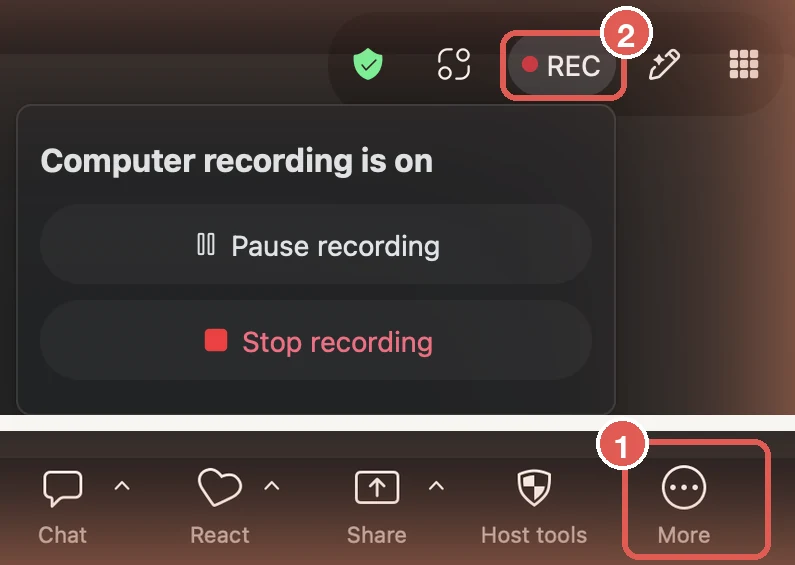
On a paid plan, Zoom Pro is $14.16 per user per month billed annually and Business is $18.33. Both add cloud recording, with 10 GB of cloud storage per license, and meetings up to 30 hours. Only hosts and co-hosts can start a cloud recording, and it goes to the host's account, under Recordings & Transcripts in the Zoom web portal. (Source: Zoom pricing and Starting a cloud recording, as of October 7, 2026.)
Step by step, with screenshots: how to record a Zoom meeting and where Zoom recordings go.
Can you record Google Meet for free?
Not with a free Google account. Google lists who can record: Google Workspace Business Standard and Business Plus, the Enterprise and Essentials editions, some education editions, Workspace Individual, and Google One subscribers with 2 TB or more of storage. Business Starter, the cheapest Workspace plan, isn't on the list. (Source: Google Meet Help, Record a video meeting, as of October 7, 2026.)
The cheapest ways in, as of October 7, 2026:
- Personal Google account: Google One's cheapest plan with 2 TB, Google AI Plus (2 TB), is $9.99 a month (Google One plans).
- Business: Workspace Business Standard is $14 per user per month with a one-year commitment. Google's comparison shows meeting recordings saved to Google Drive on Standard and higher, not on Starter (Workspace pricing).
What recording looks like once you have it:
- Who can record: the host; someone from outside the host's organization who has been made a co-host; and people from the host's organization when Host Management is off. On Workspace, an admin has to turn recording on, and you can't record if the host doesn't have permission to.
- Where it goes: the organizer's Google Drive, in a folder named Google Meet, with a sub-folder for each meeting. Starting in July 2026, Google renames the old Meet Recordings folder to Legacy Meet Recordings and moves it inside. The organizer and the person who started the recording get an email with the link, and the link is added to the Calendar event.
- Limits: recording works on a computer or an Android device only. A recording stops on its own after 8 hours. It needs free space in the organizer's Drive.
- Who is told: participants get a notification when recording starts or stops.
On a free account, Google Meet calls with 3 or more people end at 60 minutes, and one-to-one calls at 24 hours (Google Meet requirements). To record one, use Scribbl, which records Google Meet from a Chrome extension on its free plan and adds a transcript and AI notes, or your computer's screen recorder (see below). More detail: how to record a Google Meet, where Google Meet recordings go and why you can't record a Google Meet.
Can you record a Teams meeting for free?
Not on the free version of Microsoft Teams. Microsoft's own comparison for personal accounts lists meeting recordings as No on free Teams, and Yes with Microsoft 365 Personal or Family and with Teams business licenses. Its recording guide for personal accounts adds Microsoft 365 Premium. (Source: Microsoft Support, subscriptions for Teams for personal use and recordings in Teams for personal use, as of October 7, 2026.)
Free Teams meetings run up to 60 minutes for groups and up to 30 hours one-to-one, with up to 100 people (Microsoft Teams free). To record a free Teams call, Scribbl Desktop does it on Scribbl's free plan, or use your computer's screen recorder.
On a personal account with Microsoft 365 (Personal $99.99 a year, Family $129.99, Premium $199.99, per Microsoft's plan comparison):
- Who can record: anyone in the meeting with one of those subscriptions. People without one, and people signed in with a business account, can't.
- Where it goes: the meeting chat, in Microsoft's cloud, for 30 days. After that it's gone, so use Download below the recording to keep a copy.
- Who is told: everyone in the meeting sees a notification as soon as recording starts.
On a work or school account:
- Who can record: the organizer and people from the organizer's organization with a license that includes recording, such as Office 365 E1, E3 and E5, Microsoft 365 Business, Business Premium or Business Essentials, if an admin allows it. Guests and people from other organizations can't. Microsoft's Teams Essentials plan, $4 per user per month paid yearly, also lists meeting recordings with transcripts.
- Where it goes: the organizer's OneDrive, or the channel's SharePoint site for a channel meeting.
- Limits: one person records at a time. Recordings expire after 120 days by default, unless an admin chose another length (Microsoft Learn).
- Who is told: everyone in the meeting gets a notification when recording starts. (Source: Start, stop, and find meeting recordings in Microsoft Teams, as of October 7, 2026.)
Step by step, with screenshots from a work account: how to record a Teams meeting and where Teams recordings go.
Can you record a Webex meeting for free?
Yes. Webex's pricing page lists Local recording on Webex Free, and its help center says recording to your computer is available on Webex Free while recording to the cloud isn't. (Source: Webex pricing and Webex Help, Record a meeting or webinar, as of October 7, 2026.)
- Who can record: the host, if local recording is allowed for the Webex site.
- Where it goes: your computer, as an MP4. By default that's the Documents folder on Windows and your Home folder on a Mac (Record a meeting or webinar on your computer).
- Limits: only from the desktop app, not the web app. Free meetings end at 40 minutes, with up to 100 attendees. The recording only has sound if you joined with Computer audio, and it leaves out the chat and the participant list.
- Who is told: a recording indicator appears at the top right of the window. Webex also says everyone needs to give consent before a meeting is recorded.
The paid Webex Meet plan, $144 per user per year, adds 10 GB of cloud recording and meetings up to 24 hours.
Can you record a FaceTime call?
Only a one-to-one FaceTime audio call, on iPhone, and only in countries and regions where Apple offers call recording. Start Call Recording from the call's controls. Both people hear a notice that the call is being recorded. The recording is saved to the Call Recordings folder in the Notes app, and in some languages and regions a transcript is added that names who said what. (Source: Apple iPhone User Guide, Use audio call tools in FaceTime, as of October 7, 2026.)
Apple says call recording isn't available in the European Union and several other countries, including Russia, Saudi Arabia, South Africa, Turkey and the United Arab Emirates (Record and transcribe a call on iPhone).
FaceTime video calls and group calls have no Record option in Apple's FaceTime guide. For video calls, Apple's iPhone guide describes Local Capture in Control Center, which saves high-quality audio and video to your iPhone during a call. Apple describes sharing that file with the other people on the call and combining everyone's recordings afterward in an app such as Logic Pro or Final Cut Pro (Improve audio and record video calls).
Can you record a WhatsApp call?
No. WhatsApp's help center covers voice and video calls, group calls, call links and screen sharing, and none of its calling guides describes a way to record a call. The only recording in its video call guide is a video note you can leave when someone doesn't pick up. (Source: WhatsApp Help Center, How to make a 1:1 video call and Calling, as of October 7, 2026.)
WhatsApp calls are free and have no time limit, and group calls hold up to 32 people (WhatsApp calling).
Can you record a Discord call?
Not the whole call. Discord has no call recording. Its Clips feature saves the last 30 seconds, 60 seconds or 2 minutes of a stream you're sharing, straight to your computer, and you can include or leave out the voice channel's audio when you edit the clip. Clips is in early access for Nitro members and works only on Windows, not on Mac, phones or consoles. (Source: Discord Support, Clips, as of October 7, 2026.)
Can you record a Slack huddle?
No. Slack's help pages for huddles describe no way to record a huddle's audio or video, on any plan. What paid plans get instead is AI notes: Slack writes a summary, action items and a transcript into a canvas in the huddle thread, and everyone in the huddle is notified when notes start or stop. (Source: Slack Help, Use huddles in Slack and Use AI to take huddle notes, as of October 7, 2026.)
On the free plan, a huddle holds two people. On paid plans it holds up to 50, with video for 25 at a time. Slack Pro is $8.75 per user per month paid monthly (Slack pricing).
What happened to Skype?
Microsoft retired Skype on May 5, 2025, for free and paid users (Skype for Business wasn't affected). Microsoft pointed Skype users to Microsoft Teams Free, which can't record meetings (see Teams above). The portal for exporting old Skype chats and call history took requests until June 15, 2026. (Source: Microsoft Support, Skype is retiring in May 2025: What you need to know, as of October 7, 2026.)
How to record meetings for free?
There are three free ways, and which one works depends on the app and on whether you're the host.
1. Use the call app's own recorder, if your plan includes it. On Zoom and Webex, a free account records from the desktop app. You need to be the host, or on Zoom, have the host allow you to record.
2. Use your computer's screen recorder. It works on any call app and needs nobody's permission inside the app.
- Mac: press Shift-Command-5 to open Screenshot, choose to record the entire screen or a selected window, and click Options. On macOS 27 Golden Gate or later, choose Include System Audio so the other people's voices are recorded. Apple lists that option for macOS 27 or later only; on earlier versions you can choose a microphone, which records your own voice. The recording is saved to your desktop by default. (Source: Apple, How to record the screen on Mac, published September 14, 2026.)
- Windows: open Snipping Tool, select Record, then New, or press Windows logo key + Shift + R, select the area and click Start. Microsoft's guide doesn't say whether the computer's sound is captured, so test it on a call that doesn't matter first. (Source: Microsoft, Use Snipping Tool.)
You get a video file and nothing else: no transcript and no notes.
3. Use a recording app with a free plan. These work on the calls each one supports, mostly Zoom, Google Meet and Teams, and unlike a screen recorder they give you a transcript and notes too. From each company's pricing page on October 7, 2026:
- Scribbl (we make it, and it's our pick): 10 meetings a month on Google Meet, Zoom and Teams, each with the video, a transcript with speaker names, AI notes and action items, and nothing joining the call (more below).
- Fathom: unlimited recordings and transcripts. A bot joins the call to record, unless you use bot-free capture, a beta for Mac (Fathom pricing).
- Otter (Basic plan): 300 transcription minutes a month, and up to 30 minutes per conversation (Otter pricing).
- Fireflies: 400 minutes of storage per team; video recording needs a paid plan (Fireflies pricing).
For full comparisons of these apps, see Fireflies vs Otter vs Fathom, the best free AI note takers, the best meeting recording apps and meeting recorders with no bot.
Where can I record meetings for free?
In the Zoom or Webex desktop app on a free account, with your computer's built-in screen recorder, or in a recording app with a free plan. Here's the free option for each app:
| If the call is on | Free way to record it |
|---|---|
| Zoom | The Zoom desktop app, as the host or with the host's permission. Otherwise, Scribbl's free plan or your computer's screen recorder |
| Webex | The Webex desktop app, as the host. Otherwise, your computer's screen recorder |
| Google Meet, free Google account | Scribbl's free plan, with a transcript and AI notes, or your computer's screen recorder |
| Microsoft Teams, free | Scribbl's free plan, with a transcript and AI notes, or your computer's screen recorder |
| FaceTime audio, one-to-one | Call Recording on iPhone, where Apple offers it |
| FaceTime video, WhatsApp, Discord, Slack huddles | Your computer's screen recorder; none of these apps records a whole call |
Do other people know when you record?
When the call app itself records, yes:
- Zoom: participants see a recording indicator; people who dialed in hear a message.
- Google Meet: participants get a notification when recording starts or stops.
- Teams: everyone gets a notification in their Teams app.
- Webex: a recording indicator appears, and Webex says everyone needs to consent.
- FaceTime audio: both people hear a notice.
A screen recorder or a recording app outside the call doesn't set off any of these notices. So say at the start of the call that you're recording. In some places the law requires everyone's consent; see do you have to tell people you're recording and is it legal to record a meeting.
Record Google Meet, Zoom and Teams for free: Scribbl
This section is about our own product. Scribbl is an AI note taker for Google Meet, Zoom and Microsoft Teams, and it's the easiest way to record those calls for free. Nothing joins the call: Google Meet runs from a Chrome extension, and Zoom and Teams run from Scribbl Desktop for Mac (Apple silicon) and Windows. After each meeting you get the video recording, a transcript with speaker names, AI notes and action items, where a screen recorder gives you only a video file.
What it does that the apps' own recorders don't:
- No paid plan, no Record button. You don't need Google Workspace, Microsoft 365 or the host to hand you the Record button, and it works the same way on all three apps, in one account.
- Notes as well as the video. A transcript with speaker names, AI notes and action items for every meeting.
- The follow-up done for you. Automations draft the follow-up email, post a summary to Slack or Teams, log notes in HubSpot or Pipedrive, or save them to Notion. They ask before changing anything by default.
- Answers about any meeting. Smart Collections sort your meetings by themselves, and on Pro you can connect Scribbl to ChatGPT or Claude and ask about past meetings.
The free plan includes Google Meet, Zoom and Microsoft Teams, with 10 meetings a month. Pro is $13 per user per month billed annually, or $20 monthly (pricing). Recordings are private by default, and Scribbl doesn't use your meetings to train AI for anyone other than you.

As with any recorder, tell everyone you're recording.
Get Scribbl for Google MeetFAQ
Which video call can be recorded for free?
Zoom and Webex. On a free account, both record a meeting to your computer from their desktop apps, and the host has to start the recording or allow it. Free meetings end at 40 minutes on both. FaceTime can also record a one-to-one audio call on iPhone. Google Meet and Microsoft Teams need a paid plan to record, and WhatsApp, Discord and Slack huddles have no way to record a call.
How to record meetings for free?
Use the call app's own recorder if your plan includes it: Zoom and Webex do on free accounts. Otherwise, use your computer's screen recorder (Shift-Command-5 on a Mac, with Include System Audio on macOS 27 or later; Snipping Tool on Windows), or a recording app with a free plan, such as Scribbl, which we make: it records 10 meetings a month on Google Meet, Zoom and Teams, with a transcript and AI notes, and nothing joins the call. Tell everyone you're recording.
Where can I record meetings for free?
In the Zoom or Webex desktop app on a free account, with your computer's built-in screen recorder, or in a recording app with a free plan. For Google Meet on a free Google account and for free Microsoft Teams, where the app's own recorder needs a paid plan, use a recording app such as Scribbl, which we make and which records them on its free plan, or your computer's screen recorder.
Can you record Zoom meetings for free?
Yes. Zoom's free Basic plan includes computer recording in the Zoom desktop app for Windows, Mac and Linux. The host records, or lets a participant record, and the MP4 is saved in the Documents › Zoom folder on that computer. Free meetings end at 40 minutes. Cloud recording, and recording from the Zoom phone app, need a paid plan.
Can you record Google Meet for free?
Not with a free Google account. Recording comes with Google Workspace Business Standard and higher plans, Workspace Individual, and Google One plans with 2 TB or more of storage; the cheapest of those, Google AI Plus (2 TB), is $9.99 a month. Recordings go to the organizer's Google Drive, in the Google Meet folder. On a free account, Scribbl, which we make, records Google Meet from a Chrome extension on its free plan, or you can use your computer's screen recorder.
Can you record a Teams meeting for free?
Not on free Microsoft Teams. On a personal account, recording needs Microsoft 365 Personal, Family or Premium (from $99.99 a year), and recordings stay in the meeting chat for 30 days. On a work or school account, it comes with business and enterprise licenses if your admin allows it, and guests can't record. Scribbl, which we make, records Teams calls from Scribbl Desktop on its free plan.
Can you record a FaceTime call?
Only a one-to-one FaceTime audio call, on iPhone, in countries where Apple offers call recording. Start Call Recording from the call's controls; both people hear a notice, and the recording and its transcript are saved in the Notes app. Apple's FaceTime guide has no Record option for video calls or group calls.
Can you record WhatsApp calls?
No. WhatsApp has no call recording feature, and its help center's guides to voice and video calls describe no way to record one. You would need a recorder outside WhatsApp, and you should tell the other people first.
Do people know when you record a call?
When the call app itself records, yes: Zoom, Google Meet, Teams and Webex show or send a recording notice, and FaceTime plays a notice to both people. A screen recorder or a recording app outside the call doesn't set off that notice, so tell everyone yourself. In some places the law requires everyone's consent.
Can you still record calls on Skype?
No. Microsoft retired Skype on May 5, 2025 and pointed its users to Microsoft Teams Free, which can't record meetings. Recording on a personal Teams account needs Microsoft 365 Personal, Family or Premium.
Sources
Every fact above was checked on these pages on October 7, 2026.
- Zoom: pricing, Starting a computer recording, Finding your computer and cloud recordings, Starting a cloud recording, Enabling cloud recording
- Google: Record a video meeting, Learn what requirements you need to use Google Meet, Google Workspace pricing, Google One plans
- Microsoft: Microsoft Teams free video conferencing, Compare Microsoft Teams for home, Learn more about subscriptions for Microsoft Teams for personal use, Manage meeting and call recordings in Microsoft Teams for personal use, Start, stop, and find meeting recordings in Microsoft Teams, Manage Teams recording expiration policy, Skype is retiring in May 2025, Use Snipping Tool
- Webex: pricing, Record a meeting or webinar, Record a meeting or webinar on your computer
- Apple: Use audio call tools in FaceTime on iPhone, Record and transcribe a call on iPhone, Improve audio and record video calls on iPhone, How to record the screen on Mac
- WhatsApp: How to make a 1:1 video call, Calling, WhatsApp voice and video calling
- Discord: Clips
- Slack: Use huddles in Slack, Use AI to take huddle notes in Slack, pricing
- Recording apps: Fathom pricing, Otter pricing, Fireflies pricing, Scribbl pricing
Try Scribbl
Let your meetings take their own notes.
Scribbl records, transcribes, and summarizes your Google Meet calls from your browser. No bot joins the call. Free forever for individuals.
Add to Chrome · It's free