7 Best AI Notetaker Apps in 2026 (Compared and Ranked)
The best AI notetaker apps in 2026 for Google Meet, Zoom and Teams: bot vs no bot, free plans, languages, integrations and prices, with the best pick.
Updated October 23, 2026

On this page12 sections
- 01What is the best AI note taker app?
- 02What is AI notetaking
- 03What to look for in AI note taking tools
- 04How we compared and ranked these AI notetaker apps
- 05AI notetaker apps compared at a glance
- 06AI notetaker app pricing and free plans
- 07The bot vs botless AI notetaker choice, decided
- 08AI notetaker apps
- 09The 7 best AI notetaker apps, ranked
- 10Best AI notetaker app by use case
- 11Our pick for the best AI notetaker app
- 12AI notetaker app FAQ
The best AI notetaker app in 2026 is the one that gets you the notes without changing the room, and our pick is Scribbl. It records, transcribes, and summarizes Google Meet, Zoom, and Microsoft Teams with no bot, has a free plan with no credit card, and connects your meetings to ChatGPT or Claude so the follow-up actually gets written. Fathom, Fireflies, Otter, and tl;dv are the best-known alternatives, and each sends a bot into the call by default. The ranked picks, how we compared them, the at-a-glance comparison matrix, a separate pricing table, and the best pick for each use case are below.
We compared the 7 AI notetaker apps people ask about most and ranked them on the thing that actually changes your day to day, the capture method (does a bot join your call or not), then on accuracy, free plans, platforms, languages, integrations, and data handling. We publish named entry pricing and free-tier limits, third-party G2 ratings with review counts, real screenshots of Scribbl's output, and an honest rendered example of a typical bot-based tool's output. We do not invent competitor prices or feature claims; prices come from each vendor's own pricing page, checked October 7, 2026, and G2 averages move, so confirm on the source. Last updated October 7, 2026.
What is the best AI note taker app?
For most people in 2026, the best AI note taker app is Scribbl. Nothing joins the call, and every meeting gets the video, a transcript with speaker names, AI notes and action items, on Google Meet, Zoom and Microsoft Teams in one account. Smart Collections sort your meetings by themselves, Automations do the follow-up, and on Pro you can ask Claude or ChatGPT about every meeting. The free plan includes Google Meet, Zoom and Microsoft Teams, with 10 meetings a month.
| App | Free plan | Does a bot join the call? | Recording kept | Paid from |
|---|---|---|---|---|
| Scribbl (our pick) | Google Meet, Zoom and Microsoft Teams, 10 meetings a month | No | Yes, the video, with every meeting | $13 per user a month billed annually, or $20 monthly |
| Fathom | Unlimited recordings and transcriptions | Yes, by default | Yes | Premium: $16 per user a month billed annually, or $20 monthly |
| Otter | 300 transcription minutes a month, up to 30 minutes per conversation | Yes, its notetaker joins Zoom, Teams and Google Meet | Audio playback | Pro: $8.33 per user a month billed annually, or $16.99 monthly |
| Fireflies | 3 meeting transcriptions, or unlimited if its bot auto-joins your calendar meetings; 400 minutes of storage | Yes, by default | Video recording is on Pro | Pro: $10 per seat a month billed annually, or $18 monthly |
| Granola | AI notes, with the last 30 days of meeting history | No, it uses your device's audio | No, the audio is deleted after transcription | Business: $14 per user a month |
Free plans and prices in this table were checked on each vendor's own page on October 6, 2026: Fathom pricing, Otter pricing, Fireflies pricing, Fireflies help, Granola pricing and Granola's security and privacy FAQ (audio). Scribbl's plans are on the pricing page.
| Feature | Scribbl | Fathom | Otter | Fireflies | Granola |
|---|---|---|---|---|---|
| No bot joins the call | Yes | No | No | No | Yes |
| Nothing announced to attendees | Yes | No | No | No | Yes |
| Google Meet | Yes | Yes | Yes | Yes | Yes |
| Zoom | Yes | Yes | Yes | Yes | Yes |
| Microsoft Teams | Yes | Yes | Yes | Yes | Yes |
| Connects to ChatGPT or Claude | Yes | Yes | Yes | Yes | Yes |
| Keeps the meeting video | Yes | Yes | Enterprise only | Paid plans | No, audio is deleted |
| AI summary and action items | Yes | Action items on Premium | Yes | Action items on Pro | Yes |
| Desktop app | Yes | Yes | Yes | Yes | Yes |
| Free plan | 10 meetings a month, no credit card | Unlimited recordings, with a bot | 300 minutes a month | Unlimited only with auto-join on | Notes from the last 30 days |
What is AI notetaking, and how does an AI notetaker app work?
An AI notetaker app, also called an AI note taking app or an AI notes app, records your meeting, transcribes the audio into text, and uses AI to turn that transcript into a short summary with the decisions and action items pulled out. Instead of you typing notes during a call and missing half of what is said, the app captures everything and hands you a searchable record plus a recap afterward.
There are two ways an app gets the audio, and this is the choice that matters most:
- Bot-based capture. The app sends a virtual participant (a "bot") into your meeting from your calendar. It appears in the attendee list, records the call, and produces notes. Convenient for calls you cannot attend, but visible to everyone.
- Botless capture. The app records with nothing joining the call. No participant appears, nothing is announced, and no email goes to attendees. This is what apps like Scribbl and Granola do.
After capture, the better apps go beyond a raw transcript. They generate AI summaries and action items, identify speakers, let you search across past meetings, and push the output into the tools you already use. Scribbl takes the last step furthest: Smart Collections sort meetings into groups you describe in one sentence, so you can ask ChatGPT or Claude about just one group ("What were the main objections in my sales calls this week?"), and Automations draft the follow-up email or log the CRM note from what was actually said.
What to look for in AI note taking tools
Before the picks, here is what separates great AI tools for meeting notes from noisy ones. These are the axes the comparison table below covers.
- Bot vs botless capture. Does a visible participant join, or does the app capture quietly? This decides how the app feels in front of clients and whether it raises a consent question.
- Free plan. Most apps have one, but the cap differs wildly (monthly minutes, meeting count, summaries, export). Free is a primary reason people choose a tool, so the real limit matters.
- Platform coverage. Google Meet only, or Zoom and Microsoft Teams too? And which shape: browser extension, desktop app, or mobile.
- Accuracy and speaker ID. Clean audio is easy; the differences show up on crosstalk, accents, and bad microphones, and in whether speakers are labeled correctly.
- AI summaries and action items. A transcript is the floor. The useful apps add a recap, decisions, and owners.
- Languages. If your calls are not in English, language count and transcribe-versus-translate behavior decide it.
- Integrations and CRM. Does the output flow into Slack, your CRM, your docs, or an AI you already use, or does it sit in a separate app?
- Privacy, consent, and data residency. Where is data stored, how long, and is it used to train models. Matters most for EU and regulated teams.
How we compared and ranked these AI notetaker apps
We ranked every app on the same criteria and weights:
| Criterion | Weight | How we scored it |
|---|---|---|
| Capture method | 30% | Botless and invisible scored highest; a visible join-the-call bot scored lower, weighted for impact on external calls |
| Accuracy | 25% | How well transcription and speaker labels hold up on messy calls with crosstalk, from vendor documentation and public reviews |
| Free plan | 15% | Whether a real, usable free tier exists and what it caps; no-credit-card scored highest |
| Platforms and delivery | 12% | Coverage of Meet, Zoom, and Teams, and whether it ships as extension, desktop, or mobile |
| Integrations | 10% | Depth of CRM, chat, and workflow connections, plus whether output flows into tools you already use |
| Languages | 5% | Breadth of supported languages and whether the tool transcribes versus translates |
| Data handling | 3% | Transparency of retention and training policy; scored as read-the-policy for every vendor |
AI notetaker apps compared at a glance
The full matrix across the axes people actually filter on, with third-party G2 ratings and named entry pricing. The G2 column is the public average and approximate review volume on G2 (Scribbl is 4.9 from 725 reviews on G2, and 5.0 from 3,000 reviews on the Chrome Web Store); these averages shift, so treat them as directional. Starting-paid figures come from each vendor's pricing page, checked October 7, 2026, and change often. Confirm specifics on each vendor's site.
| App | G2 rating | Capture | Free plan | Starting paid | Platforms | Delivery | Speaker ID | AI summary / action items | Integrations | Best for |
|---|---|---|---|---|---|---|---|---|---|---|
| Scribbl | 4.9 (725 reviews) | Botless, nothing joins | Yes, 10 meetings/mo, no credit card | $13/user/mo billed annually, $20 monthly (pricing) | Meet, Zoom, Teams | Chrome extension (Meet) + Scribbl Desktop (Zoom, Teams) | Yes | Yes, with owners and due dates | ChatGPT, Claude; Automations: HubSpot, Pipedrive, Slack, Teams, Notion and more | External and client calls, no bot |
| Fathom | ~5.0 (high volume) | Bot joins (no-bot Mac capture in beta) | Yes, unlimited recordings | $16/user/mo billed annually, $20 monthly (Premium) | Meet, Zoom, Teams | Desktop + web | Yes | Summary on free; action items on Premium | ChatGPT, Claude; common CRMs and chat | Free recording with a bot |
| Granola | ~4.7 (growing) | Botless, keeps no recording | Yes, notes from the last 30 days | $14/user/mo (Business) | Any call on your computer | Desktop (Mac, Windows) + mobile | Limited; gaps reported | Yes, merges your typed notes | ChatGPT, Claude (MCP) | Solo live note-taking, no bot |
| Fireflies | ~4.7 (large volume) | Bot (Fred) joins | Yes, unlimited only with auto-join on | $10/seat/mo billed annually, $18 monthly | Meet, Zoom, Teams | Web, desktop + mobile | Yes | Summary on free; action items on Pro | ChatGPT, Claude; very broad CRM and search | Integrations and team search |
| Otter.ai | ~4.3 | Bot (default) joins | Yes, 300 minutes/mo | $8.33/user/mo billed annually, $16.99 monthly | Meet, Zoom, Teams | Web, desktop + mobile | Yes | Yes | ChatGPT, Claude; common tools | Live transcription, mobile |
| tl;dv | ~4.7 | Bot joins | Yes, full AI notes on first 10 meetings | $18/seat/mo billed annually, $29 monthly | Meet, Zoom, Teams | Desktop + web | Yes | Yes | ChatGPT, Claude (Pro); common CRMs and chat | Clips and highlight sharing |
| Read AI | ~4.6 | Mixed: botless on Meet, bot on Zoom/Teams | Yes, 5 meetings/mo | $15/mo billed annually, $19.75 monthly | Meet, Zoom, Teams | Web + extension | Yes | Yes, plus analytics | ChatGPT, Claude; CRM, chat, calendar | Meeting metrics and analytics |
AI notetaker app pricing and free plans
Free is one of the top reasons people choose a notetaker, so here is the free-tier and entry-paid picture with named numbers. The paid figures below come from each vendor's pricing page, checked October 7, 2026 (lowest paid plan, billed annually where that is the cheaper option), and the G2 column is the public average with approximate review volume on G2. Both move, sometimes monthly, so use them to build a shortlist and confirm the live number on each vendor's pricing page before you buy.
| App | Free plan | What the free tier caps | Starting paid (checked Oct 7, 2026) | G2 |
|---|---|---|---|---|
| Scribbl | Yes, no credit card | 10 meetings a month, with Google Meet, Zoom, and Teams included, each with the video, a transcript, AI notes and action items; Pro lifts the limit | $13/user/mo billed annually, $20 monthly (pricing) | 4.9 (725 reviews) |
| Fathom | Yes, unlimited recordings, transcripts and storage | Advanced summaries on your first 5 calls each month; AI action items, AI follow-up emails and Ask Fathom need Premium | $16/user/mo billed annually, $20 monthly (Premium) | ~5.0 (high volume) |
| Otter.ai | Yes | 300 transcription minutes a month and 30 minutes per conversation | $8.33/user/mo billed annually, $16.99 monthly (Pro) | ~4.3 |
| Fireflies | Yes | 3 meetings unless calendar auto-join is on; 400 minutes of storage per team; action items and video on Pro | $10/seat/mo billed annually, $18 monthly (Pro) | ~4.7 (large volume) |
| tl;dv | Yes | Full AI notes on your first 10 meetings only; free recordings deleted after 3 months | $18/seat/mo billed annually, $29 monthly (Pro) | ~4.7 |
| Granola | Yes | Notes from the last 30 days; no recording kept | $14/user/mo (Business) | ~4.7 (growing) |
| Read AI | Yes | 5 meetings a month, up to 1 hour each | $15/mo billed annually, $19.75 monthly (Pro) | ~4.6 |
The bot vs botless AI notetaker choice, decided
A bot is convenient because it attends for you, but it also announces itself in front of everyone in the room. On client and candidate calls, an unexpected recording assistant can feel intrusive and raises a consent question, because the other side did not agree to it. In 2025, Otter's notetaker bot drew consolidated consumer-privacy litigation in federal court over exactly this auto-joining, auto-recording behavior. The takeaway is not that bots are forbidden; it is that you should choose one on purpose. For a deeper take on the category, see our botless AI notetaker guide.
- Capture: a bot joins the meeting as a participant
- Attendees see it: yes, and some remove or block it
- External calls: the visible bot can change the room
- Examples: Otter, Fathom, Fireflies, tl;dv
- Capture: nothing joins the call
- Attendees see it: no bot, nothing announced, no email
- External calls: the meeting stays exactly normal
- Plus: free plan, Automations do the follow-up
AI notetaker apps: browser extension vs desktop app vs mobile vs bot
AI notetakers come in four shapes, and the right one depends on where you actually meet.
| App shape | How it captures | Adds a participant? | Example |
|---|---|---|---|
| Browser extension | A Chrome extension; nothing joins the call | No | Scribbl (Google Meet) |
| Desktop app | Runs on your computer during the call | No | Scribbl Desktop (Zoom, Teams), Granola |
| Mobile app | Phone-call or in-room audio on your device | No | App-store recorder apps |
| Bot from calendar | A named attendee joins and records | Yes | Fireflies, Otter, Fathom |
For people who run meetings in the browser anyway, the extension shape is the lightest: nothing installs per call and no bot joins. If you live in the Zoom or Teams desktop client, a desktop app captures cleanly. Scribbl ships both: the Chrome extension for Google Meet, and Scribbl Desktop for the Zoom and Teams apps. See our picks for the best AI notetaker Chrome extension, for Mac, and for Windows.
The 7 best AI notetaker apps, ranked
1. Scribbl, the botless overall pick
Scribbl is our top recommendation for most people because it solves the exact problem that sends folks searching for a better notetaker: the bot. Scribbl is botless. Nothing joins the call, nothing is announced, and no notification goes to the people you are meeting with. It records, transcribes, and summarizes Google Meet with its Chrome extension, and Zoom and Microsoft Teams with Scribbl Desktop (Mac with Apple silicon and Windows), and connects your meetings to the AI you already use, ChatGPT or Claude, so the follow-up gets written rather than just stored. It is rated 5.0 from 3,000 reviews on the Chrome Web Store and used by more than 10,000 organizations.
Where Scribbl pulls ahead is the work after the call. Smart Collections sort meetings into groups you describe in one sentence, so you can ask ChatGPT or Claude about just one group ("What were the main objections in my sales calls this week?"), and Automations do the follow-up from what was actually said. The free plan needs no credit card, so you can start on a real call before paying.
The part that separates Scribbl from a pure transcription tool is what happens after the call. Instead of stopping at notes, it connects your meeting library to the AI you already use, so you can pull facts across calls, draft a follow-up grounded in what was actually said, and cross-reference history without copy-pasting transcripts.
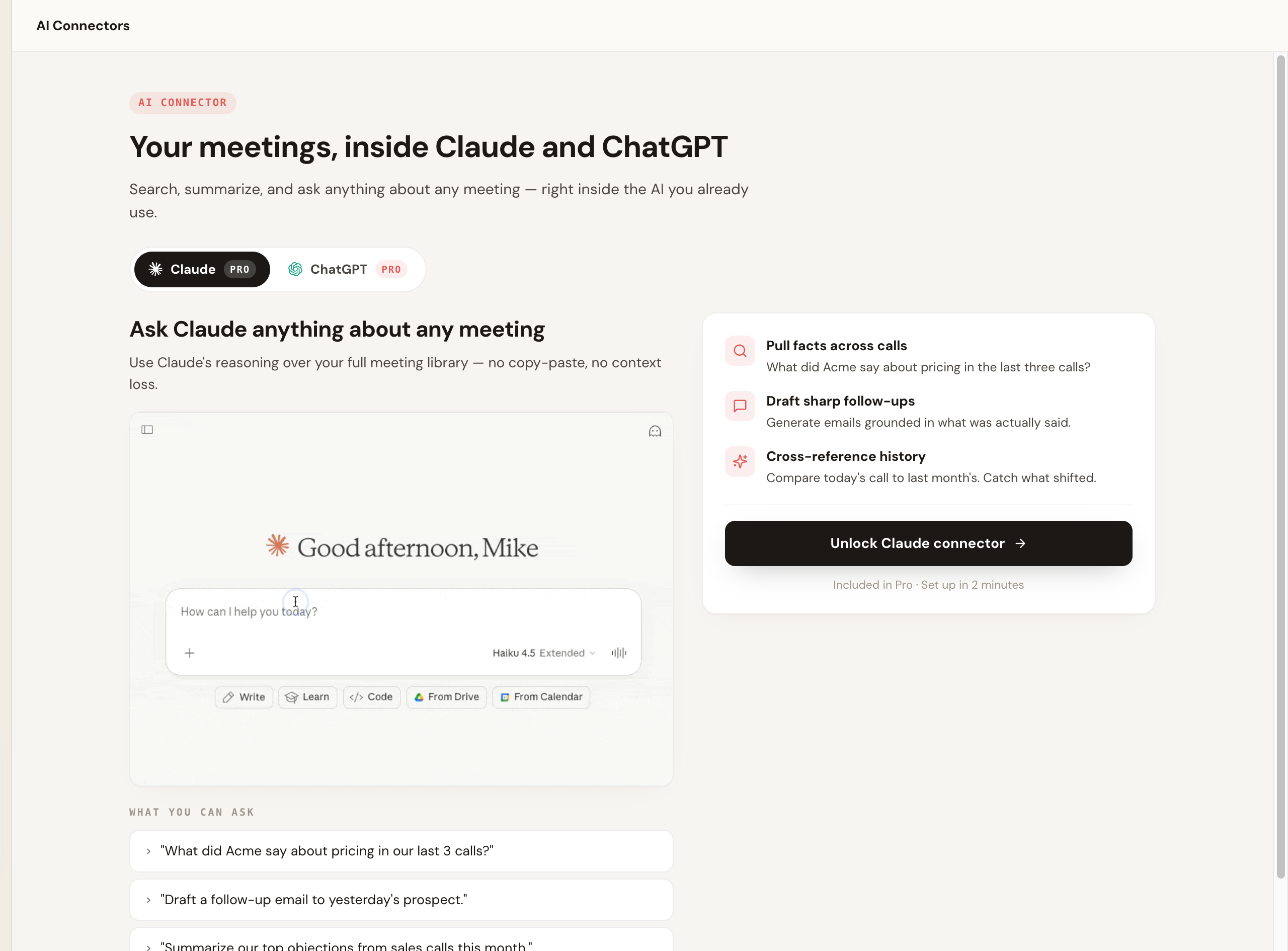
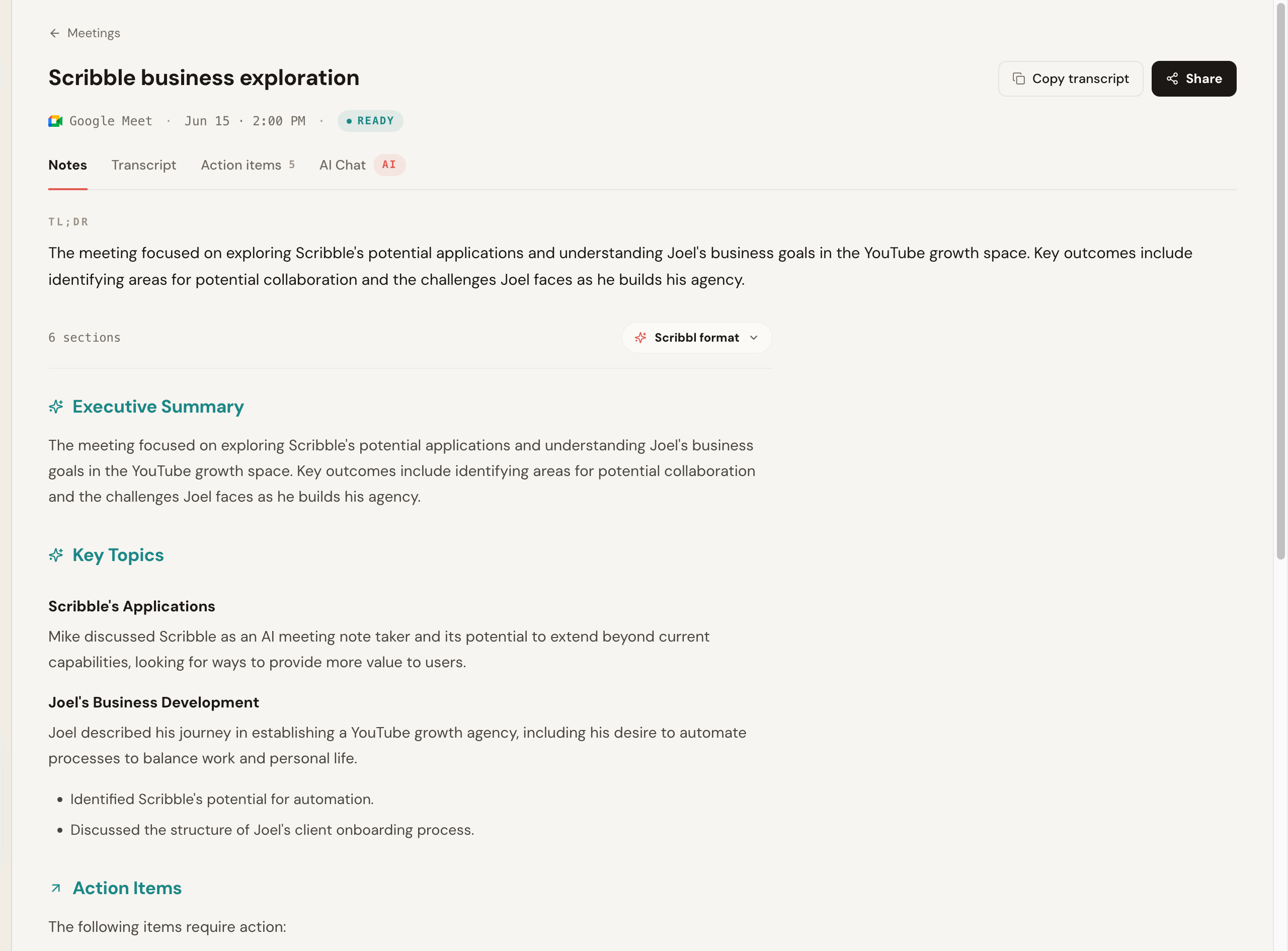
Pros: no bot ever joins; works across Meet, Zoom, and Teams; free plan with no credit card; Chrome extension for Google Meet and Scribbl Desktop for Zoom and Teams; connects meetings to ChatGPT or Claude so the work gets done; Smart Collections sort meetings into groups you describe in one sentence; Automations draft the follow-up email and log notes in HubSpot or Pipedrive; 5.0 from 3,000 reviews on the Chrome Web Store. Pricing: free plan with 10 meetings a month and no credit card; Pro is $13 per user per month billed annually, or $20 monthly. See the pricing page. Rating: 5.0 from 3,000 reviews on the Chrome Web Store and 4.9 from 725 reviews on G2, used across 10,000+ organizations. Best for: anyone with client, sales, or external calls who wants notes with no bot, and a free start. More in our botless AI notetaker explainer and the AI notetaker without a bot guide.
- Botless: nothing joins Meet, Zoom, or Teams
- Delivery: Chrome extension for Google Meet, Scribbl Desktop for Zoom and Teams
- Output: transcript, AI notes, action items with owners
- Free: real free plan, no credit card
- Connects to: ChatGPT and Claude
- So you can: ask across past meetings, or just one Smart Collection
- And get: the follow-up email written for you
- Trust: 5.0 from 3,000 reviews on the Chrome Web Store, 10,000+ orgs
2. Fathom
Fathom is a polished, widely loved notetaker, and on G2 it carries one of the highest review volumes in the category at a near-5.0 average. A bot joins the meeting to record (capture with no bot is a beta for Mac), and it produces clean summaries. The free plan records unlimited meetings, but advanced summaries cover only your first 5 calls each month, and AI action items, AI follow-up emails and Ask Fathom need Premium. The trade is the usual one: a participant appears in the call.
So the page does not only show our own product, here is an honest, clearly-illustrative rendering of what a typical bot-based notetaker's post-call output looks like, including the line that defines the category, the visible recording assistant in the attendee list. It is a diagram, not a screenshot of a real vendor's pixels.
Team reviewed the Q3 launch timeline and agreed to ship the beta the week of the 14th. Pricing page copy still open.
- Maria: finalize beta invite list (Fri)
- Dev: stage pricing copy for review
Pros: unlimited free recording, clean summaries, popular and well-supported, near-5.0 G2 at high volume. Cons: a bot joins and is visible to attendees; AI action items and follow-up emails need Premium. Pricing: free plan; Premium is $16 per user per month billed annually, or $20 monthly; Team is $15 billed annually, or $19 monthly, per user with a 2-user minimum; Business is $25 billed annually, or $34 monthly (Fathom pricing, checked October 7, 2026). G2: around 5.0 at one of the highest review volumes in the category; public average, varies. Best for: teams that want a clean, popular notetaker and are fine with a bot. See our Fathom alternative breakdown and Otter vs Fathom.
3. Granola
Granola is a note-taking app for Mac, Windows, iOS and Android that listens to your computer's audio and merges your own typed notes with an AI summary. No bot joins the call, which makes it a botless option for solo note-takers who like to jot during a meeting and have the AI clean it up afterward. It transcribes and then deletes the audio, so there is no recording to go back to. Several reviewers report gaps in speaker identification, so attribution on multi-person calls is another weak spot.
Pros: botless, blends your live notes with AI, clean desktop experience. Cons: keeps no recording; speaker-ID gaps on multi-person calls; the free plan shows only the last 30 days of notes. Pricing: Basic is free (notes from the last 30 days); Business is $14 per user per month, billed monthly; Enterprise is from $35 per user per month (Granola pricing, checked October 7, 2026). G2: around 4.7 and growing as review volume builds; public average, varies. Best for: solo professionals who take notes live and want them tidied up, with no bot.
4. Fireflies.ai
Fireflies is one of the more established and feature-rich options, with strong search, broad integrations, and team analytics. Its standard model sends a notetaker bot, often called Fred, into the meeting. If you want depth and a lot of connected tooling, and a visible bot is acceptable, Fireflies is a serious contender.
Pros: very broad integrations, strong search, team analytics. Cons: visible bot; the feature surface can feel heavy. Pricing: free tier with unlimited transcription only when calendar auto-join is on (otherwise 3 meetings) and 400 minutes of storage per team; Pro is $10 per seat a month billed annually, or $18 monthly; Business is $19 billed annually, or $29 monthly; Enterprise is $39 per seat per month, billed annually only (Fireflies pricing, checked October 7, 2026). G2: around 4.7 at one of the largest review volumes in the category; public average, varies. Best for: teams that want a deep feature set and CRM depth and do not mind a join-the-call bot. See our Fireflies alternative.
5. Otter.ai
Otter is a mature transcription product with a strong live-transcription experience and a good mobile app. By default it sends its Notetaker bot into calls across Meet, Zoom, and Teams, though its desktop app for Mac and Windows can record without one. Its free tier caps monthly minutes and per-conversation length, and auto-join behavior has drawn consent scrutiny, so set it deliberately.
Pros: strong live transcription, good mobile app, established product. Cons: bot joins by default; minute caps on free; video replay only on Enterprise. Pricing: Basic is free with 300 monthly transcription minutes and 30 minutes per conversation; Pro is $8.33 per user per month billed annually, or $16.99 monthly; Business is $19.99 billed annually, or $30 monthly (Otter pricing, checked October 7, 2026). G2: around 4.3; the lowest in this group, dragged by auto-join and accuracy complaints. Public average, varies. Best for: live transcription and mobile capture, if a bot is acceptable. See Read AI vs Otter.ai.
6. tl;dv
tl;dv focuses on recording and highlighting meetings, with clipping and sharing features teams use to spread context. It generally captures by joining the call. It is strongest as a way to cut and share moments rather than as a pure notes tool. A good fit if your workflow is built around sharing clips.
Pros: excellent clipping and highlight sharing, good free tier. Cons: a bot joins; notes are secondary to clips for some teams. Pricing: free plan with unlimited recordings, but full AI notes only on your first 10 meetings; Pro is $18 per seat per month billed annually, or $29 monthly (tl;dv pricing, checked October 7, 2026). G2: around 4.7; public average, varies. Best for: teams that share meeting clips and want recording-first features. See our tl;dv alternative.
7. Read AI
Read AI records Google Meet through Google's native API with no bot, but sends a visible assistant into Zoom and Teams, so it is mixed on capture. Its differentiator is analytics: engagement, sentiment, and meeting metrics on top of transcription and summaries. If you want team-level meeting insight and do not mind a bot on Zoom and Teams, it is worth a look; for plain notes it is heavier than most.
Pros: botless on Meet; rich meeting analytics and metrics. Cons: bot on Zoom and Teams; analytics focus is more than many people need for notes. Pricing: free plan with 5 meetings a month, up to 1 hour each; Pro is $15 per month billed annually, or $19.75 monthly (Read AI pricing, checked October 7, 2026). G2: around 4.6; public average, varies. Best for: teams that want meeting metrics and analytics. See Read AI vs Otter.ai.
Best AI notetaker app by use case
Map the tool to your most common meeting rather than to the longest feature list.
| If you want... | Pick | Why |
|---|---|---|
| Best overall | Scribbl | Botless, free to start, connects meetings to ChatGPT or Claude so the work gets done |
| Best free plan | Scribbl | 10 meetings a month with Google Meet, Zoom, and Teams included, no credit card, and no bot in the call |
| Best botless app | Scribbl | No bot on Meet, Zoom, or Teams; Chrome extension for Meet, Scribbl Desktop for Zoom and Teams; free start |
| Best for sales and CRM | Scribbl | No visible bot on prospect calls; Automations draft the follow-up email and log notes in HubSpot or Pipedrive |
| Best for privacy on external calls | Scribbl | Nothing joins the call, nothing is announced, and no email goes to attendees |
| Best for online classes and lectures | Scribbl | A searchable transcript, AI notes, and the video of long sessions on Google Meet, Zoom, or Teams |
| Best for typing your own notes | Granola | Blends your live notes with an AI summary, no bot; keeps no recording |
| Best for shared clips | tl;dv | Recording-first with strong clipping and highlight sharing |
| Best for team analytics | Read AI | Engagement, sentiment, and meeting metrics on top of notes |
Our pick for the best AI notetaker app: Scribbl
If you want a notetaker app that gets out of the way, Scribbl is the one we recommend. It records, transcribes, and summarizes Google Meet from a Chrome extension and Zoom and Microsoft Teams from Scribbl Desktop, never adds a participant, and turns each meeting into a searchable transcript with AI notes and action items. The difference that matters most is what happens after: the meeting connects to ChatGPT or Claude, so the follow-up email, the summary, the CRM note, the actual work, gets done instead of sitting in a transcript. The free plan needs no credit card and covers 10 meetings a month, and Pro lifts the meeting limit for $13 per user per month billed annually, or $20 monthly. Smart Collections sort your meetings into groups you describe in one sentence, and Automations do the follow-up: draft the email, log notes in HubSpot or Pipedrive, post to Slack or Teams, or open a Linear or Jira ticket, asking before they change anything by default.
AI notetaker app FAQ
What is the best AI note taker app?
Our overall pick is Scribbl, a botless app that records, transcribes, and summarizes Google Meet, Zoom, and Microsoft Teams without anything joining the call, has a free plan with no credit card, and connects your meetings to ChatGPT or Claude so the follow-up gets written. Fathom, Fireflies, Otter, and tl;dv are popular too, but each sends a bot into the call by default. Pick the tool that fits your most frequent call, not the longest feature list.
Is there a free AI notetaker app?
Yes. Scribbl has a free plan that needs no credit card: 10 meetings a month, with Google Meet, Zoom and Microsoft Teams included. Otter, Fathom, Fireflies, tl;dv, Granola, and Read AI also publish free tiers, but each one caps something (monthly minutes, number of meetings, AI features, or how far back your notes go), and most of them put a visible bot in your call by default. Compare the free column in the pricing table on this page and verify current limits on each vendor's pricing page, since they change.
What is the best free AI notetaker that does not use a bot?
Scribbl is our pick for a free, botless notetaker. Nothing joins the call and nothing is announced to attendees, it works across Google Meet, Zoom, and Microsoft Teams, and the free plan covers 10 meetings a month with no credit card, with the video, a transcript, AI notes and action items for each. Granola is also botless, but it deletes the audio after transcribing, so there is no recording to replay, and its free plan shows only the last 30 days of notes. Among the popular bot-based tools, a few can skip the bot from a desktop app, but the bot is usually the default, so confirm the behavior before a client call.
Do I need a desktop app, a mobile app, or a browser extension?
All three shapes exist and the right one depends on where you meet. A browser extension like Scribbl's Chrome extension (for Google Meet) needs nothing extra to launch per call, and no bot joins. A desktop app like Scribbl Desktop (Mac with Apple silicon and Windows) works with the Zoom and Teams desktop clients, again with no bot. Mobile app-store notetakers (such as standalone recorder apps) suit phone calls and voice memos, but most serious meeting capture happens on desktop or in the browser. Bot-based tools usually need only a calendar connection, but they add a visible attendee to every call.
Do AI notetaker bots show up in the meeting?
Most do. Bot-based tools like Otter, Fireflies, Fathom, and tl;dv send a named participant into the call by default that everyone can see in the attendee list, and some platforms announce it. That is fine for internal calls but can feel intrusive on external, client, or candidate calls, and it raises a consent question because the other side did not opt in. Botless apps like Scribbl and Granola capture without adding anyone to the call, so nothing is visible and nothing is announced. If a visible recorder would change the room, pick a botless app.
Is it legal to record a meeting with an AI notetaker?
Recording laws vary by country and, in the US, by state. Some places allow one-party consent (one person on the call agreeing is enough), and others require all-party consent, where everyone must agree. An AI notetaker does not change your legal obligation to disclose. The practical rule of thumb most teams use is to tell people you are recording or taking notes, and a botless app like Scribbl gives you control over that disclosure rather than a surprise bot announcing it for you. This is general information, not legal advice; check the rules for your jurisdiction and your company policy before recording sensitive calls.
How accurate are AI notetaker apps?
On clean, single-speaker audio, most tools are close. The differences show up on messy calls with crosstalk, accents, and a poor microphone. Speaker identification and proper nouns (names, product names, acronyms) are where most tools slip first. Treat published accuracy numbers as directional rather than permanent, and run your own worst call through your top two picks before committing.
What is the difference between transcription and AI summarization?
Transcription is the verbatim text of who said what, the searchable record of the call. AI summarization sits on top of that: it condenses the transcript into a short recap, pulls out decisions and action items, and often assigns owners. A good notetaker does both, but they are different jobs. A pure transcription tool gives you an accurate wall of text; a notetaker app turns that into something you can act on. Scribbl goes one step further: its Automations draft the follow-up email and log notes in HubSpot or Pipedrive from what was actually said, so the work gets done, not just stored.
How is my meeting data stored, and is it used to train AI?
Retention and training policies differ across every tool on this list and change over time, so read the current privacy policy and data-processing terms before you record sensitive calls. The questions worth asking are: where is the data stored (data residency, which matters for EU and regulated teams), how long is it kept, who can access it, and is it used to train models. With Scribbl, recordings are private by default, and Scribbl doesn't use your meetings to train AI for anyone other than you.
Do AI notetakers support languages other than English?
Many do, but coverage varies a lot, so confirm on each vendor's site. If most of your calls are not in English, shortlist on the supported-language count and on whether the tool transcribes the original language or translates it, since those are different. Scribbl transcribes more than 85 languages on Google Meet, Zoom and Microsoft Teams; confirm the current list for any tool before you commit a non-English meeting to it.
Which AI notetaker is best for sales and CRM?
Sales teams running external demos and discovery calls usually prefer a botless tool so nothing visible joins a prospect's call, then a clean handoff into the CRM. Scribbl is our pick there because it captures with no bot, and its Automations draft the follow-up email and log notes in HubSpot or Pipedrive from what was actually said, asking before they change anything by default.
Can I try an AI notetaker app for free before I pay?
Yes. Scribbl has a free plan with no credit card required, so you can capture a real call and judge accuracy, speaker labels, and the in-call experience yourself. Fathom, Fireflies, Otter, tl;dv, Granola, and Read AI also publish free tiers with usage caps. The most honest test is to run one real meeting, ideally a messy one with crosstalk, through your top one or two picks and compare the transcript and summary against what was actually said.
How much do AI notetaker apps cost?
Free plans are common, and the paid entry tiers for the leading meeting notetakers sit roughly between $8 and $20 per user per month billed annually, checked October 7, 2026. Scribbl's free plan covers 10 meetings a month on Google Meet, Zoom, and Teams with no credit card, and Pro is $13 per user per month billed annually, or $20 monthly. For the rest: Otter Pro is $8.33 per user per month billed annually ($16.99 monthly), Fireflies Pro is $10 per seat billed annually ($18 monthly), Granola Business is $14 per user per month, Read AI Pro is $15 billed annually ($19.75 monthly), Fathom Premium is $16 billed annually ($20 monthly), and tl;dv Pro is $18 per seat billed annually ($29 monthly). Notetaker pricing changes often, so confirm the live number on each vendor's pricing page before you buy. The full free-tier-and-price breakdown is in the pricing table on this page.
Which AI notetaker app is the most accurate?
There is no fixed answer, because accuracy depends heavily on your microphones, accents, and crosstalk. On clean audio most tools are close; the differences show up on messy calls and in whether speakers are labeled correctly. If accuracy is your single priority rather than whether a bot joins, run your own worst, messiest call through your top two picks before committing.
Related reading: botless AI notetaker, AI notetaker without a bot, best Zoom AI notetaker, AI notetaker Chrome extension, AI notetaker for Mac, AI notetaker for Windows, best meeting transcription software, and AI notetaker with Slack.
Try Scribbl
Let your meetings take their own notes.
Scribbl records, transcribes, and summarizes your Google Meet calls from your browser. No bot joins the call. Free forever for individuals.
Add to Chrome · It's free