How to Transcribe an Interview (2026): Steps, Software and an Interview Transcript Example
How to transcribe an interview by hand, from a file or on a Zoom, Teams or Meet call: steps, verbatim vs clean, an interview transcript example and software.
Updated October 29, 2026
The short answer
Facts about other products checked on their own pages, October 7, 2026
Record the interview with permission, get a first draft (by hand, from the recording with software, or with a note taker during a remote call), then check every line against the audio and label who is speaking.
- Consent
- Tell the interviewee you're recording and get their yes on the recording.
- Clean audio
- Headsets on a call, or a phone close to both of you in a quiet room.
- Check the draft
- Fix names and numbers, and replace Speaker 1 with real names. Then pick verbatim or clean, add timestamps, and save it with a header.
- Remote interview?
- Scribbl writes the transcript during the Zoom, Teams or Google Meet interview, with speaker names and the video, and nothing joins the call.
To transcribe an interview, record it with the interviewee's permission, get a first draft of the text (type it while you replay the audio, upload the recording to transcription software, or let a note taker write it during a remote call), then check every line against the recording and label who is speaking. Finish by picking a verbatim or clean style, adding timestamps, and saving the transcript with a short header that says who was interviewed, when, and how it was recorded.
Typing by hand takes about 3 to 6 hours per hour of audio, by Otter's estimate. Automatic transcription gives you a draft much faster, but you still check it, because software can mishear names, numbers and jargon.
This guide covers job interviews, research and user interviews, and journalism and podcast interviews. For other conversations, such as phone calls, meetings and lectures, see how to transcribe a conversation. Scribbl, an AI note taker for Google Meet, Zoom and Microsoft Teams, makes this page, and for remote interviews it writes the transcript for you, with speaker names and the video (see how). Every fact about another product comes from that company's own pages, checked on October 7, 2026, and listed under Sources.
What is an interview transcript?
An interview transcript is a written record of an interview: who said what, in order, usually with timestamps so you can find each moment in the recording. Hiring teams use transcripts to look back at what a candidate actually said, researchers code and analyze them, and journalists and podcasters pull quotes and show notes from them.
A transcript is not the same as interview notes. Notes are your summary of what mattered. A transcript is the words themselves, including the interviewer's questions.
How to transcribe an interview, step by step
1. Get consent before you record
Tell the interviewee that you're recording, what the recording and transcript are for, and who will see them. Ask, and get the yes on the recording itself, so it's in your transcript (the example below starts that way). For academic research, use the consent form your ethics board approved. More in Consent.
2. Record clean audio
Good audio saves more time than any software. On a remote call, ask the interviewee to wear headphones with a microphone, and close other apps that make sounds. In person, put the phone or recorder between you and close to both of you, in a quiet room, and record 10 seconds as a test before you start. In both cases, let people finish: answers spoken over each other are the hardest part to transcribe.
3. Decide verbatim or clean before you start
A verbatim transcript keeps every um, false start and pause. A clean transcript keeps the meaning and drops the fillers. Decide first, because going back to add the ums is slower than typing them the first time. The verbatim vs clean section shows the same answer both ways.
4. Get a first draft
There are three ways, compared in the next section: type it yourself while you replay the audio, upload the recording to automatic transcription software, or let a note taker write the transcript during a remote interview.
5. Label the speakers and add timestamps
Software often labels people "Speaker 1" and "Speaker 2". Replace them with names, initials or roles (Interviewer, Candidate, P04) and use the same label all the way through. Put a timestamp at the start of each speaker turn, or at least every minute or two, so anyone can jump to that moment in the audio.
6. Check the draft against the recording
Listen to the whole recording once at normal speed while you read along. Fix names, numbers, product names and jargon, since that's where software slips. Where you can't make out a word, write [inaudible] with the timestamp instead of guessing. Before you publish or share a quote, replay that exact moment.
7. Format it, remove private details, and save it
Add a header (project, date, place, people, how it was recorded, consent, verbatim or clean). For research, replace names with IDs if your study requires it, and swap other identifying details for general ones: an age range instead of an exact age, "a hospital in Ohio" instead of its name. Save the transcript next to the recording with a file name you can sort, such as 2026-09-14_P04_interview.docx, and limit who can open both.
Three ways to transcribe an interview
| By hand | Automatic transcription of a recording | A note taker during a remote interview | |
|---|---|---|---|
| How it works | You replay the audio and type | You upload the recording and software writes a draft | Software writes the transcript during the Zoom, Teams or Google Meet call |
| Your time per hour of audio | About 3 to 6 hours of typing (Otter's estimate) | The draft is quick; checking it takes at least one full listen | Ready after the call; checking it takes at least one full listen |
| Cost | Your time | Free options and paid plans (software table) | Built into some paid meeting plans, or a note taker's free or paid plan |
| Speaker names | You type them | Often "Speaker 1, Speaker 2" until you rename them | Names from the call, when the tool supports it |
| Best for | Short interviews, poor audio, recordings that can't leave your computer | In-person interviews and recordings you already have | Remote job, research and podcast interviews |
By hand
- Open the recording in a player you can control from the keyboard. You want to pause, jump back a few seconds and slow playback down (0.75x is often enough) without reaching for the mouse.
- Work in short chunks. Play 5 to 10 seconds, pause, type, repeat. Don't try to keep up with live speech.
- Type speaker labels as short codes, such as
mc:andjp:, then use Find and Replace at the end to turn them into full names. - Mark what you can't hear as [inaudible 00:12:41] and come back to it at the end.
- Do a second pass at normal speed to catch mistakes, as in step 6 above.
Typing by hand makes sense for a short interview, for audio so poor that software produces nonsense, or when your rules say the recording can't be uploaded anywhere. For anything longer than a few minutes, an automatic draft plus a careful check is usually faster.
Automatic transcription of a recording
You upload the audio or video file, and software returns a draft with timestamps. Microsoft Word has this built in for Microsoft 365 subscribers. According to Microsoft Support, as of October 2026:
- Open a document in Word for the web or Word for Microsoft 365 on Windows. In a browser, Transcribe works in Microsoft Edge and Chrome.
- Go to Home › Dictate › Transcribe.
- Choose Upload audio and pick the file. Word accepts .wav, .mp4, .m4a and .mp3.
- When the transcript appears, select a timestamp to play that part of the audio.
- Word labels people "Speaker 1", "Speaker 2" and so on. To rename one, select Edit transcript section, change the label, and choose Change all Speaker [x] to rename every instance.
- Choose Add all to document to put the transcript into your file.
A Microsoft 365 subscription allows 300 minutes of uploaded audio a month (30,000 with a Microsoft Copilot license). Other tools that take uploads, such as Otter, Fireflies and Whisper, are in the software table. If you'll analyze the interviews in qualitative analysis software, check whether it transcribes too: MAXQDA, for example, lets you transcribe inside the program by hand or with its own AI transcription service.
A note taker during a remote interview
If the interview happens on Zoom, Microsoft Teams or Google Meet, you don't need to upload anything. The meeting app's own transcription (on some paid plans) or a note taker writes the transcript during the call, and because each person joins from their own device, the transcript can carry their names instead of "Speaker 1". Some note takers also give you the video, a summary and action items.
Scribbl, which we make, is our pick here: it works on Google Meet, Zoom and Teams with nothing joining the call, and after each interview you get the video recording, a transcript with speaker names, AI notes and action items. It's the fastest of the three methods, since there's no file to export or upload. The remote interview section covers the built-in options on each platform.
Verbatim vs clean transcripts
| Verbatim | Clean (intelligent verbatim) | |
|---|---|---|
| Keeps | Every word, um and uh, false starts, repeated words, pauses, laughter | Every word that carries meaning |
| Drops | Nothing | Fillers, false starts, stutters |
| Best for | Conversation analysis, legal work, research where how someone speaks matters | Most job interviews, research and user interviews, journalism, podcasts |
| Typing time | Longest | Shorter |
The same answer, both ways (made-up example):
Verbatim: "Um, I open my laptop around, uh, eight. The first, the first thing I do is check, you know, our team chat. [laughs]"
Clean: "I open my laptop around eight. The first thing I do is check our team chat."
Some guides add a third style, an edited transcript, which also fixes grammar and tightens sentences. It reads well for a summary, but it's no longer exactly what the person said, so don't quote from it. Journalists in particular should quote from the clean or verbatim version and check it against the audio.
How to format an interview transcript
A well-formatted transcript has five parts:
- A header with the project or story, the date, where it took place (a room, or remote on a named meeting app), the interviewer, the interviewee (or their ID), how it was recorded and how long it ran, how consent was given, the style (verbatim or clean), and who transcribed and checked it.
- Speaker labels. Use the full name or role the first time and the same label every time after. For research, IDs such as P04 keep names out of the file.
- Timestamps in [hh:mm:ss] form at the start of each speaker turn. In long answers, add one every minute or so.
- One paragraph per speaker turn. Break very long answers into paragraphs, each with its own timestamp.
- Tags in square brackets for anything that isn't a spoken word, used the same way throughout:
| What happened | Write it like this |
|---|---|
| A word you can't make out | [inaudible 00:12:41] |
| A word you're not sure of | [Kinsley? 00:12:44] |
| Two people talking at once | [crosstalk 00:13:02] |
| Laughter or a long pause | [laughs] or [pause] |
| A name removed for privacy | [colleague's name] |
| A word you added for clarity | [the proposal] |
| A slip kept exactly as it was said | [sic] |
If your team cites transcripts by line, turn on line numbers in your word processor before you share the file.
Interview transcript example
Here is a template you can copy, followed by a filled-in example. The example is made up: the people, the study and the answers are invented to show the format.
Interview transcript template
Project:
Interview date:
Location: (room or meeting app)
Interviewer:
Interviewee:
Recording: (platform or device, length, audio or video)
Consent: (how and when it was given)
Transcript style: (verbatim or clean)
Transcribed and checked by:

[00:00:00] Interviewer name: Question
[00:00:00] Interviewee name: Answer
Example (made up)
Project: Home office study (made-up example)
Interview date: September 14, 2026
Location: Remote, on Zoom
Interviewer: Maya Chen
Interviewee: Jordan Patel
Recording: Zoom, 42 minutes, video and audio
Consent: Given on the recording at 00:00:15
Transcript style: Clean verbatim
Transcribed and checked by: Automatic draft, checked against the audio by Maya Chen

[00:00:04] Maya Chen: Thanks for making time today. Before we start, I'd
like to record this call so I can write up a transcript. Only our research
team will see it. Is that OK with you?

[00:00:15] Jordan Patel: Yes, that's fine.

[00:00:18] Maya Chen: Great. Can you walk me through how your workday starts?

[00:00:24] Jordan Patel: I open my laptop around eight. The first thing I do
is check our team chat, then I look at my calendar. [laughs] Most days it's
already full by then.

[00:01:02] Maya Chen: What happens when it's full?

[00:01:05] Jordan Patel: I move my own work to the evening. That's the part
I'd like to change.

[00:01:31] Maya Chen: You said "my own work." What counts as your own work?

[00:01:36] Jordan Patel: Writing, mostly. Proposals and [inaudible 00:01:39]
reports for clients.
Interview transcription software compared
These are the tools page 1 and the guides above name most often, plus the transcripts built into the big meeting apps. Every fact comes from each company's own pricing or help pages, as of October 7, 2026. We compared them from those pages; we didn't create accounts on them. We make Scribbl and list it first, as our pick for remote interviews.
| Tool | How you get the transcript | Free | Paid | Worth knowing |
|---|---|---|---|---|
| Scribbl (we make it; our pick for remote interviews) | Remote interviews: a Chrome extension for Google Meet, and Scribbl Desktop for Mac (Apple silicon) and Windows for Zoom and Teams; nothing joins the call | The free plan includes Google Meet, Zoom and Microsoft Teams. 10 meetings a month | Pro: $13 per user per month billed annually, or $20 monthly | Video, a transcript with speaker names, AI notes and action items; on Pro, ask Claude or ChatGPT across every interview |
| Microsoft Word (Transcribe) | Upload .wav, .mp4, .m4a or .mp3, or record live, in Word for the web or Word for Microsoft 365 on Windows | No free version | Included with Microsoft 365: 300 minutes of uploads a month (30,000 with a Copilot license) | Labels speakers "Speaker 1, Speaker 2" for you to rename; each section has a timestamp; 80+ languages and regions |
| Otter | iOS and Android apps, file imports, and Zoom, Teams and Google Meet calls | Basic: 300 minutes a month, 30 minutes per conversation, 3 file imports for the life of the account | Pro: $8.33 per user per month billed annually, or $16.99 monthly: 1,200 minutes, 90 minutes per conversation, 10 imports a month | Speaker identification on every plan; transcribes English, Spanish, French, German, Japanese and Chinese |
| Fireflies | File uploads (MP3, MP4, WAV or M4A, up to 100MB and 150 minutes each), meetings and a phone app | Yes, with 400 minutes of storage; downloading transcripts needs a paid plan | Pro: $10 per seat per month billed annually, or $18 monthly | Transcribes 100+ languages; each upload on the free plan uses a transcription credit |
| Apple Voice Memos | Record on an iPhone 12 or later; it transcribes as you record or afterward | Yes | None | English, Spanish, Portuguese, Italian, French, German, Japanese, Korean and Chinese; Apple's guide doesn't mention speaker labels |
| Whisper (OpenAI, open source) | A model you download and run on your own computer, from Python or the command line | Yes (MIT license) | None | Audio stays on your computer; larger models need up to about 10 GB of video memory; its README doesn't mention speaker labels |
| Zoom, Teams and Google Meet transcripts | The meeting app transcribes a remote interview | Depends on your plan | Zoom: Pro or higher, with cloud recording. Google Meet: certain Google Workspace editions | Teams shows each speaker's name; Zoom may show "Unknown Speaker"; Meet saves the transcript to the organizer's Google Drive |
How to choose:
- Remote interviews on Zoom, Teams or Google Meet: Scribbl. The video, a transcript with speaker names and AI notes, with nothing joining the call and no file to upload, free for 10 meetings a month. The meeting app's own transcript covers one platform, on some paid plans.
- In-person interview, iPhone in your pocket: Voice Memos. It's free, and you can copy the transcript into any document.
- A recording you already have, and you pay for Microsoft 365: Word's Transcribe.
- Research data that must stay on your computer: Whisper, run locally. Harvard Library's research guide recommends downloading the model rather than sending sensitive interviews to OpenAI's Whisper API (Harvard Library).
- Legal records, very poor audio, or a strict verbatim transcript: a human transcription service. Prices vary a lot; see what transcription services cost.
Check free limits on the vendor's own page before you plan a study around them. Some transcription guides in Google's results still list Otter's free plan at 600 minutes a month; Otter's pricing page says 300, with 30 minutes per conversation. For more on free options, see the best free transcription software, and for Otter's plans in detail, Otter.ai pricing.
How to transcribe a remote interview on Zoom, Teams or Google Meet
Each meeting app can transcribe on some plans. The person who organized the meeting usually controls it, so if you're the guest, ask the host or use your own note taker.
- Any of the three, on any plan: Scribbl. It works on all three with nothing joining the call, whoever hosts, and gives you the video, a transcript with speaker names, AI notes and action items.
- Zoom: audio transcripts come with cloud recordings on a Pro, Business, Education or Enterprise account, once cloud recording and audio transcription are turned on. The transcript is a VTT file, and Zoom may label a voice it doesn't recognize as "Unknown Speaker" (Zoom Support). Full steps: Zoom meeting transcription.
- Microsoft Teams: select More actions › Record and transcribe › Start transcription, and confirm the language. Everyone sees a notification, and the transcript shows each speaker's name and a timestamp. By default, organizers and co-organizers can download it as a .docx or .vtt file (Microsoft Support). Full steps: Teams transcription.
- Google Meet: transcripts work on Business Standard, Business Plus, Enterprise Starter, Enterprise Standard, Enterprise Plus, Teaching and Learning Upgrade, Education Plus and Workspace Individual, not on personal Google accounts. The transcript is saved to the organizer's Google Drive, and everyone in the meeting sees a Transcripts icon (Google Meet Help). Full steps: Google Meet recording and transcript.
To record the interview in the first place, see how to record a Zoom meeting, how to record a Teams meeting and how to record a Google Meet.
How to transcribe an in-person interview
In a room there's no call for software to join, so you record with a phone or a recorder and transcribe the file.
On an iPhone, Apple's Voice Memos transcribes for you (Apple Support):
- Open Voice Memos (in the Utilities folder) and tap the record button.
- To watch the transcript as you record, swipe up from the top of the waveform and tap the transcript button.
- After the interview, tap the recording, tap the transcript button, and choose View Transcript or Copy Transcript.
- Paste the text into a document, add speaker names and timestamps, and check it against the audio.
It works on iPhone 12 or later in English, Spanish, Portuguese, Italian, French, German, Japanese, Korean, and Simplified and Traditional Chinese, and Apple says it's not available in every country or region.
On Android or a dedicated recorder, record the interview, then upload the file to software that accepts recordings, such as Word's Transcribe, Otter or Fireflies, or run Whisper on your computer.
Wherever you record, put the device close to both people, away from fans and clattering cups, and test it for 10 seconds first. For interviews in a room, use one of these options.
Transcribing job, research and journalism interviews
Job interviews
Tell the candidate at the start that you're recording and who will see the transcript, and check your company's policy first, since some employers don't allow recorded interviews. A clean transcript is enough. Share it only with the hiring team, and keep it with the candidate's other interview records. Comparing candidates on what each actually said is easier when every interview has a transcript with the same layout.
Research and user interviews
Your ethics approval and consent form usually set the rules: whether you may record, where recordings and transcripts may be stored, and whether you may use cloud transcription. Check them before you upload anything. Use participant IDs instead of names, remove identifying details, and keep one transcript style and one tag list across every interview in the study so your coding stays consistent. If your data must not leave your computer, transcribe by hand or run Whisper locally. When you write up, APA Style says to quote participants you interviewed for your own research directly, not to cite them as personal communications (APA Style).
Journalism and podcast interviews
Quote from a clean or verbatim transcript, never from an edited one, and replay the moment before you publish any quote. A timestamp next to each quote makes that fast, and it's your proof if a source disputes it. For podcasts, a separate audio track per person (see the Zoom tip above) makes the transcript and the edit easier. The Reporters Committee for Freedom of the Press advises journalists to assume the stricter state law applies when people are in different states (RCFP).
Consent: tell everyone you're recording
Whatever method you use, tell everyone in the interview that you're recording, and get a yes before you start.
- US federal law lets you record a conversation you're part of, or one where a person in it has agreed in advance (18 U.S.C. § 2511(2)(d)).
- About 11 states require everyone's consent: California, Delaware, Florida, Illinois, Maryland, Massachusetts, Michigan (for recordings by someone not in the conversation), Montana, New Hampshire, Pennsylvania and Washington. A few states set different rules for in-person conversations and phone calls (RCFP).
- People in different states: assume the stricter law applies.
- Outside the US, other countries have their own rules, and research and employment rules can add more.
Teams and Google Meet show everyone a notice when their own transcription starts. Recorders on your own phone or computer don't announce themselves, so the telling is up to you. A simple line works: "I'd like to record this so I can write up an accurate transcript. Only [who] will see it. Is that OK?" This isn't legal advice; for the state-by-state detail, see do you have to tell people you're recording.
Transcribe remote interviews automatically: Scribbl
This section is about our own product. Scribbl is an AI note taker for Google Meet, Zoom and Microsoft Teams, and it's the quickest way to a transcript of a remote interview: no recording to export and no file to upload. Nothing joins the call: Google Meet runs from a Chrome extension, and Zoom and Teams run from Scribbl Desktop for Mac (Apple silicon) and Windows. After each interview you get the video recording, a transcript with speaker names, AI notes and action items.

What it does after the interview:
- Every interview in a study or hiring round together. Smart Collections sort each new meeting into the groups you describe, like "user interviews about onboarding" or "candidates for the designer role".
- Questions across every interview. On Pro, connect Scribbl to ChatGPT or Claude and ask what participants said about pricing, or how two candidates answered the same question, across every interview or just the ones in one Smart Collection.
- The write-up done for you. Automations can add a row to a Google Sheet for each interview, post a summary to Slack or Teams, save notes to Notion or Confluence, or log them in HubSpot or Pipedrive. They ask before changing anything by default.
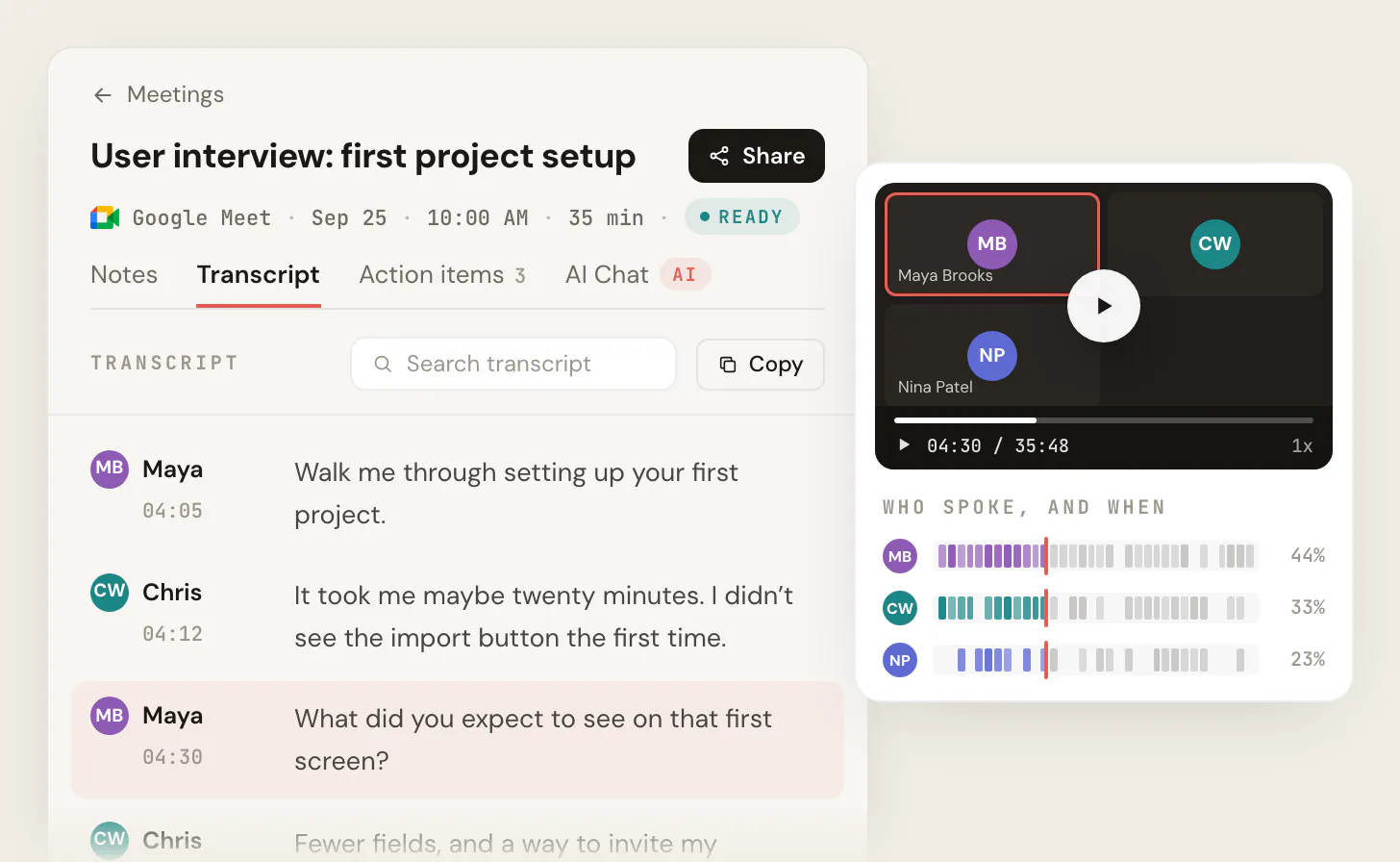
Who it's for: people who run remote interviews on Google Meet, Zoom or Teams: job interviews, user and research interviews, and remote podcast or press interviews. The free plan includes Google Meet, Zoom and Microsoft Teams. It covers 10 meetings a month. Pro is $13 per user per month billed annually, or $20 monthly (pricing). Recordings are private by default, and Scribbl doesn't use your meetings to train AI for anyone other than you. As with any recorder, tell everyone you're recording.
Try Scribbl freeFAQ
What is an interview transcript?
An interview transcript is a written record of an interview: who said what, in order, usually with a timestamp at each speaker turn so you can find that moment in the recording. It includes the interviewer's questions as well as the answers, and starts with a short header that says who was interviewed, when, where and how it was recorded. Notes are your summary of an interview; a transcript is the words themselves.
What is the best way to transcribe an interview?
Record it with the interviewee's permission, get an automatic draft, then check the draft against the recording and fix names, numbers and speaker labels. For a remote interview on Zoom, Teams or Google Meet, a note taker such as Scribbl, which makes this page, writes the draft during the call, with speaker names and the video, and the meeting app's own transcript does it on some paid plans. For an in-person interview, record on your phone or a recorder and upload the file to software such as Microsoft Word's Transcribe. Type it by hand when the interview is short or the audio is too poor for software.
How long does it take to transcribe a 1-hour interview?
By hand, about 3 to 6 hours of typing per hour of audio, by Otter's estimate, and longer for a verbatim transcript. With automatic transcription the draft comes back quickly, and the time goes into checking it: plan on at least one full listen, so about an hour for an hour of audio, plus time to fix what the software got wrong.
Can I transcribe an interview for free?
Yes. For remote interviews on Google Meet, Zoom or Teams, Scribbl's free plan (we make Scribbl) covers 10 meetings a month, each with the video and a transcript with speaker names. Apple Voice Memos transcribes recordings for free on iPhone 12 or later, in supported languages. Whisper, OpenAI's open-source model, is free and runs on your own computer, though it takes some setup. Otter's free plan gives 300 minutes a month, but only 30 minutes per conversation and 3 file imports for the life of the account. Microsoft Word's Transcribe comes with a Microsoft 365 subscription, up to 300 minutes of uploaded audio a month. Typing it yourself is always free.
How do you format an interview transcript?
Start with a header: project, date, interviewer, interviewee, how it was recorded, consent, and whether the transcript is verbatim or clean. Then give each speaker turn its own paragraph, starting with a timestamp such as [00:01:05] and the speaker's name or role. Mark what you can't hear as [inaudible] with a timestamp, and put anything you add, such as [laughs], in square brackets.
What is the difference between verbatim and clean verbatim?
A verbatim transcript keeps everything that was said and how it was said: um and uh, false starts, repeated words, pauses and laughter. A clean verbatim transcript, also called intelligent verbatim, keeps every word that carries meaning but drops the fillers and false starts. Use verbatim when how someone speaks matters, such as in conversation analysis or legal work, and clean for most job, research and journalism interviews.
Can AI transcribe an interview?
Yes. Scribbl (which makes this page) for remote interviews, Microsoft Word, Otter, Fireflies, Apple Voice Memos, Whisper, and the built-in transcripts in Zoom, Teams and Google Meet all turn speech into text. None of them is perfect, so check the draft against the recording, especially names, numbers, technical terms and any quote you'll publish, and replace labels such as Speaker 1 with real names.
How do I transcribe an interview in Microsoft Word?
In Word for the web or Word for Microsoft 365 on Windows, go to Home, then Dictate, then Transcribe, and choose Upload audio. Word accepts .wav, .mp4, .m4a and .mp3 files, labels speakers as Speaker 1, Speaker 2 and so on so you can rename them, and links each section to a timestamp. Then add the transcript to your document. It needs a Microsoft 365 subscription, works in Edge or Chrome, and allows 300 minutes of uploaded audio a month.
Can Google Docs transcribe an interview recording?
Not directly. Google Docs voice typing (Tools, then Voice typing) types what it hears through your computer's microphone while you speak, and Google's help page doesn't describe transcribing an audio file. For a recording, use a tool that accepts uploads, such as Microsoft Word's Transcribe, Otter or Whisper, then paste the text into a Google Doc.
How do I transcribe an interview on my iPhone?
Record it in the Voice Memos app. On iPhone 12 or later, Voice Memos transcribes speech in English, Spanish, Portuguese, Italian, French, German, Japanese, Korean and Chinese. You can watch the transcript live while you record, or open the recording afterward and choose View Transcript or Copy Transcript. Apple's guide doesn't mention speaker labels, so add the names when you check the text.
Do I need permission to record an interview?
Tell the interviewee and get a yes, every time. In the US, federal law allows recording when one person in the conversation agrees, but about 11 states require everyone's consent, including California, Florida, Illinois, Pennsylvania and Washington, and other countries have their own rules. When people are in different states, assume the stricter law applies. This isn't legal advice.
Should an interview transcript include the interviewer's questions?
Yes. The questions give each answer its context, and in research they show whether a question led the answer. Transcribe the interviewer the same way as the interviewee, with a name or role and a timestamp for each turn.
How do you cite an interview transcript in APA Style?
It depends on whether readers can get the transcript. An interview that isn't published is a personal communication: cite it in the text only, with initials, surname and an exact date, such as (T. Nguyen, personal communication, February 24, 2020), and leave it out of the reference list. Quotes from participants you interviewed for your own research are not cited as personal communications at all; you quote them directly. A transcript readers can find, such as a published interview, gets a reference entry for that type of source.
What is the best interview transcription software?
For remote interviews on Google Meet, Zoom or Teams, Scribbl, which makes this page: you get the video, a transcript with speaker names, AI notes and action items without anything joining the call, free for 10 meetings a month. For in-person interviews on an iPhone, Voice Memos is free. If you pay for Microsoft 365, Word's Transcribe handles uploaded recordings. For research data that must stay on your computer, Whisper runs locally.
Sources
Every product fact above was checked on these pages on October 7, 2026.
- Microsoft: Transcribe your recordings (Word), Start, stop and download live transcripts in Microsoft Teams meetings
- Otter: pricing, A Guide to Writing Interview Transcripts (the 3 to 6 hours estimate)
- Fireflies: pricing, What's included in the Fireflies Free plan
- Apple: View a Voice Memos transcription on iPhone
- OpenAI: Whisper on GitHub
- Zoom: Audio transcripts for cloud recordings, Changing settings in the Zoom Workplace desktop and mobile app
- Google: Use transcripts with Google Meet, Google Docs voice typing
- MAXQDA: Interview Transcription & Analysis
- Harvard Library: Recording & Transcription, Library Support for Qualitative Research
- Reporters Committee for Freedom of the Press: Introduction to the Reporter's Recording Guide
- Cornell Legal Information Institute: 18 U.S.C. § 2511
- APA Style: Personal communications
- Scribbl: pricing
Try Scribbl
Get the interview transcript written
Scribbl records, transcribes, and summarizes your Google Meet calls from your browser. No bot joins the call. Free forever for individuals.
Add to Chrome · It's free