Best Google Meet Recorder Extensions (2026): Scribbl, tl;dv, Otter, Fireflies and More
Best Google Meet recorder extensions in 2026, compared: what each Chrome extension records, whether a bot joins, and what each free plan includes. Oct 19, 2026.
Updated October 19, 2026
The short answer
Facts from each company's Chrome Web Store listing and pricing page, checked October 19, 2026
The best Google Meet recorder extension is Scribbl: nothing joins the call, and you get the video, a transcript with speaker names and AI notes, host or not.
- 1. Scribbl
- Chrome extension for Google Meet. Nothing joins the call. Video, transcript with speaker names, AI notes and action items after every call, on any Google account. Free plan: 10 meetings a month.
- 2. tl;dv
- Free video recordings, but its Google Meet page says the Chrome extension has a bot join the call. AI notes on 10 meetings free.
- 3. Otter
- Records on your device with no bot in Meet, or sends its notetaker in. Free plan: 300 minutes a month, 30 minutes per conversation. Video replay is Enterprise only.
- 4. Fireflies
- Its Chrome extension records Meet without the bot. Video recording starts on Pro at $10 per seat per month billed annually.
- 5. Bluedot, Loom, Vimeo Record
- Bluedot is bot-free but free for 5 meetings total. Loom and Vimeo Record are screen recorders: no transcript, no notes, and Loom's meeting recorder is a bot.
The best Google Meet recorder extension in 2026 is Scribbl: a Chrome extension that records the call with nothing joining it, and gives you the video, a transcript with speaker names, AI notes and action items, whether or not you're the host. Below it are the other Chrome extensions people find for this search, with what each one records, whether a bot joins your call, and what the free plan includes, from each company's own Chrome Web Store listing and pricing page, checked October 19, 2026.
We make Scribbl, so it's first in every table. We didn't create accounts on the other tools; every fact about them is from their own pages, linked in the Sources. If you'd rather skip the comparison: Start free and your next Meet call is recorded with no bot, even when you're not the host. The free plan includes Google Meet, Zoom and Microsoft Teams, with 10 meetings a month.
Google Meet recorder extensions compared
| Feature | Scribbl | tl;dv | Otter | Fireflies | Bluedot | Loom | Vimeo Record |
|---|---|---|---|---|---|---|---|
| Nothing joins the call | Yes | Extension sends a bot; desktop app has none | On-device mode, or its notetaker joins | Extension records without the bot | Yes | Meeting recorder is a bot; screen recording has none | Yes |
| Video of the meeting | Every plan | Free, through the bot | Enterprise only | Pro and up | Pro and up; Basic is audio only | Yes | Yes, a screen recording |
| Transcript with speaker names | Yes | Transcript with speaker labels | Live transcript | Yes | Yes | Business + AI and Enterprise | No |
| AI notes and action items | Yes | 10 meetings free, then paid | Summary and AI chat | Limited on free | Yes | Business + AI and Enterprise | No |
| Works when you are not the host | Yes | Bot needs admitting | Yes in on-device mode | Yes | Yes | Notetaker needs admitting | Yes |
| Free plan | 10 meetings a month, video included | Unlimited recordings, AI notes on 10 | 300 min a month, 30 min per conversation | No video; 3 meetings unless auto-join is on | 5 meetings total | 25 videos, 5 min each | Free screen recorder |
| First paid plan | $13 billed annually, or $20 monthly | $18 billed annually | $8.33 billed annually, or $16.99 monthly | $10 billed annually, or $18 monthly | $14 to $18, audio only | $18 | Vimeo plans |
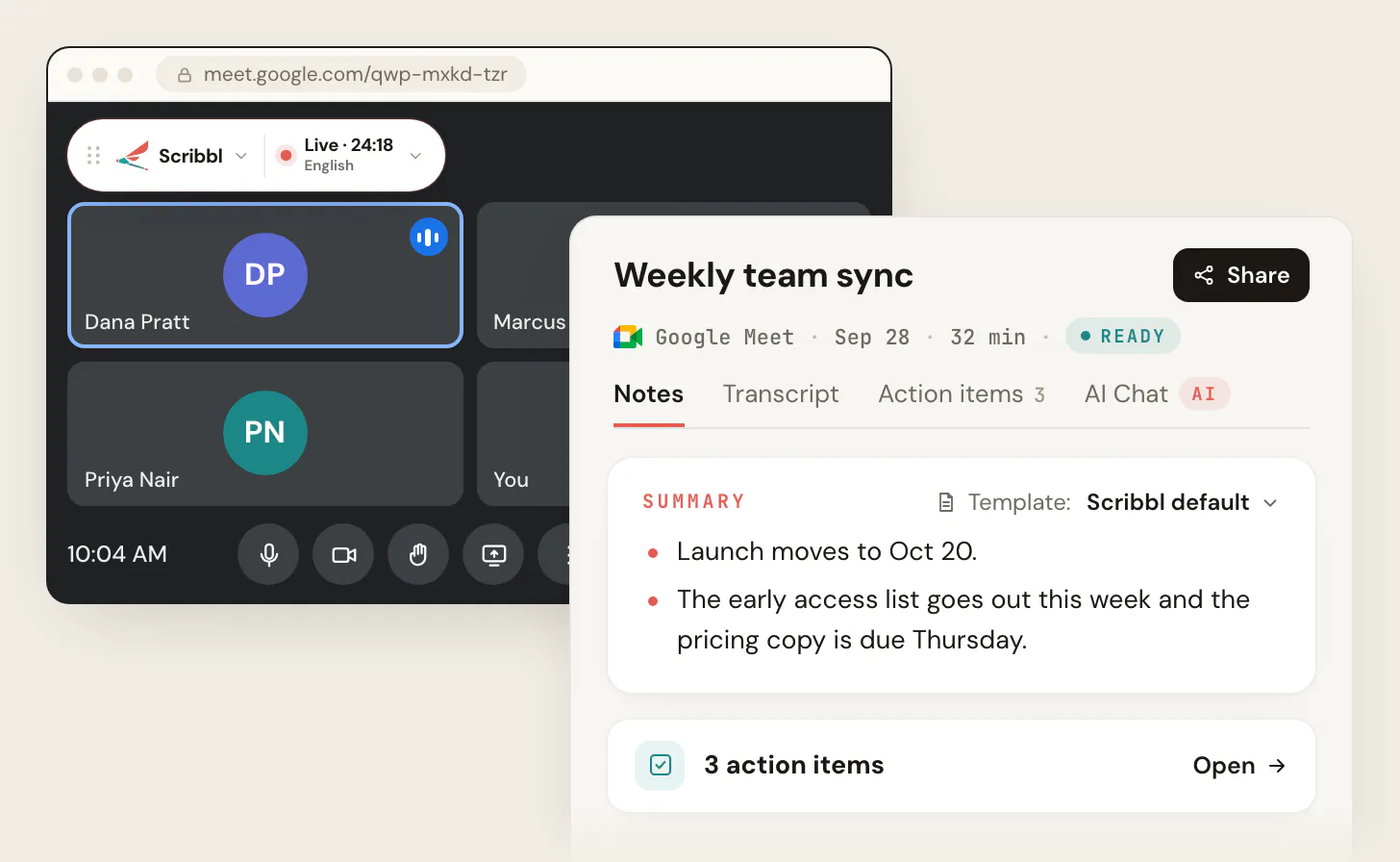
Record your next Google Meet with Scribbl
The table comes down to three limits: a bot the host has to admit, video only on a paid plan, or a screen recording with no transcript. Scribbl has none of them. Here's the whole setup:
- 1
Add Scribbl to Chrome
Start free and sign in with your Google account, free Gmail or Workspace.
- 2
Join the Google Meet call as usual
Scribbl shows Live at the top left of the call. Nothing joins the meeting and nothing appears in the participant list. Tell everyone you are recording.
- 3
Open the notes when the call ends
The video, the transcript with speaker names, AI notes and action items are on one meeting page, ready to share.
The free plan includes Google Meet, Zoom and Microsoft Teams, with 10 meetings a month. Start free.
1. Scribbl: the best Google Meet recorder extension
Scribbl is a Chrome extension for Google Meet. Install it, join a call, and it records with nothing joining the meeting: no extra participant, nothing for the host to admit. (Start free, pricing.)
- What you get after every call. The video recording, a transcript with speaker names, AI notes and action items, all on one meeting page.
- Any Google account, host or guest. It works the same on free Gmail as on paid Google Workspace, and in calls other companies host. Google's own Record button needs a paid Workspace plan and the host's permission; Scribbl needs neither.
- The work after the call. Smart Collections sort your meetings by themselves. Automations do the follow-up when a meeting lands in a collection: draft the follow-up email for you to copy or open in Gmail (it never sends by itself), log a note in HubSpot or Pipedrive, post to Slack or Microsoft Teams, save to Google Drive, Notion or Confluence, open an Asana, Monday, Linear or Jira ticket, or add a Google Sheet row. They ask before they change anything by default.
- Ask ChatGPT or Claude. On Pro, connect Scribbl once and ask either one about any past meeting (how it works).
- Zoom and Teams too. Scribbl Desktop for Mac (Apple silicon) and Windows records Zoom and Microsoft Teams in the same account, with nothing joining those calls either.
- Free plan. The free plan includes Google Meet, Zoom and Microsoft Teams, with 10 meetings a month. Pro is $13 per user per month billed annually, or $20 monthly.
- Private by default. Recordings are private, and Scribbl doesn't use your meetings to train AI for anyone other than you.
Best for: anyone who wants the video and the notes of every Google Meet call with nothing joining it, as host or guest, on any Google account. Start free.
2. tl;dv: free video, through a bot
tl;dv's Chrome Web Store listing is called "Record, Transcribe & ChatGPT/Claude for Google Meet" and promises automatic Google Meet recording for free. (Record Google Meet, pricing.)
- How it records. tl;dv's own Google Meet page says to "use the Chrome extension to have a bot join and record." Its desktop app records from your device with no bot. The store listing also mentions background recording, so check which mode you're in before a client call.
- Free plan. Unlimited video recordings and transcription, with AI notes on 10 meetings.
- Price. Pro is $18 per seat per month billed annually; Business is $29.
Watch out for: the bot the host has to admit, and the AI notes that run out after 10 free meetings. More options: tl;dv alternatives.
3. Otter: a live transcript, with video on Enterprise only
Otter's extension is "Otter.ai: Record & Transcribe Meetings - Google Meet & Web Audio." (Otter pricing.)
- How it records. The listing offers two ways in Google Meet: record on your device with no bot in the meeting, or send Otter's AI Notetaker in as a normal participant. It can also transcribe any tab with audio.
- Free plan. 300 transcription minutes a month and 30 minutes per conversation, so an hour-long Meet call gets cut off.
- Video. Video replay for Zoom and Google Meet is listed on Enterprise only.
- Price. Pro is $8.33 per user per month billed annually, or $16.99 monthly. Business is $19.99 billed annually, or $30 monthly.
Watch out for: the 30-minute cap per conversation on the free plan, and no video below Enterprise. Every plan: Otter.ai pricing.
4. Fireflies: bot-free with the extension, video on Pro
Fireflies records with a bot by default, but its Chrome extension is the exception. (Fireflies Chrome extension page, pricing.)
- How it records. The extension page says it records, transcribes and summarizes Google Meet calls "without a bot joining the meeting," and that it starts capturing on its own when the call starts.
- Free plan. Unlimited transcription only when auto-join is turned on for accounts made on or after September 1, 2026; otherwise 3 meeting transcriptions. 400 minutes of storage per team, and no video.
- Price. Pro is $10 per seat per month billed annually, or $18 monthly, and adds video recording. Business is $19 billed annually, or $29 monthly.
Watch out for: no video on the free plan. Every plan: Fireflies pricing.
5. Bluedot: bot-free, but free for 5 meetings total
Bluedot's listing is "Bluedot: AI notetaker & Meeting Recorder," described as bot-free for Google Meet, Zoom and Teams. (Bluedot pricing.)
- How it records. Bluedot says it "never invites a bot to your meeting" and captures from your browser or its desktop app.
- Free plan. Your first 5 meetings, total, not per month.
- Price. Its pricing page shows Basic at $14 to $18 per user per month, audio only, and Pro at $20 to $25 with video, depending on billing.
Watch out for: the 5-meeting lifetime limit, and audio only on Basic. More options: Bluedot alternatives.
6. Loom and Vimeo Record: screen recorders, not meeting recorders
Both show up for this search because you can screen-record the Meet tab with them. Neither gives you a transcript with speaker names or notes from that recording.
- Loom. The Chrome extension records your screen, cam and one tab's audio. Loom's free Starter plan allows 25 videos at up to 5 minutes each. Loom's separate meeting recorder sends a "Loom Notetaker" into Zoom, Google Meet and Teams calls, and its AI recaps need Business + AI at $24 per user per month. (Loom pricing, Loom meeting recording FAQs.)
- Vimeo Record. A free screen and webcam recorder whose Chrome Web Store listing doesn't mention Google Meet at all. Every recording goes to Vimeo.
Best for: a quick video of a call you'll watch once. For a recording you'll search, share and act on, you want the transcript and the notes with it, which is what Scribbl gives you. Start free.
What about Fathom, Tactiq and Google's own Record button?
- Fathom records Google Meet, but the video comes through its notetaker joining the call; its pricing page lists bot-free capture for Mac only. See Fathom pricing.
- Tactiq is a transcript extension, not a recorder: its listing says "No meeting recording is required." It's in our list of the best Google Meet transcript extensions.
- Google's Record button is built into Meet on paid Workspace plans for the host, co-hosts and people in the host's organization, and the file lands in the organizer's Drive. How it works, and why it's often missing: how to record a Google Meet.
How we ranked
We read each company's Chrome Web Store listing and pricing page on October 19, 2026, and ranked on what matters for a Google Meet recording: whether anything joins the call, whether you keep the video, whether the transcript and notes come with it, and whether it works when you're not the host. Scribbl's facts come from our own pricing page. Prices and plans change often, so check the linked page before you buy.
The pick is Scribbl: nothing joins the call, and every Google Meet call gets the video, a transcript with speaker names, AI notes and action items. The free plan includes Google Meet, Zoom and Microsoft Teams, with 10 meetings a month. Start free.
FAQ
What is the best Google Meet recorder extension?
Scribbl, which makes this page. It's a Chrome extension that records Google Meet with nothing joining the call, and every call comes back with the video, a transcript with speaker names, AI notes and action items. It works on free Gmail and paid Google Workspace, and when you're a guest in someone else's meeting. The free plan includes Google Meet, Zoom and Microsoft Teams, with 10 meetings a month.
Can a Chrome extension record Google Meet without being the host?
Yes. An extension that records in your own browser, like Scribbl, works whether you host the meeting or just attend, because nothing has to be admitted to the call. Google's own Record button only works for the host, co-hosts and people in the host's organization on paid Workspace plans. Whichever tool you use, tell everyone you're recording.
Is there a free Google Meet recorder extension?
Yes. Scribbl's free plan includes Google Meet, Zoom and Microsoft Teams, with 10 meetings a month, and each meeting gets the video, a transcript with speaker names and AI notes. Start free at extension.app.scribbl.co/signup. tl;dv's free plan has unlimited video recordings through a bot in the call, with AI notes on 10 meetings. Otter's free plan is 300 minutes a month with 30 minutes per conversation, and Fireflies' free plan doesn't include video.
Do Google Meet recorder extensions add a bot to the call?
Some do. tl;dv's Google Meet page says its Chrome extension has a bot join the call, Otter can send its notetaker in as a participant, and Loom's meeting recorder is a Loom Notetaker that joins the meeting. Scribbl, Tactiq, Bluedot and the Fireflies Chrome extension record from your browser with nothing joining. With Scribbl, there's nothing for the host to admit and nothing in the participant list.
Can I use Loom or Vimeo Record to record a Google Meet?
You can use either to screen-record the Meet tab, but you get a video only: no transcript with speaker names and no notes. Loom's free Starter plan caps screen recordings at 5 minutes each and 25 videos. Loom's separate meeting recorder sends a Loom Notetaker into the call, and its AI recaps need the Business + AI plan at $24 per user per month. Scribbl gives you the video, the transcript and AI notes from one extension with nothing joining.
Does Google Meet have its own recorder?
Yes, on paid Google Workspace plans such as Business Standard and up, for the host, co-hosts and people in the host's organization. The recording goes to the organizer's Google Drive. Free Gmail accounts and Business Starter don't have it, and guests from other companies can't start it. Scribbl's Chrome extension records any Meet call you're in, on any Google account.
Is it legal to record a Google Meet with an extension?
Recording rules depend on where everyone is. Some US states and some countries require everyone in the conversation to agree. The safe habit, whichever extension you use, is to tell everyone at the start that you're recording and stop if someone objects.
Sources
Checked October 19, 2026.
Each company's Chrome Web Store listing was read on October 19, 2026 for what it says the extension does (named below, not linked). Prices and plan limits are from the linked pricing and help pages.
- Scribbl: pricing, Scribbl for Google Meet, Scribbl Desktop; Chrome Web Store listing "Scribbl: AI Note Taker for Meetings: Record Google Meet, Zoom & Teams"
- tl;dv: Record Google Meet calls with one simple Chrome extension, pricing; Chrome Web Store listing "Record, Transcribe & ChatGPT/Claude for Google Meet"
- Otter: pricing; Chrome Web Store listing "Otter.ai: Record & Transcribe Meetings - Google Meet & Web Audio"
- Fireflies: Chrome extension page, pricing, unlimited transcriptions on the free plan; Chrome Web Store listing "Fireflies: AI meeting notes"
- Bluedot: homepage FAQ, pricing; Chrome Web Store listing "Bluedot: AI notetaker & Meeting Recorder"
- Loom: pricing, Loom meeting recording FAQs, Record meetings with Loom AI for Meetings
- Vimeo Record: Chrome Web Store listing "Vimeo Record - Screen & Webcam Recorder"
- Fathom: pricing
- Tactiq: Chrome Web Store listing "Tactiq: AI note taker for Google Meet, Zoom and MS Teams"
Try Scribbl
Let your meetings take their own notes.
Scribbl records, transcribes, and summarizes your Google Meet calls from your browser. No bot joins the call. Free forever for individuals.
Add to Chrome · It's free