Summary of a Meeting: How to Write One (Template + Examples)
A summary of a meeting records what changed: decisions, owners, dates and open questions. How to write one, a template, examples and a recap email.
Updated October 23, 2026
On this page11 sections
- 01What a summary of a meeting is
- 02What to include in a summary of a meeting
- 03Template
- 04How to write a summary of a meeting in 5 steps
- 05Example
- 06Get the summary of a meeting written for you
- 07Recap the meeting
- 08Mistakes that get a meeting summary ignored
- 09When to send a summary of a meeting
- 10FAQ
- 11Sources
A summary of a meeting is a short record of what the meeting changed: the decisions made, who owns each next step and by when, and the questions still open. To write one, keep only those things, put them in that order, and send it the same day.
That's the whole job. A summary isn't a transcript and it isn't your live notes. If you'd rather not write it at all, Scribbl writes the summary and the action items after every Google Meet, Zoom and Microsoft Teams meeting, with nothing joining the call. This guide covers what goes in a summary of a meeting, a template to copy, how to write one in five steps, before-and-after examples, and the recap email that sends it.
What a summary of a meeting is (and isn't)
A summary of a meeting serves two readers who want the same thing. One is the person who wasn't there and needs the outcome without the 45 minutes. The other is you, next week, after you've forgotten the details. Both want the result, fast.
That rules out narration ("Sarah raised the budget, then Tom pushed back") and filler ("we had a good discussion about timelines"). Every line should be a decision, an action item, an open question, or a reason someone will need later.
| Document | What's in it | Where it goes | Use it for |
|---|---|---|---|
| Summary of a meeting | Decisions, action items with owners and dates, key points, open questions | Your notes, a shared doc, or your meeting tool | The record of almost every meeting |
| Meeting recap | The same summary, written as a message with a subject line and a headline | Email or Slack, sent the same day | Telling people what happens next |
| Meeting minutes | A formal record: attendance, motions, votes, decisions | Filed for the organization | Boards, committees, nonprofits |
| Transcript | Every word, with speaker names | Your meeting tool | Checking exactly what someone said |
If you need the formal version, see meeting minutes example or the meeting minutes format with action items.
What to include in a summary of a meeting
A good summary has a short header and four parts. The header is the meeting name, date, attendees and who wrote it, so a reader can file it and know who to ask. The four parts go in this order, because readers look for decisions and their own tasks first.
- 1
Decisions
What got settled, one line each. Add the reason in brackets only when people will need it later. This is the section people open the summary to find.
- 2
Action items
Owner, a task that starts with a verb, and a due date. One person per item, never a team. No owner and no date means it's a wish, not a task.
- 3
Key points
The takeaway from each topic, not the back-and-forth. Two or three bullets. If a point led to a decision, it belongs above.
- 4
Open questions
What's still unresolved and who chases it. Naming these stops the same debate from reopening next week.
Four rules separate a summary people use from one they ignore:
- Write decisions as settled facts, in the past tense. "Moved launch to Nov 14" reads as final. "We talked about the launch date" reads as a topic, and topics get reopened.
- Give every action item one owner and a date. "The team will follow up" is how action items die. If two people share the work, write two lines. For the wording, see the meeting action items template.
- Cut quotes unless the exact words matter, like a client's wording on scope.
- Keep it to one screen. Bullets, not paragraphs. A reader should find the decisions in five seconds and their own task in ten.
Summary of a meeting template
Copy this into your notes, a doc or your meeting tool.
MEETING SUMMARY

Meeting:    [Name / purpose]
Date:       [YYYY-MM-DD]
Attendees:  [Names]
Notes by:   [Name]

DECISIONS
- [What was decided] (because [reason, only if people will forget it])

ACTION ITEMS
- [Owner]: [task that starts with a verb] (due [date])
- [Owner]: [task that starts with a verb] (due [date])

KEY POINTS
- [Topic]: [the takeaway, not the back-and-forth]

OPEN QUESTIONS
- [What is unresolved] (owner: [name], by [date])

NEXT MEETING
- [Date / time]: [the one thing it must cover]
For fill-in versions by meeting type (one-on-ones, standups, project kickoffs), see the meeting summary template guide.
How to write a summary of a meeting in 5 steps
Most people open a blank doc after the call and try to remember an hour of talk. That's why summaries come out too long or too thin. Do it in this order instead.
- 1
Keep a record of the meeting
Record it so you can listen instead of typing. Scribbl keeps the video, a transcript with speaker names, AI notes and action items for every Google Meet, Zoom and Teams meeting. Let everyone know you're recording.
- 2
Pull out what changed
Go through the notes or transcript and keep only decisions, action items, open questions and the reasons people will need later. Cut the rest.
- 3
Fill in the template
Decisions first, then action items with one owner and one date each, then key points and open questions. Short lines.
- 4
Check owners and dates
Read each action item and ask: is this the right person, and did someone actually say this date? If not, fix it or turn it into an open question.
- 5
Send it the same day
Email or Slack within a few hours, 24 at the most. End with a request to reply with corrections.
Two quick tests for step 2. The verb test: a line with no decision or action in it is probably narration. The owner test: an action item with no single named person is a wish, not a task. Give it an owner or make it an open question.
Summary of a meeting example: before and after
Here is a 30-minute project sync written the way most people write it, then as a summary. Same meeting, same content.
What most people write:
PROJECT SYNC - notes

We started by going over the launch timeline. Priya said
engineering was behind on the API work and there was a long
discussion about whether to cut the reporting feature. Devon
felt strongly we should keep it. We went back and forth and
eventually agreed to push the launch. Then we talked about
the client demo. We also touched on the budget but ran out
of time.
Nobody can act on that. There's no clear decision, no owner, no date, and the budget question is gone. The same meeting as a summary:
PROJECT SYNC SUMMARY
Date:       2026-10-09
Attendees:  Priya, Devon, Lena, you

DECISIONS
- Launch moved to Nov 14 (API work is two weeks behind).
- Reporting feature stays in v1 (the client asks for it most).

ACTION ITEMS
- Priya: send the revised engineering timeline (due Mon Oct 12)
- Lena: rewrite launch messaging for the new date (due Wed Oct 14)
- You: book the client demo for the week of Nov 2 (due Fri Oct 16)

KEY POINTS
- Demo happens before launch so the client sees it live.

OPEN QUESTIONS
- Does the new date change the Q4 budget? (owner: you, ask
  finance by Fri Oct 16)
It's shorter and it does more. The decisions are settled. Every action has a name and a date. The budget thread that got dropped in the meeting is now a tracked open question.
Get the summary of a meeting written for you
The reason summaries go out late is rarely the format. It's that writing one after you also ran the meeting is tedious. Scribbl removes that work.
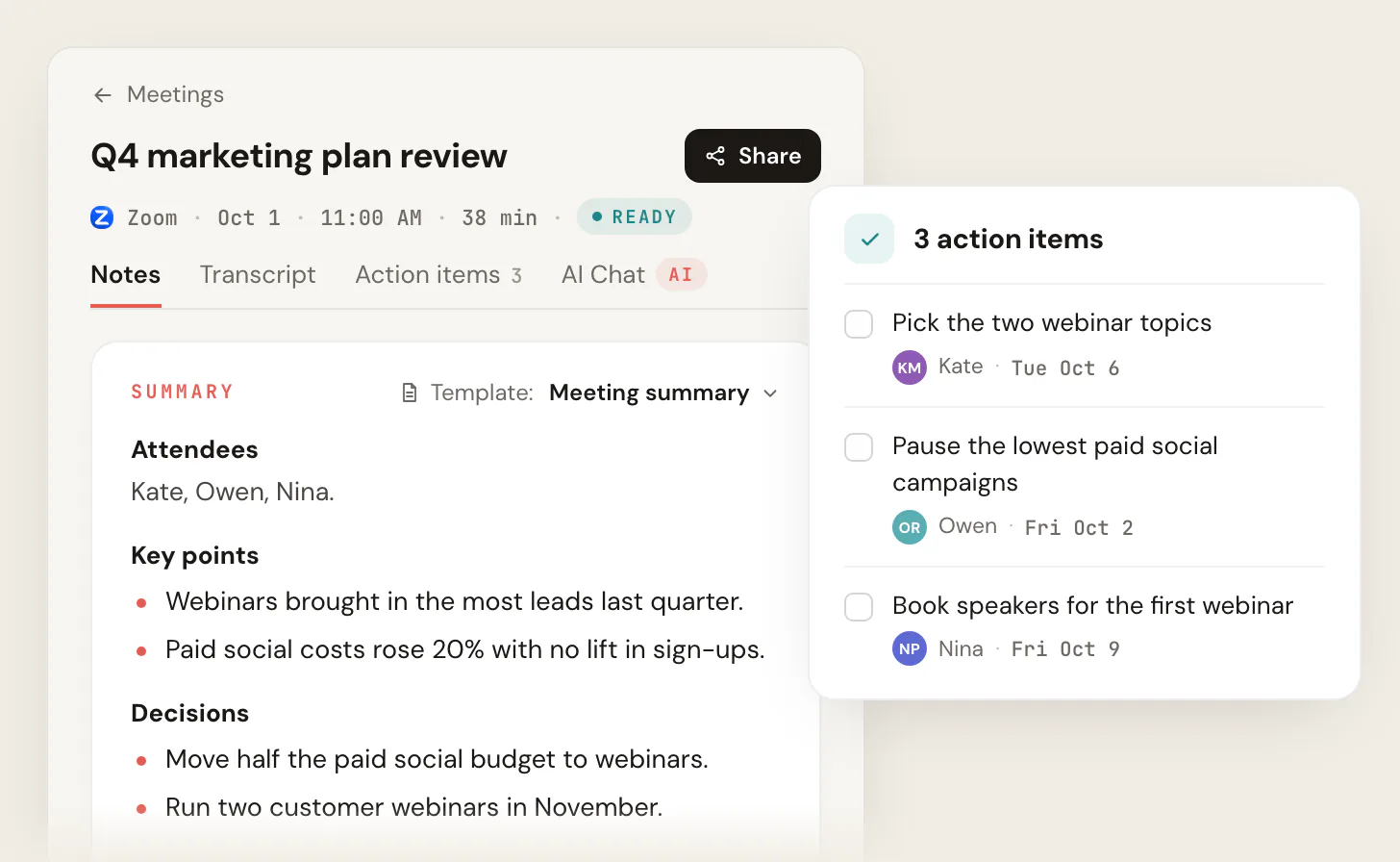
- The summary writes itself. After each meeting on Google Meet, Zoom or Microsoft Teams, Scribbl gives you the video, a transcript with speaker names, AI meeting notes and action items with owners. You can pick the notes template, like the Meeting summary template in the screenshot at the top of this page.
- Nothing joins the call. Google Meet works from a Chrome extension. Zoom and Teams work from Scribbl Desktop for Mac (Apple silicon) and Windows. No bot shows up in the participant list.
- An Automation drafts the recap email. Smart Collections sort your meetings by themselves, for example every client call into one collection. When a meeting lands there, an Automation drafts the follow-up email. You copy it or open it in Gmail, check it and send it. It never sends by itself.
- Or the summary goes where your team works. The same Automations can post the meeting notes to Slack or Microsoft Teams, save them to Google Drive, Notion or Confluence, log a note in HubSpot or Pipedrive, open an Asana, Monday, Linear or Jira ticket, or add a Google Sheet row. By default they ask before they change anything. See integrations.
- Ask about past meetings. On Pro, connect Scribbl to ChatGPT or Claude and ask "what did we decide about the launch date?" across every meeting. See the AI connector.
The free plan includes Google Meet, Zoom and Microsoft Teams, with 10 meetings a month. Pro is $13 per user per month billed annually, or $20 monthly. See pricing. Recordings are private by default, and Scribbl doesn't use your meetings to train AI for anyone other than you. Whatever you use, let everyone know you're recording.
Try Scribbl freeGoogle Meet's built-in summary vs Scribbl
Google Meet has its own option, "Take notes for me" with Gemini. It writes a Google Doc with a summary and next steps, saved in the meeting organizer's Drive. It needs an eligible Google Workspace edition or Google AI plan, it works only in Google Meet, and it supports one language per meeting, per Google's help page.
- Meetings: Google Meet, Zoom and Microsoft Teams in one account
- Free plan: 10 meetings a month, all three apps included
- Video, transcript with speaker names, AI notes and action items
- Automations draft the recap email and post the summary to Slack or Teams
- Meetings: Google Meet only
- Needs an eligible Workspace edition or Google AI plan, held by the organizer
- Summary saved to the organizer's Drive
- One language per meeting
Recap the meeting: send the summary as an email
To recap a meeting, send its summary as a message. Paste it into the body of an email or a Slack post, never as an attachment, so the action items are the first thing people see.
Subject: Recap: [Meeting name], [Date]

Hi all,

Thanks for the time today. Headline: [the single biggest outcome].

DECISIONS
- [Decision 1]
- [Decision 2]

ACTION ITEMS
- [Owner]: [task that starts with a verb] (due [date])
- [Owner]: [task that starts with a verb] (due [date])

OPEN QUESTIONS
- [Question] (owner: [name])

NEXT STEP
- [What happens next], next meeting [date / time]

Reply if I missed or got anything wrong.
[Your name]
The last line matters. It catches mistakes while people still remember the meeting, and a reply is your record that they saw it.
Client meeting recap example
A client recap is also a record of what you agreed. Spell out what you need from the client, not just your own team's tasks.
Subject: Recap: landing page review, Oct 9

Hi Dana,

Thanks for the time today. Headline: we're going with the
revised layout and moving go-live to Oct 30.

What we decided:
- Launch the landing page on the revised layout
- Go-live moves to Oct 30 to fit one more design round

Next steps:
- Priya (us): send the revised mockups (by Oct 16)
- Dana (you): confirm final copy for the hero section (by Oct 20)

Still open:
- Whether to keep the testimonial carousel; we'll decide next call

Next check-in: Oct 22, 10am. Let me know if I have any of this wrong.

Best,
Priya
Internal team recap example (Slack)
Internal recaps can be blunt. Lead with action items, tag each owner, and make blockers loud.
Sync recap, Oct 9

Decided: ship the API change behind a flag, not to everyone at once.

Action items:
- @maria: finalize the Q4 forecast (due Thu Oct 15)
- @james: unblock the staging deploy (due Wed Oct 14)
- @priya: send the vendor the signed SOW (due Fri Oct 16)

Blocker:
- Staging deploy is waiting on infra approval (owner: @james)

Next sync: Monday, same time.
For longer client follow-ups, see the after-meeting email guide and how to write a follow-up email. After a sales call, use the sales follow-up email templates.
Mistakes that get a meeting summary ignored
- No owner, or two owners. One named person per task.
- Vague dates. "Soon", "next week" and "ASAP" aren't deadlines. Use a calendar date.
- A story instead of a summary. If it reads like who said what, in order, cut it down to decisions and actions.
- Sent too late. After a day, people have moved on and the action items feel optional.
- Action items behind a link or attachment. Put them in the message body.
- No way to correct it. End with "reply if I missed anything."
When to send a summary of a meeting, and where to keep it
Send it the same day, and no later than 24 hours after the meeting. People want this: Zoom reports that 54% of employees want post-meeting summaries and action items, but only 39% say they get them (Zoom, October 14, 2025).
Keep every summary in one searchable place, not scattered across email threads. The test: can a teammate find "the call where we decided X" three months from now without asking you? In Scribbl, every meeting's notes, transcript and video stay together, and on Pro you can ask ChatGPT or Claude about all of them at once. For better notes in general, see how to take meeting notes.
FAQ
What is a summary of a meeting?
A summary of a meeting is a short record of what the meeting changed: the decisions made, who owns each next step and by when, and the questions still open. It leaves out who said what. Anyone who missed the meeting, and you next week, should be able to read it in under two minutes and know what happens next.
What should a summary of a meeting include?
The meeting name, date and attendees, then the decisions, the action items with one owner and a due date each, the key points behind the decisions, and the open questions with someone to chase each one. Leave out who said what. The transcript already has that.
How long should a summary of a meeting be?
As short as it can be while still carrying every decision, owner and open question. For a 30 to 60 minute meeting that is usually a few decisions, three to six action items and two or three key points, well under a page. If it runs past one screen, you're narrating, not summarizing.
What is the difference between a meeting summary and a meeting recap?
They hold the same things: decisions, action items with owners and dates, and open questions. A meeting summary is the record you keep with your notes. A meeting recap is that summary sent as a message, usually an email or a Slack post, with a subject line, a one-line headline and a request to reply with corrections.
What is the difference between a meeting summary and meeting minutes?
Minutes are a formal record with attendance, motions and votes, kept by boards and committees. A meeting summary is the working version for everyday meetings: decisions, owners, dates and open questions. Most meetings need a summary, not minutes.
When should I send a summary of a meeting?
The same day, ideally within a few hours, and no later than 24 hours after the meeting. People can still correct a wrong line and still feel they own their action items. Put it in the body of the email or message, not in an attachment.
Can AI write a summary of a meeting for me?
Yes. Scribbl writes the summary and the action items after every Google Meet, Zoom and Microsoft Teams meeting, with nothing joining the call, and an Automation can draft the recap email for you to copy or open in Gmail. It never sends by itself. Read the draft, check each owner and date, then send it.
Sources
Checked on October 19, 2026.
- Google Meet "Take notes for me": Google Meet Help, Take notes for me in Google Meet
- Post-meeting summaries statistic: Zoom, meeting statistics (October 14, 2025)
- Scribbl plans and prices: Scribbl pricing
- Scribbl Automations and integrations: Scribbl integrations
- Scribbl privacy: Scribbl privacy policy
Try Scribbl
Let your meetings take their own notes.
Scribbl records, transcribes, and summarizes your Google Meet calls from your browser. No bot joins the call. Free forever for individuals.
Add to Chrome · It's free